

What if a scan misses personal data because it looks in the wrong places, or leaves your team unable to show what it checked? Choosing gdpr data discovery software means looking beyond a list of detected files. Check which locations it covers, how it handles file contents, and what evidence it records.
This matters when personal data sits outside current records, manual searches are difficult to repeat, or your team needs to review findings without exposing raw content. A scan report is useful only if you can understand its scope and explain how the results were produced.
This guide sets out a practical framework for evaluating coverage, data handling, evidence, and fit. You’ll learn what to ask about endpoints and other relevant locations, whether processing happens locally or files leave the environment, and how masked previews, fingerprints, and audit logs can support review. Use the framework to compare tools and decide whether they give compliance and IT teams a repeatable way to document discovery.
Key Takeaways
- Use gdpr data discovery software to locate and record personal data in approved digital locations.
- Test detection against known sample files, because tools can differ in the formats and matches they detect.
- Compare scan scope, supported formats, processing location, evidence records, and access controls.
- Check product documentation to confirm whether raw files leave endpoints and how scan findings are handled.
- Start with a defined purpose, named compliance and IT owners, and a limited set of representative locations.
What GDPR data discovery software should help your team find
GDPR data discovery software locates and records personal data across the digital locations included in a scan. It can help teams find files that existing records and policies may not identify. Those records describe what an organisation expects to hold, but they cannot confirm where every file containing personal data is stored.
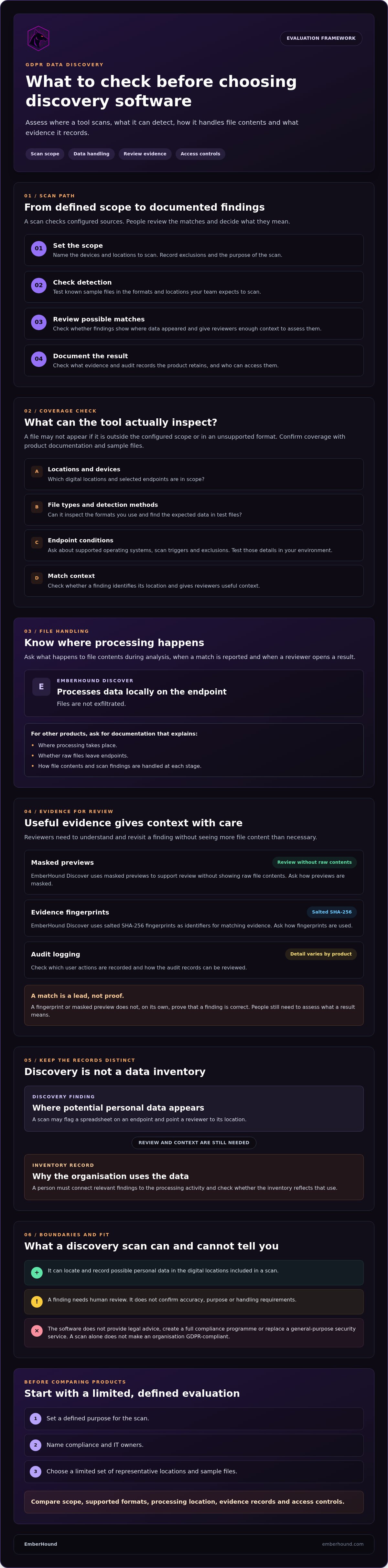
The General Data Protection Regulation (GDPR) concerns information relating to an identified or identifiable person. Discovery tools can help locate possible matches within their configured scope, but people still need to review the findings and decide what they mean. The software does not provide legal advice, create a full compliance programme, or replace a general-purpose security service. A scan alone does not make an organisation GDPR-compliant.
What does a GDPR data discovery tool identify?
What a tool finds depends on its configured scan locations, supported file types, and detection methods. When evaluating a product, use sample files that reflect your environment, such as a document with names and contact details or a spreadsheet containing customer records. Ask whether the tool can inspect the file types and locations you care about. Treat these as tests, not assumed coverage. A file outside the scan scope, or in an unsupported format, may not appear in the results.
Check how the product presents potential matches. A finding is a prompt for review, not a final judgement about the data or its use. Reviewers need enough context to assess it while following your organisation’s rules for access to personal information.
How discovery differs from a data inventory
Discovery records where potential personal data appears in scanned sources. An inventory records the wider processing context, such as why the organisation uses the data and how it fits into business processes. Discovery findings may help staff update an inventory, but they do not supply that context automatically. Someone must check each relevant result and connect it to the activity.
For example, a scan might flag a spreadsheet on an endpoint. The finding can point a reviewer to a location and file for assessment. The reviewer still needs to establish what the spreadsheet is used for and whether the inventory reflects that use. Keep this distinction clear when assessing gdpr data discovery software: it supports locating data, while people remain responsible for interpreting and documenting the processing context.
For wider selection criteria, read our GDPR data discovery software guide.
How GDPR data discovery software scans files and records evidence
A discovery scan follows a defined path: set the scope, scan supported locations, review possible matches, then document the findings. Each step matters. A tool can inspect only the sources and file types it supports, and a detected match still needs human review before anyone decides what the information means or how it should be handled.
Detection methods vary between products. Before relying on a vendor’s coverage claims, test known sample files in the formats and locations your team expects to scan. Check whether the tool finds the expected data, records where it found it, and gives reviewers enough context to assess the result. A match is a lead, not confirmation of accuracy, purpose, or handling requirements. For background on the legal context, see this guide to GDPR compliance.
What happens during an endpoint scan?
Endpoint scanning checks defined locations on selected devices for data that matches the tool’s detection rules. Agree which devices and locations are in scope before scanning. Ask each supplier to document supported operating systems, scan triggers, and exclusions, then test those details in your own environment. EmberHound Discover processes data locally on the endpoint, and files are not exfiltrated.
Ask what happens to file contents at each stage: during analysis, when a match is reported, and when a reviewer opens a result. Architecture differs by product, so request documentation that explains where processing occurs and whether raw files leave endpoints. A clear answer helps IT assess the scan’s boundaries before approving its use.
What makes discovery evidence useful?
Evidence should help a reviewer understand and revisit a finding without exposing more file content than necessary. EmberHound Discover uses masked previews to support review without showing raw file contents. It also uses salted SHA-256 fingerprints as identifiers for matching evidence. Ask how previews are masked and how fingerprints are used. Neither feature, on its own, proves a finding is correct.
Audit logging can record activity around discovery, but the level of detail depends on the product. Check which user actions and changes are captured, how records can be reviewed, and what information each entry contains. EmberHound Discover provides audit logging of data access and mutations. Review current product documentation to understand the records available and whether they meet your team’s needs.
For a fuller overview of the product’s approach, read the GDPR data discovery guide. If you want to test a scan within an approved scope, Start free GDPR scan.
How to compare GDPR data discovery software against your requirements
Compare tools against your own data map, not just a vendor checklist. The term GDPR data discovery describes the task; your evaluation needs to establish whether a product can handle the locations and files your team actually has. Run the same test plan against each shortlisted tool, then separate vendor statements from results you have verified.
| Area | What to check | How to test it |
|---|---|---|
| Scan scope | Which endpoints and repositories can be included? | Test representative, approved locations from your data map. |
| Supported formats | Which file types and data types can the configured product inspect? | Use known sample files, including any relevant image-based files. |
| Processing location | Where does processing occur, and do raw files leave the endpoint? | Review product documentation and ask the supplier to explain the data flow. |
| Evidence | Can reviewers see the source of a finding and export a useful record? | Review a sample result, its preview, fingerprint handling, and audit record. |
| Access controls | Who can view findings or change scan settings? | Check permissions using the roles your team expects to assign. |
Which locations and data types must the tool cover?
Start with your organisation’s data map. List the endpoints and repositories that matter for the proposed scan, then check each against the product configuration. Confirm whether mailbox, external hard drive, and OCR scanning are available in that configuration. EmberHound offers these as scanning options, but don’t infer support for a particular source or format from a general feature list. Record any unsupported source and the manual follow-up it would require. This makes gaps visible before selection.
Test files from representative locations rather than relying on a demonstration prepared by the supplier. Include known examples of the data types you expect to find. Record what the tool detected, what it missed, and any file or location it could not inspect. A test result gives your team a firmer basis for comparison than an untested coverage statement.
Which evidence and review controls should buyers test?
Ask reviewers to follow a finding from detection to export. Can they trace it to its source? Does a masked preview provide enough information for review without exposing unnecessary file content? How are fingerprints used, and which actions appear in audit records? Check who can access results and whether that access suits your team’s review process.
Keep claims and test results in separate columns in your comparison notes. Add pricing units and contract terms, then compare them with expected scan frequency and scope. EmberHound uses usage-based pricing, with no mandatory contracts, and offers a free scan entry point. Review the pricing details alongside your requirements before deciding whether the model fits your use.
Will GDPR data discovery software expose the files it scans?
Ask where processing takes place and whether raw files, extracts, or copies leave the endpoints. The answer depends on the product’s architecture and configuration. Marketing labels alone won’t tell you how file contents are handled. Request current technical documentation, then check that it describes the scan process and the data stored after a match.
Questions to ask about file access and data transfer
Ask the supplier to explain what happens at each stage: during scanning, when a possible match is detected, and when someone reviews the result. Confirm which data the platform retains, where it is held, and which users can access it. Ask whether the scan transfers file contents or extracts off the endpoint, and how any information sent between components is protected. Record the answers against the product documentation.
For EmberHound Discover, endpoint processing takes place locally, and files are not exfiltrated. TLS 1.3 protects data in transit, and AES-256 encryption protects data at rest. These describe specific aspects of data handling. They don’t establish how another product works or settle whether a tool fits your organisation’s requirements.
How to assess evidence without exposing raw personal data
Check what reviewers see when they open a finding. EmberHound Discover provides masked previews to support review without showing raw file contents. Ask how masking works in practice and whether the remaining details let a reviewer understand the result. Also check which users can view findings and whether access permissions can be configured to match your review process. Confirm the available controls in the product documentation.
EmberHound Discover uses salted SHA-256 fingerprints as identifiers for matching evidence. Ask how fingerprints are generated, where they appear, and what information they reveal. Review the audit records too. Confirm which user actions and changes they capture, then decide whether those records give your team enough detail to follow review activity. The EmberHound security and trust information provides a starting point for checking the product’s documented approach.
Use this evidence to assess whether gdpr data discovery software handles file contents within boundaries your IT and compliance teams understand. Keep any remaining questions on the evaluation record and resolve them before approving a wider scan.
From software evaluation to scoped GDPR discovery scans
A successful evaluation starts with a clear purpose and a narrow scope. Decide what the team needs to learn from the scan, such as whether selected endpoints contain personal data that current records don’t account for. Name a compliance owner to review findings and an IT owner to approve the technical scope. This keeps the first scan manageable and gives each result a clear route for follow-up.
Prepare a first scan without widening scope unnecessarily
Write down the systems, devices, and data locations proposed for assessment. Choose a limited set that represents your environment, rather than scanning every possible source at once. Before the scan, confirm internal authorisation, access arrangements, and who can review its results.
Agree how the team will handle uncertain matches. For example, decide who can confirm whether a finding relates to personal data and where reviewers should record their reasoning. Set boundaries for access to results and note any exclusions before the scan begins. A short written plan helps IT and compliance work from the same scope.
Review findings and decide what happens next
Assign an owner to confirm each finding and record its business context. A discovery result can point to a file or location, but a person must decide what it means for the organisation. Record unsupported locations, scan errors, and unresolved questions as gaps for later assessment. Don’t treat an unscanned source as clear simply because it produced no findings.
Keep a record of the scan scope, date, review process, exceptions, and follow-up owners. This gives the team a repeatable account of what it checked and what still needs attention. It also helps distinguish a confirmed result from an item that remains under review.
EmberHound Discover supports data discovery by scanning endpoints for personal data and mapping findings. It doesn’t make legal decisions for your organisation. Your team, with its advisers where appropriate, remains responsible for interpreting findings and deciding what action to take. A defined scope and named owners help keep the evaluation practical without treating software as legal advice.
Choose a scan your team can explain
Choose gdpr data discovery software by checking its scan coverage, file-handling boundaries, and the evidence it records. Test it against representative locations and known files. Then agree who will review matches and document gaps before expanding the scan.
EmberHound Discover processes endpoint data locally, with no file exfiltration. Masked previews and salted SHA-256 fingerprints support the review of findings. TLS 1.3 protects data in transit, and AES-256 encryption protects data at rest. These controls describe how the product handles data; your team still needs to assess findings and make its own compliance decisions.
Start with an approved scope and a clear purpose. A measured first scan gives IT and compliance a practical basis for deciding what to check next.
With clear boundaries and named owners, your team can take the next step with confidence.
Frequently asked questions
What is GDPR data discovery software?
GDPR data discovery software locates and records potential personal data in the digital locations included in a scan. It can help teams find files that existing records may not identify. The tool’s coverage depends on its scan scope, supported locations, and detection methods. People still need to review findings and establish their context. Discovery software supports this work, but it doesn’t provide legal advice or complete an organisation’s compliance programme.
How does GDPR data discovery software find personal data?
It scans configured locations for patterns or other indicators associated with personal data. Detection methods vary by tool, so test each product against known sample files in the formats and locations your organisation uses. A match needs human review: it may need confirmation, context, or further investigation. Check whether results identify the source and give reviewers enough information to assess them without exposing unnecessary file content.
Does GDPR data discovery software upload files?
It depends on the product’s architecture. Ask whether raw files, extracts, or copies leave the endpoint, and what information the system stores after a match. EmberHound Discover processes endpoint data locally, and files are not exfiltrated. Check current technical documentation for any product you assess. Confirm where processing happens, what moves between components, and who can access scan results.
Can GDPR data discovery software guarantee compliance?
No. A scan can help locate personal data within its configured scope, but it cannot decide whether the data is being handled appropriately or complete a compliance programme. Your organisation must review findings, establish their business context, and decide what action to take. Treat the software as a discovery tool. Seek suitable legal advice for questions about interpreting GDPR requirements or making legal decisions.
What should I compare when choosing GDPR data discovery software?
Compare scan scope, supported file types, processing location, evidence, access controls, and the review workflow. Test representative locations and known sample files instead of relying only on vendor coverage statements. Check who can view findings, how reviewers trace a match to its source, and whether evidence can be exported. Assess pricing units and contract terms against your expected use before making a decision.
Can GDPR data discovery software scan emails and images?
Some tools support mailbox scanning or OCR for image-based data, but coverage varies by product and configuration. Confirm which mailbox sources and file or image types are supported before planning a scan. EmberHound offers Local Mailbox Scanning and OCR Scanning. Check the current product documentation for the formats and locations relevant to your organisation.
Is data discovery the same as data mapping?
No. Data discovery locates potential personal data in the sources a tool scans. Data mapping records wider information about how data is processed, such as its purpose and its place in business activities. Discovery findings can help inform a map, but they don’t complete it automatically. A person needs to review each relevant finding and add the processing context the inventory requires.


