

Who actually searches for personal data when you buy DSAR support? If you're comparing dsar software uk options with outsourced help, it matters as much as the features on a product page.
Personal data can sit across endpoints and files, while a lean team may have little time to search each location by hand. A managed service provider may carry out some tasks for you. Discovery software gives your team tools to locate data, but your staff still need to run the process and review the results. The label alone won't tell you who does what.
This guide compares outsourced DSAR support with discovery software, so you can match each task to the people who will perform it. You'll see what to check about provider responsibilities, security controls, team capacity and data locations. We'll also explain how endpoint discovery software, such as EmberHound Discover, can support a search without presenting it as a managed service. The aim is a practical choice: support that fits your workflow and gives your team a clear route to finding personal data.
Key Takeaways
- Check the service contract to see which DSAR tasks an outsourced provider performs and which stay with your team.
- Assess dsar software uk by checking which endpoints it scans, how it handles files and what evidence it records.
- Ask providers to distinguish current capabilities from add-ons, roadmap items and work carried out by third parties.
- Map where personal data is held, assign task owners and define your evidence needs before choosing a solution.
- Consider whether endpoint discovery and a DSAR disclosure pack fit your workflow, while keeping review and response decisions with the appropriate people.
DSAR managed service or software: what does your UK team need?
A DSAR managed service is an arrangement where an external provider carries out tasks agreed with an organisation. The provider's responsibilities depend on the contract. One agreement might cover searching for records; another might include reviewing matches or preparing response materials. Check the scope before comparing providers.
A DSAR is a request to access personal data. It relates to an individual's right of access. The practical question is who performs each step: an external provider, your own team using software, or a combination. Assign an accountable owner to every task, including the final decision about what to disclose.
What work might a DSAR provider handle?
Ask whether the contract covers searching, reviewing matches, redacting information or preparing a response. Treat each as a separate scope question, rather than assuming every service includes them. Operational support may help with your process, but don't assume a provider gives legal advice or makes decisions on your organisation's behalf. Clarify who approves the response and handles questions outside the agreed work.
What does DSAR discovery software do?
DSAR software helps an organisation find potential personal data in the locations it supports. Your team defines the search scope, scans relevant locations and reviews potential matches. The software output is a starting point for human review. It doesn't decide what information should be disclosed or make a legal decision for you.
When comparing dsar software uk options, check that the supported locations match where your personal data is held and that someone has time to review the results. A tool focused on endpoints won't cover locations outside its supported scope. Read the GDPR data discovery guide for more on how discovery fits into the search process.
Before choosing, write down each task and its owner. This makes it easier to see whether your team needs contracted operational support, software it can run, or a defined split between the two.
How DSAR data discovery software finds personal data and records evidence
Discovery follows a practical sequence: define the search scope, scan supported locations, review potential matches and prepare findings for the people handling the request. A search is only as useful as its scope. If a mailbox or external drive isn't covered, its contents won't appear in the scan results.
EmberHound processes scans locally on endpoints and does not exfiltrate files. Its platform provides masked previews and salted SHA-256 fingerprints. A masked preview lets a reviewer inspect a match without displaying the full content. A fingerprint can help identify a file without exposing its contents. Both can support review, but neither decides whether information should be disclosed.
Here, audit-ready evidence means masked previews, salted SHA-256 fingerprints and audit logging that can support a record of discovery activity. Ask providers which events their logs capture and whether they record access or data changes. Don't assume those details from the word “audit”. The ICO guidance on the right of access explains the wider request process; your team still needs to assess discovery results.
Which data locations should a buyer include?
List the locations relevant to your workflow, then ask providers to confirm supported endpoints, mailboxes and external drives in writing. EmberHound offers local mailbox scanning and external hard-drive scanning as add-ons. Check whether these options cover the locations you need. Images and scanned documents need a separate check: OCR scanning is available, but confirm its scope and supported document types before relying on it.
How should a buyer assess evidence and security?
Ask what a reviewer can see, how fingerprints are generated and which actions the audit log records. Check specifically whether access and changes to data are captured. These are separate questions from whether a tool produces scan findings.
EmberHound states that it uses TLS 1.3 for data in transit and AES-256 encryption at rest. Treat these as stated controls, not as a substitute for checking how the product fits your security requirements. Review the product security and trust information for further details.
When comparing dsar software uk options, use a test scope that reflects your actual endpoints and file types. Review the available product security information before deciding whether the scanning approach suits your environment.
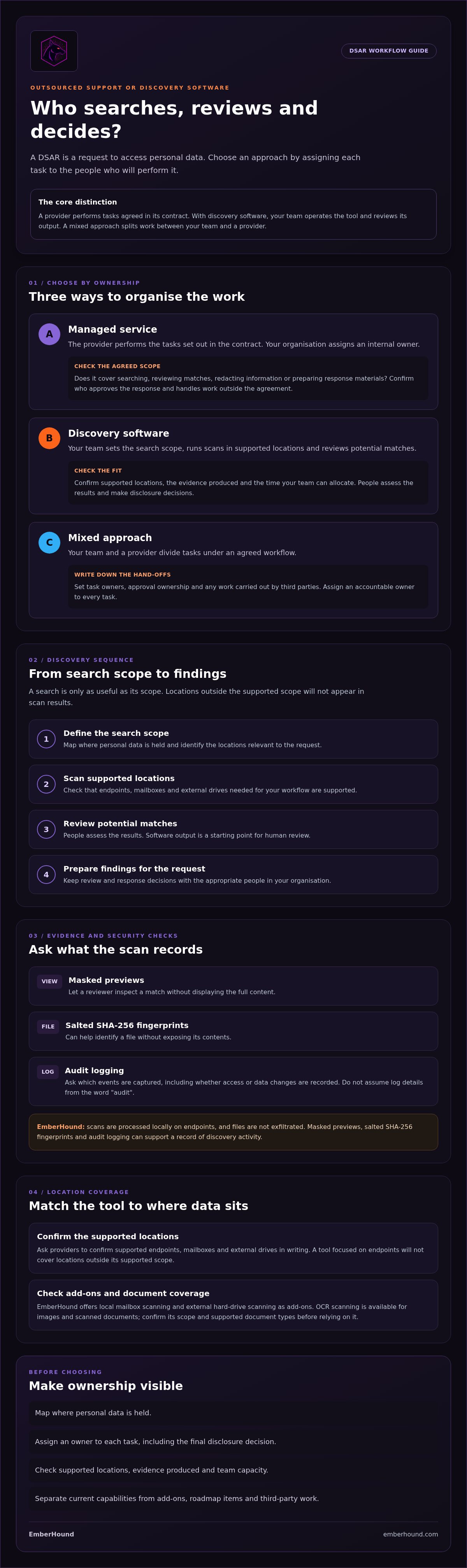
Compare DSAR managed service and software providers using these criteria
Compare each option by looking at the work it leaves with your team. Use the same request scenario and internal requirements to assess a provider-led service and a software-led approach. A managed service may take on contracted tasks; with software, your team operates the tool and reviews its output. Neither label tells you exactly what is included.
Comparison area | Provider-led service | Software-led approach
Task ownership | Who searches, validates matches, reviews records and prepares disclosure material? | Which steps will your staff run, check and approve?
Data locations | Which endpoints, mailboxes and other locations are covered? | Which locations and file types does the software support?
Evidence | What findings, previews and activity records are supplied? | What evidence does the tool produce, and who reviews it?
Security | Where is data processed, and how are files handled and protected? | Is processing local or remote, and what encryption and audit records are documented?
Internal review | Which decisions and approvals remain with your organisation? | Who checks matches and decides what may be disclosed?
What questions reveal the actual service scope?
Ask for a written scope that names each task, its owner and its hand-off point. Request details of exclusions, dependencies, tasks your staff must complete and the escalation route for unclear results. Ask what happens when a location isn't supported or a match is ambiguous. Confirm which capabilities are included, which are add-ons, which are planned and which rely on third parties.
Keep operational work separate from decisions your organisation must make. The Data Protection Act 2018 is part of the UK legal framework. A supplier's search or review work doesn't by itself determine what your organisation should disclose.
How should UK buyers assess security and evidence?
Ask for current documentation on processing location, encryption and file handling. Check whether previews mask content, whether raw files leave endpoints and what the audit records capture. Ask separately whether access to findings and changes to data are recorded. Look for specific answers, rather than a general statement that a service is secure.
EmberHound states that scans run locally on endpoints and files aren't exfiltrated. Its stated controls include TLS 1.3 in transit and AES-256 encryption at rest. Compare those documented details with each provider's answers and your own requirements. For a practical review list, see the GDPR data audit preparation checklist.
For dsar software uk buyers, score both approaches against the same required locations, evidence needs and available staff time. Record any gaps as questions or customer tasks before you choose.
Plan a DSAR buying decision around your team and workflow
Start with the work your team needs done. A buying decision based on features alone can leave gaps between discovery, review and response. Use this assessment to turn your workflow into clear requirements:
- 1. Map locations. List the endpoints and other data stores that may hold relevant records. Mark any location a proposed service or tool doesn't cover.
- 2. Assign owners. Name who sets the search scope, runs or commissions discovery, reviews matches and approves response material.
- 3. Define evidence needs. Decide what records your team needs from a search, such as findings, masked previews or activity logs.
- 4. Test fit. Check the approach against your actual locations, staff capacity and existing workflow before committing.
Separate recurring discovery from case-specific work. Your team may need a repeatable way to locate data across endpoints, while review, redaction and response preparation may vary by request. Set these as separate requirements in your evaluation. Check current ICO guidance and relevant legislation for the legal deadlines and process requirements that apply to your organisation.
When might outsourced support suit a lean team?
If staff can't take on search or review work, assess whether a provider can perform those operational tasks under contract. Before sharing access, agree confidentiality terms, approval points and an escalation route for unclear matches or unsupported locations. Outsourcing tasks doesn't remove the need for an internal owner to oversee the work and make organisational decisions.
When might discovery software fit an existing team?
Software may suit a team with an established DSAR workflow that wants to locate data itself. Test the endpoints you need to search and inspect the evidence the tool produces. Include the people who will review the results, not only the staff who will run the scan. This GDPR discovery software overview explains the role of discovery in the process.
For a pilot, agree success criteria before scanning starts. Specify which locations to test, what counts as a useful finding, how reviewers will assess results and who signs off on the outcome. Record unsupported locations and any additional staff work. This makes the test useful for procurement, not just a product demonstration.
If a provider uses usage-based purchasing, check its current pricing and usage information and confirm how usage applies to your planned workflow.
Where EmberHound fits in a UK DSAR workflow
EmberHound is GDPR data discovery software. Its Discover product scans endpoints and processes scans locally, without exfiltrating files. Masked previews and salted SHA-256 fingerprints give your team information to assess scan results. Your organisation remains responsible for reviewing matches and deciding what to disclose. EmberHound is not a managed service provider or legal consultant.
A DSAR disclosure pack is listed among EmberHound's offerings. Check its current availability and contents before treating it as part of your workflow. It doesn't change who owns the review or response decisions. When assessing dsar software uk, confirm which tasks the product supports and which remain with your team.
What EmberHound can contribute to discovery
Endpoint scans can help locate personal data within the supported scan scope. Your team reviews potential matches and decides what to do with the findings. Masked previews can show information about a match while concealing content; salted fingerprints can help identify files. Neither makes a disclosure decision.
Keep product claims tied to current capabilities. Protect is on the roadmap and isn't live, so it shouldn't form part of a current assessment. For the DSAR disclosure pack, check the exact materials and any limits before assigning it a role in your response process.
How to assess product fit before starting
Start by matching the scan to your workflow. List the endpoints you intend to include, identify who will review findings and decide what evidence your team needs. Confirm that the free GDPR scan supports the endpoint scope you plan to test. A product view is available in the product demonstration.
Before beginning, confirm the scan scope and how its output fits your internal review process. Check that the right staff can access findings and that someone owns follow-up on uncertain or unsupported results. These checks help you assess fit against your locations and available capacity, without treating discovery as outsourced DSAR handling.
Choose dsar software uk that fits your workflow
A sound buying decision starts with clear task ownership. Check what an outsourced provider will do under its contract, or what your team must operate and review when using software. Then compare each option against the locations you need to search, the evidence you expect and the time your team can commit.
For teams considering dsar software uk, EmberHound provides endpoint scanning with local processing and no file exfiltration. Masked previews and salted SHA-256 fingerprints support the review of matches. The platform states that it uses TLS 1.3 in transit and AES-256 encryption at rest. Your organisation remains responsible for reviewing findings and deciding what to disclose.
Match the tool or service to your actual workflow. A clear scope and named internal owners make it easier to assess whether discovery software, contracted support or a combination suits your team.
Frequently Asked Questions
Is a DSAR managed service the same as DSAR software?
No. A DSAR managed service is an arrangement where an external provider carries out tasks agreed in its contract. The exact work and boundaries vary by provider. DSAR software gives an organisation tools to find or organise information, with its own team operating the software and reviewing the results. Before choosing, check who searches, who reviews findings and who prepares any response material.
Can DSAR software handle a request without staff involvement?
No. Discovery software can help locate potential personal data in supported locations, but staff need to set the search scope and review the results. They must assess which records are relevant and decide what information to disclose. For example, a scan may flag a file for review, but a person must check its contents and determine how it should be handled in the response process.
How do I choose between a DSAR managed service and software?
Start by listing the tasks your team needs help with and the locations it must search. Consider whether staff have time to operate discovery software and review matches, or whether contracted operational support is worth assessing. Ask providers to state their responsibilities, exclusions, hand-offs and internal approval points. Compare both options against the same workflow, including case-specific review and response tasks.
What should a UK business check before buying DSAR software?
For dsar software uk options, check which endpoints and other locations are supported, how scans process files and what evidence the tool records. Confirm whether mailbox or external-drive scanning is included or an add-on. Ask what encryption and access records are documented, and who reviews scan results. Check current pricing and usage terms directly with the provider before planning a purchase.
Does DSAR software decide which personal data to disclose?
No. DSAR software can identify potential matches within the search scope and provide findings for review. It doesn't make the organisation's disclosure decision. A person responsible for the request must assess whether a match is relevant and determine how it should be handled. Masked previews or fingerprints can support examination of results, but they don't replace human review or approval.
How can I check whether a DSAR provider protects personal data?
Ask for current documentation on processing locations, file handling, encryption and audit records. Check whether raw files leave endpoints and whether previews mask content. Ask what activity is logged and who can access findings. For example, EmberHound states that it processes scans locally on endpoints, does not exfiltrate files, and uses TLS 1.3 in transit and AES-256 encryption at rest. Assess these details against your requirements.
Can EmberHound provide a DSAR managed service in the UK?
No. EmberHound provides GDPR data discovery software and a DSAR disclosure pack. It sells scanning tools, not managed security services or legal compliance consulting. Its software can support discovery within the product's scope, while your organisation remains responsible for reviewing findings and deciding what to disclose. If you need a provider to perform operational DSAR tasks, check that provider's contract and confirm exactly which tasks it covers.


