

What matters more in endpoint card scanning: where a scan runs, or what happens to its findings? For teams weighing Spirion vs EmberHound for endpoint card scanning, that distinction affects how you assess card data exposure, endpoint coverage and audit evidence.
It’s reasonable to check whether vendor claims match the capabilities available today. Spirion uses endpoint agents that report findings and metadata to a central administration server, and its platform includes policy-based remediation. EmberHound Discover processes data locally on the endpoint, with no file exfiltration during scanning. Its evidence includes masked previews and salted SHA-256 fingerprints.
This comparison focuses on documented endpoint scanning requirements and the product claims that matter to your decision. It explains how each approach handles findings, what to verify about coverage and evidence, and which questions to ask where documentation leaves gaps. The aim is to help you choose a practical next step based on your team’s requirements, not assumptions about either platform.
Key Takeaways
- Set your endpoint card scanning requirements first, including the evidence your team needs to review.
- In spirion vs emberhound for endpoint card scanning, compare documented data handling and endpoint coverage, not product labels.
- Check Spirion's current documentation for agent behaviour, findings sent to its central server, and available remediation controls.
- Assess EmberHound Discover's local processing, masked previews, salted SHA-256 fingerprints and audit logging against your evidence needs.
- Test both products against the same approved endpoint scope. A scan alone does not establish PCI DSS compliance. Use a free scan to begin evaluating EmberHound.
Spirion vs EmberHound for endpoint card scanning: define your requirements first
Start with the task: identify payment card data stored on endpoints, then decide what evidence your team needs to review. In spirion vs emberhound for endpoint card scanning, the useful comparison is between documented capabilities and your environment, not broad product labels.
Set the boundaries before assessing either tool. List the endpoint types and locations in scope, such as staff laptops, shared workstations or servers. Ask vendors which card data patterns and file types their current products can scan. If your scope includes images or scanned documents, ask whether those are supported and what evidence reviewers receive for a match. Don’t assume support from a general claim of data discovery.
What endpoint card scanning needs to establish
Separate detection from review. A result count may show that a scan found matches, but your team also needs to understand what a finding contains, how it can be checked and what record remains after review. Ask for a demonstration using an approved test set. Confirm how the tool handles card data on the endpoint, which details appear in results, and whether access or changes are recorded. Endpoint scanning is one part of the wider data protection category described by Data Loss Prevention (DLP) software. Establish whether you need discovery evidence, controls over data movement, or both.
Check operational fit as well. Confirm which endpoints can be included, what installation or permissions are required, and how findings reach the people who review them. Treat claims about detection coverage, central reporting, remediation and evidence formats as questions to verify against current product documentation. For Spirion, check what endpoint agents send to central administration and which finding details reviewers can access.
What is confirmed about EmberHound Discover
EmberHound Discover scans endpoints and processes data locally on the endpoint. File contents are not exfiltrated during scanning. Its evidence includes masked previews, salted SHA-256 fingerprints and audit logging. Compare these documented product details with your review requirements. They do not establish PCI DSS compliance or remove the need for your own assessment.
Keep the comparison within scope. EmberHound provides scanning software, not managed security services or legal advice. Your team remains responsible for choosing the endpoints to assess and deciding how scan results fit into its wider PCI DSS work. With your requirements recorded, test each vendor against the same documented scope and note any unanswered questions before deciding.
Compare Spirion and EmberHound on endpoint processing and data handling
For spirion vs emberhound for endpoint card scanning, compare what leaves the endpoint as carefully as what the scan finds. The Payment Card Industry Data Security Standard (PCI DSS) is the relevant standard for payment card security, but a scanning tool's data handling still needs its own technical review. Ask what the product reads, what it sends elsewhere, and what reviewers can see.
| Area | EmberHound Discover | Spirion |
|---|---|---|
| Processing location | Processing occurs locally on the endpoint. | Endpoint agents report findings and metadata to a central administration server. Verify current deployment and data flows with vendor documentation. |
| File handling | File contents are not exfiltrated during scanning. | Verify what the agent reads, what file content or metadata it transfers, and where that data is processed. |
| Encryption | TLS 1.3 protects data in transit; AES-256 protects data at rest. | Find the current documentation for data in transit and at rest, including applicable configurations. |
| Audit evidence | Evidence includes masked previews, salted SHA-256 fingerprints and audit logging. | Verify evidence fields, audit events, access controls and retention details with current vendor documentation. |
Where scanning takes place and what happens to files
Local processing describes where scan work happens. File transfer describes whether contents leave the endpoint. These are related questions, but they aren’t interchangeable. EmberHound Discover’s documented approach is endpoint-only processing with no file exfiltration during scanning. For Spirion, request a data-flow explanation covering agent activity, file access, transfers to central administration and any processing beyond the endpoint. Confirm the details for the configuration you would deploy.
How encryption and access evidence affect the comparison
Encryption details matter, but they don’t tell you which users can view evidence or how long records remain available. EmberHound Discover uses TLS 1.3 in transit and AES-256 at rest. Masked previews limit the raw card content shown during review; salted SHA-256 fingerprints provide a record-level reference without displaying file contents. Check the exact evidence fields and review process with your team.
For both products, ask for documentation on audit events, evidence access and retention. EmberHound's security and trust information covers relevant security details. To evaluate local processing and evidence handling, Start free scan.
Compare card data findings, audit evidence, and review workflows
Check detection claims against the data your team actually holds. For both products, ask which card data patterns and file formats are supported, whether coverage depends on configuration, and how the vendor tests detection accuracy. Request clear documentation on false positives and reporting fields. A broad claim of card data discovery won’t tell you whether a particular file type or data pattern is in scope.
For wider context on the purpose and limits of scanning, read the PCI DSS card data scanning guide. A scan can help locate card data, but it cannot establish PCI DSS compliance on its own or remove your organisation's assessment and audit obligations.
What a useful card data finding should show
Review each result for enough context to investigate it. Ask whether it identifies the endpoint and provides relevant file or finding details, and whether reviewers can assess a match without seeing raw file contents. Request a demonstration using an approved test set. Compare the same documented data patterns and file formats in each product, then record where coverage differs or needs configuration.
Detection scope is only one part of the review. Ask how the tool distinguishes a confirmed match from a possible one, how reviewers mark or resolve findings, and what appears in exported reports. For Spirion, verify these details in current product documentation. Ask the same questions about EmberHound Discover, and confirm any specific card data or file format coverage with the vendor before relying on it.
How to assess evidence and audit history
EmberHound Discover's evidence includes masked previews, salted SHA-256 fingerprints and audit logging. Masked previews reduce the raw card details displayed during review. Fingerprints give teams a reference for a file without displaying its contents. Ask both vendors which users can view evidence and whether the audit history records evidence access and changes.
For a like-for-like assessment, check what each report records: endpoint identification, finding context, review status and relevant audit events. Confirm how long evidence and logs remain available, and whether those settings can be changed. Verify vendor answers against product-specific documentation. Evidence can support internal review, but it doesn’t guarantee an audit result or prove compliance by itself.
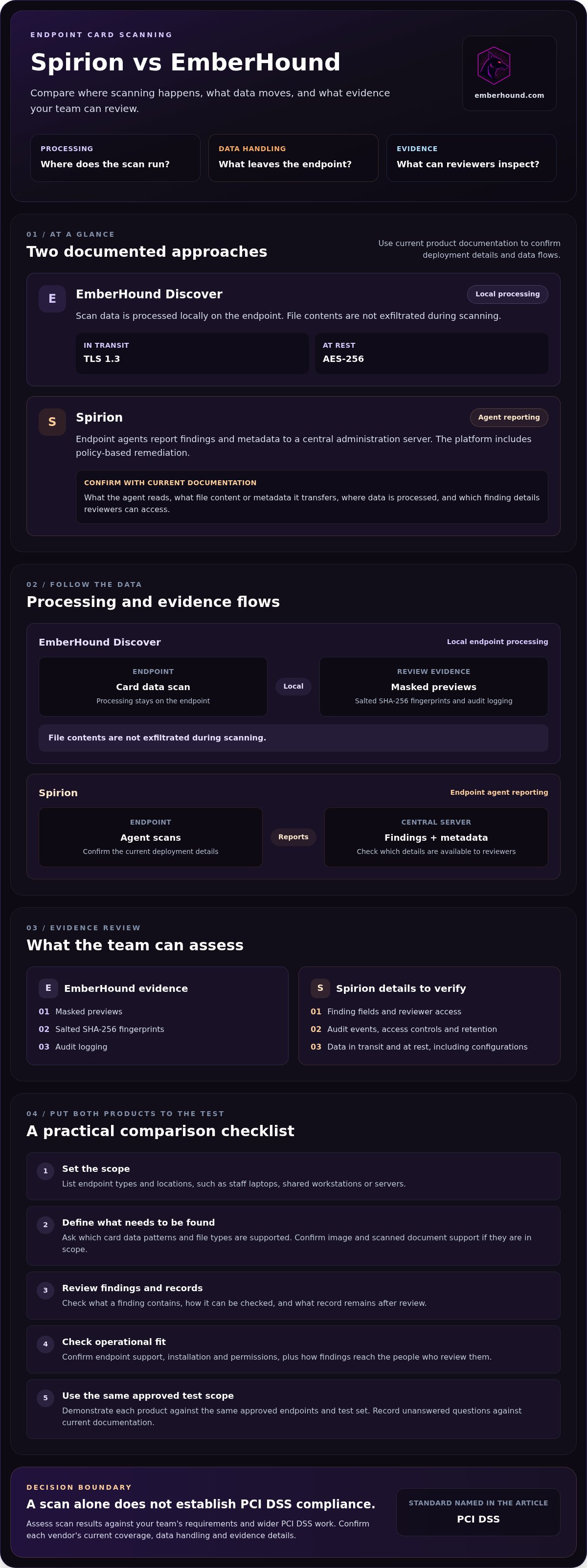
Use this checklist to test Spirion and EmberHound against your environment
A fair product test needs a fixed scope. Choose a controlled, approved set of endpoints that reflects the systems you need to assess. Where possible, use the same endpoints, test data and review criteria for both tools. Record differences in configuration, permissions or scan settings. Otherwise, a result may reflect the setup rather than the product.
A practical product evaluation sequence
Before testing, write down the endpoint scope, card data patterns, file types and evidence your reviewers need. Ask each vendor to explain scan setup, processing location, access controls and the outputs available to your team. Keep the answers with your test notes so you can compare them against the results.
- Set the scope. List the approved endpoints and the data locations each test must cover.
- Confirm the configuration. Record agent or software requirements, permissions, exclusions and any settings that affect detection.
- Run equivalent tests. Use the same documented scope for each product. Note where vendor configuration differs.
- Review findings. Check endpoint identification, finding context, false positives and the effort needed to resolve results.
- Assess evidence and administration. Record what the team can review or export, how access and changes are logged, and what remains unanswered.
Score each product against your requirements for data handling, findings, evidence, administration and operational fit. Use a simple status such as meets, partly meets or unverified, and keep unanswered questions visible. A capability described in a sales discussion still needs supporting product documentation or a demonstration in your test environment.
Questions to ask before selecting either platform
Use the same questions with both vendors. Ask which endpoints, file types and card data patterns are supported. Confirm where processing occurs and whether file contents leave the endpoint. Ask what evidence your team can export, review and retain, and what audit history is available. Check detection limitations and how reviewers distinguish likely matches from false positives.
For Spirion, verify current product behaviour and configuration details against vendor documentation. For EmberHound Discover, assess its documented endpoint processing and evidence against the needs you recorded. Review EmberHound pricing information for current usage-based pricing details and the free entry point. Keep the comparison tied to the same test scope, then decide against your team's recorded requirements.
When EmberHound fits endpoint card scanning, start with a free scan
EmberHound Discover may suit a team that needs endpoint scanning with local processing and no file exfiltration during scanning. Its evidence includes masked previews, salted SHA-256 fingerprints and audit logging. These details may help reviewers examine findings while limiting exposure to raw file contents. They don’t establish whether the product covers your full card data scope, so check that against your documented requirements.
When EmberHound Discover may suit your team
For teams weighing spirion vs emberhound for endpoint card scanning, start with the requirements that prompted the evaluation. Does your team need local endpoint processing? Will reviewers need a masked preview or a fingerprint to refer to a finding? Does the audit history provide the record your internal review expects? Compare the answers with the workflow your staff will use.
EmberHound Protect is on the roadmap, not live. Base your decision on EmberHound Discover’s available capabilities and verify any requirement that falls outside them. If your project also covers sensitive data beyond payment card data, the GDPR data discovery overview provides broader discovery context.
What to confirm before you proceed
Before selecting either product, confirm that the proposed scan scope covers the endpoints, file types and card data patterns your organisation needs to assess. Review current product documentation for setup, processing, evidence outputs and any limits that affect your environment. For Spirion, verify its current endpoint behaviour and evidence details against current vendor documentation. Record unclear points and obtain answers before relying on them.
Check your internal security approval requirements before running a scan. Agree which endpoints are approved, who can access results and how your team will review findings. A visual walkthrough can help reviewers assess the workflow; see the EmberHound product demonstration.
Use a free scan as a practical first step in evaluating EmberHound Discover against your approved scope. Compare what it detects and the evidence it provides with the requirements you set. A scan helps assess product fit; it doesn’t establish PCI DSS compliance or replace your organisation's assessment work.
Choose your next step using documented requirements
The spirion vs emberhound for endpoint card scanning decision comes down to your endpoint scope, data handling requirements and the evidence your reviewers need. Compare both products against the same approved test scope. Before relying on a claim, check current Spirion documentation for endpoint behaviour, data transfers, detection coverage and evidence outputs.
EmberHound Discover may suit teams that need local endpoint processing without file exfiltration during scanning. TLS 1.3 protects data in transit, and AES-256 protects data at rest. Confirm that the documented scan scope matches your card data requirements. A scan alone doesn’t establish PCI DSS compliance or replace your organisation's assessment work.
Begin evaluating EmberHound Discover with a free scan. Review the results with your team and record any questions that need answers before deciding. You’ll have a defined test plan and evidence to assess.
Frequently Asked Questions
Is Spirion or EmberHound better for endpoint card scanning?
Neither is automatically the better choice. The right fit depends on your endpoint scope, data handling requirements and evidence needs. In spirion vs emberhound for endpoint card scanning, compare both products against the same approved endpoints and documented card data patterns. EmberHound Discover processes data locally and provides masked previews, salted SHA-256 fingerprints and audit logging. Verify Spirion's current scanning, transfer and evidence details in vendor documentation before deciding.
Can EmberHound scan card data on endpoints without uploading files?
Yes. EmberHound Discover processes scan data locally on the endpoint, and file contents are not exfiltrated during scanning. Its documented evidence includes masked previews and salted SHA-256 fingerprints, so teams can review finding information without displaying raw file contents in those evidence items. Check the product documentation against your internal security requirements, including what evidence is retained and who can access it.
How does endpoint card scanning evidence differ between Spirion and EmberHound?
EmberHound Discover documents masked previews, salted SHA-256 fingerprints and audit logging. These help reviewers examine findings and refer to files while limiting exposure to raw content. Check Spirion's findings and evidence outputs against current product documentation, including which details its agents send to central administration and what reviewers can access. Compare exported reports, access records and retention details using the same review criteria for both products.
What should I check before choosing endpoint card scanning software?
Define the endpoints, card data patterns and file types in scope first. Ask each vendor where processing occurs, whether file contents leave endpoints, and what evidence reviewers can access or export. Confirm how the software records access and changes, how findings can be reviewed, and which configuration settings affect coverage. Test each product against the same approved scope, and record limitations or unanswered questions before making a selection.
Does endpoint card scanning software make an organisation PCI DSS compliant?
No. Endpoint card scanning can help locate payment card data, but a scan alone does not establish PCI DSS compliance or remove assessment obligations. Treat scan results as one input to your organisation's wider compliance work. Confirm the relevant scope and requirements with the people responsible for your PCI DSS assessment, then use the scanning tool to gather findings and evidence for review.
Does EmberHound Protect include endpoint card scanning today?
No. EmberHound Protect is on the roadmap and is not currently live. EmberHound Discover is the available product for endpoint scanning. Its confirmed capabilities include local endpoint processing, no file exfiltration during scanning, masked previews, salted SHA-256 fingerprints and audit logging. Base product decisions on Discover's current documentation, and ask EmberHound to clarify any requirement that depends on a roadmap feature.
Can I start evaluating EmberHound without a long-term contract?
Yes. EmberHound's pricing model has a free entry point and no mandatory contracts, with usage-based pricing. You can begin with a free scan to assess Discover against an approved endpoint scope and your team's evidence requirements. Check the current pricing information for the terms that apply to your evaluation. A scan is a product assessment step, not a substitute for your organisation's PCI DSS review. Start free scan.


