

A policy that covers staff prompts alone leaves important decisions about data, suppliers and automated access unresolved. An AI governance policy template should set rules across the AI lifecycle, from development and procurement to day-to-day use. Adapt it to your organisation’s systems and responsibilities.
Decide what data can be used, how its source and licence will be recorded, which AI tools and agents can access business systems, and when a person must review an output. These are the practical foundations of governance. A well-adapted AI governance policy template gives teams a clear starting point for making and documenting those decisions.
This guide explains what to include and how to adapt a template for your UK organisation. It covers training data quality and rights, approval and access controls for AI agents, staff responsibilities, supplier checks, risk management and ongoing monitoring. It also explains how the NIST AI Risk Management Framework can structure AI risk assessment, measurement and management. The result is a policy your teams can apply across the way AI is built, bought and used.
Key Takeaways
- Record where training data came from, how its quality is assessed and what licence permits its use.
- Set clear policy ownership and oversight so staff know who approves AI use and reviews decisions.
- Use the NIST AI Risk Management Framework to organise risk assessment, measurement and ongoing management.
- Require approval for AI agents and give each agent access only to the systems and data it needs.
- Apply the policy across AI development, procurement and staff use, with controls suited to each stage.
Training data provenance, quality and licensing
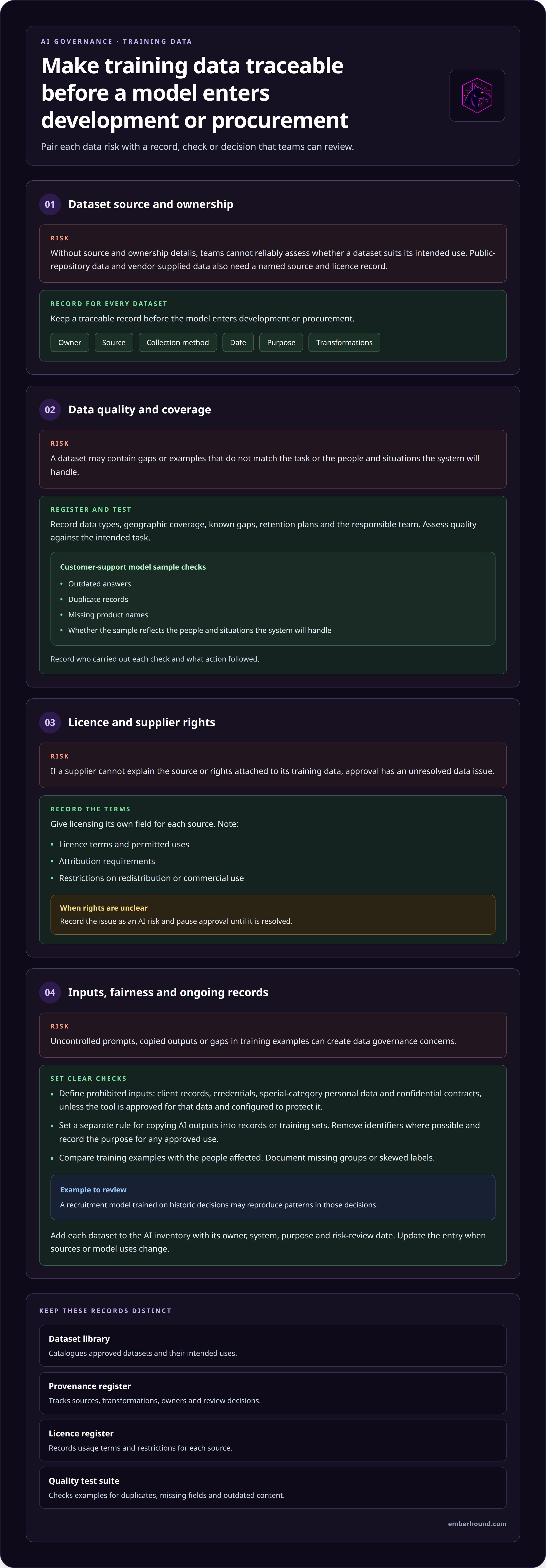
Keep a traceable record of training data before a model enters development or procurement. For each dataset, record its owner, source, collection method, date, purpose and any transformations. A dataset from a public repository still needs a named source and licence record, as does data supplied by a vendor. Without this information, teams cannot reliably assess whether a dataset is suitable for its intended use.
Create a dataset register with an entry for each source. Include data types, geographic coverage, known gaps, retention plans and the responsible team. Assess data quality against the task: for a customer-support model, sample records for outdated answers, duplicates and missing product names. Check whether the sample reflects the people and situations the system will handle. Record who carried out each check and what action followed.
Give licensing its own field. Record the licence terms, permitted uses, attribution requirements and any restrictions on redistribution or commercial use. If a supplier cannot explain the source or rights attached to its training data, record the issue as an AI risk and pause approval until it is resolved. A dataset library can hold approved sources, while a provenance register tracks how each dataset reached a model. These records support consistent reviews.
- Dataset library: catalogues approved datasets and their intended uses.
- Provenance register: tracks sources, transformations, owners and review decisions.
- Licence register: records usage terms and restrictions for each source.
- Quality test suite: checks examples for duplicates, missing fields and outdated content.
Define prohibited inputs before staff use generative AI. For example, block prompts containing client records, credentials, special-category personal data or confidential contracts unless the tool has been approved for that data and configured to protect it. Set a separate rule for copying AI outputs into records or training sets. Staff should remove identifiers where possible and record the purpose for any approved use. UK teams can map personal-data handling decisions to their GDPR data protection guidance.
Include a fairness check in data governance. Compare training examples with the people affected by the system, and document missing groups or skewed labels. A recruitment model trained on historic decisions, for example, may reproduce patterns in those decisions. Add each dataset to the AI inventory with its owner, system, purpose and risk-review date. Update the entry when sources or model uses change, so reviewers can trace a concern to the relevant dataset and team.
What is an AI policy template?
An AI policy template provides a starting framework for responsibilities, approval routes and rules for AI use. It needs to be adapted to the organisation’s purpose, systems and risks. It is not a finished policy: teams must decide who has authority and how staff are expected to follow the rules.
Yes. A UK organisation can start with a free template or draft its own policy. Either way, adapt the rules to its AI systems, data and decisions before putting them into use. Check that the template covers the tools and work the organisation actually uses; generic wording may not fit.
Establish governance before setting detailed controls. An oversight group could include representatives from IT, information security, data protection, legal, HR and teams using AI. Appoint a chair and define the group’s remit: approving use cases, assigning owners, reviewing risks and recording decisions. It might meet when a proposed system changes how staff handle information or make decisions. Keep a decision log identifying who approved each use and any conditions attached.
Use simple tools to keep decisions visible:
- Responsibility matrix: assigns an owner, approver and reviewer to each AI use case.
- Approval register: records the purpose, tool, decision and conditions for use.
- Decision log: captures reasons for approval, rejection or changes to controls.
- Review checklist: prompts teams to assess accuracy, fairness, privacy and human oversight.
State what responsible AI use means in practice. The ethics guidelines referenced by the EU AI Act identify principles including human oversight, privacy and data governance, transparency, fairness and accountability, according to EUR-Lex. UK organisations can use these principles as prompts, then tailor their own rules and controls to the AI they use.
Match human review to the consequences of an AI-assisted decision. For example, high-stakes decisions about student progression, grading or discipline should not be made by AI without human oversight. A policy can require a named decision-maker to review relevant evidence and record the final rationale before action is taken.
Set accuracy checks for routine work too. Require staff to verify AI-generated figures, names, claims and sources before sharing outputs. Users remain responsible for material created with AI support, so the policy should require review, revision and fact-checking against multiple sources. A checklist can make this process consistent.
Finally, define how the oversight group handles change. It should monitor AI use, review recommendations as tools evolve and record decisions. An organisation can use a decision log and scheduled reviews to update approvals when a tool, purpose or risk changes. To put policy decisions into practice, take the next step.
Alignment with the NIST AI Risk Management Framework
The NIST AI Risk Management Framework provides guidance on AI governance, risk assessment, measurement and ongoing management. Use it to connect policy commitments to controls, evidence and named owners. It offers a structure for managing risk throughout a system’s lifecycle, from initial proposal to deployment and review.
For UK organisations, applicable regulation depends on the sector, activities and use of AI. Identify the legal and regulatory requirements that apply to each use case, then record the relevant owner and evidence. ISACA advises organisations to research generative AI requirements for their industry and jurisdiction.
Start with an inventory of AI systems and proposed uses. For each, record its purpose, users, affected groups, supplier and potential impact on decisions. Assess what could go wrong and who might be affected. For example, a tool that prioritises service requests could consistently delay cases from a particular group. Record the potential harm, its cause and how the organisation would detect it.
Turn each identified risk into a control and a way to test it. A risk register can record the issue, owner, mitigation, evidence and approval status. A requirements-mapping table connects applicable obligations to controls. A test plan explains how teams will check that those controls work in expected conditions and foreseeable failures.
Useful tools include:
- AI inventory: records systems, owners, purposes and affected users.
- Risk register: tracks identified harms, mitigations and remaining risks.
- Requirements mapping table: links applicable requirements to controls and evidence.
- Monitoring dashboard: tracks performance measures and changes over time.
- Incident log: records failures, complaints, investigations and corrective actions.
Define monitoring measures before deployment. For a customer-service assistant, these might include inaccurate answers, failed hand-offs or recurring complaints. Compare results with the system’s intended purpose. If error patterns change or a control fails, investigate the cause, record corrective action and decide whether use should continue. Governance should cover ongoing monitoring of performance, fairness and regulatory alignment.
Review the policy at least every 12 months, and sooner if tools or regulations change significantly. Reopen an assessment when a system gains a new purpose, uses different data or affects new groups. Record the review date, decision-maker and resulting changes. This gives the organisation a clear record of why its risk controls remain suitable, or what needs to change before the system continues in use.
AI agent governance and approved access
AI agents can authenticate to existing systems, so govern each one like a human account. Assign a named owner and unique identity, and limit access to the approved task. An agent drafting support replies might need access to a knowledge base, but not payroll records. Record each permission and its business reason so reviewers can see what the agent can access.
For generative AI, name approved tools and prohibit entering personal, confidential, regulated or client data unless a tool is approved for that data and configured to protect it. If a business or enterprise version is available, specify it as the approved option for work. Explain how staff should handle outputs, including checking generated facts before sharing them with colleagues or customers.
Set an approval route before staff connect an agent to business systems. Require a written proposal stating its purpose, owner, data access and connected applications. The approving team can assess whether the permissions fit the task, then record its decision and any limits. A meeting assistant, for example, might need calendar access but no permission to change staff records.
Use distinct controls for identity, permissions and review:
- Identity and access management (IAM): creates a unique account for each agent and applies role-based permissions.
- Approved-tool register: lists permitted AI tools, approved uses and any data restrictions.
- Model registry: records model versions, owners, intended uses and validation results.
- Audit log: captures agent actions, access attempts and changes for later review.
- Sandbox environment: tests an agent with controlled data before it can act on live systems.
Before release, validate the model and the agent’s connected actions. Test whether the model handles expected inputs accurately, refuses prohibited requests and passes uncertain cases to a person. Then test permissions: an agent that summarises invoices should not be able to approve payments. Record test results, unresolved issues, the approver and release conditions in the model registry.
Set access boundaries in plain language. Define which systems an agent may read, which actions it may take and which require human approval. A booking agent might draft a change but need staff approval before altering a customer record. Review permissions when the agent’s purpose or connected systems change, and remove access when the agent is retired.
Set operational rules for transparency. Tell staff when an AI agent is active, name its owner and explain how to report an unexpected action. Give people a route to request human review when an agent’s output affects their work or service. Keep a change log of model updates, permission changes and approval decisions. These records help establish what the agent could access and why it acted.
Policy coverage across AI development, procurement and use
Apply the policy throughout each AI system’s lifecycle, from proposal to everyday use and retirement. Cover employees, contractors and temporary staff using AI for work on any device. This closes a common gap: staff using personal devices still need clear rules for work information. Assign an owner to each system and record its purpose, users and lifecycle stage.
During development, set controls for design decisions and testing. Record the intended use, data sources, model version and known limitations. Test outputs against realistic cases before release. For a tool that summarises customer messages, check whether it invents details or misses complaints. Document the results and require approval before changing the model or expanding its purpose.
Use a separate decision route for procurement. Before buying or enabling a tool, assess the organisation’s needs by department and identify who will use it, as ISACA advises. Record the supplier, data handled, access requested, intended outputs and available safeguards. A marketing team testing an image generator, for example, needs different permissions from a finance team processing invoices. Include supplier changes and contract renewals in the review process.
Give teams practical tools for applying the policy across development, procurement and use:
- Lifecycle register: tracks each AI system, its owner, purpose and stage.
- Procurement assessment: captures supplier details, data access and approval decisions.
- Test record: stores test cases, results, limitations and release approval.
- Change log: records model updates, new uses and control changes.
For staff use, state which tools are approved, what tasks they can support and what information must not go into prompts. Require users to review outputs before relying on them. A generated summary might omit a key condition from a contract, so staff need a way to report errors and correct work products. Apply the policy to AI features embedded in existing software too.
Ethics controls should address AI’s effects on people. ISACA advises assessing technical and ethical risks, including generated misinformation. For a customer-facing chatbot, define how it signals uncertainty and hands a case to a person. For a decision-support system, specify who reviews its recommendation and records the final decision. Assign these responsibilities to named roles.
Connect the lifecycle approval gates. A proposal cannot move to procurement without an owner and purpose; a purchased system cannot enter use without testing and approval. Reopen the assessment if a supplier changes a model or a team proposes a new use. This gives staff a clear route from idea to approved use.
EmberHound
EmberHound helps organisations identify personal and payment card data that AI systems may access or process. Its GDPR Data Discovery and PCI Card Data Discovery can support a governance programme by showing where sensitive information is stored. Combined GDPR + PCI Coverage addresses both data discovery needs, while a DSAR Disclosure Pack supports handling subject access requests.
Turn to these tools when your AI inventory or risk assessment raises questions about sensitive data in business systems. Data discovery can help teams locate relevant information and inform decisions about access, use and disclosure. It supports the evidence-gathering part of governance; policy ownership, tool approval and human oversight remain organisational responsibilities.
Contact EmberHound to discuss how its data discovery offerings fit your organisation's needs.
Put governance into everyday decisions
An AI policy becomes useful when people can apply it to a real decision. Choose one use case and trace its path from proposal to everyday work. Note where a decision is unclear, who needs to make it and what evidence would help. These gaps give you a practical first revision grounded in how your organisation works.
Treat an AI governance policy template as a starting point. Keep it current by giving staff a clear way to raise concerns about an AI system and assigning someone to respond. Feedback from actual use can reveal where wording needs more precision or teams need clearer instructions.
Start with one use case, clarify the next decision, then apply what you learn elsewhere. To support your governance work with data discovery, start a free GDPR scan with EmberHound.
A workable policy grows from clear decisions and regular attention. Start with the AI use case your team needs to govern now.
Frequently Asked Questions
What should an AI policy include?
Include a scope statement explaining which work activities and systems the policy covers. Define terms staff might interpret differently, such as “AI-generated content” or “automated recommendation”. Add an exception process for unusual cases, including who can approve an exception and how its rationale is recorded. A research team, for example, may need a distinct rule for using synthetic data in a controlled experiment.
Can I adapt the template to my industry?
Yes. Use terminology and examples staff recognise from their daily work. A logistics company might define AI-assisted route planning; a design studio might describe image-generation use in client projects. Include processes that reflect how work is done, and remove examples that could confuse staff. This makes instructions easier to apply without assuming every team faces the same use cases.
How do I write an AI policy for my business?
Gather existing rules that already affect AI use, such as information security, records management and staff conduct policies. Mark overlaps or contradictions, then add AI-specific wording only where existing documents leave a gap. Ask a small group of intended users to apply the draft to realistic work examples. Clarify ambiguous terms before the authorised approver signs it off.
What about the EU AI Act?
The EU AI Act may affect organisations operating in or selling into the EU, depending on their AI use. Add a field to the AI inventory for EU-facing products, services and deployments, then assess each relevant use against applicable obligations. This makes cross-border exposure visible when a product enters a new market. Record the assessment owner and review it when the organisation’s EU activity changes.
Why does AI governance matter?
Governance helps organisations decide which AI uses need attention first. A system that shapes access to a service may warrant closer scrutiny than a tool that reformats internal notes. A shared decision method helps teams explain why review effort differs across use cases. It also helps leaders set priorities when staff time and technical resources are limited.
What should an AI governance policy include?
Include practical operating details: where staff can find the current version, who maintains it and how updates are communicated. Explain how the policy relates to existing internal rules, so teams know which document to follow when instructions overlap. A short version history can show what changed and why, helping staff distinguish current guidance from older local copies.
What UK laws and regulations should an AI governance policy address?
Identify requirements based on the organisation’s activities, information and sector. Data protection requirements may apply when AI processes personal data; payment card requirements may apply where cardholder data is involved. Sector-specific rules can affect particular services or decisions too. Record each requirement, the process it relates to and the internal owner responsible for keeping the assessment current.
Who should own and approve an AI governance policy?
Senior leadership should authorise the policy, while a named policy owner maintains the working version and manages updates. The appropriate approver depends on the organisation’s structure and the policy’s scope. A business might require executive approval for organisation-wide rules, with departmental leaders confirming practical procedures for their teams. Keep the approval record with the policy’s version history.


