

How can you find personal data across your endpoints without exposing the files you’re trying to protect? Manual searches can leave teams unsure what they have missed. Automated GDPR data discovery scans endpoint data locally and gives your team evidence to review without sending files elsewhere.
Before choosing a scanning approach, consider what the scan covers, how it handles raw content, and what your team can verify from the results. Clear scope and evidence help staff assess findings without opening every file.
This article explains how an automated discovery scan moves from scope to findings, what evidence to expect, and how to assess coverage and data handling. It also explains how EmberHound Discover uses masked previews, salted SHA-256 fingerprints, and audit logging to support review. A free GDPR scan is a practical first step towards locating personal data across endpoints.
Key Takeaways
- Automated GDPR data discovery helps locate and map files that may contain personal data, but findings still need human review.
- Set the scan scope around the endpoints and other locations you need to examine, then review and record decisions about the results.
- Compare scanning approaches by endpoint coverage, processing location, evidence provided, and how staff review findings.
- Check what the scanner processes and records so your team can understand how scan evidence is produced.
- EmberHound Discover scans endpoints and provides masked previews, salted SHA-256 fingerprints, and audit logging.
What automated GDPR data discovery finds, and what it does not prove
Automated GDPR data discovery scans endpoints to locate and map files that may contain personal data. It gives an organisation a view of where relevant files sit within the scan scope. Treat findings as leads for review, not as a final judgement about what the data means or how it should be handled.
Asset registers and documented processes describe known systems and approved ways of working. They may not capture every local copy, old project folder, or file saved outside the usual process. A scan can identify locations that need attention, but its coverage depends on which endpoints and file types are included.
What does an automated GDPR data discovery scan look for?
A scan looks for files that may contain personal data. Depending on what the scanning approach can process, these may include documents or images with details that identify or relate to a person. A match is a reason to review the file, not proof that the information is personal data in context.
Context matters. A name in a staff record has a different purpose from the same name in a public document. Reviewers need to consider why the file exists, who uses it, and whether the scan result is accurate. They can then record the organisation’s decision and any follow-up action.
In brief, an automated discovery scan identifies and maps files that may contain personal data within its defined scope. It does not establish what the data means in context, whether its use is lawful, or whether the organisation meets GDPR requirements.
Can a discovery tool prove GDPR compliance?
No. Finding files supports data discovery work, but it does not assess the organisation’s purposes for using personal data, its processes, or its wider compliance position. The General Data Protection Regulation (GDPR) provides the broader framework. A scan produces technical findings that staff must interpret and act on.
Discovery outputs are also separate from remediation and legal advice. A tool can help show where potential personal data was found and provide evidence about the scan. Decisions about retention, access, and other organisational actions remain with the organisation. For wider context on the regulation, read the GDPR compliance guide.
How automated GDPR data discovery scans endpoints and creates findings
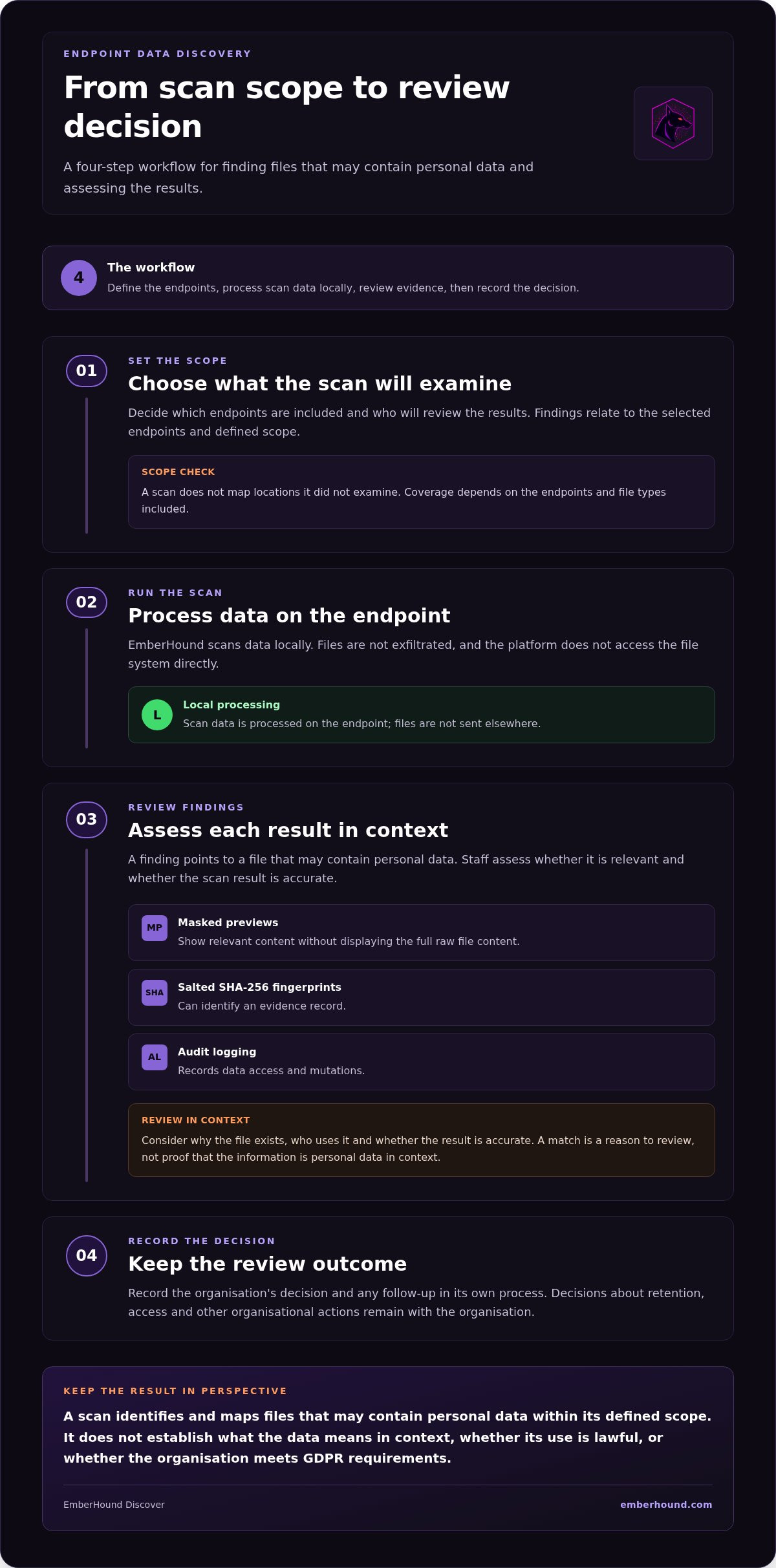
An endpoint scan turns a defined scope into findings for people to review. Each result points to a file that may contain personal data. Staff can examine the available evidence, decide what the result means in context, and record that decision.
What happens during an endpoint scan?
EmberHound scans data locally on the endpoint, and files are not exfiltrated. The platform does not access the file system directly. Scan results relate to the endpoints and scope selected, so teams should not treat them as a map of locations the scan did not examine.
A practical workflow has four steps:
- Set the scope. Decide which endpoints are in the scan and who will review the results.
- Run the scan. The scan processes data locally and identifies files that may match its discovery criteria.
- Review findings. Staff assess each result and its available evidence, including whether the file is relevant in the organisation’s context.
- Record the decision. Keep a record of the review and any follow-up in the organisation’s own process.
How do findings become reviewable evidence?
A finding gives the reviewer a specific result to assess. Masked previews can show relevant content without displaying the full raw file content. A salted SHA-256 fingerprint can identify an evidence record. Audit logging records data access and mutations. These outputs help teams examine findings and track activity, but a scan result is not a legal conclusion.
For a broader product explanation, read the GDPR data discovery software overview. The NIST data discovery and standards resources provide a separate reference point for data and standards resources.
To see how a scan works against a defined endpoint scope, start free GDPR scan.
How to assess an automated GDPR data discovery tool
Assess a scanner against the work your team needs it to do. For automated GDPR data discovery, ask which endpoints are scanned, where processing happens, what evidence is retained, and how staff review findings. Clear answers help your team understand the product’s scope and the evidence behind its claims.
| Assessment area | What to establish | EmberHound Discover |
|---|---|---|
| Scope | Which endpoints and data locations are included? | Scans endpoints. Results relate to the defined scan scope. |
| Processing location | Is file content processed locally, or transferred elsewhere? | Processing is local, with no file exfiltration. |
| Evidence format | Can reviewers assess a finding without viewing the full raw content? | Supports masked previews and salted SHA-256 fingerprints. |
| Review workflow | What can staff inspect, and what activity is recorded? | Audit logging records data access and mutations. |
Check scope and data handling
Establish which endpoints are in scope and which locations the scan examines. Endpoint scanning does not establish coverage of other environments or storage locations. Check what the scanner processes and records, and whether file contents leave the endpoint. EmberHound processes scan data locally and does not exfiltrate files.
Local processing and evidence design answer practical questions: do files stay on the endpoint, can a reviewer assess a result without seeing the full raw content, and can the team identify the evidence record later? EmberHound uses TLS 1.3 for data in transit and AES-256 encryption at rest. TLS applies to data sent between systems; AES-256 describes protection for data at rest. These controls do not expand scan scope or establish compliance by themselves.
Check whether evidence supports review
Findings are useful when staff can inspect why a file was flagged and record their assessment. Masked previews limit the raw content shown during review. Salted fingerprints help identify evidence records, while audit records show data access and mutations. The organisation still decides what each finding means and what action to take.
The Data Protection Network discusses why data mapping matters for compliance. For EmberHound’s stated security controls, see its security and trust information. Technical documentation should make scope, processing, and evidence behaviour clear enough for your team to assess.
How to put automated personal-data discovery into practice
A useful discovery process has a clear owner and a defined purpose. Automated GDPR data discovery can help locate files for review, but your organisation remains responsible for deciding what each result means and what action to take.
Prepare for the first scan
Before scanning, agree which endpoints are in scope and assign people to review the findings. Set the purpose too. For example, the team might be checking where personal data is held across selected endpoints. A clear purpose helps reviewers assess matches consistently instead of treating every result as a confirmed issue.
Then work through the scan and review:
- Define scope. List the endpoints to include and note any known gaps in coverage.
- Run the scan. Keep a record of the scope and the person responsible for initiating it.
- Review findings. Check each result against its file context. Decide whether it is relevant, needs further review, or can be closed.
- Record decisions. Document the outcome and any follow-up in your organisation’s process. Use available audit records to support traceability.
Keep responsibility with named people in the organisation. A scan can identify potential matches and provide evidence for review. It does not decide whether a particular use of personal data is lawful or what the organisation must do next.
Choose scope that reflects where work happens
Start with the endpoints that suit the purpose of the scan. If relevant records may also sit in mailboxes or on external hard drives, include those locations in the discovery plan. EmberHound offers local mailbox scanning and external hard-drive scanning add-ons. OCR scanning can detect data within images and scanned documents. Review these results alongside endpoint findings.
Use a separate audit-preparation process to organise supporting material and responsibilities. The technical GDPR data audit checklist can help structure that preparation. For context on how mapping and scanning differ, see the GDPR data mapping and scanning comparison.
Keep the records useful. Note what was in scope, who reviewed the results, and why a finding was closed or sent for further action. This gives the organisation a practical record of decisions without asking the scanning tool to make legal judgements.
Start automated GDPR data discovery with EmberHound Discover
EmberHound Discover is the live data discovery track for endpoint scanning. It helps teams locate and map files that may contain personal data, then review scan findings with supporting evidence. Teams can use it to examine a defined endpoint scope as part of their automated GDPR data discovery work.
What does EmberHound Discover do?
Processing takes place locally on the endpoint, and files are not exfiltrated. Discover provides evidence features for reviewing results. Masked previews limit the raw content shown during review, salted SHA-256 fingerprints help identify evidence records, and audit logging records data access and mutations.
These features support the review process. Your team still assesses findings in context and decides what to do with them. A scan can show where potential personal data was found, but it does not make legal decisions or establish GDPR compliance by itself.
Discover is part of the wider category of GDPR data discovery software. For more on how that software can support data location work, read this GDPR data discovery software guide.
How can a team begin a free GDPR scan?
A free GDPR scan gives your team a starting point. Begin with a clear endpoint scope and decide who will review the findings. Use the results to identify files that may need closer attention, then record the team’s assessment through your organisation’s review process. The scan is one step in discovery work; your organisation remains responsible for interpretation and follow-up.
Discover uses a usage-based model: you pay for what you use. You can start free, with no mandatory contracts. Begin with a defined scan, then consider your next steps based on the work your team needs to do.
Keep the first step focused. Choose the endpoint scope, run the scan, and review the evidence before deciding whether to extend discovery. This gives reviewers a defined set of findings to assess.
Make personal-data discovery a practical next step
Automated GDPR data discovery helps teams locate files that may contain personal data across the endpoints in scope. Findings need review. A scan can show where potential matches were found, but your organisation decides what they mean and what action to take.
EmberHound Discover processes data locally, with no file exfiltration. Masked previews help reviewers inspect findings without displaying full raw file content. Salted SHA-256 fingerprints identify evidence records, and audit logging records data access and mutations. Data in transit uses TLS 1.3, and data at rest uses AES-256 encryption.
Start with a defined endpoint scope and a clear review owner. Use the results to guide further investigation, then record decisions through your organisation’s process. The scan supports discovery work; it does not make legal decisions or establish GDPR compliance by itself.
A focused first scan gives your team a defined set of findings to review. Use the evidence to decide what needs further investigation and record the next steps in your organisation’s process.
Frequently asked questions
What is automated GDPR data discovery?
Automated GDPR data discovery scans endpoints to find and map files that may contain personal data. It gives a team a view of potential data locations within the scan scope. Staff must review findings in context and decide what they mean. A scan supports discovery work, but it does not determine whether an organisation complies with GDPR or whether a particular use of personal data is lawful.
How does automated GDPR data discovery work?
The tool scans the selected endpoints and identifies files that may match its discovery criteria. Findings give reviewers specific results to examine. With EmberHound Discover, processing takes place locally on the endpoint, and files are not exfiltrated. Reviewers can use masked previews and salted SHA-256 fingerprints to assess findings and identify evidence records, while audit logging records data access and mutations.
Can automated data discovery find personal data in every file?
No. A scan’s results depend on its scope and the data it can process. It may identify files that appear to contain personal data, but teams should not assume every file, location, or format has been covered. For example, a scan limited to selected endpoints does not establish what is stored elsewhere. Review the stated scope and assess findings against the organisation’s context.
Does automated data discovery guarantee GDPR compliance?
No. Automated discovery can help locate files that may contain personal data, but a scan does not assess every aspect of an organisation’s data use or compliance. Findings need human review, and the organisation remains responsible for decisions and follow-up. Treat scan evidence as an input to discovery work, not as legal advice or a full compliance assessment.
Is endpoint-only scanning safer than uploading files to a scanner?
Endpoint-only scanning keeps file processing local and avoids exfiltrating files to the scanner. That can reduce the need to transfer raw file contents for scanning. It does not, on its own, prove that a tool or an organisation’s wider environment is safe. Assess the processing design, evidence handling, and security controls together to decide whether an approach suits your requirements.
What evidence should an automated GDPR scanning tool provide?
Useful evidence should let staff understand and review findings without exposing more raw content than necessary. EmberHound Discover supports masked previews, salted SHA-256 fingerprints to identify evidence records, and audit logging of data access and mutations. Teams should also retain the scan scope and their own review decisions so a finding can be understood in context and follow-up can be traced.
Can automated GDPR data discovery help with a subject access request?
Yes. Discovery can help locate files that may contain personal data relevant to a subject access request, within the scan scope. The organisation must review results and determine what information is relevant to the request. EmberHound also provides a DSAR Disclosure Pack. Automated discovery can support the search process, but it does not decide what should be disclosed or complete the request by itself.


