

A PDF can hide sensitive data in plain sight. Some files contain selectable text that a standard search can read; others are scanned page images, where words remain invisible to text search unless OCR is used. That split makes pdf search compliance more involved than typing a name into a search box, especially across a large collection.
Manual review can miss files and make it harder to record what was checked. A PDF may also mix text and image pages, so relying on one search method can leave gaps.
This guide explains when text search is enough and when OCR is needed. You’ll learn how to set up a repeatable PDF discovery workflow and what to record when a search returns a match. It also covers evidence that supports review without circulating full document contents. EmberHound Discover processes endpoint data locally, without file exfiltration. Evidence can include masked previews, salted SHA-256 fingerprints, and comprehensive audit logging, so teams can review findings with less exposure to raw content.
Key Takeaways
- Define which records and data categories your review covers before you start pdf search compliance.
- Use text search for selectable PDF text. Scanned page images need OCR to make visible words searchable.
- Choose a search method that fits the number of files and the evidence your review needs.
- Keep the workflow repeatable: set the scope, locate files, search, review matches, and record results.
- Use evidence such as masked previews and salted SHA-256 fingerprints to review findings with less exposure to raw file content.
PDF search for compliance: What teams need to find
PDF compliance search means locating sensitive information in documents for a defined review. The search identifies potentially relevant records; a person then assesses what the findings mean for the review’s purpose and applicable requirements. A match is a discovery result, not a compliance decision.
A search can show where a term or data pattern appears. It cannot determine on its own whether the information was collected, stored, or shared appropriately. That assessment depends on context, scope, and the requirements relevant to the organisation.
What sensitive data might a PDF contain?
A PDF could contain a customer’s name and contact details, an employee identifier, or payment-card data in an invoice or transaction record. These examples can help shape a search, but a document’s contents depend on how it was created and used.
Set the review purpose first. A review of personal data may need different search terms from one focused on payment-card data. Define the relevant categories from the records in scope and the applicable framework before choosing search terms. This gives the search a clear boundary.
Why PDF search needs more than a filename search
A filename or folder label describes where someone saved a document, not everything it contains. A file called "meeting notes" could include customer contact details; a folder labelled "finance" could contain a saved attachment with payment-card data. Names and labels can help locate likely records, but they cannot establish what is inside each file.
Copies add another layer. A document may be saved in a shared folder, retained in an archive, or downloaded as an email attachment. Searching one obvious location can leave other copies outside the review. A repeatable pdf search compliance process starts by defining which systems and locations are in scope, then checks document content using a suitable method.
This is part of finding electronically stored information for a defined purpose. The overview of Electronic discovery (eDiscovery) describes how electronic records, including documents, can be relevant to formal searches. For a wider view of locating personal data across an organisation, read this GDPR data discovery guide.
How PDF text search and OCR find different content
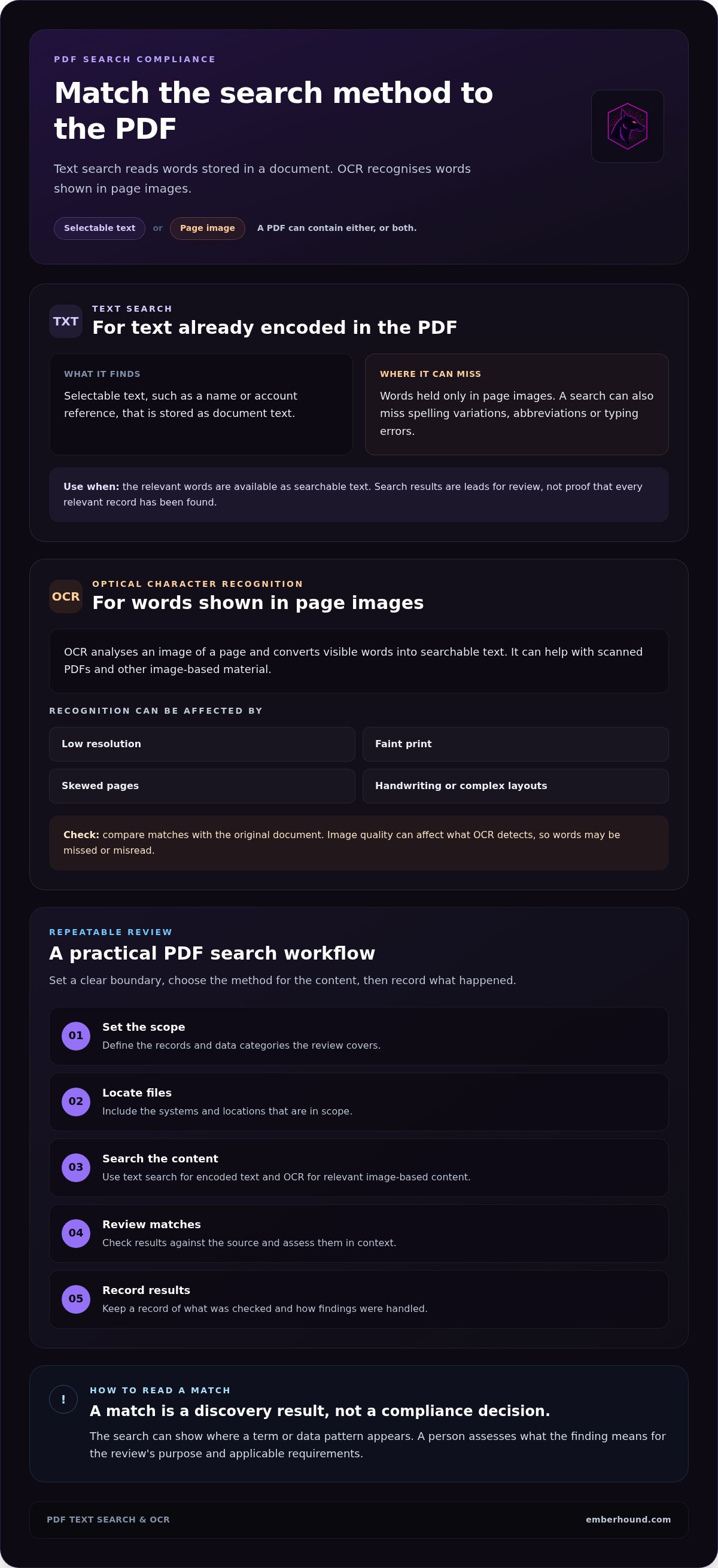
PDFs can store words as text, as page images, or as a mixture of both. The search method needs to match the content. Text search reads words encoded in a document; OCR recognises words shown in page images. For pdf search compliance, choosing the wrong method can leave relevant content undiscovered.
How searchable PDF text is found
Some PDFs contain text that a user can select and copy. A text search checks that encoded content for terms or patterns, such as a name or an account reference. It does not need to interpret the page as an image.
Results depend on how the document was built and how the search is set up. A query for one spelling may miss a variation, abbreviation, or typing error. Tables and unusual reading order can also affect how text is stored and returned. Treat a search result as a lead for review, not proof that every relevant record has been found.
When OCR is needed for scanned PDFs
A scanned page may look like text to a person, but the PDF can contain only an image of the page. OCR, or optical character recognition, analyses the image and converts visible words into searchable text. OCR can also be used on other image-based or scanned material.
Recognition quality depends on the source image. Low resolution, faint print, skewed pages, handwriting, or complex layouts can affect what OCR detects. Review matches against the original document and consider whether scan quality could have caused missed or misread words.
OCR output helps locate possible records. It does not decide whether the information is handled appropriately or whether a legal or framework requirement is met. Assess the results against the purpose and scope of the work.
- Text search: Searches text already encoded in the PDF. It can miss content held only in page images.
- OCR: Recognises text within images or scans so it can be searched. Image quality and page layout can affect recognition, so check results against the source.
Keep the general search method separate from a product’s supported capabilities. EmberHound’s OCR capability detects data in images and scanned documents. For a practical review, use text search where document text is available, OCR where relevant content is image-based, then assess the results in context. Explore endpoint data discovery as one way to support that review.
Which PDF compliance search method fits your documents?
The right method depends on the number of documents, how they store text, and what evidence the review needs. A one-off check of a small set of readable documents may suit manual inspection. A wider review needs a repeatable way to find potential matches and record how they were handled. For pdf search compliance, consider data handling alongside the search method: who can see file contents, and what does the review retain?
Manual review, text search, and automated discovery
- Manual review: A person opens each document and checks its contents. This can help with a small, well-defined set or with interpreting an ambiguous result. As the document set grows, it becomes harder to apply the same checks consistently and record what was reviewed.
- Built-in text search: A PDF reader or file tool searches accessible text for terms chosen by the reviewer. It can suit a focused search of a limited number of documents. Results depend on the text being searchable and on the terms used, so spelling variations or unexpected wording may be missed.
- Automated discovery: Discovery software scans endpoint data for sensitive information and can help teams locate potential matches across a broader scope. It can support repeatable reviews when the search scope and review criteria are clear.
OCR is a separate capability for image-based or scanned material. It recognises text within images so visible words can be searched. OCR output still needs review, especially where page quality or layout may affect recognition. Match the method to the material: text search for accessible text, OCR for scanned content, and human review to assess findings.
How to assess evidence and exposure
Evidence should help a reviewer understand a finding without exposing more document content than the review needs. Opening the original file gives direct access to its contents. A masked preview can show enough context to check a match whilst concealing some underlying text. A salted SHA-256 fingerprint can help identify a file or check whether it has changed without displaying its contents. These evidence types have different uses; a fingerprint does not explain what data was found.
Audit logging can help teams understand access to findings and keep a record of relevant activity. As part of the review design, specify what evidence is recorded and who can view raw content. EmberHound Discover processes endpoint data locally, with no file exfiltration. Its evidence can include masked previews, salted SHA-256 fingerprints, and comprehensive audit logging. EmberHound uses TLS 1.3 for data in transit and AES-256 encryption for data at rest.
A practical workflow for searching PDFs for compliance
A repeatable process starts with a clear question: which information are you looking for, and where could it be stored? Define the review before searching. This keeps the work focused and makes it easier to explain what the search covered and what it did not.
Set the search scope before scanning
Identify the review purpose, relevant endpoints, and document locations. Decide whether the task concerns personal data, payment-card data, or both. Keep those categories distinct where the review requires it, and choose search terms that reflect the records in scope.
Use this sequence to organise the work:
- Define the scope. Record the review purpose, data categories, systems, and locations to include.
- Locate the files. Identify the folders, endpoints, archives, and saved attachments that fall within that scope.
- Select the search method. Use text search where the document contains searchable text. Use OCR for relevant image-based or scanned material.
- Review the results. Check a sample of matches against the source documents. Adjust search terms or scope if the sample shows missed variations or irrelevant results.
- Record the process. Note the locations searched, method used, terms or categories applied, review date, and known limitations.
Review findings and retain useful evidence
A search match is a prompt for review, not automatic confirmation that sensitive information has been exposed. Check whether the result contains the data category you intended to find and whether OCR or text extraction may have affected the match. Record how you assessed ambiguous results, and keep unreviewed matches separate from confirmed findings.
Evidence should let reviewers understand a finding with limited access to raw content. A masked preview can show context whilst concealing some text. A salted SHA-256 fingerprint can be recorded without displaying the document’s contents. Tie the evidence to the scope and method used, so another reviewer can understand what the result represents.
For wider planning beyond a PDF review, use this GDPR data audit guide. A clear record of the review scope and its limits helps teams explain what they searched and where further checks may be needed.
How EmberHound supports endpoint data discovery and PDF review
PDF search compliance needs a clear search scope and evidence that reviewers can interpret. EmberHound Discover is endpoint data discovery software. It scans endpoints for sensitive data and provides audit-ready evidence. Teams assess findings against their review purpose and relevant requirements.
What Discover contributes to a PDF review
Endpoint scanning can help locate sensitive data across the systems included in a review. Use the defined scope and data categories to assess which findings need attention. EmberHound’s OCR capability detects data in images and scanned documents. This can support reviews that include image-based material, but the search method still needs to match the content being reviewed.
PDF review may be one part of a wider personal-data discovery task. For context on that broader work, see the GDPR data discovery guide.
How EmberHound handles scanning and evidence
Processing takes place locally on endpoints. Files are not exfiltrated for processing. This gives review teams a way to search endpoint data without sending file contents elsewhere for scanning.
Evidence can include masked previews, salted SHA-256 fingerprints, and comprehensive audit logging. A masked preview gives a reviewer some context whilst concealing part of the raw content. A salted fingerprint can help identify a file without displaying its contents. Audit logging records activity relevant to understanding how findings were accessed. Each form of evidence has a different purpose, so choose what the review needs and restrict access to raw documents where possible.
Data in transit is protected with TLS 1.3, and data at rest is encrypted with AES-256. These are product security controls. They do not determine whether a particular organisation meets a legal or framework requirement. Search results and evidence support a review; interpreting the findings still requires judgement.
Make your next PDF review easier to explain
Effective pdf search compliance starts with a defined scope. Decide which systems and data categories matter, then match the search method to the documents. Text search finds words encoded in a file; OCR can help identify text in images and scanned documents. Review each match and record what you searched, including any limits that could affect the findings.
EmberHound Discover scans endpoint data with local processing and no file exfiltration. Evidence can include masked previews and salted SHA-256 fingerprints, so reviewers can examine findings with less exposure to raw file contents. Data in transit is protected with TLS 1.3, and data at rest with AES-256 encryption.
Choose the approach that fits your review, then assess each finding in context. A clear record of the scope and method gives your team a practical basis for follow-up.
Start with a focused review and a process your team can repeat.
Frequently Asked Questions
What does PDF search for compliance mean?
PDF search for compliance means locating relevant information inside PDF documents for a defined compliance or security review. The search may cover personal data, payment-card data, or other sensitive information, depending on the task. A match is a discovery result, not a decision about compliance. Assess the context, how the information is handled, and which requirements apply to the review.
Can you search a scanned PDF for sensitive data?
Yes. A scanned PDF may contain page images instead of searchable text, so optical character recognition (OCR) can recognise words within those images. Recognition quality can vary with image clarity and page layout. Review potential matches against the document before relying on them. Record that OCR was used and note limitations, such as unclear or distorted pages that may affect the results.
Is text search enough for PDF compliance checks?
Text search can help when a PDF contains accessible text and the search terms match the information you need to find. It will not identify words held only in page images. A review may need OCR for scanned pages as well as text search. Choose the method based on the document content, the scope of the review, and the evidence your team needs to retain.
How do I search multiple PDFs for personal data?
Define the document locations and personal-data categories in scope first. Check whether the PDFs contain searchable text, scanned page images, or a mixture of both. Use text search for accessible text and OCR for relevant image-based pages. Review potential matches against the documents, then record the search scope, method, and limitations. Keep evidence in a form that avoids unnecessary access to full document contents.
Does searching PDFs make an organisation GDPR compliant?
No. Searching PDFs can help locate personal data, but the search itself does not establish GDPR compliance. The organisation must assess what the data is, why it is held, and how it is handled against relevant requirements. Keep discovery work separate from legal interpretation. For questions about how GDPR applies to a specific situation, consult authoritative guidance or seek qualified advice.
How can a team keep PDF scan evidence without exposing file contents?
Limit access to original documents and retain evidence suited to the review. A masked preview can show relevant context whilst concealing some content. A salted SHA-256 fingerprint can support file identification without displaying the full contents. EmberHound Discover processes endpoint scans locally, with no file exfiltration. Its evidence can include masked previews and salted fingerprints for review.


