

A customer record can move from a form into a spreadsheet, a shared folder and an old backup. Each copy may remain long after the original task is complete. Data minimization techniques help teams decide what to collect, where personal data needs to be kept and who needs access.
Removing fields or deleting records can feel risky. Staff still need information to do their work, and retention decisions can be applied inconsistently across systems. The UK GDPR’s data minimisation principle requires personal data to be adequate, relevant and limited to what is necessary for its purpose.
This guide sets out practical steps to reduce collection without disrupting work, review retention and access, and find where sensitive data remains. It also explains how data discovery can help teams build a clearer picture before changing collection or storage practices. The aim is a repeatable review process, with a way to check whether each change works.
Key Takeaways
- Apply data minimization techniques at collection by checking the purpose of each form field and whether it needs to be required.
- Use the UK GDPR principle to assess whether personal data is adequate, relevant and limited to its stated purpose.
- Identify the working record before removing duplicate exports or copies, and follow approved procedures for changes.
- Start a repeatable review by recording data locations, collection points and the people responsible for them.
- Use data discovery to locate sensitive data; your team decides what to change and when.
What data minimisation means in everyday business practice
Data minimisation means collecting and keeping only the personal data that has a clear connection to a defined purpose. It applies to everyday choices: which fields appear on a form, which details staff record, and whether a working file needs extra copies. It does not mean removing all personal data. A service may need certain details to work, while other information has no clear role.
For UK organisations, the rule is set out in Article 5(1)(c) of the UK GDPR. Personal data must be adequate, relevant and limited to what is necessary for the purpose of processing. The ICO’s data minimisation guidance explains how to apply this principle. The wider idea is also described in Data minimization.
Use the stated purpose as a practical test. If a team collects information to arrange a service visit, it may need a customer’s name, contact details and appointment address. A field asking for a person’s job title needs its own reason. Apply the same test after collection: does each record or copy still serve the purpose? These data minimization techniques help teams identify information that may no longer be needed. The right decision depends on how the data is used and any other relevant requirements.
How data minimisation relates to purpose
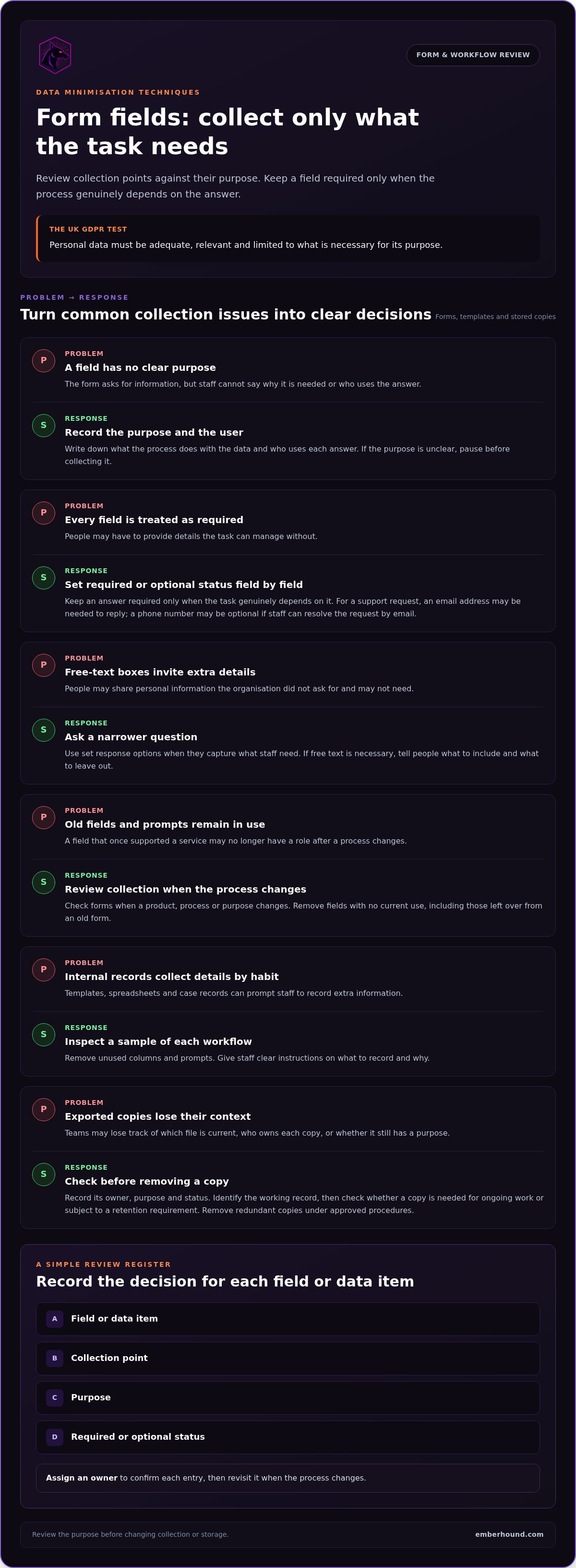
Write down what each process does with personal data, then review every data item against that purpose. For example, a contact form might ask for a phone number, email address and marketing preference. If staff only need an email address to reply, they could make the phone number optional or remove it. Keep a field required only when the process genuinely depends on it.
What data minimisation does not mean
Data minimisation is not a reason to delete records without checking why they exist or whether they still serve a valid purpose. Minimisation concerns the amount and relevance of personal data. Security controls concern how data is protected, while retention decisions determine how long records are kept. These areas are connected, but each needs a separate decision. Refer to current ICO guidance and authoritative legal sources when interpreting the requirements for your organisation.
Keep the reasoning visible. A short record of each purpose and the fields or records it needs gives staff a basis for review. It also shows where a decision needs further consideration. Applying the principle supports better decisions, but it does not automatically establish compliance with every data protection requirement.
Data minimisation techniques for forms and collection processes
Forms are a common point where unnecessary personal data enters a process. Review questions on online and paper forms, then check fields used in account creation, support requests, bookings and other collection points. For each field, record its purpose and who uses the answer. If the purpose is unclear, pause before collecting it.
Review forms and digital collection points
Make a field-by-field inventory. Mark each item as required or optional, and explain why a required answer is needed to complete the task. For example, a support form may need an email address so staff can reply. A phone number may be optional if the team can resolve the request by email. Remove fields with no current use, including those left over from an old version of the form.
Free-text boxes need particular care. They can prompt people to share details the organisation did not ask for and may not need. Use a narrower question or set response options when these capture the information staff require. If a free-text box is necessary, tell people what to include and what to leave out.
Review collection points when a product, process or purpose changes. A field that once supported a service may become redundant after the process changes. Consider whether optional entry or a shorter retention period suits the purpose, then document the decision through the organisation’s normal approval process.
Reduce collection in internal workflows
Customer-facing forms are only part of the picture. Staff templates, spreadsheets and case records can prompt teams to record extra details out of habit. Inspect a sample of each workflow. Remove unused columns and prompts, then give staff clear instructions on what to record and why. This keeps records useful and gives staff a consistent basis for deciding what to enter.
For a practical review, create a simple register with four columns: field or data item, collection point, purpose, and required or optional status. Assign an owner to confirm each entry and revisit it when the process changes. These data minimization techniques turn a general intention into specific form and workflow changes. For wider context, read the GDPR guide to personal data.
When teams need to locate sensitive data before changing collection practices, EmberHound Discover scans endpoints and processes data locally, without file exfiltration. The findings help your team identify where data is and decide what to change. Start free GDPR scan.
Reduce stored copies and limit access to personal data
Personal data can spread beyond the main system. A staff member exports a report for a one-off task, saves it in a shared folder, then sends another copy to a colleague. Over time, teams may lose track of which file is current, who owns each copy, or whether it still has a purpose.
Start with known locations, such as shared folders, staff endpoints and exported files. Record each copy’s owner, purpose and status before making changes. Identify the working record, then remove redundant copies under approved procedures. First establish whether a copy is needed for ongoing work or subject to a retention requirement. A duplicate is only redundant once the organisation has confirmed it can be removed.
Find and review duplicate copies
Use a simple register to track what you find and the decision made. Include the location, responsible owner, business purpose and next action. If nobody can explain why a copy remains, assign someone to resolve that question before deletion. This gives teams a consistent basis for review and helps prevent a useful working record from being removed by mistake.
Shared folders deserve attention because access can persist after a project ends or a colleague changes role. Review folder membership alongside the files themselves. Removing someone’s access may be appropriate even when the record needs to remain.
Apply access limits that match work needs
For each category of personal data, identify the roles that need it to do their work. Then use the organisation’s normal access review process to remove permissions that no longer have a clear work-related reason. Revisit access when responsibilities change. Access limits reduce who can view or handle information; they do not reduce how much data the organisation holds. Treat access controls and data minimisation as connected but separate decisions.
The distinction matters throughout the data lifecycle. These data minimization techniques address collection, storage and access in different ways:
| Point | Practical action | Intended outcome |
|---|---|---|
| Collection | Remove fields without a clear purpose | Gather less unnecessary personal data |
| Storage | Identify the working record and remove redundant copies through approved procedures | Keep fewer unneeded copies |
| Access | Review permissions by role and work need | Restrict who can view or handle data |
Record the decision and its owner, especially when the right action is unclear. A clear record helps teams handle the same issue consistently in future reviews.
Build a repeatable data minimisation review process
A review is useful when the organisation can see what changed and who owns the next step. Start with a baseline for one process. Record its collection points, known data locations, current owner and stated purpose. A support workflow, for example, might use an online form, a case system and a shared folder. Capture those locations before deciding what to amend.
Keep the first review focused. Choose a process with a clear owner, then document why it uses personal data and what information appears at each stage. Agree who can approve changes, such as removing a form field or deleting a duplicate file. This gives staff a clear route for decisions and helps avoid inconsistent changes.
Turn review findings into owned actions
Assign each proposed change to a named role or team. In the action record, note the reason, decision, action date and any question that remains open. For example, if a spreadsheet contains a field staff rarely use, its owner can confirm whether the field serves a current purpose before it is removed. Keep unresolved items visible and assign someone to reach a decision.
Check the process after making a change. Confirm that staff can still complete the task and that the revised form or workflow works as intended. If the change causes a practical problem, record what needs adjustment and who will decide. Close the action once the agreed change has been checked.
Measure change without inventing a compliance score
Use the same method at each review so you can compare results with your baseline. Track concrete measures such as fields removed, optional fields changed, or duplicate copies reviewed. These figures describe the work completed. On their own, they do not prove that the organisation meets its legal obligations.
Keep the record proportionate. A simple log can capture:
- The process and its stated purpose.
- The location or collection point reviewed.
- The decision, owner and action date.
- The result of checking the change, plus any open question.
Schedule another review when the process or its purpose changes. Use the same register to note new data flows, reassess earlier decisions and assign follow-up actions. These data minimization techniques make progress visible without reducing it to a score. Teams can explain what they reviewed, what they changed and what still needs a decision.
Use data discovery to support evidence-led minimisation
A review can only address data the team knows about. Data discovery helps locate sensitive data across endpoints, giving reviewers evidence to compare with stated purposes and existing records. A file found in an unexpected location may prompt a check of how it got there, who uses it and whether the process still needs it.
Discovery informs decisions; it does not make them. Teams assess whether to change a collection point, remove a redundant copy, adjust access or retain information for a valid purpose. The right judgement depends on the process and any relevant requirements.
Use discovered locations to guide the review
EmberHound Discover scans endpoints and processes data locally, without file exfiltration. Its findings can help reviewers identify sensitive data in locations missing from their initial process map. They can compare those locations with the purpose, owner and approved working record. This gives the team a specific starting point for follow-up, rather than relying only on a written inventory.
For example, if a review identifies a file on an endpoint outside the expected workflow, the team can find out who created it and whether it is still needed. Discovery identifies the location. The organisation decides what action is appropriate. These data minimization techniques work best when findings feed into an owned review process and the decision is recorded.
Keep evidence useful and limited
Review evidence should help staff assess a finding without unnecessarily exposing the file itself. EmberHound Discover can provide masked previews and salted SHA-256 fingerprints. A masked preview limits what a reviewer sees; a fingerprint helps identify a file without displaying its raw content. These outputs give reviewers evidence to consider while keeping it distinct from the original file.
Platform data is protected with TLS 1.3 in transit and AES-256 encryption at rest. EmberHound Discover provides evidence for review while processing data locally on the endpoint.
Set a clear next step for each finding: confirm its purpose, identify an owner, then decide whether collection, retention or access should change. Keep the discovery result as evidence for that decision, not as an automatic instruction to delete. Discovery supports the review, but it does not guarantee compliance or replace the organisation’s judgement.
Make each review a practical next step
Effective data minimisation starts with a clear purpose. Check the fields your organisation collects, review stored copies, and match access to work needs. Record decisions, assign owners, and compare later reviews with the same baseline. These data minimization techniques turn scattered clean-up into a repeatable process.
Data discovery can show where sensitive data sits before your team decides what to change. EmberHound Discover scans endpoints, processes data locally and does not exfiltrate files. Masked previews and salted SHA-256 fingerprints give reviewers evidence without exposing raw file content. Data in transit is protected with TLS 1.3, and data at rest with AES-256 encryption.
Start with a process your team knows well. A clearly owned review gives you a practical way to build a repeatable approach and make the next decision easier.
Frequently Asked Questions
What are data minimisation techniques?
Data minimisation techniques are practical ways to limit personal data to what a stated purpose needs. Examples include removing unnecessary form fields, reviewing duplicate copies and restricting access to people who need the information for their work. Under the UK GDPR, personal data must be adequate, relevant and limited to what is necessary for its purpose. The right action depends on how the organisation uses the data.
How can a business minimise the personal data it collects?
List the fields each process collects and record the purpose of each one. Remove fields that have no clear use, make genuinely optional details optional, and narrow free-text prompts when structured answers will do. Ask the process owner to review proposed changes before they go live. Record the decision and revisit it if the process or its purpose changes. This gives the team a consistent basis for reviewing collection.
Does data minimisation mean deleting all personal data?
No. Data minimisation means limiting personal data to what is adequate, relevant and necessary for its stated purpose. Deletion may be appropriate, but first consider why the record exists, whether it is still needed and any relevant retention requirements. Record the reasoning and decision. If the legal position is unclear, consult current authoritative guidance, such as the ICO’s data protection guidance, before acting.
How often should an organisation review the data it holds?
Choose a review rhythm that suits the process, and review sooner when its purpose, system or way of working changes. There is no single interval that fits every organisation and process. A review can record known data locations, collection points, owners, duplicate copies and decisions. Keep the method consistent between reviews so you can see what has changed and which questions still need an owner.
Can data discovery software help with data minimisation?
Yes. Data discovery software can help teams locate sensitive data and see where it appears, giving reviewers information to assess collection, storage and access. EmberHound Discover scans endpoints, processes data locally and does not exfiltrate files. Its findings help teams investigate locations and copies. People who understand the process must decide whether data is needed, should be retained or can be removed.
How can we show that data minimisation reviews took place?
Keep a record of the process and purpose reviewed, the decision, the responsible person or role, and any action taken. Compare later reviews with the same baseline. For example, note form fields removed or duplicate copies reviewed. These measures show what work was done, but a number alone does not prove legal compliance. Keep review evidence useful and avoid exposing raw personal data unnecessarily.


