

A compliance promise won’t tell you what happens to a file during a scan. When assessing gdpr compliance scanning software, ask what it can search, where processing takes place, and what information the tool records. Personal data can be spread across endpoints and file types, so an unclear scan scope can leave gaps.
It’s reasonable to want useful findings without giving a vendor unnecessary access to raw file content. You also need evidence you can review again, not a manual search that’s difficult to repeat. EmberHound Discover processes scans locally and does not exfiltrate files. Its masked previews and salted SHA-256 fingerprints support review while limiting exposure to file contents.
This guide explains how to compare scan coverage, processing boundaries, evidence, and fit with your team’s workflow. You’ll learn what to ask vendors about file types and scan targets, how to check where data is handled, and which records can help your team review findings. The aim is a repeatable discovery process with clear limits, not a promise that software alone makes your organisation GDPR compliant.
Key takeaways
- Assess gdpr compliance scanning software by checking its configured scan scope and confirmed data sources.
- Ask vendors where processing happens and whether raw file content leaves the endpoint.
- Compare what each tool records, including masked previews, fingerprints, and access logs.
- Set a limited initial scope, assign reviewers, and decide how your team will record follow-up.
- EmberHound Discover scans endpoints with local processing, no file exfiltration, and no direct file-system access.
What GDPR compliance scanning software does with personal data
GDPR compliance scanning software searches configured data sources for patterns that may indicate personal data, then records matches for review. Coverage depends on the sources and scan scope selected, as well as the data types the tool can recognise. A scan of selected endpoints, for example, says nothing about a mailbox or shared drive unless those sources are supported and included in scope.
That boundary matters. Before comparing tools, list the systems and endpoints your team wants to examine. Check whether the software can scan each source and relevant file type. Broad compliance language is no substitute for a clear account of what the scanner actually checks.
How scanning supports GDPR data discovery
Finding possible personal data gives a team a starting point for internal review and data mapping. A result might point to a document on an endpoint or a record in a configured source. Someone still needs to check what the data is, why the organisation holds it, and how it relates to the relevant process.
This context matters because a match alone cannot explain the organisation’s purpose for processing. Teams new to the regulation can use this General Data Protection Regulation (GDPR) overview for background, then consult their own policies and records. For a practical introduction, see the GDPR guide for organisations.
What scanning software does not decide
A scan does not provide legal advice or decide whether processing is lawful. It reports technical findings within its configured scope. People in the organisation must interpret those findings alongside the relevant purposes, processes, policies, and records.
Scanning software also does not certify an organisation or complete its GDPR programme. A completed scan can show what the tool found in the sources it checked. It cannot establish that every relevant source was included or that the organisation meets all its obligations. Keep those claims separate when assessing vendor descriptions.
Treat gdpr compliance scanning software as a discovery aid. Confirm the scan boundary, review matches with the right people, and record decisions through your existing processes. This gives the team useful information to act on without treating a technical scan as a legal conclusion.
How GDPR scanning software finds and records personal data
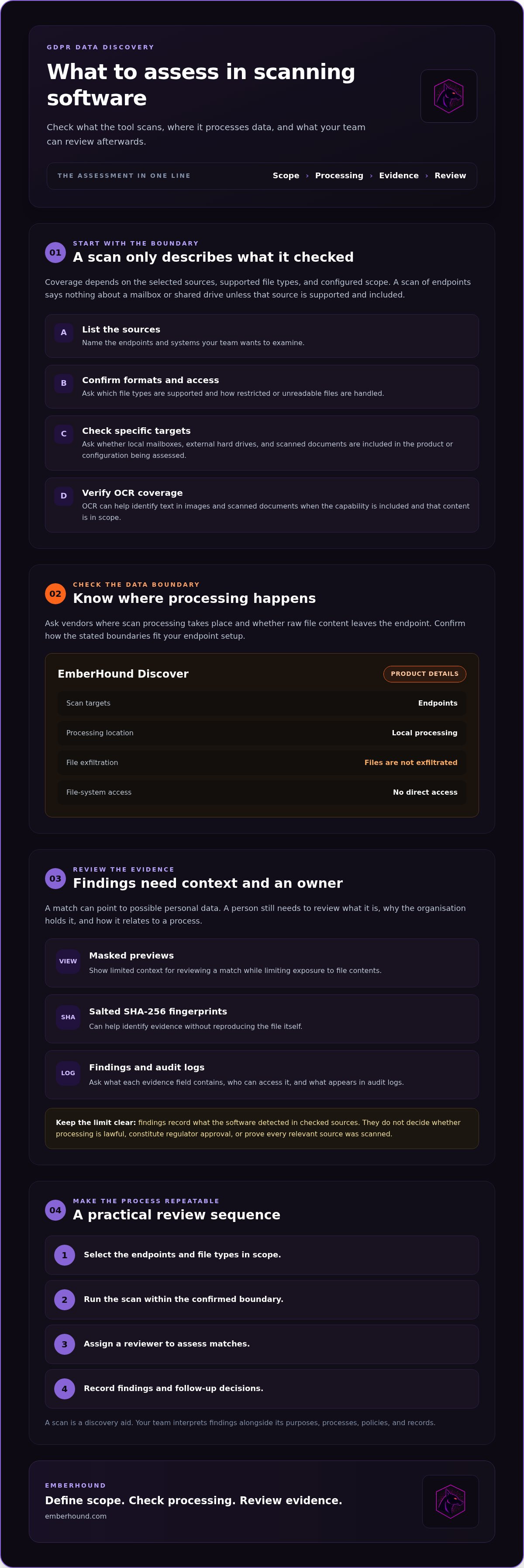
A useful scan follows a defined path: select the endpoints in scope, run the scan, review matches, record findings, and plan follow-up. Assign an owner to each step. For example, an IT team might scan a set of staff endpoints, then ask a data owner to confirm whether a flagged document relates to a current business process.
Coverage depends on what the product is configured to scan and which sources it supports. A scan result only describes the sources checked. Ask vendors to identify supported endpoints and file types, and clarify how the tool handles access restrictions or files it cannot read. Don’t assume the scanner searches every repository by default.
Which data sources and file types are in scope?
Request a list of scan targets and supported formats. Ask whether local mailboxes, external hard drives, and scanned documents are included in the product or configuration you are assessing. OCR can help identify text in images and scanned documents, but only if the capability is included and the relevant content is in scope. Confirm the current feature set before planning coverage around it.
EmberHound Discover scans endpoints for personal data and maps findings. Processing takes place locally, files are not exfiltrated, and the platform does not access the file system directly. Check how these boundaries fit your endpoint setup and scanning requirements.
What scan evidence can teams review?
Evidence should help a reviewer assess a match without exposing more file content than necessary. EmberHound Discover uses masked previews to show limited context, alongside salted SHA-256 fingerprints that can help identify evidence without reproducing the file itself. Ask vendors what each evidence field contains, who can access it, and what appears in audit logs.
Findings and logs document what the software detected and recorded. They do not establish that processing is lawful, constitute regulator approval, or prove that every relevant source was scanned. Your team still needs to interpret results and decide what action to take. The ICO guidance on UK GDPR is a reference for the wider governance context.
Before starting, define the endpoints and file types you want to include, assign someone to review matches, and agree how findings and follow-up decisions will be recorded. Keep the first scan scope within confirmed product capabilities. To review the available setup, see the scan configuration options.
How to compare GDPR compliance scanning software
Compare the data-handling path first. A long feature list won’t tell you whether the scanner covers your endpoints, keeps file contents local, or produces evidence your team can use. Ask each vendor the same questions, then assess the answers against your systems and review process.
Start with a direct question: do raw files leave the endpoint, and who can access them? Ask for a clear explanation of where scanning happens, what data moves between systems, and which roles can view findings. Check claims against product documentation and contractual terms.
| Area | What to ask | What to confirm |
|---|---|---|
| Scan scope | Which endpoints, data sources, and file types are supported? | That the sources you need are included in the current product configuration. |
| Processing location | Where does scanning take place? | Whether file contents are transferred off endpoints, and for what purpose. |
| Raw-file handling | What does the software read, transmit, or retain? | Who can access raw content and how access is controlled. |
| Evidence | Are masked previews, fingerprints, and audit records available? | What each record contains and how your team can review or export it. |
| Security and deployment | What encryption, access logging, and deployment requirements apply? | Specific controls, access records, and any endpoint or infrastructure needs. |
Questions to ask about data handling
Ask which encryption protects data in transit and at rest, and request the technical details. Check how access to findings and evidence is controlled and recorded. EmberHound Discover processes scans locally, does not exfiltrate files, and does not access the file system directly. Its stated protections include TLS 1.3 for data in transit and AES-256 for data at rest. You can review EmberHound security and data handling.
Questions to ask about evidence and workflow
Find out whether evidence includes masked previews, fingerprints, and audit records. Then check how reviewers can use findings in your organisation’s existing process. A fingerprint may help identify evidence across reviews; a masked preview may give context without displaying full file contents. Confirm what the product records and whether your team can export or otherwise use those records.
Compare workflow fit, not feature counts. A lean team may need a clear way to assign match reviews and record follow-up. A larger endpoint estate may need different deployment arrangements. The NIST Privacy Framework provides a voluntary reference for privacy risk management, but it does not replace your organisation’s own decisions.
Use the same questions for every gdpr compliance scanning software vendor. Record answers, note any limits, and verify claims about scope, processing, and evidence before making a selection.
How to introduce GDPR scanning software into a team workflow
A scan is useful only if people know what it covers and what happens next. Start with a limited scope based on a clear business need and the software’s confirmed capabilities. For example, begin with selected staff endpoints where teams expect personal data to be stored. Keep the first pass manageable, then use what you learn to plan any wider rollout.
Set scope and assign review ownership
List the endpoints and repositories included in the scan. Assign a role to review matches and decide how that person will refer questions to the relevant business or data owner. Record exclusions and unknown coverage too. A clear boundary helps stakeholders understand what the scan assessed and what remains unchecked.
Before starting, agree how often the team will review results. The right cadence depends on your operational needs and how you plan to use the findings. Keep it practical. A lean team needs an owner and a workable review schedule, not a process that creates more records than it can maintain.
Review results and keep a usable record
Review each match before changing a record, access permission, or retention practice. A scanner can identify a possible match, but a reviewer must check whether it is relevant and understand its context. Masked previews and salted SHA-256 fingerprints can help with review and identification while limiting exposure to raw file content.
Keep the technical scan record separate from legal conclusions and organisational decisions about processing. Record the scope, review outcome, owner, and follow-up decision in the place your team already uses for this work. A technical GDPR audit preparation checklist can help structure the records your team wants to prepare.
Use this short checklist before the first scan:
- Scope: Have you listed the endpoints and sources included, plus exclusions?
- Ownership: Is a role accountable for reviewing findings?
- Cadence: Have you agreed when reviews will take place?
- Evidence: Do you know where scan records and follow-up decisions will be stored?
Run the agreed scope, review findings, and record follow-up before expanding coverage. This keeps gdpr compliance scanning software tied to a repeatable team process. Review the available scan setup options when you’re ready to define your scope.
Assess EmberHound Discover for GDPR personal data scanning
EmberHound Discover is the live data discovery product for finding and mapping personal data on endpoints. Its scope is endpoint-based. Processing takes place locally, files are not exfiltrated, and the platform does not access the file system directly. Check that this scope matches the endpoints your team needs to assess before choosing it as your gdpr compliance scanning software.
Discover records findings for review. Masked previews provide limited context, while salted SHA-256 fingerprints help identify evidence without reproducing file contents. Audit logging records data access and mutations. Data in transit is protected with TLS 1.3, and data at rest with AES-256.
Where EmberHound Discover fits
Endpoint scanning can suit teams that need to locate and map personal data held across staff devices. Findings and audit records can support internal review, with people in your organisation responsible for interpreting results and deciding what to do next. The related DSAR Disclosure Pack is available for teams handling disclosure workflows.
Discover is a data discovery tool. It does not provide legal consulting or certify that an organisation complies with GDPR. A scan records what the product finds within its configured scope. Your team remains responsible for its policies, processing decisions, and wider compliance work.
Start with a scan and check product fit
Before starting, confirm which endpoints and data types are supported in the current product, how findings are reviewed, and which evidence your team can use. Check the processing details against your requirements, including the local processing boundary and handling of raw files. Then choose a scope that reflects your business need and the product’s confirmed capabilities.
EmberHound Protect is on the roadmap and is not live. Assess Discover on its current endpoint discovery capabilities, not on planned functionality. For background on the topic, see our GDPR data discovery guide.
Start with a defined scan scope, then review the findings with the people responsible for those endpoints. Keep technical results separate from legal conclusions and organisational decisions.
Choose a scanner your team can verify
The right gdpr compliance scanning software is one whose scope and data-handling path you can explain. Confirm which endpoints and sources it covers, then check how findings fit your review process. A scan provides technical information for your team to assess. People still need to interpret matches and decide what action to take.
EmberHound Discover scans endpoints and processes data locally. Files are not exfiltrated. Masked previews and salted SHA-256 fingerprints support review without reproducing file contents. TLS 1.3 protects data in transit, and AES-256 protects data at rest. These details give you a clear basis for assessing the product’s processing boundaries and evidence.
Start with a defined scope and an assigned reviewer. Keep a record of what was checked and what needs follow-up. Scanning supports data discovery, but it does not provide legal advice or guarantee GDPR compliance. Your team can use the findings as a practical starting point for its own review.
Choose a manageable scope and start with a free GDPR scan.
Frequently asked questions
What is GDPR compliance scanning software?
GDPR compliance scanning software searches configured data sources for patterns that may indicate personal data and records the matches for review. Its findings depend on the sources and file types included in the scan. A discovery tool can help a team locate information for internal review and data mapping. It does not provide legal advice, certify compliance, or replace the wider policies, records, and decisions in a complete GDPR programme.
Does GDPR scanning software make an organisation GDPR compliant?
No. Software can help locate personal data and give a team technical findings to review. People in the organisation must interpret those findings in context and decide what action is appropriate. A scan cannot determine an organisation’s legal obligations, decide whether its processing is lawful, or account for every part of its GDPR programme. Treat scan results as discovery evidence, not a compliance guarantee or legal conclusion.
Is it safe to scan personal data with GDPR compliance software?
There is no blanket answer. Assess how each product handles data before scanning: where processing takes place, whether file contents leave the endpoint, who can access findings, and what encryption applies in transit and at rest. Ask how previews, fingerprints, and logs are stored and controlled. EmberHound Discover processes scans locally and does not exfiltrate files, but buyers should still confirm that its documented boundaries suit their own requirements.
Can GDPR compliance scanning software scan email and attachments?
It depends on the product’s supported mailbox sources and configuration. Mailbox scanning is distinct from scanning files stored on endpoints, so confirm whether the software can access the mailboxes and attachments in your environment. EmberHound offers Local Mailbox Scanning. Check the current scope and supported content with the vendor before treating mailbox data as covered by an endpoint scan.
How does GDPR scanning software find personal data in images?
Optical character recognition, or OCR, extracts text from images and scanned documents so scanning software can check that text for possible personal data. Results depend on whether OCR is included, which image and document formats are supported, and whether those files are in the configured scan scope. Ask the vendor to confirm current format coverage and any limits before relying on OCR for discovery.
What evidence should GDPR scanning software provide?
Useful evidence can include recorded findings, masked previews that limit the content shown to reviewers, fingerprints that help identify evidence, and access records that show relevant activity. Check what each item contains and who can view it. EmberHound Discover uses masked previews, salted SHA-256 fingerprints, and audit logging. These records can support review, but they do not amount to a legal assessment or regulator approval.


