

A longer feature list won’t tell you whether a data discovery tool suits your team. The right Spirion data privacy alternative depends on where it can scan, how it handles files, and what evidence it gives you to review.
When comparing tools, look beyond feature names to how scanning works in practice. Spirion uses endpoint agents that report to a central console. EmberHound Discover scans endpoints locally, with no file exfiltration. Its masked previews and salted SHA-256 fingerprints let teams review findings without displaying raw file contents.
This guide compares options by scanning scope, data handling, evidence, and fit for your team. It also explains EmberHound’s current scope, including its GDPR data discovery capabilities, so you can assess whether they meet your requirements. A free scan gives you a way to test product fit before adding a tool to your process. No discovery tool guarantees GDPR compliance, so check its documented capabilities against your organisation’s needs.
Key takeaways
- List the data types, locations, and evidence your team needs before comparing vendors.
- Check each Spirion data privacy alternative’s current scanning and security claims against the vendor’s own documentation.
- Assess how discovery results could support your GDPR workflow. Don’t treat a tool as legal advice or a compliance guarantee.
- Plan a limited test using approved data sources and agreed success criteria before deciding whether to switch.
- Review sample findings and the effort involved to judge whether a tool’s evidence controls suit your process.
What buyers mean by a Spirion data privacy alternative
A Spirion data privacy alternative is a data discovery tool you assess against your organisation’s requirements for finding and handling sensitive information. The right fit depends on what data you need to locate, where it is held, how scanning works, and what evidence your team needs to review. Data discovery software identifies and records relevant data. It doesn’t provide legal advice or managed security services.
For GDPR work, teams may need to locate personal data and understand where it is held. The General Data Protection Regulation (GDPR) provides the wider regulatory context, but a discovery tool cannot determine your legal obligations. Start with your own workflow and requirements.
Which discovery problem are you trying to solve?
Define the task before comparing products. Locating personal data for GDPR work has a different scope from searching more broadly for sensitive information. List the data types you need to find, then identify where they may be stored, such as employee endpoints, mailboxes, or external hard drives.
Decide what your team needs after discovery. Are scan results enough, or do you also need support preparing a data subject access request (DSAR)? EmberHound offers a DSAR Disclosure Pack, as well as local mailbox and external hard drive scanning add-ons. Check whether each item is available in the product configuration you’re evaluating.
What should a comparison establish?
Use current vendor documentation to confirm which data types and sources each tool supports. A source name alone doesn’t prove coverage. Check supported file types and data patterns, then establish how the scan runs: does it process files locally, or send file contents elsewhere? Record what happens to scan results and who can access them.
Next, check whether the evidence suits your review process. A tool may provide findings, masked previews, fingerprints, or audit logs. These serve different purposes, so confirm what is available and what reviewers can see. EmberHound’s documented capabilities include local endpoint processing, no file exfiltration, masked previews, salted SHA-256 fingerprints, and audit logging.
- Record each required data type and source.
- Confirm deployment and data-handling details in current documentation.
- Separate live functions from optional add-ons and roadmap items.
This gives your team a clear basis for comparing vendors. Product fit depends on verified coverage, deployment requirements, and how results move through your internal workflow.
Compare Spirion alternatives by scanning scope, data handling, and evidence
Start with the factors that affect exposure and review work. Check where each tool can scan, how it handles file contents, what evidence your team can inspect, and whether its outputs fit your existing workflow. The NIST Privacy Framework is a voluntary resource for structuring privacy risk discussions. It can help your team frame requirements before assessing products.
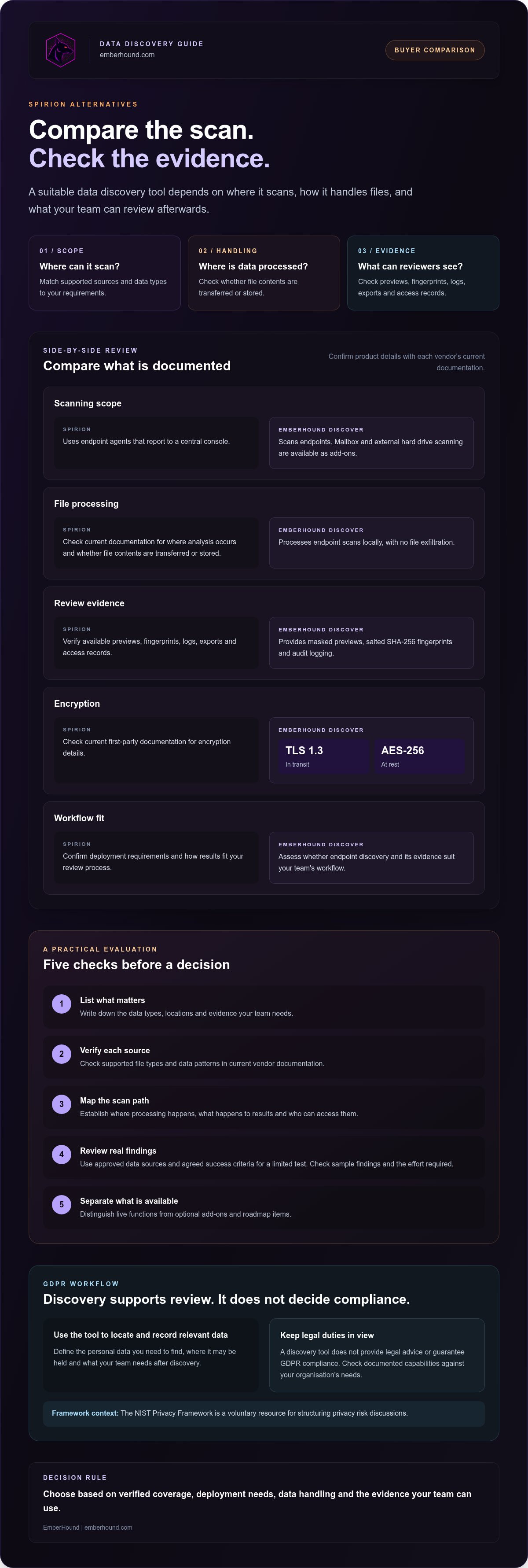
Comparison point | Spirion | EmberHound
Source coverage | Verify supported sources and data types against current Spirion documentation. | Endpoint scanning. Mailbox and external hard drive scanning are available as add-ons. Confirm they fit your required sources.
Processing | Verify where analysis occurs and whether file contents are transferred or stored. | Scanning is endpoint-only, with local processing and no file exfiltration.
Evidence | Verify available previews, fingerprints, logs, exports, and access records. | Masked previews, salted SHA-256 fingerprints, and audit logging are available.
Encryption | Check current first-party documentation for encryption details. | TLS 1.3 is used in transit, and AES-256 encryption is used at rest.
Workflow fit | Confirm deployment requirements and how results fit your review process. | Assess whether endpoint discovery and the available evidence suit your team’s workflow.
How does each tool handle files during a scan?
Ask vendors to describe the scan path in plain terms. Does processing happen on the endpoint, through a remote service, or another way? Find out whether raw file contents are transferred, retained, or shown to reviewers, and check the documentation for exceptions. A claim about local processing should make clear what data, if any, leaves the device.
EmberHound processes endpoint scans locally and doesn’t exfiltrate files. Assess this against your organisation’s data-handling requirements. For current security and data handling details, review EmberHound’s security and data handling details.
What evidence can a team review or retain?
Compare evidence by function. A preview helps a reviewer inspect a finding. A fingerprint can help identify a file without displaying its contents, while an audit log records activity. Check whether exports and access records are available before assuming they’re included. EmberHound provides masked previews, salted SHA-256 fingerprints, and audit logging.
Make the requirements practical: write down what reviewers need to see, what must remain hidden, and which records your internal process requires. Then compare those requirements with documented product functions. To assess EmberHound against a defined set of endpoints, you can start with the free scan.
How to assess whether an alternative fits your GDPR workflow
Choose a tool based on the work your team needs to do. A discovery platform can help locate data and organise findings, but it can’t interpret GDPR for your organisation or guarantee compliance. Use your established policies and the people responsible for privacy and security to set the evaluation criteria. EmberHound’s GDPR guidance page offers product-related context, not legal advice.
Map your data sources and discovery tasks
Before comparing a Spirion data privacy alternative, write down where relevant records may be held and what your team needs from a scan. Include endpoints, mailboxes, external drives, and the document types that matter to your organisation. Then distinguish routine discovery from work related to a data subject access request (DSAR). You may need one capability or both.
Test findings and evidence with your team
Use a limited test scope approved under your organisation’s procedures. Ask the people who would review the findings whether they can understand each result without seeing raw file contents. Record unclear findings and questions about source coverage, access, and retention. Resolve those points with the vendor before deciding.
- Document the task. State whether the requirement is GDPR-related data discovery, DSAR preparation, or another sensitive data search.
- Map the sources. List relevant endpoints, mailboxes, external drives, and document types. Confirm in current product documentation that each shortlisted tool supports them.
- Set review criteria. Decide what the responsible team needs to see in findings and evidence, and what should remain masked or restricted.
- Run an approved test. Use agreed sources and success criteria. Check sample findings, evidence, and the effort required for review.
- Record open questions. Note gaps in coverage, unclear data handling, or unanswered questions about access and retention. Seek written clarification before proceeding.
A DSAR Disclosure Pack may support the document-gathering stage of a request. It doesn’t replace your organisation’s review, decisions, or response process. Your team remains responsible for deciding how to use findings in its workflow.
Keep legal interpretation separate from tool evaluation. The FTC business guidance on data security is a US resource, so don’t treat it as guidance on UK GDPR. For a UK organisation, route questions about legal duties through the appropriate responsible person or adviser. Use the software test to assess product fit, not to reach a legal conclusion.
How to run a practical alternative evaluation before switching
A controlled test can show whether a Spirion data privacy alternative fits your team’s actual work. Agree the test scope internally before scanning. Choose approved sources, define what a useful result looks like, and decide who can review the findings. Keep the test small enough for your team to assess properly.
Set test criteria before scanning
Choose representative endpoints and data types that the vendor’s current documentation confirms are supported. Note the formats you expect the tool to scan, along with any sources outside the test. Confirm setup steps and permissions with IT before running the scan.
Set review criteria with compliance and IT stakeholders. Can reviewers identify why a file was flagged from a masked preview? Are fingerprints and audit logs available for the checks your process requires? Record the expected review effort and who needs access to findings. These criteria help the team assess results, but they don’t guarantee compliance.
Review results and product boundaries
Compare findings with known test material. Investigate missed matches and unexpected results, and ask the vendor about patterns or formats you can’t verify. Note how long reviewers spend understanding findings and whether the evidence supports the team’s agreed review process.
Before a wider rollout, record setup requirements, permissions, supported formats, and open questions about access or retention. Check product boundaries as carefully as scan results. EmberHound endpoint scanning is available alongside add-ons for local mailbox scanning, external hard drive scanning, and OCR. Confirm which options your test requires and whether they cover your sources. Keep Protect separate in your notes: it’s on the roadmap and isn’t a live capability.
- Before scanning: document the approved sources, data types, access rules, and success criteria.
- During review: assess sample findings, masked previews, fingerprints, audit logs, and reviewer effort.
- Before deciding: list coverage gaps, add-on needs, and technical questions that still need answers.
Use the results to decide whether to extend the test, ask for clarification, or stop. A free scan can help your team assess fit against an agreed scope.
When EmberHound may fit as a Spirion data privacy alternative
EmberHound may suit a team whose main requirement is endpoint discovery, local processing, and evidence that limits exposure of raw file contents. It’s one option to assess against your documented needs. Its available capabilities don’t imply feature parity with Spirion, so compare the sources, workflows, and controls your organisation actually requires.
Where EmberHound’s current capabilities may fit
EmberHound Discover scans endpoints for sensitive data. Processing happens locally, and files aren’t exfiltrated. Masked previews and salted SHA-256 fingerprints give reviewers ways to inspect findings without displaying raw file contents. Audit logging is also available.
EmberHound provides GDPR and PCI card data discovery. OCR, local mailbox scanning, and external hard drive scanning are also available as capabilities or add-ons. Confirm which option applies to your intended scan before comparing coverage. Local processing and masked evidence are product characteristics to assess against your requirements. They don’t guarantee compliance with GDPR or PCI DSS.
EmberHound provides scanning software, not legal advice or managed security services. A DSAR Disclosure Pack may support a disclosure workflow, but your organisation’s team remains responsible for review and decisions.
What to confirm before choosing EmberHound
Check that the product supports your required operating systems, file formats, and detection patterns. Confirm any integration needs with the product team. These details affect whether endpoint scanning will cover the sources in your test scope. Add unsupported sources to your gap list rather than assuming they’re included.
Review the current plan scope and usage-based pricing on the EmberHound pricing page. For more context on the GDPR discovery offering, see the GDPR data discovery software guide. Use both pages alongside your approved test results to judge fit for your team.
If local endpoint processing and masked evidence match your stated needs, a free scan can help you assess the product against an agreed scope. Start with the sources and success criteria your team has approved.
Choose by fit, then test your choice
A sound comparison starts with your team’s needs. Confirm which sources and data types a tool can scan, how it handles files, and whether its evidence suits your review process. Check vendor claims against current documentation, then use a controlled test to identify gaps before making a wider change.
If a Spirion data privacy alternative needs to prioritise endpoint scanning and local processing, EmberHound Discover is one option to assess. It scans endpoints locally, with no file exfiltration. Masked previews, salted SHA-256 fingerprints, and audit logging support review. TLS 1.3 protects data in transit, and AES-256 encryption is used at rest. These are product capabilities, not a guarantee of GDPR compliance.
Test against sources and success criteria your team has approved. The results can help you decide whether EmberHound fits your workflow or whether you need different coverage. A limited evaluation gives your team a practical basis for that decision.
Begin with an approved scope and use the scan results to assess fit.
Frequently asked questions
What is a Spirion data privacy alternative?
A Spirion data privacy alternative is a data discovery tool assessed against your organisation’s needs for finding and handling sensitive information. Compare the sources it scans, the data types it detects, how it processes files, and what evidence your team can review. Define these requirements first. A discovery tool identifies data; it doesn’t provide legal advice or managed security services, and using one doesn’t guarantee GDPR compliance.
Is EmberHound a replacement for Spirion?
EmberHound may fit some teams, but it isn’t a universal replacement for Spirion. EmberHound Discover scans endpoints, processes data locally, and doesn’t exfiltrate files. Its scope and workflows may differ from Spirion’s, so check both products against the sources, deployment needs, and evidence your organisation requires. Verify current Spirion capabilities in its product documentation, then run a limited test before deciding whether EmberHound fits your use case.
How should I compare data privacy discovery tools?
Compare tools against documented requirements, not feature counts. List the data types and sources you need covered, then verify supported file formats and scanning methods in current vendor documentation. Check whether files leave the endpoint, how findings are presented, and what logs or evidence are available. Include setup, permissions, and review effort in your evaluation. A controlled test with agreed success criteria can reveal gaps before a wider rollout.
Does EmberHound upload files during scanning?
No. EmberHound scans endpoints with local processing, and files aren’t exfiltrated during scanning. Review how a vendor handles scan results as well as file contents, including what information is stored and who can access it. EmberHound provides masked previews, salted SHA-256 fingerprints, and audit logging. These controls help teams review findings without displaying raw file contents, but they don’t establish compliance on their own.
Can a data discovery tool prepare a GDPR response on its own?
No. A discovery tool can help locate relevant data, and a DSAR Disclosure Pack may support the disclosure workflow. People in your organisation still need to review findings, make decisions, and manage the response. A product can’t decide how GDPR applies to a request or replace legal advice. Before selecting software, map the steps your team handles and confirm which parts the tool supports.
How is EmberHound priced compared with Spirion?
EmberHound uses usage-based pricing, has a free scan entry point, and has no mandatory contracts. Spirion uses subscription licensing, with fees that vary by endpoint or user count; pricing is provided by custom quote, with no public plans or free trial. Compare the quoted scope and billing basis with EmberHound’s current plan details. Check the vendors’ pricing information directly before budgeting or comparing total costs.
Is EmberHound Protect available now?
No. Protect is on EmberHound’s roadmap and isn’t currently live. The available track is Discover, which scans endpoints for sensitive data and provides evidence such as masked previews, salted SHA-256 fingerprints, and audit logging. Base your evaluation on functions available now. If a requirement depends on Protect, ask EmberHound to confirm its current status rather than treating a planned capability as available today.


