

A model list alone won’t show where AI affects your business. An AI asset register, also called an AI use-case register, records how your organisation uses AI and who is accountable for each use. A model inventory tracks the systems themselves, such as their versions and performance.
It’s easy to lose sight of AI use when tools arrive through staff choices or software updates. A clear register gives teams a shared view, supports risk decisions and helps connect AI processing involving personal data to the organisation’s record of processing activities.
This guide explains what to record, how a use-case register differs from a model inventory and how to find AI use across departments. It also covers how ownership and risk levels can guide reviews, so the register supports GDPR oversight rather than becoming another unused list.
Key Takeaways
- Record AI by business use case, then link each use to the systems that support it.
- Ask process owners about staff-introduced tools and AI features added through software updates.
- Give each use-case entry an accountable owner so teams know who maintains its details and reviews its risks.
- Connect AI use involving personal data to your record of processing activities.
- Use data discovery to find personal information that may affect how an AI use case is assessed.
Is an AI use-case register the same as a model inventory?
An AI use-case register records how a department applies AI to a business task. A model inventory records the AI systems themselves, including versions, lineage and performance.
Recording Use Cases Rather Than Tools
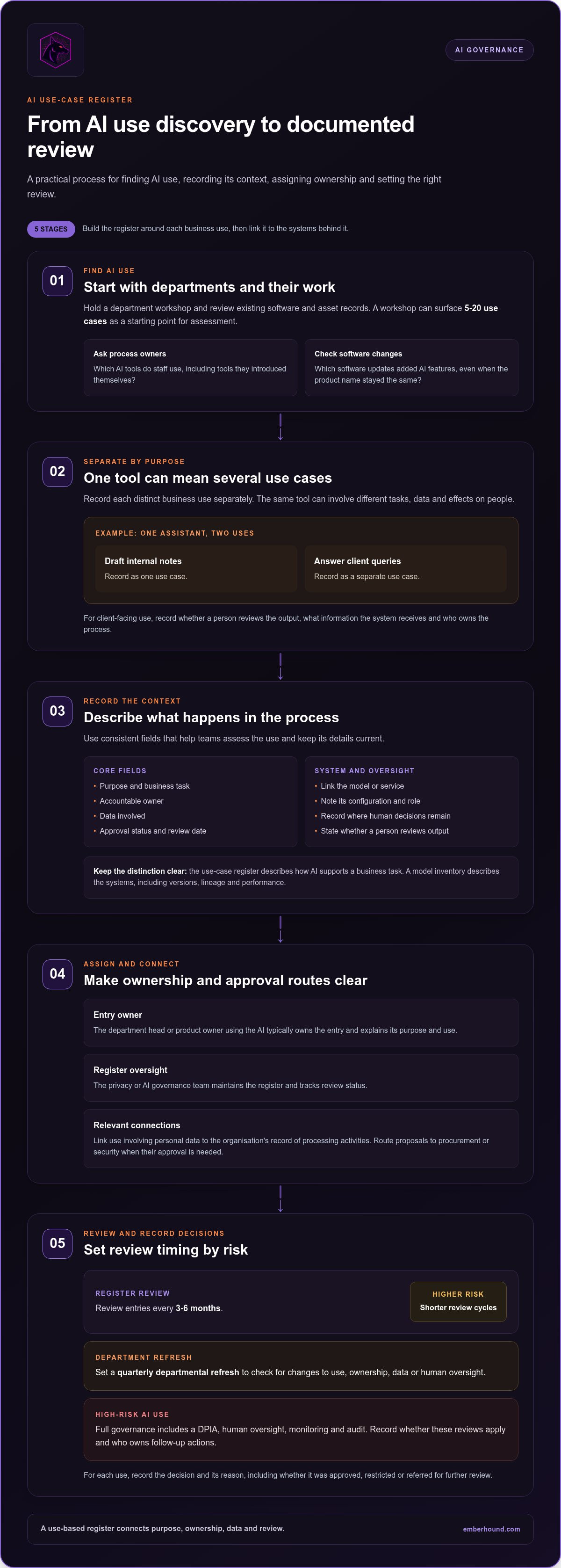
A use-case entry describes the purpose, users and process around an AI application. This matters because the same tool can support different tasks, using different data and affecting people in different ways. Record each distinct use separately. For example, if a team uses one assistant to draft internal notes and answer client queries, those are two use cases to assess.
Link each entry to the model or service involved, then record its configuration and role in the process. A custom model, an AI agent and a standard tool may all support the same business use. Organising records by use case helps teams clarify what the AI does, who relies on its output and where human decisions remain.
Registering Internal AI Tools
Internal AI use includes tools employees use for work, including organisation-wide assistants such as Copilot. Record the approved purpose and acceptable-use rules at organisation or department level. This sets clear boundaries without requiring a separate entry for every user or prompt.
Include the responsible department, the data involved and the tasks the tool supports. If an internal assistant handles staff records, record that use separately from its use to summarise public documents. The register then describes the processing context, not just the product name.
Staff may introduce AI tools through browser accounts, personal subscriptions or new features in existing software. Process owners can help uncover them. Discuss the department’s asset list, then ask which tools staff use and which software updates introduced AI features. A familiar spreadsheet or collaboration platform may gain a drafting feature without changing its name.
Record models, agents, MCP services, skills and tools at a level that makes their function clear. An external model accessed through an API key or OAuth can be listed as a model service. For an agent, describe its task and the tools it can call. For a skill or MCP service, record its role in the workflow and the systems or data it can access.
AI that interacts with clients needs a use-case record tied to that interaction. For example, a customer-support assistant may draft replies for staff, while another configuration sends answers directly to clients. These are different uses. Record whether a person reviews the output, what information the system receives and who owns the process.
For UK GDPR work, connect relevant entries to records of processing activities when personal data is involved. The GDPR guide can help frame that data-discovery context. Keep the register focused on each use, its supporting systems and the department accountable for it.
Governance, accountability and risk decisions
An AI use-case register gives governance teams a shared basis for assigning ownership and deciding what review each use needs. Its value depends on keeping records current and approval routes clear.
Register Purpose and Governance
The register connects each AI application to its purpose, accountable owner and relevant governance decisions. This lets teams assess it in context, because the same AI tool can create different risks when used for different tasks.
Link new use cases to existing procurement, security review and change-management workflows. For example, a proposal to use software for staff decisions can trigger a review before deployment. Where personal data is processed, link the entry to the organisation’s record of processing activities. Keep the register useful for decisions rather than treating it as a separate list.
Centralised Visibility and Accountability
A central register gives departments and governance teams a shared view of approved and proposed AI use. The department head or product owner using the AI typically owns the entry, while the privacy or AI governance team maintains the register.
This split makes accountability practical. A department can explain the business purpose and how staff use the system. The governance team can track review status and raise questions about data or oversight. A not-for-profit could use the same approach for software that helps triage grant applications. Record who makes the final decision and where human review happens.
Self-service workflows can collect the proposed use, purpose, data and owner before review. Route the entry to procurement or security when their approval is needed. This gives staff a clear process and reduces reliance on manually updating a central spreadsheet after adoption.
Templates and Register Completeness
UK organisations can use an internal template or governance software. No single format suits every use. Start with fields that support decisions: purpose, owner, data involved, approval status and review date. Apply the same structure across departments.
An incomplete or outdated register can leave a new use outside governance reviews. Teams may then miss changes to data use, ownership or human oversight. Review entries every three to six months, with shorter cycles for higher-risk uses, and set a quarterly departmental refresh.
High-risk AI use calls for full governance, including a DPIA, human oversight, monitoring and audit. The register should show whether those reviews apply and who owns follow-up actions. For each entry, record the decision and its reason. This trail helps teams explain why a use was approved, restricted or referred for further review.
AI asset discovery and integrations
Discovery needs to connect business tasks with the AI systems behind them. A department workshop can surface 5-20 use cases, giving teams a practical starting point for assessment.
Approaches to AI Use-Case Discovery
An AI use-case discovery process combines discussions with departments and reviews of existing software and asset records. This matters because an asset list alone may not show how staff apply AI to their work. Ask process owners to describe tasks, tools and outputs, then compare their answers with approved software and procurement records.
Use a shared template to capture each use case's purpose, department, owner and status. Keep the plain-language description to 1-2 sentences. For example, record whether a writing assistant drafts internal reports or prepares text for customers. Those purposes can involve different data and decisions, even when they use the same system.
Give each entry a unique identifier in the format AIS-###, such as AIS-001. Record the date the AI solution was first added in YYYY-MM-DD format. These fields help teams distinguish similar entries and follow changes over time. A spreadsheet can work at first, provided owners update it when a use changes.
Discovery should cover technical routes into AI services. Record external models reached through API keys or OAuth as model services, then compare them with software configurations and integration details. This helps link a use case to the service supporting it, including when an application calls a model behind the scenes.
Asset Discovery and Reuse
Asset discovery maps the links between business uses and their supporting systems. One AI system may support several use cases, while one use case may rely on several systems. Recording both links helps teams assess a proposed use against existing configurations before creating a new service.
For example, a department may already use an approved language model to summarise documents. Another team proposing document summaries can review the existing asset, its status and the conditions attached to its use. Reuse can reduce duplicate work, but the new use still needs its own assessment of purpose, data and decision-making.
Keep access rights and technical dependencies visible in the record. Note whether a use depends on an API, a software feature or a connected service. If a model changes, teams can identify the use cases that rely on it and decide whether their existing assessments still apply.
A useful register links each use to its business domain, then links each use to its supporting systems. Teams can search by department, service or purpose. This structure makes reuse easier to assess without assuming every AI asset suits every task.
Identifying AI system roles and risk levels
Record each AI use’s role, risk level and accountable owner. These details help teams decide what review it needs.
UK GDPR can require records of processing activities where an organisation processes personal data, and an AI use can be linked to that record. It does not prescribe a separate AI processing register as such. UK organisations should document AI use through applicable existing obligations and governance processes.
The EU AI Act is Regulation (EU) 2024/1689, according to the European Union. It applies risk-tiered obligations to AI providers and deployers. A UK organisation should assess whether its activities fall within the Act's scope, rather than assuming every AI use has identical duties.
Identify the organisation’s role for each use. A vendor supplying an AI system may act as its provider, while an organisation using it may be its deployer. Record the vendor, the organisation’s role and the system’s lifecycle stage. For example, a department using an external recruitment tool needs to assess its own use and responsibilities, not just the supplier’s product description.
Use a risk method that staff can apply consistently. A numerical scale of 1-5 can help compare entries, while low, medium and high labels make the result easier to discuss. Some registers use 3- or 4-tier schemes. Define what each level means, then record the reasons for the rating and the person who approved it.
Risk depends on the use and its effects on people. Employment decisions, credit decisions, healthcare, education access and law enforcement are examples of high-risk AI uses with significant consequences for individuals. A system that drafts an internal summary may carry different risks from one that influences a decision about a job applicant. Record the people affected, the decision point and the human oversight for each use.
Vendor risk management needs specific evidence in the register. Record the supplier, service, purpose, data categories, permissions and relevant review status. Note whether the organisation uses a vendor’s hosted model or connects through an API. If the vendor changes the service or its configuration, update the entry and reassess the use across its lifecycle.
Keep risk decisions traceable. For each entry, capture the assessment outcome, its rationale and any required review. Link higher-risk uses to governance steps such as a DPIA, human oversight, monitoring and audit. This gives privacy, security and business teams a shared basis for deciding whether an AI use can proceed, needs controls or should be restricted.
AI asset registers and organisational visibility
A register gives teams a view of where AI is used across the organisation. A typical mid-sized organisation has 50-500 active AI use cases, so a single team’s list may not show the full picture.
Visibility depends on recording each use and linking it to its supporting systems. Include the business purpose, department, owner, asset type and model version. These fields show whether several departments rely on one asset or one process depends on multiple systems. They also help identify who needs to act when a model or service changes.
A model inventory supports system monitoring. Systems missing from that inventory fall outside the monitoring that relies on it. An AI register adds business context: which use cases rely on each system, who uses them and what work they support. Together, these views help teams distinguish a software asset from its business applications.
Unregistered models and tools may still be in use, but they lack central governance, observability and cost tracking through the register. Teams may have no clear view of a tool’s owner, approved purpose or use across departments. Staff may also duplicate an existing resource because they cannot see that another team already uses it.
Make the register searchable by department, asset type, version and use case. For example, a privacy team could find every use involving a particular model, then identify the departments that depend on it. A change to that model can be assessed against linked use cases instead of treated as an isolated technical update.
A queryable access log can record who accessed which models, when they accessed them and what they used them for. This gives teams a way to compare actual use with the recorded purpose. It can also show whether access permissions match the work assigned to a department or user.
Cost controls add another point of visibility. When an asset or team reaches its spend cap, further requests are denied until the cap is reset or adjusted. Recording the cap and responsible owner helps explain why requests stop and who can review the limit. It also makes usage easier to interpret alongside the relevant asset and business use.
For each existing asset, link its version and owner to the use cases it supports. This turns the register into a view of organisational reliance, not just a software catalogue. Teams can see where a change, access review or cost decision may affect active work.
EmberHound: GDPR Data Discovery
EmberHound is a practical next step when an AI use case may involve personal data, but teams need to locate that data first. GDPR Data Discovery helps identify sensitive information across business data; PII Data Discovery focuses on personally identifiable information. The findings can give privacy and governance teams clearer context when assessing how an AI use processes personal data.
This is useful when an organisation is building its AI register and needs to understand where relevant information sits. Data discovery supports the work alongside register governance. The register still records each AI use, its owner and its risk decisions; data discovery helps teams examine the information connected to those uses.
Explore data discovery for your organisation with EmberHound. Visit emberhound.com or contact the team.
Make the next register update count
Use your AI asset register and AI use-case register to guide future technology choices. Before adopting a new system, consider which business need it serves and what evidence would show whether it is working as intended. This gives decision-makers a clearer basis for setting priorities.
When a decision involves locating sensitive data, EmberHound’s data discovery tools can help.
Make your next technology decision with a clear purpose in view.
Frequently Asked Questions
What is an AI Registry and why do I need one?
An AI registry is a controlled reference for understanding how AI is used across an organisation. It helps teams respond when a supplier changes its terms or a tool produces an unexpected result. Staff can identify the relevant use, trace its dependencies and find the internal route for review. This makes the registry useful during procurement renewals and incident follow-up, not only during planned governance reviews.
How granular should entries be?
Create separate entries when a change affects the purpose or consequences of an AI use. For example, software that extracts totals from supplier invoices serves a different function from software that ranks suppliers by predicted reliability. Even if both use the same document-processing service, their outputs inform different decisions. Keeping those uses distinct helps teams assess a proposed change without treating every configuration as a separate system.
What is an AI asset register or AI use case register?
These terms describe records used to organise information about AI technology and its use in an organisation. Teams may use either label, so define the scope in the register’s opening notes. For example, state whether it covers staff use of AI features in existing software, purchased AI services, internally built systems or all three. A shared scope prevents departments creating competing records with different meanings.
What information should an AI asset register include?
Alongside basic identification, consider recording the system’s deployment environment, data-retention settings and fallback process. For example, note what staff should do if an automated document check fails or returns an unusable result. Record where testing evidence is stored, too, so a reviewer can find it without searching email threads. These details help teams understand how the system works in practice and what happens when it cannot be used.
What is the difference between an AI asset register and an AI use case register?
An AI asset register centres on the technology; an AI use-case register centres on the business activity. This distinction matters when replacing or retiring systems. If a supplier service is withdrawn, an asset-focused record helps identify the affected technology, while use-focused records show which business activities need an alternative. Keeping the terms and scope explicit helps procurement and operations plan changes without overlooking dependent work.
Who should own and update an organisation's AI use case register?
The business lead responsible for an AI use should be accountable for its operational details. Technical staff can notify that owner when system configuration or access changes, while the governance team maintains the register’s shared structure. Assign a deputy for handovers or absence. For example, when a product lead leaves, the deputy can preserve the decision history and identify entries that need a new accountable owner.


