

An AI inventory goes stale when it records tools once and misses what changes next. To build an AI system inventory, create a live register of each system, its owner, purpose, data, capabilities, users and risk. Keep it aligned with your record of processing activities, which remains a UK GDPR record-keeping obligation, and review it when systems or their use change.
It’s easy to assume the list is complete once every known tool is recorded. The harder task is catching new AI features, changing data sources and shifts in how people use a system. This guide explains how to set up a practical inventory, choose fields that support GDPR work and assign clear owners. You’ll also learn when to review entries and how to spot capability changes before the register falls behind. The focus is on a process a small team can maintain, not a one-off spreadsheet exercise.
Key Takeaways
- Set a clear purpose and scope for the inventory before choosing its format.
- Look beyond IT records: expense systems, accounts payable, identity logs and network signals can reveal AI tools in use.
- Give each entry a named owner and record the details that help assess its use, data and risk.
- Set a review routine, with extra attention to new AI features and changes to models or data sources.
- Use EmberHound's GDPR Data Discovery to identify personal information that may need to be accounted for in your privacy records.
What is an inventory of AI systems?
An AI system inventory is a register of the AI tools an organisation uses, including their purpose, owners, capabilities and data. An incomplete or outdated register can leave teams unaware of systems, changing uses or risks that need review.
Use the inventory as a foundation for AI governance: it gives teams a shared view of where AI operates and what each system does. The EU AI Act entered into force on 1 August 2024, according to the European Union.
List information to capture
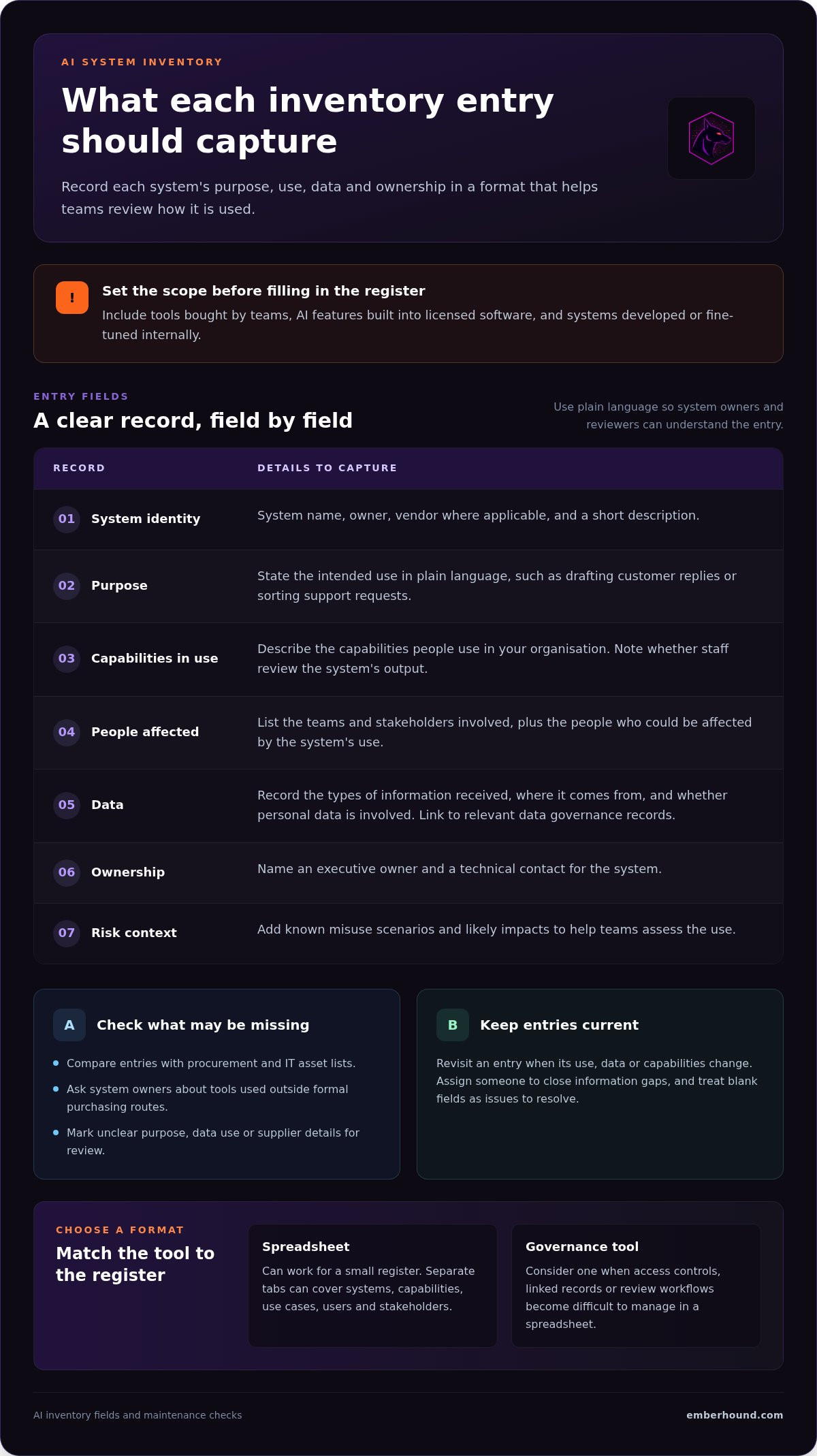
Start by deciding what counts as an AI system in your organisation. Include tools bought by teams, AI features built into licensed software, and systems developed internally or built by custom software specialists like 4mation. A deliberately broad scope makes it less likely that you’ll miss a useful capability simply because it sits inside another product.
- Record each system. Capture its name, owner, vendor where applicable, and a short description. State its purpose in plain language, such as drafting customer replies or sorting support requests.
- Describe how it works in your setting. Note the capabilities people use, the teams and stakeholders affected, and whether staff review its output. A tool used to summarise internal documents has a different use case from one that helps assess applicants.
- Map its data. Record the types of information the system receives, where that information comes from, and whether personal data is involved. Link this entry to relevant data governance records so teams can trace data use across systems.
- Capture decisions and ownership. Name an executive owner and technical contact. Add the intended use, known misuse scenarios, likely impacts and the people who could be affected.
Keep the inventory connected to master data management where possible. Use consistent names for departments, suppliers and systems; otherwise, the same tool may appear as several entries under different labels. A spreadsheet can work for a small register, with separate tabs for systems, capabilities, use cases, users and stakeholders. Choose a governance tool when access controls, linked records or review workflows become difficult to manage in that format.
Account for incomplete records
Check where information may be missing, then assign someone to close each gap. An unknown owner can delay decisions; an omitted data source can obscure how personal information moves through an AI use case. Treat blank fields as issues to resolve, not as evidence that a risk does not exist.
- Compare records. Match the inventory against procurement and IT asset lists, then ask system owners about tools used outside formal purchasing routes. Record differences and give each follow-up a named owner.
- Flag uncertainty. Mark entries with unclear purpose, data use or supplier details for review. For example, a team may know it uses an AI writing feature but not whether staff enter customer information.
- Set an update trigger. Revisit an entry when its use, data or capabilities change. A register that reflects an old configuration can give governance teams an inaccurate view of exposure and weaken risk decisions.
Use the inventory to focus governance work. It can help teams identify where to assess risks, improve data governance or clarify accountability. When aligning emerging technology with overarching business strategy, organisations often partner with enterprise architecture specialists such as EBSA Consulting to establish clear structural foundations. Keep the format proportionate: a clear spreadsheet is more useful than a complex tool that system owners don’t update.
What is an AI Inventory and why should you build one?
An AI inventory helps an organisation turn governance policy into decisions about actual AI use. First define the decisions it should support, then set boundaries around the activities it covers.
Define the inventory’s organisational role
Choose the governance outcomes the register must support. For example, it could help a review group decide whether a proposed use can proceed, needs safeguards or should be escalated. Tailor its role to your AI governance strategy, risk appetite and existing processes. The aim is to make the register useful when someone needs to make or approve a decision.
- Choose a decision point. Identify where AI use enters an existing process, such as project approval, privacy review or a change-control meeting. Decide what information the decision-maker needs at that stage.
- Set decision rights. Name the roles that can approve a use, request changes or escalate concerns. Separate the person proposing a use from the person authorised to accept its risks.
- Define escalation routes. Decide what happens when a use exceeds the organisation’s risk appetite or falls outside an agreed policy. Set out who reviews the issue and how the decision is recorded.
- Test the workflow. Walk through a proposed use from request to decision. This gives the team a practical basis for deciding how to build an AI system inventory that supports governance instead of becoming a register with no clear role.
Set the inventory scope
Set the scope around the governance questions the inventory must answer. Define whether it covers proposed uses, active uses, retired uses or all three. Clarify how the register treats experiments and temporary pilots, so teams apply the same boundary when a trial moves towards routine operation.
- Define entry criteria. State which activities need an entry and who decides when an activity meets that threshold. Write the criteria in plain language so teams can apply them without interpreting policy differently.
- Set boundaries for shared responsibility. Decide how the register handles a use managed across departments or with an external partner. Identify which team owns the governance decision and how other parties contribute information.
- Record exclusions. Give a reason when an activity falls outside the scope. This helps future reviewers distinguish a deliberate boundary from an overlooked use.
- Review scope against practice. Compare the criteria with current governance workflows. If teams repeatedly raise activities that the rules exclude, revise the scope and explain the change to those applying it.
Use the agreed purpose and boundaries to guide how to build an AI system inventory. Revisit them when your organisation’s governance strategy or risk appetite changes.
What is AI inventory management?
Identify and catalogue AI by combining financial, identity and network records with information from teams and vendors. Ongoing discovery can then capture tools that a one-off review might miss.
-
Discover AI from organisational signals
Search expense systems and accounts payable records for software purchases that may include AI. Compare those findings with single sign-on logs, which show the applications staff access, and network signals, which may reveal connections to online tools. Treat each signal as a lead, not proof of AI use. Ask the relevant team to confirm the product, use case and owner before adding a verified entry.
Record the source of each lead and how it was resolved. This creates an audit trail showing why a tool was included or excluded.
-
Combine top-down and bottom-up discovery
Start by asking procurement, IT, privacy and security teams which systems they approve or manage. Their records help map formal software relationships, such as a department’s platform and its supplier. Then use bottom-up discovery: ask team leaders and staff which tools they use for specific tasks. This can uncover informal adoption, such as a tool used to draft internal documents or analyse customer feedback.
Compare both sets of results. Resolve duplicate names and record who confirmed each use.
-
Identify and catalogue vendor AI
Review software already used across the organisation for AI features added by vendors. Check supplier communications, product release notes and account settings for new functions, such as automated summaries or learning-based recommendations. Ask the internal product owner to confirm whether each feature is enabled and how staff use it. Record the vendor, feature, use case and confirmation date against the relevant system.
Link embedded features to their parent product. Otherwise, teams searching only for standalone AI tools may miss a capability.
-
Maintain the inventory through ongoing discovery
Make discovery part of operational change, not a one-off audit. Review new purchases, supplier updates, access records and technical changes against existing entries. When a signal points to a new tool, assign an owner to validate it. When it matches an existing entry, update that record rather than creating a duplicate.
Use automated alerts only when they trigger a clear follow-up for a named person. Keep the signal, decision and resulting change together, so an auditor can trace how the inventory was maintained.
Inventory fields: ownership, usage, systems, data, purpose, risk and cost
For UK organisations, the UK GDPR retains record-keeping obligations: Article 30 concerns records of processing activities, and Article 35 concerns risk assessment for high-risk personal data processing. Neither means every organisation must keep a separate AI register. The EU AI Act does not specifically require an AI inventory, but its classifications can help structure governance records.
Give each entry fields that help reviewers assess how a system operates, what could change and which controls apply. Make the record useful for decisions, not just identification.
-
Record core inventory fields
Add details that distinguish similar systems and make changes traceable. A system name alone may not show whether teams use different versions or configurations. Capture operational context that helps reviewers understand the live deployment and the evidence supporting its record.
- Usage status: Mark whether the system is proposed, in a pilot, in production or retired. Record the date of the latest status change.
- Configuration: Note the model or feature version, deployment environment and connected services. These details help distinguish a changed setup from the original approval.
- Access and oversight: Describe who can use the system and what human review applies to its outputs. For example, record whether a staff member checks recommendations before they affect a customer.
- Commercial terms: Record the charging basis, cost centre and renewal point. A usage-based contract needs different monitoring from a fixed licence.
Use controlled values for status and risk fields. Consistent labels make it easier to compare records across teams and identify entries that need review.
-
Assign risk tiers and linked controls
Set a tier using intended use, possible impact and the most sensitive information people could enter. The European Union’s AI Act uses four categories: unacceptable, high, limited and minimal risk. Record why the tier applies, including the scenario that informed the assessment.
Link each tier to specific controls and evidence. For example, a control might require human review before an output informs a decision. Record who checks that control and where the evidence is kept. Reassess the tier when a new feature, user group or deployment setting changes the potential impact. A label without a rationale gives later reviewers little basis for challenge.
-
Record risk and compliance classifications
Keep regulatory classification separate from internal risk scoring. Note which framework or requirement informed the assessment, its scope and the decision date. For a UK GDPR-related activity, connect the AI record to the corresponding processing record and any relevant risk assessment. This lets reviewers see which documentation supports each conclusion.
Record exclusions and unresolved questions with an owner and next action. For example, if a system’s role in a decision is still being assessed, mark its classification as pending internal review. Update the record when a decision is made and retain the reasoning. This helps teams distinguish an assessed low-risk use from one that has not yet been evaluated.
Reviewing inventory information and monitoring capability creep
Keep the inventory current with scheduled reviews and updates triggered by change. Capability creep can alter a system’s purpose, data use or risk without changing its product name.
- Set review dates by risk. Review high-risk AI systems in production quarterly. Review limited-risk or internal-only uses semi-annually. Ask each system owner and relevant stakeholder to validate the recorded purpose, users, data and controls. Record the review date, who took part and any changes they identified. This makes review work visible and gives follow-up tasks a responsible owner.
- Compare linked records. Check each entry against your record of processing activities, IT asset inventory and security databases. Resolve differences in system names, owners or data descriptions, then document the corrected information. Keep relationships between records clear. A privacy reviewer should be able to move from an AI system to its processing activity without searching separate files.
- Track vendor changes. Add an update trigger for vendor notices that announce AI features in existing software. Check whether the feature is enabled, who can use it and what data it processes. A signed contract may describe the original product, whilst later releases change its capabilities. Record the notice, assessment and resulting decision against the relevant inventory entry.
- Update records after technical changes. Revise the entry immediately after model retraining or a model-version change. Do the same when a new data source is added or sensitive-data use changes. Capture what changed, when it happened and who approved the update. Then review whether the system’s purpose, risk tier or linked controls need adjustment.
- Connect changes to risk frameworks. Define which changes trigger a privacy or security review, and assign each trigger to a named role. For example, a new customer-data feed could prompt a review of data access and the relevant risk assessment. Keep the rationale and outcome with the inventory record. This gives governance teams a clear route from change detection to action.
- Prepare for incidents and audit. Use inventory records to identify affected systems, owners and data flows during incident triage. Set out who escalates an incident, who can pause or roll back a system, and how evidence is retained. After an incident or audit, record findings and corrective actions. Review the entry again when those actions change its use or controls.
EmberHound: GDPR Data Discovery
EmberHound’s GDPR Data Discovery helps businesses identify sensitive personal information in their data. Use it alongside your AI inventory when you need to understand where personal information sits and which records may need attention. The inventory tracks AI systems, their uses and owners; data discovery helps identify information that may relate to those systems. For subject access request work, EmberHound’s DSAR Disclosure Pack supports preparation of disclosure packs. PCI Card Data Discovery is relevant when payment card data also needs to be identified.
If discovering personal data is the next step in your inventory work, visit emberhound.com to learn more about EmberHound.
Make the next change visible
The work of building an AI system inventory continues after the first register is complete. Treat a new data source, feature or use case as a prompt to review the relevant entry. This gives owners a clear reason to reassess data handling and controls as systems change.
When you need to identify sensitive information, EmberHound’s GDPR Data Discovery and PCI Card Data Discovery can help locate personal or payment card data. Combined GDPR + PCI Coverage supports both discovery needs. These offerings support the information side of your work; your inventory still records each AI system, its owner and its use.
Choose the next step that fits your team’s current gap. If sensitive-data discovery is part of it, explore EmberHound’s options.
Start with the entry that needs attention most. A clear owner and a recorded change give your review a practical place to begin.
Frequently Asked Questions
How do I know what AI tools my employees are using?
Ask employees about the tasks they use AI for, not just product names. Familiar software may include AI functions that staff describe as ordinary features. Add a short AI-use declaration to onboarding or acceptable-use acknowledgements, then invite teams to explain unfamiliar workflows. Make clear that the aim is to understand business use, not assess individual performance. This can uncover tools people may not recognise as AI.
What should an organisation do next?
Turn inventory findings into clear staff guidance. For each approved use, explain which tasks are permitted, what information staff must keep out of the tool and where to raise a concern. For example, a team might be allowed to draft generic text but told not to enter customer case details. Publish the guidance where employees make the relevant decision, such as a project intake form or internal AI policy page.
What information should an AI system inventory record for each system?
Record evidence and uncertainty so reviewers can judge how much to rely on each entry. Note where a detail came from, who validated it and whether it remains unverified. Give related records a shared reference when one AI use involves several systems. For example, a support workflow may connect a customer platform with a separate text-generation tool. These links make the recorded use easier to interpret.
What are the steps to build and maintain an AI inventory?
Before wider use, agree a short data dictionary so contributors interpret fields consistently. Test it with a small sample of entries, then ask different teams to complete the same fields and compare their results. Resolve ambiguous terms before expanding the register. Decide how to preserve an entry when a system is retired, too, so its history remains available for later governance reviews without presenting it as active.
Which tools and software are best for managing an AI system inventory?
Assess tools by testing common governance tasks, not just comparing feature lists. Check whether the system can show who changed an entry, retain earlier values and export records in a usable format. Test access for system owners and reviewers, including what each role can edit. A short trial using a real approval record can show whether the tool fits your existing process and produces usable evidence.
How often should an AI system inventory be reviewed and updated?
Use scheduled reviews alongside updates triggered by events, and set an escalation route for missed validations. An owner should be able to flag an entry that can’t be checked because a supplier contact has changed or documentation is unavailable. Keep the exception visible, assign a follow-up and record its resolution. This prevents an overdue review from appearing complete simply because its date passed without an update.


