

The EU AI Act doesn't expressly require businesses to create an AI inventory. But Articles 9, 11, 12, 14, 29, and 72 make an internal register a practical necessity for organisations that need to identify and manage AI systems. The AI inventory requirements under the EU AI Act start with knowing what systems you use and what each one does.
An AI inventory can feel like another register to maintain, especially when AI features are built into software your teams already use. UK organisations may also fall within the Act’s scope if an AI system’s output is used in the European Union. A clear inventory gives you a place to assess those systems and record what needs attention.
This checklist explains how to identify AI systems, assess their risk, and record ownership, purpose, data, and compliance evidence. It covers the fields that make each entry useful, including who is responsible and what review or assessment is needed. The aim is a practical record your team can update as its use of AI changes.
Key Takeaways
- The EU AI Act doesn't expressly require an AI inventory, but a register helps you identify systems and assess which rules may apply.
- Classify each system by its use and risk, then record whether your organisation acts as provider, deployer, importer or distributor.
- Give every entry an operational owner and a compliance owner, with clear notes on purpose and human oversight.
- Record whether personal or special category data is involved, where it comes from and the lawful basis for processing.
- Track the assessments and evidence relevant to each system, then update the register when systems or their uses change.
Does the EU AI Act require an inventory?
The EU AI Act does not expressly require businesses to create an AI inventory. To build one, identify AI systems, assign organisational roles, and record each system’s use and risk. These AI inventory requirements under the EU AI Act give teams a practical way to organise those checks.
-
Define which systems belong in the inventory
Start by setting a scope that covers AI used, developed or supplied across your organisation. Article 3 defines an AI system as a machine-based system that infers outputs, such as predictions, recommendations or decisions, from inputs. Include tools that generate content or recommendations, including features embedded in existing software.
Search procurement records for AI products, supplier contracts, and software renewals. Compare the results with single sign-on (SSO) application records, which show which tools staff access through work accounts. Ask department leads about tools bought directly or used outside approved procurement. For example, check HR, customer service, and IT for AI features used by individual teams.
Keep a record of proposed systems as well as active ones. The EU AI Act may apply to UK organisations when an AI system’s output is used in the European Union. Classify each use by its purpose. Employment, education, essential services, law enforcement, migration, justice, critical infrastructure, and biometric identification need closer review for potential high-risk use.
-
Identify each organisation's AI system roles
For each inventory entry, record whether your organisation acts as a provider, deployer, importer, or distributor. Its role can differ between systems, so assess your organisation’s activity for each one. Record the supplier and the internal team using the system. Don’t assume that procurement alone establishes your organisation’s role.
Review contracts, product documentation, and deployment records to understand how the system reaches users and how your organisation uses it. A business developing a system for use under its own name may need a different role assessment from a team using a supplier’s tool. Record the basis for your classification and any unanswered questions that need follow-up.
These role labels help direct later AI Act compliance checks. They also prevent a single organisation-wide label from obscuring different responsibilities across departments. Revisit the role when a system is adapted, supplied onwards, or introduced for a new purpose. Such changes can affect how the system should be assessed.
-
Create the inventory as a compliance foundation
Create a central register with an entry for each system and use case. Record its name, supplier, department, purpose, organisational role, status, and initial risk assessment. Include a field for the evidence supporting each classification. A spreadsheet can work initially; assign an owner to keep the entries up to date.
The EU AI Act does not explicitly use the term "AI inventory". Articles 9, 11, 12, 14, 29, and 72 make an internal register a practical necessity. These provisions cover areas such as risk management, documentation, record-keeping, human oversight, deployer duties and post-market monitoring. Link relevant records to the system entry.
For teams putting AI inventory requirements under the EU AI Act into practice, use the register to prioritise review, not to mark every system compliant by default. Record whether a system needs further assessment and who will take the next action. Most substantive obligations apply from 2 August 2026, with requirements phased by risk and use case. A dated inventory gives teams a clear starting point for ongoing compliance work.
Inventory fields for conformity and compliance status
Give each system a compliance record showing its status, evidence, and next action. These fields help governance teams assess whether the Act is in scope and direct reviews to the right owner.
- Assign an operational owner and a compliance owner to every system. The operational owner tracks how the tool is used; the compliance owner tracks assessments and evidence. Record both people by name or role, then set a review date. Clear ownership prevents an employment tool, for example, from sitting in the register without anyone responsible for its assessment.
- Add a scope-check field covering the system’s purpose, affected people, and likely risk category. Flag uses involving employment, critical infrastructure, or access to essential services for closer review. Record why the team assigned that category, which facts informed the decision, and whether further assessment is needed. This makes an AI Act compliance check repeatable rather than an unsupported label.
- Record whether the system needs a data protection impact assessment (DPIA) or a Fundamental Rights Impact Assessment. Include the assessment's status, owner, date and link to its evidence. Under GDPR Article 30, the European Union requires controllers and processors to maintain a Record of Processing Activities. Link relevant processing records to the AI entry, so reviewers can trace how personal data relates to the system.
- Track conformity evidence in separate fields. Note whether a conformity assessment or CE marking applies, and whether technical documentation and EU database registration are in place, where applicable. Record the human oversight mechanism, the person or role responsible for it, and the escalation route. If an assessment is still open, name the next action and its owner instead of marking the system compliant.
- Use existing records to identify gaps and systems that need review. GDPR records, including records of processing and DPIAs, can help locate AI uses involving personal data. DORA ICT risk registers can also help identify potentially prohibited AI systems. Link each useful record to the relevant inventory entry and note what it contributes. Keep the AI register as the index, with source evidence in its existing record system.
- Set status terms staff can apply consistently: not assessed, under review, action required, or evidence recorded. Add a brief reason and supporting record for each status. For example, for an AI system used in a regulated infrastructure process, the register should show who reviewed its scope and where the assessment evidence is held. Update the entry when the system’s purpose or use changes.
What is an AI system inventory?
- Define the inventory as a working register of AI systems, their uses, and their review status. Give each entry a stable name and record the tool, department, purpose, owner, and risk classification. Use a spreadsheet or an existing governance register that staff can update and search. For example, record a recruitment-screening system separately from a general writing assistant, even if both come from the same supplier.
Keep the format consistent. A reviewer should be able to identify the system, see who made the decision, and find the evidence behind its classification. Add a status field for open assessments and actions. Describe each system’s use, rather than listing supplier products alone.
- Record the reason for each risk classification. The EU AI Act sets four risk levels: unacceptable, high, limited, and minimal or no risk. Note the intended purpose and the people affected, then flag uses that need closer review. For example, biometric identification and employment systems call for a different review from a tool that drafts internal meeting notes.
Base the classification on how the system is used. A product name alone cannot explain what a team does with it. If a system supports a decision about a person, describe the decision and the human role in it. Reviewers can then assess whether the category fits the documented use.
- Use administrative penalties to set review priorities. The EU AI Act permits fines of up to 7% of global annual turnover for prohibited practices. Other violations can attract up to 3%, while supplying incorrect or misleading information to authorities can attract up to 1%.
Each ceiling relates to a different breach. Identify possible prohibited practices in the register and record the evidence for each assessment. Assign an owner to unresolved questions. An omitted inventory entry and a prohibited AI practice are separate issues; document the conduct involved before assessing a potential penalty.
- Link each entry to its compliance documentation. Record the relevant risk assessment, conformity assessment status, and evidence location, where applicable. Note whether human oversight is defined and who handles escalation. These fields help staff track open work and find the supporting material for review.
Make evidence references easy to use. Name the record, its owner, and its current status. For a system used to assess job applicants, link the use-case description and review record to the entry. Mark completed work and planned action separately so staff can see the current state of the assessment.
- Use the register to manage decisions and updates. Assign an owner to each action, state what needs to happen next, and record changes to the system’s purpose. Review the classification when a team introduces a new use, such as extending a customer-support chatbot to make decisions about service eligibility. That change may call for a fresh assessment of the system’s role and risk.
Keep a brief history of material changes and decisions. This helps the team explain why a system received a particular classification at a given point. Use the inventory to connect systems, decisions, and evidence. Maintain it as a control document alongside the records supporting each assessment.
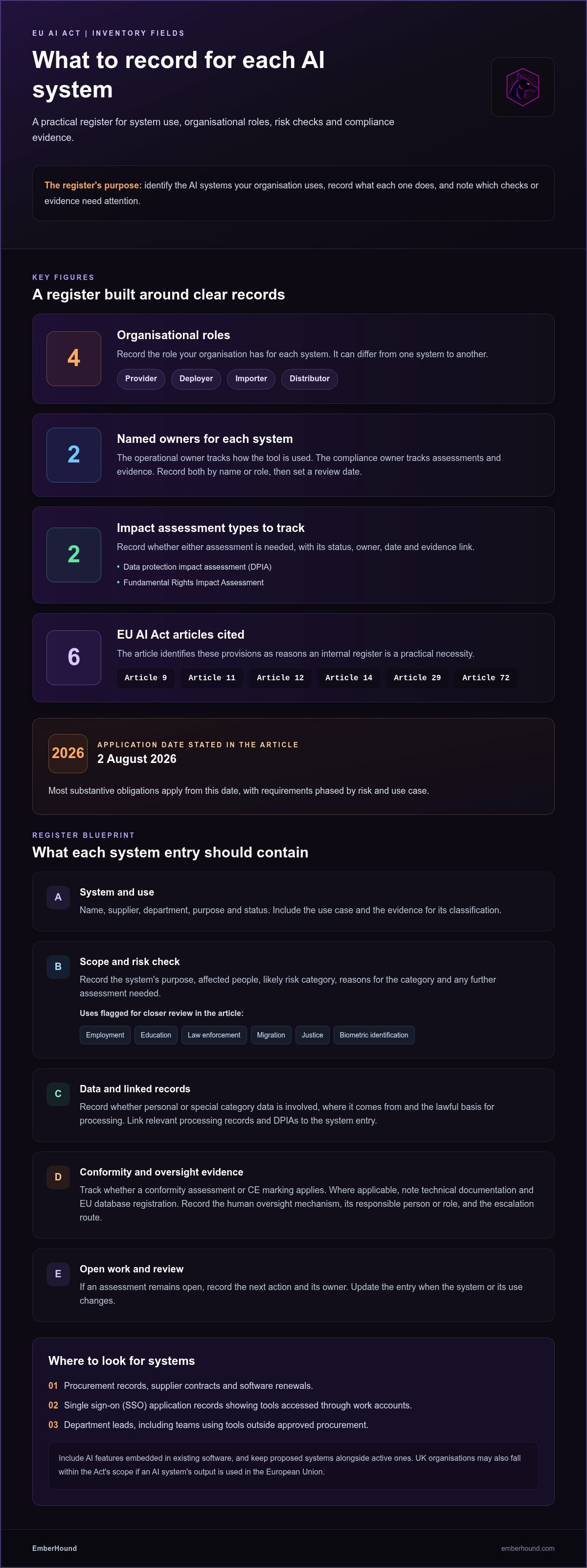
Inventory fields for ownership, purpose, data and evidence
Build each entry around a specific use case. Record who owns it, why it is used, what data it handles, and where its evidence is held.
- Name an operational owner and a compliance owner for each system. Record their team, role, and responsibilities, then identify who updates the entry when the system changes. For example, a recruitment team may manage daily use, while a compliance lead tracks the assessment. Add an escalation route so staff know who handles questions about the system’s use.
- Describe the system’s purpose in terms staff can compare with actual use. Record the task it supports, the decision it informs, and who may be affected. Separate the intended purpose from local use. An education tool designed to support learning may also be used to evaluate learners, so document that use separately for assessment.
- Document whether the system processes personal data or special category data. Identify the data subjects, such as applicants or customers, and the data sources, such as forms or business records. Record the applicable GDPR lawful basis alongside the processing purpose. These fields help reviewers trace how information enters the system and how the team uses it.
- Describe the system’s inputs and outputs at a useful level. Note whether it generates recommendations, predictions, content, or decisions, and explain how staff use those outputs. For example, record whether a caseworker reviews a recommendation before acting. This detail supports transparency within the organisation and gives reviewers context for assessing risk.
- Link each entry to its supporting evidence. Keep the register concise and store full documents in their relevant record locations. Record each evidence item’s title, location, owner, and status. Useful records may include a purpose statement, data-flow description, assessment, and supplier documentation. Add the date of the latest review and note any open action, such as clarifying whether a new data source changes the system’s use.
- Keep a change history for each system. Record what changed, when the change was assessed, and who approved the updated entry. A new department, data source, or decision process can alter the documented purpose. For a European-facing service, retain the evidence used to assess its use and transparency needs. The register should show current details and preserve enough history to explain earlier decisions.
Who must maintain an AI inventory under the EU AI Act?
The EU AI Act does not expressly require a general AI inventory. Organisations using or supplying AI should still assign someone to maintain a register and coordinate system reviews. Responsibility should reflect the organisation's activities rather than sit with one department alone.
- Appoint an internal register owner to gather updates across the organisation. This role may sit with compliance, risk, or IT, depending on existing governance. Give the owner a clear route to request system details and record who supplied them. Without a named coordinator, a newly purchased tool or AI feature may go unrecorded.
- Ask each department using AI to name an operational contact. HR can identify recruitment tools, customer service can report chatbots, and finance can flag systems that support credit decisions. Ask each contact to describe the actual use, who relies on its output, and whether staff act on recommendations. This helps distinguish approved uses from changes made later within a team.
- Record your organisation's role for each system: provider, deployer, importer, or distributor. A business may hold different roles across its systems, so assess each activity separately. For example, one team might use a supplier's AI tool while another develops a system under its own name. Write down the facts supporting each role assessment.
- Include UK operations in the scope review if an AI system's output is used in the European Union. A UK headquarters does not, by itself, determine whether the Act applies. Record where the system is made available and where its output is used. Then identify the business activities and teams connected to that use.
- Set a process for updating the register when new systems are introduced or existing ones change. Procurement can notify the register owner when a supplier adds an AI feature. IT can flag software changes, while department contacts report new uses. Record the change, who reviewed it, and any follow-up action. This keeps the register connected to current business activity.
- Keep role-specific records available to the people responsible for each system. A provider's documentation may differ from a deployer's records of operational use. Link each register entry to its supporting evidence and name the owner responsible for maintaining it. If several organisations take part in supplying or using a system, record each organisation's role separately.
EmberHound: GDPR Data Discovery
EmberHound’s GDPR Data Discovery helps identify personal data across business data, which can inform the data fields in your AI system inventory. Use it when you need visibility into personal information held across your organisation. For systems that handle payment card data, PCI Card Data Discovery can help locate it. The DSAR Disclosure Pack supports the preparation of data for subject access requests.
These tools support data discovery and disclosure. They don’t classify AI systems or determine your duties under the EU AI Act. Record their findings alongside each system’s purpose, data sources, and relevant evidence, then assess the system separately under the Act.
Visit emberhound.com to learn more about EmberHound’s data discovery services.
Make the next AI use visible before it goes live
Make inventory updates part of your organisation’s change process. Before a team adopts an AI feature, ask it to record the intended use, data involved, and accountable owner. This gives reviewers a starting point before the feature becomes part of routine work.
Keeping system records connected to the data they use can make an inventory easier to manage. If your review identifies personal and payment card data that needs locating, EmberHound’s Combined GDPR + PCI Coverage supports discovery across both areas. Data discovery supports your records; it does not classify an AI system or determine its regulatory status.
Choose a clear next step and keep the inventory connected to the teams making changes. A small update when a system is adopted is easier to act on than rebuilding the register after systems have spread across departments.
Start with the next system your organisation plans to use, then build the inventory from there.
Frequently Asked Questions
What Is the EU AI Act?
The EU AI Act is the European Union's regulation for AI systems. According to the European Union, it is Regulation (EU) 2024/1689, dated 13 June 2024. It uses a risk-based framework, with requirements depending on a system's risk level and use. For a UK organisation, the Act can matter when an AI system's output is used in the European Union.
What are the EU AI Act deadlines the inventory feeds?
The deadlines are phased. The Act entered into force on 1 August 2024. Prohibitions on certain AI practices and AI literacy duties applied from 2 February 2025; duties for general-purpose AI models began on 2 August 2025. Most substantive obligations apply from 2 August 2026. Article 50 transparency requirements also apply from 2 August 2026, with content-identification and some high-risk requirements scheduled later.
What is prohibited AI?
Prohibited AI means practices that fall within the Act's banned categories because of unacceptable risk. Article 5 prohibits practices including government social scoring. Its prohibitions became enforceable on 2 February 2025. Emotion inference is also prohibited in workplaces and education, except where systems are placed on the market for medical or safety reasons. Flag uses involving social scoring or emotion analysis for focused review.
What does the EU AI Act require for AI system inventory and documentation?
The Act doesn't expressly require a general AI inventory, and it doesn't use the term "AI inventory". It does set documentation and record-keeping requirements for particular roles and risk categories. For example, Article 11 sets technical documentation requirements, while Article 14 covers human oversight documentation for high-risk systems. Use the inventory to point to relevant records. Maintain the underlying documentation separately and keep it available for review.
How to classify AI systems by risk under the EU AI Act?
Classify a system by assessing its intended purpose and how it is used. The Act has four risk levels: unacceptable, high, limited, and minimal or no risk. Check whether the use involves an Annex III area such as employment, education, or access to essential services. For example, assess a tool used to evaluate learners differently from one that drafts general study notes.
What information should an EU AI Act AI inventory include?
Include enough detail for someone unfamiliar with the system to understand its use and follow its review history. Record its business purpose, supplier, internal owner, deployment status, and the decision or task it supports. Add a version or change reference, the date of the latest review, and links to relevant assessments. For example, distinguish an experimental pilot from a system already used in live customer decisions; as organisations move initiatives forward, services such as pronix.ai can help transition AI pilots into secure, scalable production outcomes.
What are the EU AI Act compliance deadlines for AI system providers and deployers?
There isn't one deadline for every provider and deployer obligation. Most substantive requirements apply from 2 August 2026, while Article 26 deployer obligations are listed as applying from 2 December 2027. Providers of general-purpose AI models placed on the EU market before 2 August 2025 must take the necessary steps to meet their obligations by 2 August 2027. Record each system's role and applicable requirements separately.
How do EU AI Act requirements differ for providers, deployers, importers and distributors?
The role depends on what your organisation does with a system. A provider develops or supplies an AI system under its name; a deployer uses a system in its work. An importer brings a system from outside the European Union into the EU market, while a distributor makes a system available along the supply chain. One organisation can hold different roles for different systems, so assess each product and activity separately.


