

An information asset register (IAR) tracks data assets; a ROPA records how personal data is processed. That is the core of the AI register vs ROPA distinction: the records overlap, but they answer different questions. Under UK GDPR Article 30, organisations must maintain records of processing activities.
It’s easy to treat the two records as interchangeable when a small team is already tracking systems, files and data flows in different places. But an asset list alone may not show the purposes, lawful basis or data sharing involved in processing personal data.
This guide explains what each record does, what a ROPA must contain and how to keep it up to date as processing changes. You’ll also learn how an information asset register can help locate information, identify assets that may contain personal data and map how that data moves through your organisation.
Key Takeaways
- Separate the record of processing activities from the information asset register: one describes processing, the other helps map the assets that hold information.
- Use data mapping to trace where personal data comes from, why it is used, who can access it and how it moves.
- Keep the record current when processing activities or security measures change, and assign clear ownership for updates.
- Assess any record-keeping exemption against the processing conditions, not organisation size alone.
- Treat an AI register as a distinct record, then check how it relates to your data protection records and the systems documented in them.
What is a Record of Processing Activity (ROPA) and do I need one?
A ROPA records how an organisation processes personal data. According to UK legislation, GDPR and UK GDPR Article 30 require organisations to maintain a record of their processing activities.
ROPA as a Personal Data Register
A ROPA describes personal data processing: what information is used, why it is used and how it moves through the organisation. A ROPA focuses on processing activities, and linking relevant information assets can help show where personal data is involved. For example, an entry about a customer database should describe the processing involved in collecting and using customer details.
Each entry should make the purpose and lawful basis clear. It should also identify categories of data subjects, such as customers or employees, and categories of personal data, such as contact details. List recipients, including organisations that receive the data. If recipients are in third countries or are international organisations, document the appropriate safeguards.
A useful entry also describes processing operations, envisaged erasure time limits and the technical and organisational measures used to protect data. A processor’s entry should include the categories of processing carried out for each controller. ICO templates can help structure the details, but the organisation remains responsible for keeping its own record accurate.
Who Maintains a ROPA
Controllers and processors each have record-keeping duties, with different details to record for their roles. According to the European Union, Article 30(2) of the GDPR places obligations on processors and their representatives, as well as controllers and their representatives. A controller records its processing purposes; a processor records the processing it performs for controllers.
Organisations with fewer than 250 employees may qualify for an exemption only under specific conditions. Some types of processing may affect whether an organisation qualifies for the exemption. So is processing involving special-category data referred to in Article 9, or personal data about criminal convictions and offences. According to UK legislation, Article 9 identifies the special-category data relevant to that exception.
UK GDPR Article 30 names a ROPA, not a separate general AI register. Organisations using AI need to record the processing when the AI system handles personal data, with the relevant record-keeping duties depending on whether they act as controller or processor. For failures, the European Union states that GDPR Article 83(4)(a) can attract fines when organisations fail to maintain processing records or provide a complete index to authorities. That provision concerns record-keeping; it does not set out a separate fine for omitting an AI register.
What must be included in a ROPA?
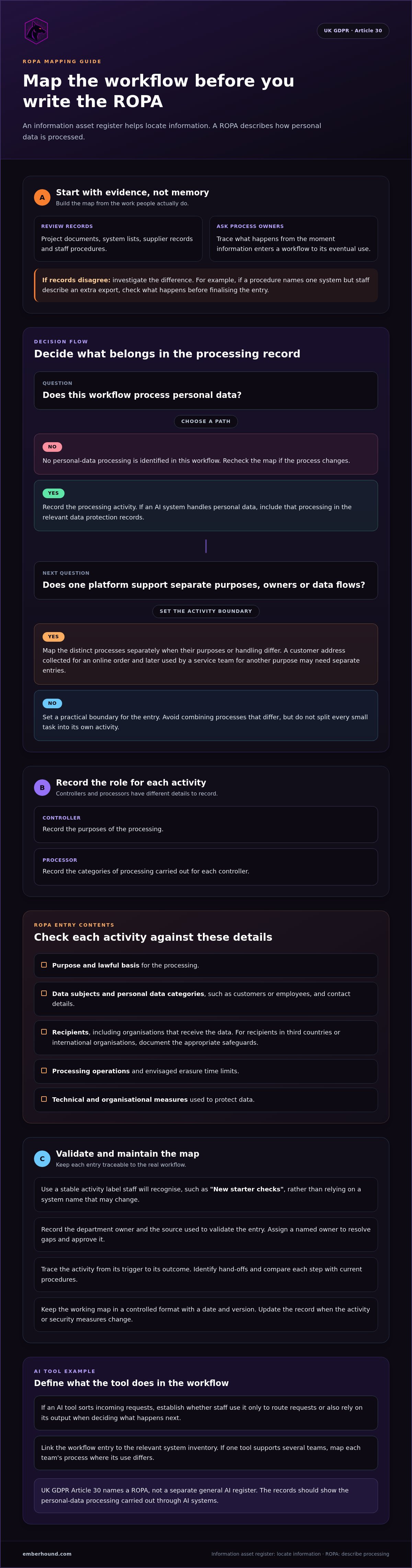
Before completing entries, decide what counts as a distinct processing activity. One platform may support separate processes with different purposes, owners or data flows. Treating every tool as a single activity can obscure those differences, while splitting every small task can make the record difficult to maintain. Set practical boundaries for each entry based on the organisation’s actual workflows.
Build the map from evidence, not memory alone. Compare project documents, system lists, supplier records and staff procedures. Ask process owners to explain what happens from the moment information enters a workflow to its eventual use. If a procedure names one system but staff describe an additional export, investigate the discrepancy before finalising the entry.
Give each activity a stable label that staff will recognise across documents. “New starter checks” is easier to trace than a system name that may change after a supplier migration. Record the department owner and the source used to validate the entry. This creates a practical audit trail for future reviews without copying every operational document into the ROPA.
Check whether the same information appears in separate workflows. A customer address might be collected through an online order and later used by a service team for a different purpose. Map those uses separately when their purposes or handling differ. This helps teams avoid treating the initial collection as the full picture of later processing.
The AI register vs ROPA distinction helps show where an AI tool belongs in the map. Start with the workflow that uses the tool, then establish whether that activity involves processing personal data. Link the workflow entry to the relevant system inventory. This is particularly useful when one tool supports several teams, as each may use it for a different process.
Before approving an entry, check that it is complete. Ask the owner to trace the activity from its trigger to its outcome, identify hand-offs and compare each step with current procedures. If an AI tool sorts incoming requests, for example, establish whether staff use it only to route requests or also rely on its output when deciding what happens next. That distinction helps define the activity accurately.
Assign a named owner to resolve gaps and approve the entry. Keep the working map in a controlled format with a date and version, so staff can identify the current copy. The AI register vs ROPA comparison may reveal an unlinked system entry or a mapped process without a clear system owner. Ask the relevant team to resolve each mismatch, then update the records once the workflow is understood.
Keeping a ROPA up to date
A ROPA becomes unreliable if it describes an outdated process. Give each processing activity an owner who can report changes, and set a review point for each entry. A new customer form, software change or updated supplier arrangement may affect what the organisation records. Keep the record in step with the work.
The Information Commissioner's Office says the GDPR’s record-keeping exemption applies to companies or institutions with fewer than 250 employees only if at least one of the stated conditions is met. The exemption does not apply where processing is likely to risk people’s rights and freedoms, occurs regularly, or involves special-category data or criminal convictions and offences. Check each condition against the organisation’s actual processing.
Employee numbers alone do not settle whether a ROPA is required. A small organisation that regularly processes personal data may still need one. A small employer handling health information or criminal records should also assess the relevant exception. Document the reasoning, including the activities considered and who made the assessment. Revisit it when processing changes, rather than relying on an old headcount review.
Set event-based update triggers as well as a routine review. For example, notify the record owner when a department introduces a system, changes how it uses data, appoints a supplier or starts sharing information with a new recipient. Controllers should also capture changes reported by processors. A contract review or project approval can prompt an update before the new processing becomes routine.
The GDPR does not set a fixed interval for reviewing a ROPA. Update it when processing activities or security measures change, and consider an annual management review as a regular checkpoint. Check that recorded processes still match current practice. For example, compare a staff procedure with the system configuration and ask the process owner to resolve any mismatch.
Keep the current record in a structured format that authorised staff can retrieve promptly. Add a review date and named owner to each entry, and retain a clear history of significant amendments. This helps explain why the record changed after a system replacement or new data use. It also prevents staff from treating a saved copy as proof that its contents are still accurate.
When a review identifies a gap, assign a specific action to the responsible team. If a marketing platform now receives customer details, update the affected activity and record the change date. If a supplier stops processing data, amend or remove the entry once the work has ended. These checks keep the record tied to actual operations and clarify accountability across controllers and employees.
Information Asset Register purpose and benefits
An Information Asset Register (IAR) lists an organisation’s information assets; a ROPA records how personal data is processed. The records overlap when an asset contains personal data, but each answers a different question.
Information Asset Register Purpose
An IAR is a central record of information assets, such as HR systems, paper files, electronic care records and work devices. It helps staff locate information and identify who owns each asset.
For each asset, record its description, location, owner, organisational significance and whether it may contain personal data. For example, a shared spreadsheet could identify a recruitment folder, its department owner and where it is stored. Choose categories that make sense to the staff who need to find or manage the information.
An IAR gives teams a view of where information sits and how it is stored, processed or shared. This can help identify asset-related risks, such as unclear ownership or access beyond the team’s purpose. It can also support enquiries from partner organisations, the ICO or statutory bodies in the organisation’s field.
Use a consistent format across departments. If HR records assets by system name while operations uses building names, staff may miss duplicate or related records. Agree categories, assign an owner to each asset and note whether it contains personal data. These fields help connect an asset to the relevant processing activity without treating the IAR as a ROPA.
AI Register Scope
An AI register is an internal inventory of AI systems and how the organisation uses them. It helps staff see which tools are in use and who is responsible for each.
For each AI system, record its name, business purpose, owner, supplier and the teams using it. Note what information is entered, whether it may include personal data and how staff use the output. For example, link a tool that drafts customer replies to the team handling those replies and record what information is supplied to it.
The UK GDPR and the Data (Use and Access) Act form part of an organisation’s data protection context, but an AI inventory and a ROPA serve different purposes. If an AI system processes personal data, link its entry to the relevant ROPA activity. The ROPA records processing details; the AI register identifies the system and how it is used.
Connect the records using shared system names or asset identifiers. If an AI tool is replaced, staff can find the affected asset entry and processing activity. That link shows which records need review and whether their documented purpose, data categories or access arrangements still match the system in use.
What is an AI register under UK GDPR and the Data (Use and Access) Act?
An AI register is an internal inventory of the AI systems an organisation uses and their purposes. It helps staff identify each system’s owner, the information it handles and the location of related data protection records.
The UK GDPR and the Data (Use and Access) Act form part of the UK data protection context. An AI register does not replace a ROPA when an AI system processes personal data. Keep the system inventory and processing record connected, with each serving its own operational purpose.
Start an entry with the system’s name, supplier, business owner and intended purpose. Add the department using it and the teams responsible for oversight. For example, an entry for a tool that drafts customer replies should name the customer service owner and explain that staff use it to prepare responses. This gives colleagues a clear point of responsibility.
Describe the system’s inputs and outputs in plain terms. Record whether staff enter personal data, such as a customer’s account details, and how they use the result. Note whether an employee reviews the output before it informs a decision. This helps the organisation understand the system’s role in a workflow, rather than treating “AI” as one broad category.
Include governance details that help teams assess changes: who approved the use, what limits apply and when the entry needs review. For example, a shift from drafting replies to recommending account actions changes the system’s purpose. Record the change and assess whether the linked data processing record also needs updating.
For each AI entry involving personal data, link the relevant information asset and ROPA activity. A shared system name or asset identifier can connect the inventory to the data map. If a supplier changes, staff can trace which activities and assets may need review. Make the link specific: a general note such as “see privacy records” provides little direction.
The distinction is practical. An AI register shows which systems an organisation uses and who is accountable for them. A ROPA describes personal data processing, including its purposes and recipients. Together, the records help teams trace an AI tool from its owner and use to the personal data processing connected with it.
EmberHound: GDPR Data Discovery
EmberHound’s GDPR Data Discovery helps organisations locate personal data to inform their records of processing. Use it when your team lacks a clear view of where personal data is stored or needs a more accurate picture of information held across the business. Discovery findings can inform your records, but they do not replace a ROPA or the decisions needed to complete it.
For organisations handling payment card data as well as personal information, EmberHound offers PCI Card Data Discovery and Combined GDPR + PCI Coverage. Its DSAR Disclosure Pack supports subject access request workflows. Choose the option that fits the data discovery task you need to address.
Make the next system change easier to govern
The AI register vs ROPA distinction matters most when a tool, supplier or business process changes. Make documentation part of the decision to introduce or alter a system. Set a clear point for the relevant teams to review the information it uses and decide whether existing records need updating.
This makes compliance records useful references for everyday decisions. A project owner can flag a new data use early, while the team responsible for privacy records assesses the impact before the change becomes routine. Keep the hand-off clear, so future reviews begin with named responsibilities rather than a last-minute search for information.
If locating personal data is your next practical step, EmberHound’s data discovery tools can help. Choose an approach that fits the information you need to find, then use the results to support your organisation’s record-keeping.
Clear ownership gives your team a workable starting point. Take the next step with confidence.
Frequently Asked Questions
How do I create a RoPA?
Start by asking each department to identify processes that use personal data. For example, a payroll team can describe how staff details reach its payroll system and which organisations receive them. Use an ICO controller or processor template to organise the information, then ask each process owner to check their entries. Keep the completed record in a format authorised staff can retrieve when needed.
What exactly is the ROPA?
A ROPA records an organisation’s personal data processing activities. It describes processing at activity level, so one organisation may have separate entries for payroll, recruitment and customer support. It helps staff trace why personal data is used and how each activity operates. An asset list can point to the systems or files involved; the ROPA describes the processing carried out through them.
Why is a ROPA important for GDPR compliance?
A ROPA gives an organisation a structured account of its data processing and supports its ability to demonstrate accountability. It can also help staff answer questions about a particular activity, such as which supplier receives customer details. If the ICO requests the record, a current, accessible version helps the organisation respond with relevant information instead of reconstructing processes from scattered files.
What information must a UK ROPA include under Article 30 UK GDPR?
Under Article 30, a controller’s record includes its contact details, processing purposes, categories of data subjects and personal data, recipients, international transfers and safeguards, envisaged erasure time limits, and a general description of security measures. A processor’s record covers its processing categories, controller details, transfers and security measures. Match each field to the activity. For example, identify the recipient of payroll data rather than writing “external supplier”.
Does a ROPA need to include AI systems and automated decision-making?
Include an AI-related processing activity when the system processes personal data. Describe the purpose and relevant data categories, then identify the activity in a way staff can connect to the system. For example, if a tool analyses customer messages to classify support requests, record that processing and link it to the tool’s owner. This distinguishes the system inventory from the record of personal data processing.
How do AI registers and ROPAs relate to DPIAs, algorithmic transparency records and the ICO?
An AI register is separate from a ROPA. If an AI system processes personal data, record that processing in the ROPA and link it to the relevant system inventory. UK organisations must make their ROPA available to the ICO on request.


