

Yes, an AI inventory is a sensible governance step if your organisation uses AI, particularly when systems handle personal data or influence decisions. To decide whether you need one, ask whether you can identify each system, its purpose, the data it uses and who is accountable for it. If those details are hard to find, you have a visibility gap.
AI may be built into software bought by a team, a supplier service or a tool used without formal approval. This can make it difficult to see how personal information moves through a system. A clear record helps your teams understand what is in use and assess privacy and security risks.
This guide explains how an AI inventory supports governance, who should maintain it and how to find AI systems across your organisation. It also covers what to record and which risks to consider, so you can build an inventory that reflects how your organisation actually uses AI.
Key Takeaways
- Set shared ownership across privacy, technical, business and risk teams, with a clear person responsible for keeping records current.
- Find AI use across teams, supplier services and existing software; automated discovery can identify technical details, but people must confirm purpose and permitted use.
- Use an inventory to support governance and assess privacy and security risks. The legal duties depend on how each system is used and the data it handles.
- Record each system's purpose, owner, status, data categories, users, dependencies and review date so teams can assess it over time.
- Use GDPR Data Discovery when you need to identify where personal information is held across your organisation.
Shared responsibility for maintaining an inventory
An artificial intelligence inventory needs named owners across the organisation. Data science understands model design, IT knows where systems run, privacy teams assess personal data, and compliance and risk teams track controls. A coordinator can manage the record, but each team must keep its own information accurate. For example, the product owner records a new generative AI feature, while privacy staff assess how it uses data.
Assign ownership by responsibility. Business teams describe purpose and users. Technical teams record the model, platform, dependencies and changes. Data owners document sources, sensitivity and permitted use. Privacy, compliance and risk teams set review requirements. This division keeps the inventory useful without leaving one person to guess how every system works.
Build inventory updates into existing workflows. Create a record during intake, then review it at design, testing and approval. Before deployment, confirm the production version and accountable owner. Change approval, monitoring and incident management should trigger further reviews. Close a record at retirement only after documenting when the system stopped operating and what happened to its data.
Agree change triggers before a system goes live. A new purpose, data source, user group, supplier or level of automation can change the risk profile. Record who assesses each trigger and how the decision is captured. The EU AI Act defines substantial modification in Article 3(23); organisations can use that concept when setting reassessment criteria, without treating it as a blanket UK requirement.
- Intake: record the proposed use, business owner and supplier.
- Approval: confirm data, controls and intended users before deployment.
- Change: reassess after a material shift in purpose or data.
- Retirement: record closure and the handling of associated data.
Predictive maintenance needs the same discipline. If a model forecasts equipment failure, record its purpose, input data, operational owner and review date. Changes to sensor data or maintenance decisions can affect the model’s output, so they should prompt an assessment. Keep this model inventory separate from a physical stock count: a system that predicts parts demand does not show whether those parts are available.
Automation can flag missing fields or overdue reviews, but it cannot confirm whether a system's purpose has changed. Assign a person to resolve each alert and update the record. For a GDPR-focused view of finding personal data across systems, see the GDPR data discovery guide.
These responsibilities may sit under an AI governance or model risk management function. Whatever the structure, inventory systems rely on high-quality data: inaccurate, outdated or incomplete records can lead to flawed predictions and decisions. A stock alert configured to trigger when stock falls below 20 units is only useful if the count is reliable; a system may show 50 units available when only 42 units are physically present.
AI inventory discovery and ownership
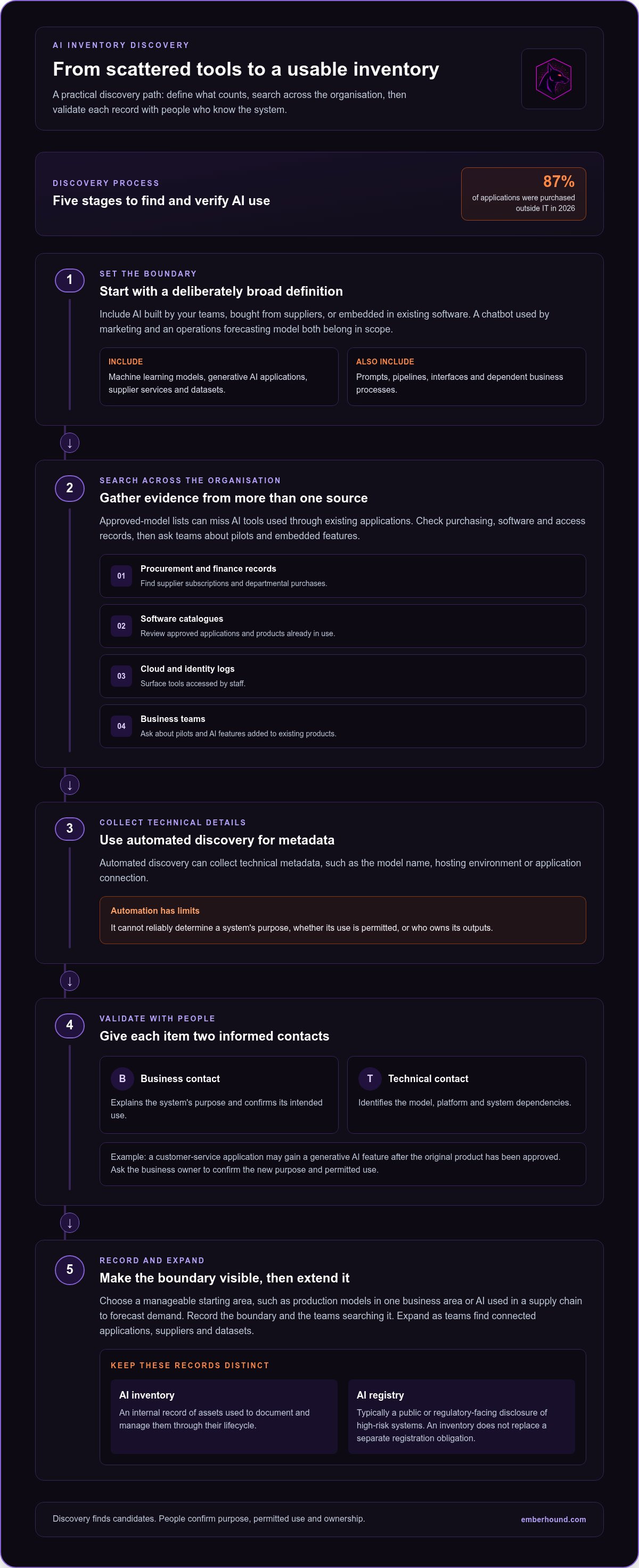
Start discovery with a broad definition of artificial intelligence. Include machine learning models, generative AI applications, supplier services, datasets, prompts, pipelines, interfaces and dependent business processes. A chatbot bought by marketing and a forecasting model built by operations both belong in scope. A central register limited to approved models can miss tools staff use through existing applications.
Use several evidence sources to find those systems. Procurement records reveal supplier subscriptions; software catalogues show approved applications; cloud and identity logs can surface tools accessed by staff. Ask business teams about pilots and embedded AI features, such as field teams adopting PHOTO iD for automated photo organisation and property inspections. In 2026, 87% of applications were purchased outside IT. That makes finance and departmental purchasing records useful discovery sources.
Automated discovery can collect technical metadata, such as a model name, hosting environment or application connection. It cannot reliably determine a system’s purpose, whether its use is permitted or who owns its outputs. A business owner must validate those details. For example, a customer-service application may add a generative AI feature after procurement has approved the original product.
Keep the inventory distinct from an AI registry. An inventory is an internal record for documenting assets and managing them throughout their lifecycle. A registry is typically a public or regulatory-facing disclosure of high-risk systems. A central inventory can help teams identify assets that may need further assessment, but it does not replace any separate registration obligation.
Choose a manageable starting boundary. You could catalogue production models in one business area or AI used in a supply chain to forecast demand. Record the boundary and the teams responsible for searching it. Expand the scope as teams identify connected applications, suppliers and datasets. This makes gaps visible without waiting for every department to complete a full review.
Use established frameworks to shape discovery. ISO/IEC 42001:2023 is a standard related to AI management systems. The EU AI Act defines an AI system in Article 3(1), which can inform a deliberately broad inventory definition. The NIST AI Risk Management Framework places system identification and classification in its Map function. These references help teams structure tracking; they do not decide ownership for you.
For each discovered item, assign a business contact who can explain its purpose and a technical contact who can identify its dependencies. Link related models, datasets and applications, so a supplier change or new data source prompts review. If you are ready to organise AI discovery, start mapping the AI tools in use.
Do UK organisations need an AI inventory by law?
UK organisations should assess their legal duties based on how each AI system is used and what information it processes. An AI inventory is an internal governance record that can help teams identify systems and document their assessments. It supports compliance work, but the legal assessment determines which duties apply. For example, a system processing personal data raises different questions from an internal tool that handles no personal information.
GDPR is relevant when AI systems process personal data. An inventory can help document a system’s purpose, data sources, owner and risk assessment. These entries support accountability and give teams a record of how they considered the system. For instance, a model analysing customer records calls for a clear account of its data flows and intended use.
The EU AI Act is a separate framework to consider where its requirements apply. It entered into force in August 2024, with obligations phased in through 2027. High-risk system requirements, conformity assessment, transparency obligations and EU database registration take effect on 2 August 2026. Article 71 provides for registration of high-risk AI systems in the EU database. These dates and provisions relate to the EU framework, while UK organisations should assess whether that framework applies to their activities.
This assessment matters for a UK business selling into, operating in or supporting activity connected with the EU. Consider the system’s role, users and market when determining which requirements apply. An internal inventory can help identify systems for further assessment. A registry entry provides information about a system, but its classification and legal treatment require separate assessment.
- Record the use: describe the system's purpose and the decisions it supports.
- Map the data: note whether personal information is processed and where it comes from.
- Identify responsibility: name the business owner and the teams assessing privacy and risk.
- Track the assessment: record relevant decisions, controls and review dates.
For example, a UK retailer using AI to rank job applicants should document the purpose, data and decision pathway. A supplier tool forecasting warehouse demand needs its own assessment, particularly if it uses personal data or informs another decision. Distinct uses call for separate assessments, even when the same supplier provides both systems.
Tie legal review to actual use. A new purpose, changed data sources or a different effect on people can prompt reassessment. Record the reason for the review and its outcome. This gives privacy and compliance teams a clear basis for deciding which obligations apply to each system.
What information should an AI inventory record for each system?
Give every AI system a record identifying its purpose, owner and current status. Add the business area, intended users and review date. For example, a recruitment tool should state whether it screens applications or assists a recruiter. That distinction helps reviewers understand how its outputs may affect people.
Describe the system and its place in the organisation. Record whether it is a machine learning model, generative AI application or supplier service. Note its provider, version and technical dependencies where known. If a customer-service platform uses a supplier’s language model, link the application to that model and provider in the register.
Document the data behind the system. Record data categories, sources, sensitivity, quality and permitted use. Note whether personal information is involved, and describe how data moves into and out of the system. A demand forecast using sales history has a different data profile from a tool analysing customer correspondence.
- Purpose and use: state the task, users and decisions the system supports.
- Ownership and status: name the business owner and record whether it is proposed, tested, deployed or retired.
- Data: record categories, source, sensitivity, quality and permitted use.
- Dependencies: link relevant suppliers, datasets, interfaces and connected processes.
- Risk and review: record the risk assessment, controls, compliance status and next review date.
For a vendor service, capture the provider, contract reference, data flow and service dependency. Record third-party risks and an exit plan. If a business relies on a supplier’s AI for customer support, the record should show what information the service receives and what happens if the service changes or ends.
For a dataset, record its source, sensitivity, quality and permitted use. Add lineage, access and retention details so teams can trace how information reaches a model. For example, if a model uses a dataset derived from customer records, its entry should identify the dataset and the controls governing access.
Keep the record proportionate to the system’s risk. A low-impact internal assistant may need less evidence than a system that affects access to services or processes sensitive data. Record why the risk level was assigned and what evidence supports that decision. Review the entry after changes to purpose, data, users or supplier, and update its date and status.
Make each inventory field relevant to a decision. If the owner, data source or intended use is unknown, mark the gap for follow-up instead of filling it with an assumption. This keeps the record useful for privacy, technical and risk reviews.
What tools and templates are available for managing an AI inventory?
A spreadsheet can work for a small, defined portfolio. Create fields for the system name, purpose, owner, status, data categories, supplier, risk review and next review date. Give each entry a unique identifier so connected models, datasets and applications can be linked accurately. Assign an editor and track changes. For example, a team testing a writing assistant can record its status and the responsible business area.
As records grow, a shared database or governance platform can help manage access, changes and review reminders. Choose one that links related records. An application entry could connect to its supplier model, data source and business process. If the supplier changes, reviewers can see which connected records may need attention.
Automated discovery tools can surface technical signals from software records, cloud resources or application connections. Treat those signals as leads for human review. A tool may detect an AI feature in customer software, while the business owner confirms how staff use it and what data it handles. Technical detection helps locate candidates; people establish purpose and permitted use.
A practical template makes responsibilities and open questions visible. Include fields for the business owner, technical contact and review status. Record whether a system is proposed, being tested, deployed or retired. Add the date and reason for each material change. For example, a new supplier or a different use of customer data should be traceable in the record.
- Identity: name, identifier, system type and business area.
- Use: purpose, users, decisions supported and deployment status.
- Data: categories, source, sensitivity and permitted use.
- Governance: owner, risk review, controls, change history and review date.
- Connections: supplier, model, dataset, application and dependent process.
Keep the template proportionate to each system's risk. An internal writing assistant may need fewer review fields than a system that assesses people or processes sensitive data. Record the reason for the risk level and the evidence reviewers need. ISO/IEC 42001:2023 can inform an organisation's AI management approach; select tools that fit its review workflows.
Test a platform with one real system before moving existing records. Ask its business owner to complete the entry, then check whether privacy and technical reviewers can find dependencies and open actions. If a spreadsheet makes change tracking difficult, a shared tool with clear ownership and history may suit the team better.
EmberHound: GDPR Data Discovery
EmberHound’s GDPR Data Discovery helps organisations identify personal data. It can support the data-mapping work behind an AI inventory by helping teams locate personal information across their environment. It complements the inventory: teams still record each AI system’s purpose, owner and use.
Use GDPR Data Discovery when you need to understand where personal data sits before assessing which AI systems use it. Organisations that also handle payment card data can use PCI Card Data Discovery or Combined GDPR + PCI Coverage for those discovery needs. A DSAR Disclosure Pack supports preparing information for subject access requests.
For help identifying personal information across your systems, contact EmberHound or visit emberhound.com.
Make your next step a clear one
If you’re deciding whether your organisation needs an AI inventory, focus on the next decision your teams need to make. Choose one AI use and identify who can explain its purpose and data use. That gives colleagues a practical starting point for deciding what the inventory needs to record.
When personal data is hard to locate, data discovery can help teams find it. EmberHound provides GDPR Data Discovery, PCI Card Data Discovery and Combined GDPR + PCI Coverage to identify sensitive information. Your organisation’s assigned owners remain responsible for AI system governance and inventory decisions.
Choose the next action that addresses your current gap. If you need to locate sensitive data, explore data discovery. If ownership is unclear, assign someone to the system and its records. A manageable first step gives your teams a clearer basis for ongoing governance.
Frequently Asked Questions
What is an AI inventory and what should it include?
An AI inventory is a working record of the AI systems an organisation uses or develops. It should help a reviewer understand what a system does and trace how it connects to other tools. For example, link a writing assistant to the application that provides it and the team that uses it. Keep records specific enough to distinguish separate uses of the same supplier’s software.
Which AI systems should be included in an organisation's inventory?
Include AI built in-house, bought from suppliers, added to existing software or tested by staff. A team’s trial of a generative AI assistant can matter even if it never becomes an approved business tool, particularly if staff enter work information. Include connected components that affect the system’s behaviour, such as a supplier model or a business application passing it customer data.
How do you create and maintain an AI inventory step by step?
Start by setting the inventory’s boundary, such as one department or a defined set of business applications. Gather candidate systems from software records and team discussions, then ask each relevant owner to verify their use. Create a record for each confirmed system and flag unresolved details for follow-up. Review records when a tool is introduced, changes purpose or is retired, and keep earlier decisions traceable.
Who should own and govern an AI inventory?
A senior governance lead should set the inventory rules and resolve gaps, while system owners remain accountable for accurate records. For example, a marketing lead can describe how a writing tool is used, and IT can identify its technical connections. Privacy and risk reviewers can assess relevant concerns. Record who approves changes and who can close an entry, so responsibility remains clear when staff or suppliers change.
What are the risks of not keeping an AI inventory?
Without an inventory, teams may overlook an AI feature that processes personal data or lose track of which supplier receives it. This can make it harder to investigate an unexpected output, explain a system’s use or assess a proposed change. For example, if a team cannot identify which tool handled a customer record, it may struggle to trace the data flow and assign follow-up actions.


