

The risk starts with what someone enters in a prompt. Unapproved AI tools at work are AI services used without prior approval or review by an organisation’s IT or security team. This is known as shadow AI. It can expose confidential or personal information if staff enter it into a tool the organisation has not assessed.
It’s understandable that employees turn to AI for everyday tasks. But convenience doesn’t mean a tool is suitable for work data. The Information Commissioner’s Office says the UK GDPR requires personal data to be processed with appropriate security, including protection against unauthorised or unlawful processing and accidental loss, destruction or damage.
This article explains what counts as shadow AI, how information entered into AI platforms can create risk, and what a workplace policy should cover, from approved tools and restricted data to human review. It also explains how data discovery can help an organisation locate personal information that needs attention.
Key Takeaways
- Shadow AI includes workplace AI used without approval, including features built into everyday apps.
- Set out which tools staff can use, what information they must keep out of prompts, and when a person must review AI output.
- Keep personal, customer and confidential business information out of public AI tools unless your organisation has explicitly allowed its use.
- Personal accounts and devices can make workplace AI use harder for IT teams to see and manage.
- Map where personal data is stored so your organisation can assess what information may need attention.
AI policies and personal device guidelines
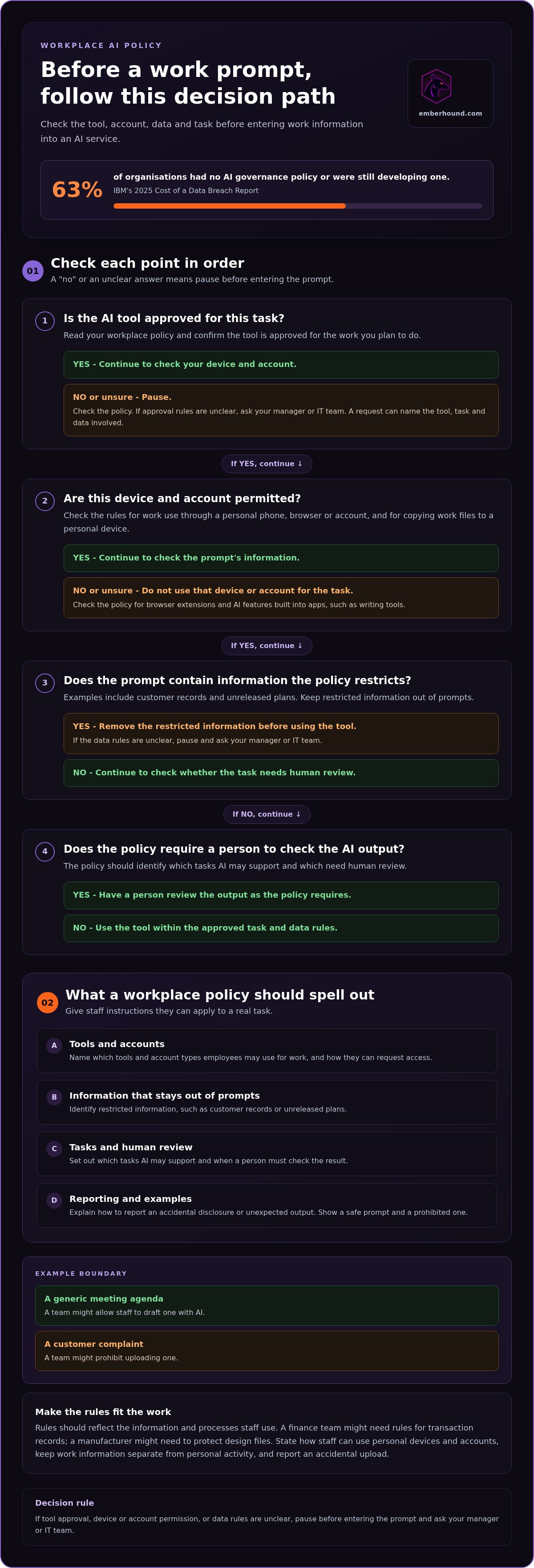
Before using an AI tool at work, read your workplace policy and confirm the tool is approved for your task. Check whether your device and account are permitted, then remove any information the policy classifies as restricted. If approval or data rules are unclear, pause and ask your manager or IT team before entering a prompt.
Rules should reflect how work differs across industries. Workers in finance, the information industry and manufacturing were more likely to regularly use unapproved AI tools than workers in healthcare, education and retail. A finance team might need rules for handling transaction records; a manufacturer might need to protect design files. The policy should match the information and processes staff actually use.
IBM's 2025 Cost of a Data Breach Report found that 63% of organisations had no AI governance policy or were still developing one. A written policy gives employees a clear decision path. It should name approved tools, explain how staff request access, and identify tasks that need human review. Avoid a rule that simply says "use AI responsibly". It gives employees no practical test.
An acceptable use policy should turn those decisions into clear instructions. Set out:
- Which tools and account types employees may use for work.
- Which information must stay out of prompts, such as customer records or unreleased plans.
- Which tasks AI may support, and which require a person to check the result.
- How staff report accidental disclosure or an unexpected AI output.
For example, a team might allow staff to draft a generic meeting agenda but prohibit uploading a customer complaint. Make the distinction easy to apply.
Guidelines for personal devices need the same clarity. State whether staff may use AI through a personal phone, browser or account, and whether work files can be copied to that device. Set rules for browser extensions and built-in assistants, too. An AI feature in a writing app can receive text just like a separate chatbot. Tell employees which account to use and how to keep work information separate from personal activity.
Make approval practical. A request process can ask employees to name the tool, task and data involved. IT or a line manager can then approve or refuse access under the organisation’s rules. Record the decision so teams can apply it consistently. Train staff on the approved workflow, and update guidance when tools or workplace tasks change. A brief example of a safe prompt and a prohibited one can make the boundary easier to follow.
What Are the Risks of Not Managing Shadow AI Usage?
Unmanaged AI use creates a gap between what staff do and what an employer can see. UpGuard found that more than eight in ten workers surveyed used unapproved AI tools at work. Without an agreed process, an employee might paste a draft contract into a personal account and then struggle to identify where the text went. IT teams may also overlook AI features in browser extensions or meeting software.
The behaviour can span job levels. UpGuard found that executives reported the highest use of unapproved AI, while mid-level managers used it at a rate similar to lower-level workers. That matters because a senior leader using an unapproved service can set an informal example. A team may then treat personal accounts as acceptable, even if the employer’s written rules say otherwise.
IBM’s 2025 Cost of a Data Breach Report found that 20% of organisations had unauthorized AI tools in their environments. That figure points to a control problem: an organisation may have AI activity it has not reviewed. If teams use different services for similar tasks, managers may struggle to trace which tool handled a document or who approved its use.
Employees often choose these tools for practical reasons. A public chatbot can quickly draft an email, summarise a long report or turn rough notes into a clear plan, while dedicated platforms such as claramiai.com reflect how professionals turn to specialised workspaces for research and writing. If an approved option is hard to access, staff may use a personal account instead. A blanket ban can leave that pressure unaddressed, pushing use out of view rather than giving people a workable route.
Demand also grows when employees see colleagues using generative AI for routine work. Employers need to distinguish useful experimentation from unmanaged exposure. For example, a generic project plan may be suitable for an approved tool, while a customer complaint could contain personal details that should stay out of a public prompt.
- Give staff a clear way to request access for a specific task.
- Record which tool and account were approved, and for what use.
- Explain how to report an accidental upload or unexpected output.
These steps help managers respond to actual use rather than assumptions. Review requests based on the task, the data involved and the tool’s account arrangements. If an executive needs AI for board papers, for instance, assess that use case against the same rules as other teams. Consistent decisions make exceptions easier to spot and address before personal accounts become routine.
Risks of exposing confidential data
Yes. Using an unapproved AI tool could breach UK GDPR or confidentiality obligations if personal or confidential information is disclosed without proper authority or safeguards. Using an unapproved tool alone does not establish a breach. The information entered and how the service handles it matter.
A prompt can reveal more than its author intends. A worker asking an AI service to rewrite a customer complaint might include the customer’s name, contact details and account history. A request to summarise a staff appraisal could reveal sensitive employment information. The service receives that text as input, so the organisation needs to understand how it processes it.
The Information Commissioner’s Office says the UK GDPR requires personal data to be processed with appropriate security. This includes protection against unauthorised or unlawful processing and accidental loss, destruction or damage. If a public AI platform receives personal data without suitable safeguards, the organisation may need to assess a data protection issue. Sharing confidential business information outside authorised channels can also create contractual or commercial problems.
Exposure can happen through more than prompts. A worker might attach a document, paste source code or provide a transcript for a summary. An AI feature in a browser extension or meeting application may also receive text or audio. The information collected depends on the feature and its settings. Staff should treat each upload, pasted extract and connected feature as a separate disclosure decision.
Before using a tool, identify the data involved and follow the organisation’s rules. Keep these examples out of prompts unless the employer has explicitly approved their use:
- Customer names, contact details and complaint records.
- Employee information, such as appraisal notes or absence details.
- Passwords, access tokens and confidential business plans.
Tool settings and supplier terms affect what happens after submission. Before approving a platform, an employer should establish where it stores business information, how long it retains it, who can access it, and whether prompts or data may train its models. A private account doesn’t answer those questions by itself. Nor does deleting a conversation necessarily mean every copy has been removed.
If information has already been entered, stop further uploads and record what was shared, which tool received it and when. Follow the organisation’s incident process so the right team can assess the data, access and retention details. Don’t copy the material into another service to investigate. That could create another disclosure and make the original exposure harder to track.
Shadow AI and unauthorised workplace AI use
Shadow AI means AI technology used for work without prior approval, review or authorisation from IT and security teams. It could be a public chatbot, a writing assistant built into software, or a transcription feature used during a meeting. The key question is whether the organisation has authorised and assessed that use.
Some tools are easy to spot. An employee might open a public generative AI website to draft an email. Others are built into everyday services: a browser extension can summarise a page, a search engine can generate an answer, and a spreadsheet assistant can suggest formulas. A meeting recorder may also use AI to create a transcript or summary. These functions can appear as ordinary buttons rather than separate applications.
Personal accounts make work use harder to identify. LayerX's 2025 research reports that 71% of enterprise AI usage happens through personal accounts. For example, a staff member could sign into an AI service with a private email address, then use it to rewrite work documents. The activity may sit outside the employer's usual account management, leaving no clear connection to a workplace identity.
Approval needs to cover each tool and its purpose. An employer may allow an AI writing assistant for generic copy but restrict it from processing customer records. A separate tool, account or feature may have different settings and data handling. Treat a new integration as a fresh request, even if it appears inside software the organisation already uses.
To find hidden use, map the routes employees take to AI. Review installed browser extensions, software integrations and approved application settings. Ask teams which tools they use for drafting, transcription, coding or research. Compare their answers with access records and procurement information. Each method reveals a different part of the picture. A list of centrally purchased software alone may miss personal accounts and features enabled within existing applications.
- Record the tool, account type and workplace task.
- Identify what information the feature can access.
- Route approval to the person responsible for security or the relevant system.
That record helps distinguish an approved use from a hidden one. It also gives managers a practical way to discuss technology without treating every use as misconduct. If an employee uses an unapproved summariser for public material, the organisation can assess the tool and task. If it processes internal documents, the review must also consider the information involved. Clear approval routes make those distinctions visible and give staff a next step before they adopt another AI feature.
Restrictions on data shared with AI platforms
UK data protection rules, including the UK GDPR, apply when workplace AI processes personal data. Employers should assess each use against their data protection responsibilities before staff submit personal information.
Make the boundary practical at the point of work. Give employees a simple test: could someone identify a person, business or project from this prompt and its context? A prompt without a name may still reveal identity through a job title, date, location or unusual event. For example, replacing a customer’s name with “Client A” may not remove identifying details from a detailed complaint.
Break tasks into the smallest useful input. If an employee needs help improving a sentence, they can submit that sentence without the full email thread. If they need a formula, they can describe the spreadsheet columns instead of pasting rows of real records. A prompt should contain only what’s needed for that specific task.
Policies can set practical restrictions for different work activities:
- Use invented examples when testing prompts or demonstrating a workflow.
- Remove names, unique identifiers and unnecessary background before submitting an extract.
- Keep documents, email threads and spreadsheet rows out of prompts unless the use has been approved.
- Separate public information from internal project context when drafting a request.
Consider what context may travel with a prompt. A connected assistant could draw on selected files, conversation history or an application workspace. Before enabling a feature, establish what information it can access and whether users can limit that access. For instance, an assistant that can search a shared folder may encounter files beyond the document an employee intended to summarise.
Set rules for the output, too. AI-generated text can reproduce details from submitted material, so employees should check drafts before forwarding, publishing or adding them to another system. A summary for an internal meeting may include details that don’t belong in a wider report. Make the intended audience part of the review.
Give staff a clear route for uncertain cases. They can describe the task without disclosing the underlying data, then ask the responsible manager or IT contact whether the proposed input is permitted. This lets the organisation assess the use before information leaves its approved environment. If the task can be done with a fictional example or shorter extract, use that version and keep the original records out of the prompt.
EmberHound: GDPR Data Discovery
EmberHound helps organisations locate personal information across their data. GDPR Data Discovery can identify where relevant data sits, giving teams a clearer starting point for assessing what may need attention after AI use.
Use it when you need visibility into personal information held across business systems. For organisations handling payment card data as well, PCI Card Data Discovery or Combined GDPR + PCI Coverage can address that discovery scope. The DSAR Disclosure Pack supports subject access request handling.
Data discovery doesn’t replace an AI use policy or determine whether a particular upload breached confidentiality rules. It can help teams find and assess data within the organisation as part of their response. Contact EmberHound to discuss your data discovery needs.
Set a clear next step for safer AI use
Make the next decision practical: assign ownership for AI approvals, then give staff a clear way to raise new tools or tasks. Unapproved AI tools at work become easier to manage when employees know who decides, what information must stay out of prompts, and how to report accidental disclosure.
Keep the policy connected to the data itself. When a team needs to locate personal information as part of its response, EmberHound's data discovery tools can help identify where it sits. This supports the organisation's assessment, while decisions about AI policy and legal compliance remain with its responsible teams.
Choose a workplace use case and put the rules into practice. Set its approval route, define permitted data, and clarify how to report issues. Then communicate those instructions to the people who will use the tool.
Clear ownership gives employees a practical way forward. Your organisation can take the next step with confidence.
Frequently Asked Questions
What is shadow AI?
Shadow AI is workplace use of AI that an organisation hasn’t formally reviewed or approved. The boundary can be easy to miss: a staff member might use an AI translation function inside a tool already used for work. Include these features in software reviews and ask teams to flag new AI functions after application updates.
What can employers do?
Employers can assign a senior owner to oversee workplace AI and ensure decisions have clear accountability. They can also connect AI reviews with existing procurement and software-change processes. For example, when a department requests a new writing application, its review can record the intended work use and who owns the resulting material. Organisations can also collaborate with IT and communications specialists like SolaaS to maintain flexible, scalable infrastructure that supports staff needs securely. This keeps decisions connected to real business processes.
What is Unauthorized AI Usage?
Unauthorised AI use means using a tool or feature outside the permission granted by an employer. Permission can have limits: an employee may be allowed to use a workplace writing assistant for internal notes, but not for material intended for a client. The key question is whether the specific use falls within the organisation’s approved scope, not simply whether the tool is available on a work device.
What are unapproved AI tools in the workplace?
They are AI services or features that the organisation hasn’t reviewed and authorised for workplace use. Examples include an AI translation service, a code-completion feature or a voice assistant used to prepare work material. Familiar applications can add AI functions over time, so a software inventory should account for features as well as application names.
Why do employees use unauthorised AI tools at work?
Employees may use them because a task feels routine and low-risk, so they don’t realise the tool needs review. For example, someone translating a short internal note may see it as a simple task and overlook the information in its context. Clear guidance should explain that both the data and intended use matter, even when the task seems ordinary.
What are the risks of using unapproved AI tools at work?
One less visible risk is losing a reliable record of how work was produced. If an AI-generated analysis later informs a business decision, the organisation may not know which tool or version produced it, or what a reviewer changed. That can make the reasoning behind the final document harder to explain. Keeping a record of material AI-assisted work can help teams reconstruct its development.
What should UK employers include in an AI acceptable-use policy?
As well as setting boundaries for use, an employer can define who owns AI-assisted work and how long prompts or outputs should be kept under existing records procedures. It should also explain when staff need to disclose AI assistance internally. For example, a team preparing a client report could record which sections used AI and who checked the final content.
How can businesses detect and prevent shadow AI use?
Reviewing purchasing and reimbursement records can reveal subscriptions missing from an organisation’s software inventory. Compare those records with team feedback, then investigate unfamiliar services through the appropriate internal process. To reduce repeat use, trial proposed tools with a representative team and document whether they fit the actual task. This can help leaders address demand before informal workarounds become routine.


