

A polished dashboard can still leave a CISO without a clear view of sensitive files on endpoints. A CISO dashboard for sensitive data visibility needs evidence behind each finding: which sources were scanned, what data types were identified, when results were collected, and how reviewers can verify them without opening raw files. If scan coverage is unclear, a neat chart can make a partial result look complete.
Sensitive data can sit across different sources, and security teams can't afford to turn every review into manual file inspection. Dashboard claims vary, so buyers need to look beyond screenshots and understand how discovery works. For UK organisations handling personal data or card data, visibility should support security and compliance reviews while limiting exposure of file contents.
This guide explains what a CISO should see, how to assess source coverage and evidence quality, and which buying criteria matter for privacy and auditability. It covers how endpoint discovery, masked previews, salted SHA-256 fingerprints, and audit logs can inform a CISO's view. The practical starting point is a discovery scope your team can define and verify.
Key Takeaways
- Use a CISO dashboard for sensitive data visibility to answer where sensitive data sits and what the discovery process covered.
- Prioritise findings with clear data categories, locations, scan scope, status, and timestamps.
- Compare tools by source coverage, processing location, evidence quality, and audit logging.
- Set an evaluation scope by recording the endpoints and approved data sources your team needs to assess.
- EmberHound Discover adds endpoint findings to a CISO visibility workflow through local scanning, masked previews, and salted SHA-256 fingerprints.
What a CISO dashboard for sensitive data visibility needs to answer
A CISO dashboard is a decision view built from security data the team can inspect and trust. For sensitive data, it should answer three practical questions: what was found, where was it found, and what did the search cover? A chart without those details can make partial discovery look complete.
The Chief Information Security Officer (CISO) oversees security, and a dashboard is one part of that work. It presents information for decisions. Data discovery identifies and maps sensitive data. Access governance focuses on who can reach it and under what conditions. Incident response guides action after a security event. These activities can inform one another, but each answers a different question.
What does sensitive-data visibility mean for a CISO?
Sensitive-data visibility is an evidence-based account of what sensitive data was found, where it was found, and what the discovery process covered. The word "found" matters. An inventory maintained by hand records what someone believes exists. Discovery evidence records what a defined scan identified. Neither view should imply knowledge of sources outside its scope.
Scope and scan status give findings context. If a review covered selected endpoints, the view should make that boundary clear. A completed scan and a scan that stopped early cannot support the same conclusion. Timestamps help a CISO judge whether a result reflects a recent check or an older snapshot. Without these details, teams may mistake missing findings for proof that no sensitive data exists.
Useful visibility includes the limits of the evidence. It should distinguish a confirmed finding from an assumption, show which sources were included, and make gaps or incomplete scans apparent. This helps a CISO assess what the results support without treating an unverified inventory as fact.
Which security decisions should the view support?
A CISO needs findings that point to a clear next step. A result might prompt a team to set a priority, identify an owner, or investigate a location in more detail. The dashboard should help answer who will review a finding and what information they need to act. A chart that attracts attention but leaves ownership and follow-up unclear adds little to the decision.
Security and compliance teams may use the same discovery evidence for different reviews. Security staff can use a location and data category to decide where to investigate exposure. Compliance staff can use scan scope and recorded evidence in their review. Discovery results can inform these activities, while the organisation assesses its obligations and controls through its own processes.
- Use findings to identify a review owner and a specific follow-up action.
- Keep scan scope and status beside results so teams can judge what the evidence covers.
- Separate verified discovery results from assumptions and manually maintained records.
The CISO dashboard for sensitive data visibility should make it easier to ground decisions in evidence. Its value comes from what the data can substantiate, not from the space a chart occupies.
Which sensitive-data signals and evidence should the dashboard show?
A useful view puts each finding in context. A data category alone tells a CISO little about where information sits or how current the result is. The CISO dashboard for sensitive data visibility should connect each finding to its location, scan scope, status, and timestamp so reviewers can judge what the evidence supports.
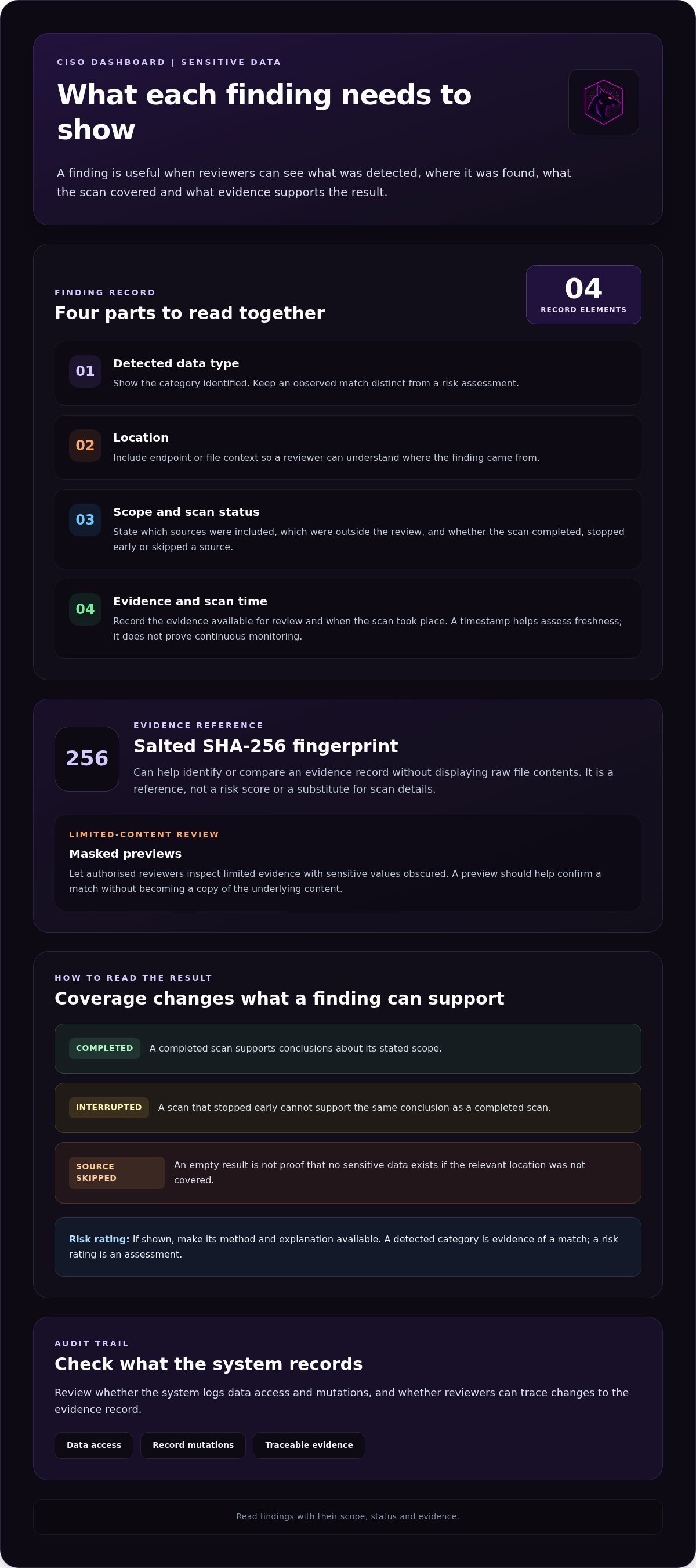
A useful discovery record identifies the detected data type, its location, the scan scope and status, and the evidence available for review. Keep observed facts separate from interpretation. A detected category is evidence of a match. A risk rating is an assessment that needs its own method and explanation. If a dashboard presents a risk score, reviewers should be able to see how it was derived.
What should a sensitive-data inventory record contain?
Record enough context for a reviewer to locate and assess a finding without opening files by default. Useful fields include the detected data type, endpoint or file context, scan status, and scan time. A clear scope statement should show which sources were included and which were outside the review.
Coverage affects how a result should be read. A completed scan across its stated scope supports a different conclusion from a scan that was interrupted or skipped a source. Show these states plainly. Don't present an empty result as proof that no sensitive data exists if the scan didn't cover the relevant location. A timestamp helps teams judge whether a finding is current for their review, but it doesn't show that a source has been monitored continuously.
How can a dashboard present evidence without exposing files?
Raw file contents can expose the information a review is meant to protect. Masked previews let authorised reviewers inspect limited evidence while obscuring sensitive values. A preview should help confirm why a match was recorded without becoming a copy of the underlying content.
A salted SHA-256 fingerprint can help identify or compare an evidence record without displaying raw file contents. Treat it as a reference for the record, not as a risk score or a replacement for scan details. Reviewers still need the data category, location, scope, and status to understand what the fingerprint represents.
Audit logging also matters. Check whether the system records data access and mutations, and whether reviewers can trace changes to records. These entries help teams examine how evidence was handled during a review. They do not, on their own, establish that a finding is accurate or complete.
- Observed evidence: the detected category, source context, scan status, and timestamp.
- Scope: the sources included in the scan and any recorded coverage gaps.
- Interpretation: a risk assessment kept distinct from the detection result, with its basis made clear.
Teams assessing endpoint discovery can configure an endpoint discovery plan and consider how its findings would fit these review fields.
How to compare CISO dashboards and sensitive-data discovery tools
Compare the evidence behind a product's view, not the number of charts on screen. A discovery tool identifies and maps sensitive data within a defined scope. A governance platform may manage policies or permissions, while a wider security platform may bring together alerts from several systems. Those functions can complement discovery, but they answer different questions. A CISO dashboard for sensitive data visibility is only as useful as the discovery data it presents.
Start with your environment. List the sources your review must cover, then compare each product's stated scope with that list. Endpoints, mailboxes, external hard drives, and image-based files may need different scanning methods. OCR, for example, is relevant when the evaluation includes images containing text. Record gaps clearly rather than treating a broad product label as proof of coverage.
Compare coverage and processing against your scope
Establish which sources are scanned, where processing occurs, and whether files leave the endpoint. These details affect coverage and the handling of sensitive content. A tool that scans endpoints may leave mailbox or hard-drive sources outside its scope. Review the product documentation for each source and processing claim. EmberHound Discover scans endpoints locally, and files are not exfiltrated.
Comparison criterion | What to assess
Source coverage | Which endpoints and approved sources are scanned? Are mailbox, external hard-drive, and OCR needs within the stated scope?
Processing location | Where does scanning take place? Does the documentation state whether files leave endpoints?
Evidence | Can reviewers inspect masked previews or fingerprints and understand how a finding was produced?
Audit logging | Are data access and record mutations logged, and can reviewers examine those entries?
Check what evidence and product claims support
Evidence is useful when reviewers can connect a result to its source and understand how it was produced. Masked previews support review without displaying raw file contents. Fingerprints help identify evidence records. Audit records show data access or changes. Check the product documentation for the detail each claim requires.
Keep evidence quality separate from certification or compliance claims. A discovery result can inform a security or compliance review. The organisation still needs to assess whether it meets a standard. Treat framework mappings and integration statements as claims to verify against published documentation. Confirm which product function supports the mapping, what data it uses, and what the integration exchanges. If supporting detail is absent, record the claim as unverified.
Use these criteria to shortlist tools against your stated scope. To assess endpoint discovery in practice, start a free scan.
How to assess sensitive-data visibility before selecting a tool
A scoped evaluation gives the team evidence to compare with its needs. Start with a security question, such as whether sensitive data can be found on selected endpoints. Then define the sources to include and agree what a useful result must show. This keeps a CISO dashboard for sensitive data visibility grounded in the organisation's review rather than a generic product demonstration.
How should a team define its discovery scope?
Write down the locations and data types the review needs to cover. Include endpoints, and record whether approved mailboxes or external hard drives are in scope. Add scanned documents or image-based files if the team needs to assess them, since OCR may be relevant. A GDPR data audit preparation checklist can help organise audit-planning questions alongside the technical scope.
- Set the question. State what the team needs to learn, such as where a selected category of sensitive data appears within a defined group of endpoints.
- List the sources. Record the endpoints and approved data sources in scope. Note mailbox or external hard-drive requirements separately, along with any need to scan image-based files.
- Agree the evidence. Decide what the team needs to inspect in a finding, such as its source context, scan status, and a privacy-preserving preview.
- Run a small pilot. Use a representative, approved portion of the scope. Record what the tool scanned and any sources the pilot didn't include.
- Review the results. Examine sample findings with the people who will use them. Record whether the evidence answers the original question and what needs further investigation.
How should teams review scan results?
Compare pilot results with the agreed scope. Check sample findings, masked previews, and fingerprints, then assess whether the processing behaviour matches the team's requirements. Reviewers should be able to understand how a finding was produced and distinguish an observed result from an interpretation. Record unanswered questions about coverage as follow-up items, not as established product failures.
Keep the review concrete. If an in-scope source was absent from the scan, note the gap and its effect on the evaluation. If a finding lacks enough context for a reviewer to assess it, record which field or evidence is missing. This gives procurement and security teams specific points for comparing tools.
At the end of the pilot, summarise what was tested, what the evidence supports, and what remains outside scope. That record helps the team make a selection based on its requirements. It also gives the next review a clear starting point, without treating a limited test as a statement about every source or use case.
Where EmberHound Discover fits in a CISO visibility workflow
EmberHound Discover is a data discovery platform. It scans endpoints to find and map sensitive data, giving teams findings to consider in their wider security review. Those findings can inform a CISO's reporting process alongside information from other security systems. Discover supplies a discovery input for the visibility workflow.
What EmberHound Discover does for sensitive-data visibility
Discover supports GDPR data discovery and PCI card data scanning. Teams can use these capabilities to locate relevant data for their reviews, then assess the results against their requirements. OCR scanning can include image-based files in a discovery assessment. Local mailbox and external hard-drive scanning are also available for approved review scopes that include those sources.
Product and security information can help teams assess how discovery fits their processes. EmberHound's trust information is one reference for that review. Teams can use the findings in their security and compliance work, with decisions and follow-up managed through their existing processes.
How to take a low-friction first step
A free scan gives a team a practical way to assess discovery against a defined scope. Begin with the endpoints or data categories that matter to the current review, then decide whether to extend the assessment to other sources. This keeps the first evaluation focused and gives reviewers a concrete basis for the next step.
EmberHound uses a usage-based pricing model with no mandatory contracts. Discover can support teams working on GDPR or PCI reviews. The organisation remains responsible for interpreting findings within its own processes.
Put your visibility requirements to work
Turn dashboard requirements into a practical next step: decide who will review discovery findings, how they will record follow-up, and what evidence they need before expanding the assessment. This lets your team test whether discovery results can support a CISO dashboard for sensitive data visibility within its review process.
Set an evidence-handling baseline before the next scan. EmberHound uses TLS 1.3 for data in transit and AES-256 encryption at rest. Assess these protections alongside your organisation's access and retention requirements. Product controls inform those decisions, while your team sets the process for using and retaining discovery evidence.
A focused first assessment gives your team a basis for deciding what to review next. Start with a scope you can assess properly, then build from the evidence.
Choose a defined set of endpoints or data categories for your first assessment. Start free scan and review the findings against your team's visibility requirements.
Frequently Asked Questions
What should a CISO dashboard show for sensitive data visibility?
It should help a CISO see which findings need a decision and which have been reviewed. A practical view can include the review outcome, the person or team responsible for the next action, and any recorded exception. For example, a team could mark a result as requiring investigation or as reviewed with a documented reason. This gives governance discussions a clear view of follow-up, not only a count of results.
Can a data discovery tool replace a CISO dashboard?
No. A discovery tool answers a focused question about data sources, while a leadership dashboard can bring information from different security processes into one reporting view. For example, a CISO may need to discuss discovery results alongside open incidents or unresolved policy exceptions. Decide where discovery findings will be reviewed and reported, then choose a process that connects them to wider decisions.
How can sensitive data be scanned without exposing file contents?
Limit who can review sensitive findings, and keep raw values out of routine reports, tickets, and meeting materials. Give reviewers only the evidence needed to assess a result. Before selecting a tool, consider how review permissions fit your team's roles and how findings will be shared internally. This reduces unnecessary handling of sensitive content during investigation and follow-up.
Does endpoint-only scanning mean files are uploaded?
No. "Endpoint-only" describes the source being assessed; it doesn't, by itself, explain how information moves during processing. Review the product's data-flow information to understand what remains on the endpoint and what information is transmitted. Include that in procurement, and record the answer alongside your own requirements for handling scan results. The label alone doesn't establish how data moves.
Can a sensitive-data discovery platform support GDPR and PCI reviews?
Yes. Discovery can inform a GDPR or PCI review by helping a team identify data locations relevant to its assessment. Connect each selected finding to the internal question it helps answer, note who assessed it, and record the team's conclusion. Use that record as supporting material while the organisation interprets its obligations and assesses its wider controls through its own processes.
What is the difference between masked previews and data fingerprints?
Use a masked preview when a reviewer needs to judge whether a detected match looks relevant. Use a fingerprint to refer to or compare a particular evidence record without relying on its visible contents. For example, a reviewer might inspect a preview during triage, then use the fingerprint when discussing that record with a colleague. Review materials still need access controls.
Is sensitive-data scanning useful for a small security team?
It can help a small team focus review time on a defined question. Choose a task with a clear owner, such as checking a particular group of endpoints before a planned internal review. For organisations with leaner internal resources, partnering with managed IT and cybersecurity specialists like SpaceCenter Systems can provide the operational support needed to act on these findings. Agree in advance who will assess results and how the team will record decisions. This keeps the work manageable and helps the team judge whether the process is useful before broadening its scope.


