

GDPR accountability depends on an evidence trail, not a single dashboard. For a DPO, that trail can be spread across spreadsheets, systems, and teams, while personal data sits in overlooked files or on endpoints. Choosing tools for DPO to demonstrate GDPR accountability starts with identifying which tools organise existing records, which help find data, and what each can prove.
Software can support evidence collection, but it can't make legal decisions or establish compliance on its own. Before choosing a tool, check where its evidence comes from, which locations and data it covers, and how it handles personal data.
This guide compares the main tool categories used in an accountability workflow, including governance platforms, records and assessment tools, and data discovery. It explains where discovery fits when teams need visibility of personal data across endpoints, and how masked evidence can support review without displaying raw file content. You'll also find practical criteria for comparing scope, evidence quality, and data handling, plus steps a lean team can use to organise records and identify gaps.
Key Takeaways
- Choose tools for DPO to demonstrate GDPR accountability by the evidence task they support, from maintaining records to locating personal data.
- Compare each tool by the evidence it captures, the systems it covers, how readily records can be retrieved, and how it handles data.
- Set a workable process by defining evidence needs, assigning owners, collecting records, and reviewing gaps.
- Keep people responsible for decisions and oversight. Software can organise evidence, but it cannot establish compliance on its own.
- Assess where endpoint data discovery fits in your workflow, including how masked previews and fingerprints support review.
What GDPR accountability evidence should a DPO be able to find?
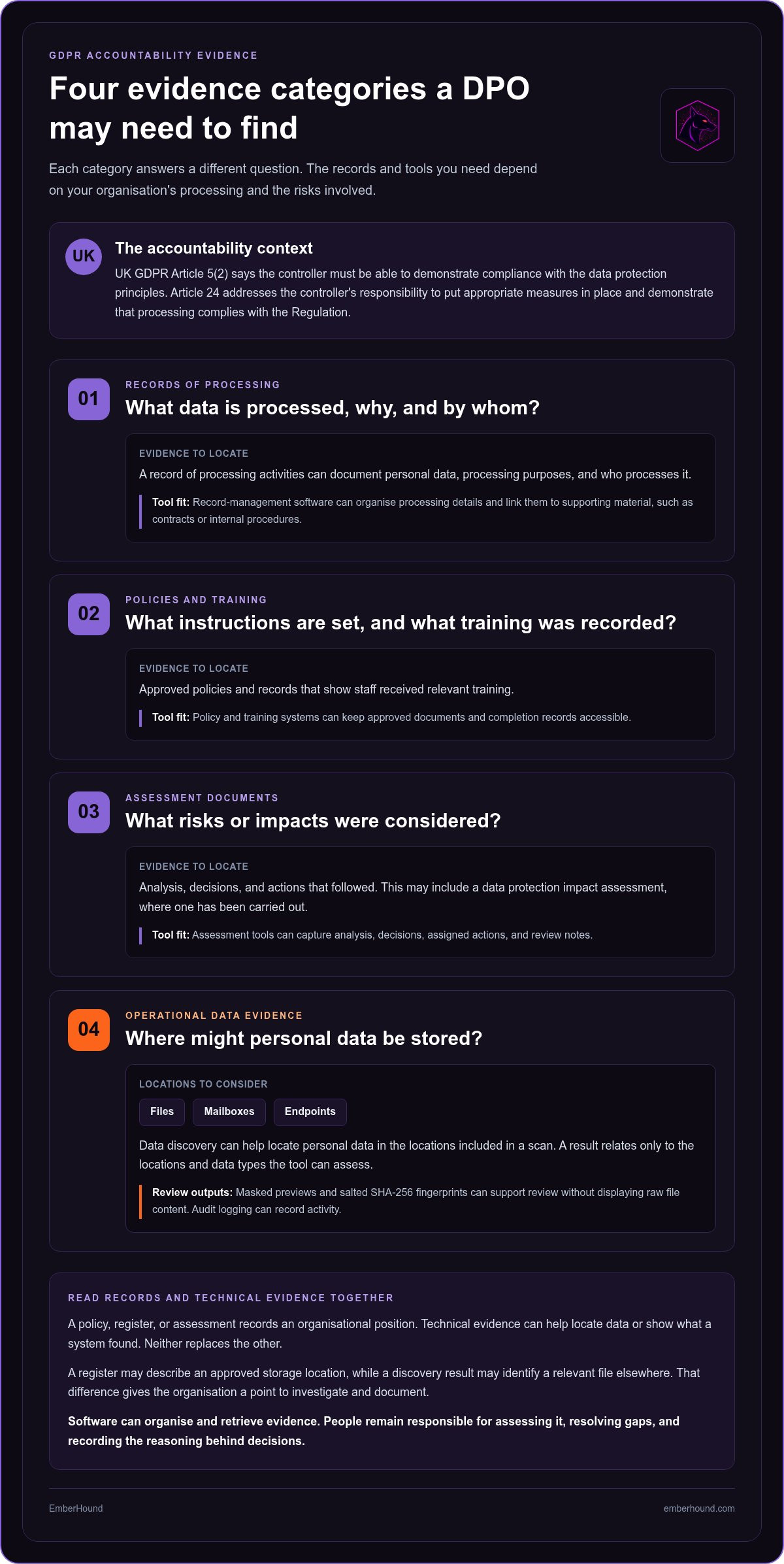
Accountability evidence is information an organisation can use to document and explain its data protection decisions. Under Article 5(2) of the UK GDPR, the controller is responsible for, and must be able to demonstrate, compliance with the data protection principles. Article 24 also addresses the controller's responsibility to put appropriate measures in place and demonstrate that processing complies with the Regulation. The General Data Protection Regulation (GDPR) sets the wider framework. In practice, evidence should show what the organisation decided and how its processing works.
That evidence is rarely held in one report or dashboard. A DPO may need to find records, decisions, and technical information across different teams. The right evidence set depends on the organisation's processing and the risks involved—for instance, teams gathering participant insights through behavioural research platforms like Ergoneers must document specialised data streams alongside routine corporate files.
What evidence might a DPO need to retrieve?
Start with four evidence categories. Each answers a different question:
- Records of processing: What personal data is processed, for what purposes, and by whom? A record of processing activities can document this information.
- Policies and training records: What instructions have been set, and what records show that staff received relevant training?
- Assessment documents: What risks or impacts were considered, and what decisions or actions followed? This may include a data protection impact assessment where one has been carried out.
- Operational data evidence: Where might personal data be stored, including in files, mailboxes, or on endpoints?
Keep the roles of these records distinct. A policy, register, or assessment records an organisational position. Technical evidence can help locate data or show what a system found. Neither replaces the other. For example, a register may describe an approved storage location, while a discovery result may identify a relevant file elsewhere. That discrepancy gives the organisation a specific point to investigate and document.
Where do tools help, and where do they stop?
Tools for DPO to demonstrate GDPR accountability can make evidence easier to record, locate, and retrieve. A register can organise processing details, an assessment tool can store review documents, and a discovery tool can help identify personal data within its defined scope. To assess a result, check what locations and data types the tool covers and what its records actually show.
Software cannot decide whether an organisation's processing is appropriate, take responsibility for its choices, or guarantee compliance. People still need to assess evidence, resolve gaps, and record the reasoning behind decisions. A tool can support oversight, but the organisation remains responsible for that judgement.
For a practical starting point, use the GDPR data audit preparation checklist to identify records to gather before reviewing coverage and gaps.
Which tool categories help DPOs build an accountability evidence set?
Start with the task, not a vendor's general claim that its platform covers compliance. Different tools create or organise different evidence. A processing register describes data use, an assessment tool records analysis, and discovery software can help locate data. The ICO Guide to GDPR Accountability and Governance provides a reference point for the governance context. Use it to identify the evidence you need, then map each task to a suitable tool.
Tool categories can overlap, but their outputs aren't interchangeable. Check whether a system stores a decision, tracks a request, records training, or reports a data location. This makes it easier to see which evidence tasks remain uncovered.
Records, assessments, and request-management tools
Record-management software helps organise processing details and link them to supporting material, such as contracts or internal procedures. Assessment tools give teams a place to capture analysis, decisions, assigned actions, and review notes. Policy and training systems keep approved documents and completion records accessible. Together, these records can show how a decision was reached and who owns a follow-up.
Request-management workflows support the handling of data subject access requests (DSARs). They can help teams assign tasks, gather response material, and track what has been collected. Check whether the workflow gives the response team a clear view of outstanding items and their source records.
For a lean team, ask whether a tool makes evidence easier to retrieve and keep current. A clear owner and a dated record can be more useful than a large library of unreviewed documents. The tools for DPO to demonstrate GDPR accountability should match the evidence work your organisation actually does.
Data discovery and evidence from endpoints
Registers and assessments describe known processing. Data discovery addresses a different task: finding personal data across the locations included in a scan. GDPR data discovery software can identify files across endpoints, giving teams another source to compare with documented records. Check the scan's coverage because a result only relates to the locations and data types the tool can assess.
Discovery outputs can include masked previews and salted SHA-256 fingerprints. Reviewers can use these to examine scan evidence without displaying raw file content. Audit logging can record activity. Choose outputs according to the review question, and check that they provide enough context for the task.
Teams considering endpoint data discovery can explore EmberHound Discover as part of a wider evidence workflow.
How should DPOs compare GDPR accountability tools?
Compare tools against the evidence work your team needs to do. A dashboard can look clear in a demonstration, yet still leave staff searching for source records or unable to tell what a result covers. Tools for DPO to demonstrate GDPR accountability should fit your team's capacity and produce outputs that staff can review and explain.
Use the same criteria for each option. Separate capabilities described in product documentation from broader vendor claims, then assess how each tool fits your requirements. Product documentation describes what the supplier says the tool does. Your assessment should establish whether that capability meets the task you have in mind.
Check scope, evidence quality, and retrieval
Start by listing the locations and material you need a tool to cover. Check which systems, endpoints, files, and formats it can examine, and note any stated exclusions. Then assess the output: can a colleague understand what it represents and trace it to the relevant source? Can staff retrieve earlier results and record follow-up against them?
| Criterion | What to compare |
|---|---|
| Evidence type | Does the tool produce records, assessment material, request information, data-location results, or another defined output? |
| Coverage | Which systems, endpoints, files, and formats are in scope? What is excluded? |
| Retrieval | Can authorised staff find earlier outputs and connect them to review notes or actions? |
| Access controls | How are permissions managed, and can access be limited to relevant users? |
| Data handling | What do the product documents say about processing, retention, transfers, and evidence visibility? |
| Implementation effort | What configuration, training, and ongoing administration will the team need? |
Evidence quality depends on whether an output answers a real review question. If a report lacks enough context to identify its source or meaning, staff may need to pair it with another record. Test retrieval as well as presentation: ask a colleague to find a previous result and explain what action, if any, is recorded against it.
Review data handling and operating fit
Read product and security documentation for details on processing location, file handling, encryption, access logging, and the information visible in outputs. Compare those details with your organisation's requirements. EmberHound's security and data processing information is one source to review as part of that assessment.
Then consider the work around the tool. Who will configure it, review outputs, manage access, and maintain records? Does that fit existing systems and team capacity? Include the effort needed to keep outputs organised, not only the functions shown in a product demonstration.
To assess data discovery as part of your evidence process, Start free GDPR scan.
How can a DPO put accountability tools into a working evidence process?
A workable process gives each evidence item a purpose, an owner, and a clear route for review. Focus on organising records and decisions so people can find and assess them. A tool can support this work, but it cannot guarantee compliance or take responsibility for the organisation's choices.
Use this sequence to get started:
- Define the evidence need. Specify the question the evidence should answer, such as where a category of personal data is held or why a process was approved.
- Assign an owner. Name the person responsible for maintaining the record and the person who reviews it. Avoid leaving ownership with a team name alone.
- Collect the source material. Bring together the relevant record, decision, scan output, or supporting document. Note its origin and the date it was created or reviewed.
- Review gaps and assign actions. Record what is missing, unclear, or inconsistent. Give each follow-up an owner and capture its outcome beside the related evidence.
- Retain the output. Store the final record where authorised colleagues can retrieve it, following the organisation's own retention and access controls.
This creates a traceable working record, not an automated compliance verdict. A scan result, for example, may prompt a review of a file location. The organisation must decide what the result means and record any action taken.
Set ownership and review points
Set review triggers around changes that could affect the evidence. A new system, altered process, or change to a data source may call for a fresh check—for instance, integrating multi-touch attribution software UK enterprises use to track user journeys creates fresh data flows that require documented oversight. Record the trigger, review outcome, decision-maker, and any action due. This gives colleagues context when they revisit the evidence, without requiring a fixed review interval that may not suit every process.
For discovery work, define scope before interpreting results. Record which endpoints or locations were included, what the tool could examine, and what fell outside that scope. GDPR data discovery guidance can help teams frame this part of their evidence process. A finding applies to the scan's scope, so don't treat it as a complete picture of every place personal data may exist.
Keep evidence useful and appropriately protected
Restrict access according to your organisation's controls. Reviewers need enough detail to understand and trace a finding, but may not need to see raw personal data. Where suitable, a masked preview or fingerprint can support review without displaying raw file content. Record why an output was retained and who can access it.
Keep the process manageable for the team. If evidence is copied into several systems, identify the source of truth and link related records where possible. EmberHound's usage-based pricing and free scan can give teams a starting point for assessing data discovery.
Where does EmberHound fit among tools for DPOs?
EmberHound Discover handles the data discovery part of an accountability workflow. It scans endpoints and maps sensitive data within the scan's scope. It does not manage every compliance record or provide legal consulting. The organisation remains responsible for deciding what findings mean and how to act on them.
What EmberHound Discover can contribute
Endpoint scans can help teams locate personal data for internal review. Processing takes place locally. Discover does not access the file system directly or exfiltrate files. Its outputs can include masked previews, salted SHA-256 fingerprints, and audit logging. A masked preview can support a review without displaying raw file content. A fingerprint can help identify a result without including the file itself.
These outputs can add technical evidence to an organisation's existing records. They do not explain why data is present, whether its use is appropriate, or what policy decision should follow. The organisation needs to review those questions, assign findings to someone who can investigate, and document the outcome.
When data discovery is one part of the wider workflow
Discover supports data discovery and evidence gathering. It does not maintain every policy, assessment, or organisational decision a DPO may need to locate. Teams can use scan results alongside their existing records, then document ownership, review decisions, and follow-up in the right places. This keeps the tool's role clear and avoids treating a technical result as a compliance decision.
When comparing GDPR data discovery software, consider which locations you need to examine and how findings will enter your review process. Discover is endpoint-focused. The scan's defined scope matters, and findings may need to be compared with other sources of evidence.
Related capabilities include GDPR scanning, DSAR disclosure packs, OCR scanning, local mailbox scanning, and scanning external hard drives. These options address different data discovery or disclosure tasks. Choose the relevant capability according to the locations and material your organisation needs to review. They do not replace records of processing, policies, assessments, or decisions.
For a DPO comparing tools for DPO to demonstrate GDPR accountability, Discover is one data discovery option within a wider set of evidence tools. It can help internal reviewers see personal data found on endpoints. The organisation still needs to interpret the output, decide what action to take, and keep a record of that decision.
Make your next evidence step manageable
Choose one evidence gap that matters to your team and decide how you'll assess it. For example, define the endpoint scope, name the reviewer, and agree how findings will be recorded. This gives your team a practical way to assess whether data discovery fits its workflow before making it part of routine evidence work. Tools for DPO to demonstrate GDPR accountability should support clear ownership and review, while decisions remain with the organisation.
As part of that assessment, compare technical details with your own security requirements. EmberHound Discover uses TLS 1.3 in transit and AES-256 encryption at rest. These are product safeguards; they do not establish compliance for the organisation or replace its assessment of risk and evidence handling.
Start with a focused scan, then use what you learn to plan the next step in your evidence process.
A focused first step gives your team a clear task to own and review. From there, you can decide what evidence work to tackle next.
Frequently Asked Questions
Does GDPR require a DPO to use specific software?
No. The UK GDPR does not prescribe a particular software product for a DPO or organisation to use. Teams can maintain evidence through suitable manual records, existing business systems, or dedicated tools. The practical test is whether the organisation can find and explain relevant information when needed. Before buying software, identify which evidence is difficult to maintain or retrieve, then decide whether a tool would address that specific problem.
Can software alone demonstrate GDPR accountability?
No. Software can store records or produce technical results, but people must assess what those outputs mean and make organisational decisions. For example, a system might flag personal data in an unexpected location. Someone still needs to investigate, decide what action to take, and record the outcome. Tools for DPO to demonstrate GDPR accountability support that process; they don't replace responsibility, oversight, or judgement.
What is the difference between a data discovery tool and a compliance management tool?
A data discovery tool searches defined locations for data that matches its scanning criteria. A compliance management tool usually helps organise records and tasks, such as policies, assessments, or review actions. Both can support the same evidence process, but their outputs differ. A discovery result may point to a file location; a management record may explain who reviewed it and what decision followed.
Can endpoint scanning expose the personal data it finds?
It depends on the tool and the evidence it presents. EmberHound Discover processes locally on endpoints and does not exfiltrate files. It can provide masked previews and salted SHA-256 fingerprints for review without displaying raw file content. Check what a tool shows, stores, and transfers, and who can access its outputs. Handle scan results under your organisation's access controls.
How can a small organisation keep accountability evidence organised?
Choose one agreed place for each type of record, then name an owner and reviewer. Use a consistent label or reference to connect related material, such as a processing record, assessment, and action note. Keep a brief decision history with the evidence: what was reviewed, who made the decision, and whether follow-up remains open. Start with the records your team needs to retrieve most often.
Can a data discovery tool help with a subject access request?
Yes. A discovery tool can help locate potential personal data in the locations it scans, which may support the search for material relevant to a subject access request. EmberHound provides a DSAR Disclosure Pack, alongside discovery capabilities such as mailbox scanning and OCR. Discovery outputs still need human review. The organisation must determine which material relates to the request and how to handle it before preparing a response.
What should a DPO check before choosing GDPR accountability software?
Test the tool against a real evidence task. For a discovery product, use a representative set of the locations and file types you need to assess, then check whether reviewers can understand and retrieve the results. Review documented data handling, access controls, and setup requirements. Decide who will own the outputs and follow-up. A short, defined evaluation can reveal practical gaps before wider adoption.


