

A data inventory can be accurate and still miss personal data saved in everyday files. DPO challenges with unstructured data start with visibility: emails, attachments, scanned documents, images, and files on staff devices may sit outside formal records and structured databases.
Finding these files by hand takes time, and the search can be difficult to repeat or evidence consistently. Automated discovery can extend the search across endpoints, but the method matters. Your team needs to know what gets scanned, where processing takes place, and what information the tool retains or displays.
This guide explains why unstructured sources create extra discovery work for DPOs. It compares manual searches with automated, endpoint-based discovery, then sets out the evidence and safeguards to assess before choosing an approach. EmberHound Discover scans endpoints locally. Masked previews and salted SHA-256 fingerprints support review without exposing raw file content, while OCR can detect data in images and scanned documents.
Key Takeaways
- DPO challenges with unstructured data start when records do not show where personal data appears across everyday files.
- Group discovery sources by type. Different locations and formats may need different search methods.
- Compare manual and automated searches by coverage, repeatability, evidence, and how each handles raw content.
- Set a clear scope before searching, then review findings and record the evidence your team needs.
- Treat discovery as one part of data protection work. Finding files does not complete GDPR compliance.
Why unstructured data creates a visibility challenge for DPOs
Unstructured data is information held in files and other content that does not follow a consistent database format. A database may store customer details in defined fields, such as name and address. A document, image, or scanned record has no equivalent set of fields for a standard inventory to list. The information is still there, but its location and meaning can be harder to identify.
That gap creates practical DPO challenges with unstructured data. A record of approved systems can show where an organisation expects information to sit, but may not show every working copy, saved attachment, or older file held elsewhere. Discovery depends on knowing where files are kept, what they contain, and how the team will record its review.
What unstructured personal data can look like
Examples include an office document containing staff details, a scanned form with a home address, or an image that captures a name or other identifying information. These are possible sources, not claims about how often each appears in an organisation.
Personal data can appear in the body of a file or within an image. A filename or metadata field may give no indication of the content. Searching file titles alone for a person's name can therefore miss relevant information. Scanned documents may also need text recognition before their contents can be searched.
Why a data map may not show the full picture
A data map records known systems, processes, and locations. While broader data governance strategies frequently compare architectures like a data fabric vs knowledge graph to unify disparate systems, day-to-day file handling can create a very different picture: someone may save a working copy to a shared folder, move an older document to an archive, or keep a duplicate on a device. The original owner may have changed roles, leaving no obvious business contact for the file.
Each gap adds work to discovery. A DPO or colleague must establish which locations are in scope, identify files that warrant review, and record what was checked. Without a repeatable search record, it can be difficult to explain the scope or revisit the same locations later.
This work sits within a broader DPO role. The Data Protection Officer role and responsibilities include privacy oversight, while locating files is an operational task that also involves the teams who manage devices and records. Discovery can inform GDPR work, including a review of where personal data is held, but it does not establish compliance by itself. The GDPR guide explains the wider context. A practical starting point is to compare recorded locations with the file sources people actually use, then keep a clear account of the search and its findings.
Where DPOs encounter unstructured data and why it is hard to find
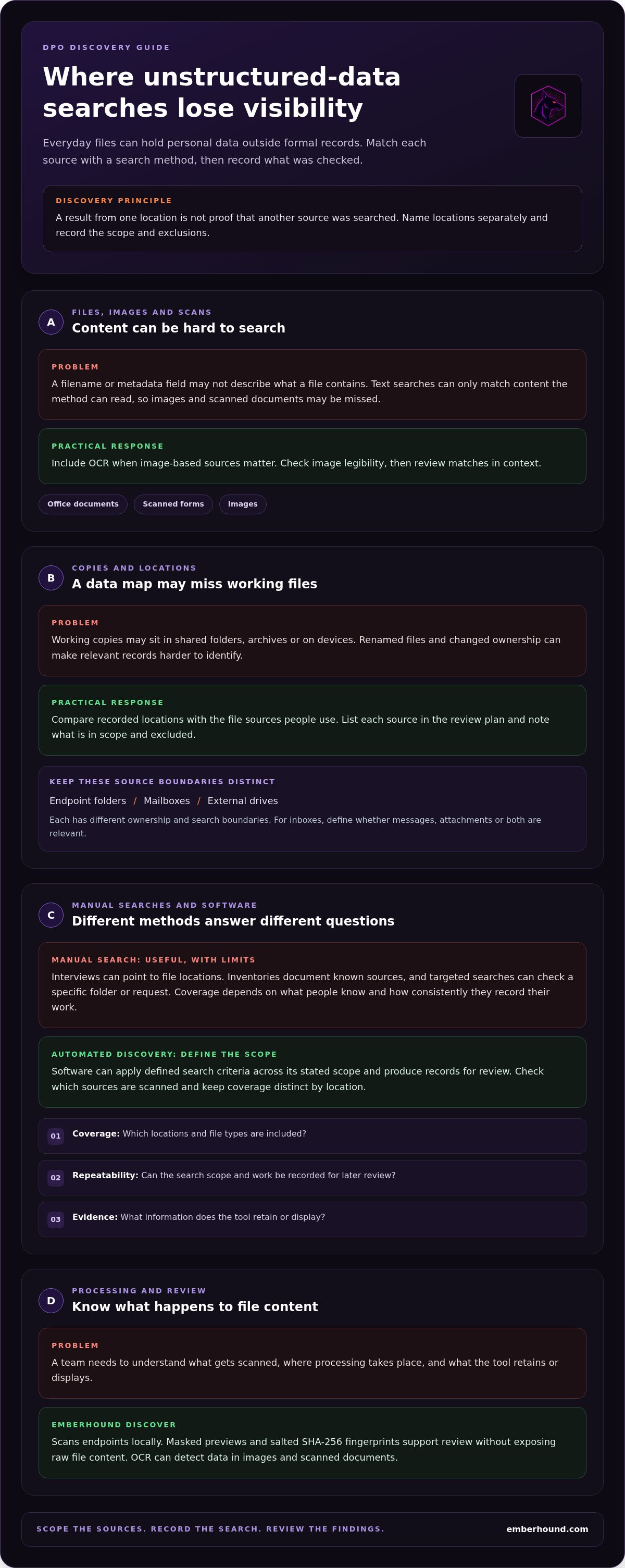
Discovery depends on the source being examined. Endpoint folders, mailboxes, and removable storage have different ownership and search boundaries. Name each source separately in the review plan, so a result from one location is not mistaken for coverage of another. This source-level view helps DPOs identify which search methods fit and where a separate check may be needed.
Files can also be copied between locations or saved under inconsistent names. A search built around one naming convention may miss a renamed copy, while a file moved to an unfamiliar folder may sit outside the expected review area. Record source scope and exclusions before interpreting results.
Files, images, and scanned documents
Searchability depends on how content is stored. Text-based searching can only match content the method can read. For image-based material, OCR can extract text for detection, but results depend on image legibility and how the content is arranged. Include OCR in the scope when image-based sources matter, then review matches in context.
Endpoints, mailboxes, and external drives
Endpoint discovery gives teams a defined boundary for checking files held on devices. Mailboxes and external drives have different access and review boundaries, so treat them as separate sources in the discovery plan. EmberHound provides mailbox and external hard drive scanning as add-ons. Record these sources separately from endpoint coverage so the search scope is clear.
For inbox reviews, define whether messages, attachments, or both are relevant. For external drives, identify which devices are in scope and who is responsible for them. These boundaries make later review more straightforward. Explore endpoint data discovery as a starting point for a defined scan scope.
Manual searches or automated discovery: how DPOs can compare approaches
Manual checks and discovery software answer different questions. Interviews can reveal where teams keep files; inventories can document known locations; targeted searches can investigate a specific folder or request. Software can apply defined search criteria across its stated scope and produce records for review. When addressing DPO challenges with unstructured data, compare each method against the sources you need to examine and the evidence your team must retain.
What manual discovery can and cannot establish
Manual discovery is useful when the scope is narrow, a team member knows the location, or a particular file needs checking. Staff interviews can point to shared folders, and a focused search can test a known location. These methods rely on what people know and how consistently they record their work. An undocumented folder or inconsistent filename can make a relevant file harder to identify. Manual work can still be appropriate, but its coverage depends on the scope and records kept.
Compare each approach against the same criteria:
Source coverage: Manual searches can target locations identified by staff or an inventory. Automated discovery covers only the endpoints, file types, and sources stated for the tool. Check exclusions and add-on sources before drawing conclusions.
Repeatability: A manual search can be repeated when the team records its locations, terms, and method. Software can apply documented criteria again within its supported scope. In either case, record what was searched and what fell outside scope.
Evidence: Manual notes can document checks and decisions. Software outputs may include findings, timestamps, or other records, depending on the tool. Confirm which evidence is produced and whether it supports review of individual results.
Raw-content handling: Manual review may expose file contents to the person checking them. Software differs. Assess what it reads, displays, stores, and transfers, including whether previews reveal raw content.
Questions to ask when assessing discovery software
Start with the scope. Which endpoints and file types can the tool scan? Does that scope match the locations in your discovery plan? Then examine how the software processes and presents results. A finding is easier to review when the tool provides enough context to assess it without displaying more content than the task requires.
EmberHound Discover processes scans locally on endpoints, and files are not exfiltrated. Masked previews and salted SHA-256 fingerprints support review and evidence handling without exposing raw file content. Its audit logging records activity. Assess these controls alongside the security measures: TLS 1.3 in transit and AES-256 encryption at rest. The EmberHound security and trust information sets out further detail.
For a lean team, the decision is often about fit: keep targeted manual checks where they work, and assess automation for repeat searches within its defined scope. No tool result proves that every location has been searched. Keep the scope and exclusions visible in your records.
A practical workflow for finding and evidencing personal data
A defined process helps teams understand what they searched and how they handled findings. It also keeps the work focused: discovery can inform data protection activity, but it does not complete GDPR compliance. These steps give DPOs a repeatable basis for reviewing personal data across agreed sources.
Set scope before scanning
Write down the endpoints and source types in scope before a scan begins. List exclusions separately. Treat mailbox and external hard drive scanning as distinct sources, and record whether they are included. If scanned documents or images are in scope, consider whether OCR is needed to detect text within them.
- Define the question. State what the discovery is intended to locate and why. Agree which teams, devices, and repositories are relevant to that purpose.
- Record coverage. Note the endpoints and file types included, plus any exclusions. List mailboxes and external drives separately so no one mistakes endpoint coverage for coverage of every source.
- Choose the search method. Set out whether the team will use an inventory, targeted searches, discovery software, or a combination. Keep the method consistent with the agreed scope.
- Check handling before processing. Establish where scanning takes place, whether raw file content leaves the endpoint, and what the tool displays or retains. EmberHound Discover processes scans locally on endpoints, and files are not exfiltrated.
- Review findings. Check each result in context and record the review decision. A match is a prompt for assessment, not by itself a conclusion about the data or its use.
- Preserve the search record. Document the scope, method, exclusions, review decisions, and available evidence. Keep this record with relevant audit preparation material; the GDPR guide provides wider context for that work.
Review findings and preserve useful evidence
Evidence should help a reviewer understand what was found and how the team assessed it, while limiting unnecessary exposure of file contents. Masked previews can show relevant context without displaying raw content. Salted SHA-256 fingerprints can identify findings and help distinguish records during review. A fingerprint does not establish that processing is lawful or that a file should be retained.
Keep the evidence in context. Record which source was searched, when the review took place, and the decision made. EmberHound audit logging records platform access and mutations. Those logs can support a record of activity within the platform, but they do not replace the team's notes about search scope or decisions. When preparing audit material, separate discovery evidence from the wider records needed to explain the organisation's data protection work.
How EmberHound supports DPO discovery work with unstructured data
EmberHound Discover is the live data discovery track for locating and mapping sensitive data. For teams facing DPO challenges with unstructured data, it scans files on in-scope endpoints and presents findings for review. Teams still need to define which devices and sources to assess, then interpret results against that scope.
What the discovery workflow can show
Findings and data maps show where sensitive data was detected within the scan's defined coverage. Reviewers can use this information to identify locations that may need attention. The output supports discovery and evidence handling. It is not a legal conclusion or a complete GDPR compliance assessment.
Processing takes place locally on endpoints, and files are not exfiltrated. Masked previews give reviewers context without displaying raw file contents. Salted SHA-256 fingerprints identify findings, helping teams refer to them during review without using the underlying content as the evidence itself.
OCR can detect data in images and scanned documents included in scope. This supports discovery in files whose text would not be found through a standard text search. Mailbox and external hard drive scanning are available as add-ons, so teams can include those locations as separate sources when defining coverage.
Start with a scoped GDPR scan
Begin with the personal data sources your team has chosen to review. Define the endpoint scope, note any exclusions, and decide whether scanned images or documents require OCR. If the discovery needs to include mailbox or external drive content, account for those sources separately. A clear scope gives reviewers a basis for interpreting findings and recording what the scan did not cover.
During discovery, file contents remain on the endpoint. EmberHound's platform does not access the file system directly. It uses TLS 1.3 for data in transit and AES-256 encryption at rest. These controls describe the processing and encryption model; they do not guarantee a particular compliance outcome.
The pricing page explains usage-based access and the free scan entry point. Use that information when considering how to begin discovery within your defined scope, without assuming a particular scan result or coverage beyond the sources selected.
Make your next discovery step count
DPO challenges with unstructured data are easier to manage when discovery starts with a clear question and a defined scope. Choose the personal data sources you need to review, record what falls outside that scope, and decide how your team will assess findings. This gives colleagues a practical starting point they can revisit as systems and file locations change.
EmberHound Discover scans endpoints locally, with no file exfiltration. Masked previews and salted SHA-256 fingerprints support evidence handling without exposing raw file content. The platform uses TLS 1.3 in transit and AES-256 encryption at rest. These controls describe how discovery is handled; findings still need review in the context of your organisation's work.
A scoped scan gives your team a defined set of sources to review. Use the results as discovery evidence, then decide what follow-up is appropriate for your records and processes.
Start with a defined scope and a free GDPR scan. Use the findings to guide your team's review.
Frequently asked questions
Does GDPR require a DPO to use automated scanning?
No. GDPR does not prescribe a particular discovery product or name automated scanning as the required method. The ICO's accountability guidance explains the need for organisations to demonstrate their compliance measures. A DPO can document why the chosen discovery process fits the organisation, what it covers, and where its limits sit. This is general information, not legal advice.
Can discovery software replace a DPO's review?
No. A person must assess whether a finding is relevant and decide what follow-up is appropriate. For example, a name match could refer to a customer, a colleague, or someone mentioned in passing. Its context affects how the result should be handled. Software output reflects its configured scope and detection logic. Use it as an input to organisational decisions, not as an automated legal judgement.
What should a DPO record after finding personal data in files?
Record the source and location, the finding category, its review status, and any follow-up action. Add enough context for another authorised colleague to understand why the result was assessed in a particular way. For example, a brief note can explain why a possible match was dismissed. Avoid copying personal data into notes when a reference or concise description will do. Follow the record-keeping process set by your organisation.
Can masked previews show enough information to review a finding?
Sometimes. A preview may support initial triage, but a reviewer might need more context to decide whether a result is relevant. Set review access according to the task, and record when a preview was insufficient. EmberHound uses masked previews, but masking does not establish that a finding is accurate or remove every disclosure risk. Treat the preview as one input to a human review.
How often should an organisation scan for personal data?
There is no single schedule that suits every organisation. Set a cadence based on how often the relevant endpoints and data stores change, and on how the team reviews discovery results. A device refresh or a new repository might prompt an additional check. Record the chosen schedule and its scope, then revisit both when the environment or review process changes. Do not present an internal schedule as a fixed GDPR interval.
Can an unstructured-data scan identify every instance of personal data?
No scan should be treated as proof that every instance has been found. Results depend on the data patterns the method can detect and the sources included in its configuration. For EmberHound, mailbox and external hard drive scanning are add-ons, so account for them separately when planning coverage. Review exclusions and assess findings against the task. A clean result is limited to the scan that was actually run.
Does a data discovery scan replace a data protection impact assessment?
No. A discovery scan provides information about data within its scope; an impact assessment examines the risks of a proposed processing activity. The ICO's DPIA guidance explains the assessment process and when organisations should consider one. Discovery findings may inform that work, but they do not amount to a completed assessment or decide what action the organisation should take.


