

Could your team find sensitive files on endpoints without taking on a wider privacy management platform? That question sits at the heart of choosing a trustarc data discovery alternative for uk businesses. TrustArc covers privacy management tasks including data discovery, data mapping, risk assessment, and consent management. An endpoint discovery tool focuses on locating sensitive data on devices. The products may sound similar, but their scope and workflows differ.
For a lean compliance or IT team, the practical questions are where scans run, how findings are reviewed, which security controls protect the process, and whether the product scope matches your needs. Compare these points before deciding whether to change tools.
This guide compares TrustArc and EmberHound on those points. EmberHound Discover scans endpoints and processes data locally. Masked previews and salted SHA-256 fingerprints support evidence review. TLS 1.3 protects data in transit, and AES-256 encryption is used at rest. You’ll see how privacy management and endpoint discovery serve different jobs, what to assess in a focused alternative, and how a free scan can help you evaluate EmberHound for your team.
Key Takeaways
- Define which endpoints and data sources your team needs to cover before comparing products.
- Compare workflow, evidence outputs, and security controls using the same criteria for each option.
- Assess a trustarc data discovery alternative for uk businesses against your team’s UK GDPR context and existing privacy workflows.
- Use a short scoring process to assess scope, evidence, security, and day-to-day fit.
- A free scan can help your team test whether EmberHound fits its discovery needs.
TrustArc data discovery alternatives: identify the job your team needs done
Start with the work your team needs done. A vendor’s reputation won’t show whether a product scans the sources you care about, produces evidence you can review, or fits the time your team has available. Assess a trustarc data discovery alternative for uk businesses against those practical needs, rather than a general ranking of privacy software.
Data discovery means locating and mapping sensitive data across sources included in a defined scan. Depending on the product and its scope, those sources might include employee endpoints, mailboxes, or external drives. Endpoint data discovery is the process of scanning in-scope devices to locate sensitive data and record findings for review; it does not certify regulatory compliance.
Some discovery methods use metadata to describe files and their properties. The broader concept of metadata discovery can help explain how systems identify and organise information. For a buying decision, focus on what the tool scans and what your team can do with its results.
When a TrustArc alternative is worth evaluating
Consider an alternative when your scope changes, your team has less time for manual searches, or endpoint scanning becomes a specific requirement. These are reasons to compare workflows, not evidence that TrustArc lacks a capability. TrustArc includes data discovery and mapping within a wider privacy management suite, alongside other functions.
Keep the decision tied to your setup. If existing tools already support consent management or DSAR handling, you may need a discovery tool that works alongside them. If one platform supports several workflows your team relies on, replacing it could add work. Map the required tasks first, then assess whether a focused option covers the discovery need.
Data discovery versus a broader privacy platform
A discovery tool locates data within its scan scope. A wider privacy platform may also support programme tasks such as consent management, data mapping, risk assessment, or DSAR workflows. Product scope varies, so compare specific functions rather than relying on category labels. Discovery results can inform privacy work, but a scanning tool does not replace legal advice or every function in a privacy programme.
Before comparing products, write down which tasks your current tools must continue to support. Separate those from the discovery requirement. For example, a team may need to locate personal data on staff devices while keeping its current process for consent records and individual rights requests. That distinction helps prevent a change from leaving an operational gap.
Make a short scope note before moving to a shortlist:
- Sources: Which endpoints and other locations need scanning?
- Purpose: What questions must discovery results answer?
- Existing workflows: Which privacy tasks must remain in place?
- Team capacity: Who will run scans and review findings?
With those answers, you can judge whether a broader privacy platform or a focused endpoint discovery tool fits the work. The right trustarc data discovery alternative for uk businesses depends on the sources, evidence, and ongoing workflows your team needs to manage.
Compare TrustArc data discovery alternatives by workflow and evidence
Compare what each product does during a scan, what information leaves the source device, and what a reviewer receives afterwards. A feature list alone won’t show whether the workflow fits your endpoints or produces evidence your team can use.
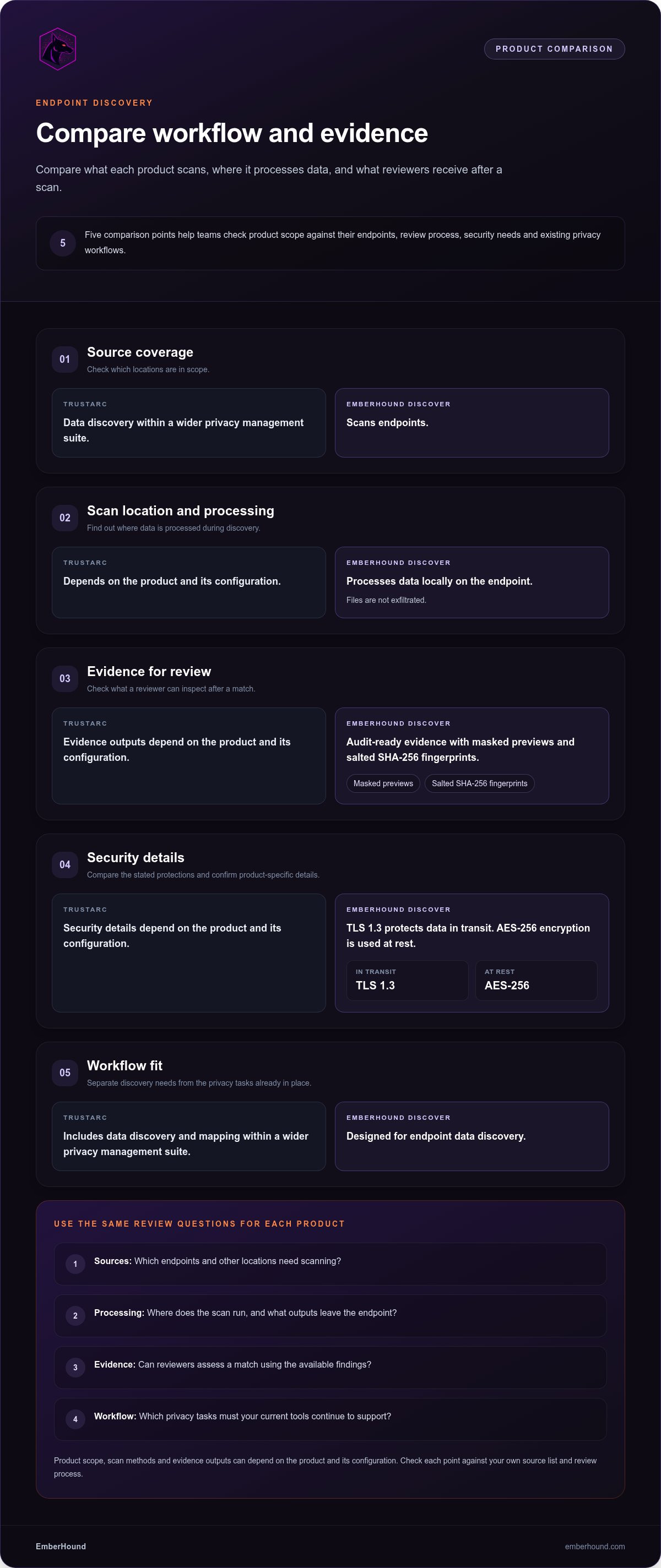
Use the table as a working checklist. TrustArc includes data discovery within a wider privacy management suite. The exact sources scanned, processing model, and evidence outputs depend on the product and its configuration.
| Comparison point | TrustArc | EmberHound Discover |
|---|---|---|
| Source coverage | Data discovery within a wider privacy management suite. | Scans endpoints. |
| Scan location | Depends on the product and configuration. | Processes data locally on the endpoint. |
| Evidence | Depends on the product and configuration. | Produces audit-ready evidence with masked previews and salted SHA-256 fingerprints. |
| Security | Depends on the product and configuration. | Uses TLS 1.3 in transit and AES-256 encryption at rest; files are not exfiltrated. |
| Workflow fit | Includes data discovery and mapping within a wider privacy management suite. | Designed for endpoint data discovery. |
Check what each tool scans and how it processes files
Start with your source list. If you need endpoint discovery plus mailbox or external-drive scans, record each source separately and compare it with each product’s scope. Include the scan location and processing model in the same comparison.
EmberHound Discover scans endpoints and processes data locally, with no file exfiltration. Use this as a concrete baseline: record the device types in scope, what the scan accesses, and what outputs leave the endpoint. Apply the same criteria to each product you assess.
Compare evidence, access controls, and security details
Raw file access and masked evidence outputs are different. Reviewers can inspect masked previews and salted fingerprints without seeing raw file content in the evidence. Check whether findings give reviewers enough context to assess a match and whether the evidence fits your review process. EmberHound produces audit-ready evidence, but that description does not specify particular audit-log functions.
Encryption and scan outputs describe product controls and evidence. They don’t certify legal compliance. UK teams can refer to UK data protection legislation for official government information and seek appropriate legal advice. Apply the same comparison criteria to each tool and record any details that remain unclear.
If you want to assess endpoint discovery in practice, a free EmberHound scan can help you evaluate workflow fit.
Assess whether an alternative fits UK GDPR and your operating model
UK GDPR is the context for assessing how your organisation handles personal data. A discovery tool can help your team locate data within its scan scope and review findings. The tool alone does not establish compliance or decide what your organisation must do. For regulatory guidance, consult the ICO UK GDPR guidance and seek appropriate legal advice where needed.
Assess a trustarc data discovery alternative for uk businesses against your actual operating model. A platform may cover more workflows than your team needs, while a focused scanner may leave other processes untouched. Start by setting a clear boundary between discovery work and the privacy programme around it.
Match the tool to your team and data sources
Set out which sources are must-haves and which are optional. Endpoint coverage may be the immediate priority, while mailbox scanning, external hard drives, or OCR may matter for particular teams or records. Avoid scoring a product highly for scope you won’t use. Record who will define scan scope, review findings, and decide what happens next.
Capacity matters. A lean IT team may need a workflow that keeps scan review manageable and makes findings clear to the people who must act on them. Consider how the tool fits with your existing privacy systems, including any consent or DSAR workflows. GDPR data discovery software for UK teams can support discovery work, but scanning does not replace legal advice or the wider privacy functions your organisation may need.
Check evidence handling and security expectations
Decide what reviewers need to see to assess a finding. Can they inspect a useful preview without exposing raw file contents? Is there a fingerprint or other reference to distinguish findings during review? Establish what product records are available to support your internal process. Assess audit logging as a separate requirement rather than inferring it from a general claim about audit-ready evidence.
Compare processing location and security controls using documented product details. EmberHound Discover processes data locally during endpoint scans and does not exfiltrate files. Its evidence includes masked previews and salted SHA-256 fingerprints. TLS 1.3 protects data in transit, and AES-256 encryption is used at rest. These are product controls, not a compliance certification.
Review EmberHound’s security controls alongside the details for other tools. Keep a simple record of each product’s processing model, evidence available to reviewers, encryption details, and unanswered questions. This gives your team a basis for judging operational fit without treating a scanner as a substitute for UK GDPR assessment.
Use a practical shortlist to compare TrustArc data discovery alternatives
A short, consistent review is more useful than a long list of features. Give each option the same scope and questions, then record where it meets your needs, where it falls short, and what remains unclear. Keep mandatory requirements separate from preferences so a product demonstration doesn’t distract from a missing source or evidence need.
Questions to resolve before selecting a tool
Before comparing options, write down the systems and endpoints that must be included. Name optional sources separately, such as mailboxes, external hard drives, or files that may need OCR. Identify who will review findings and which roles should see evidence. Note dependencies on consent management, DSAR handling, or other privacy programme tools that will remain in use.
- Define scope. List required endpoints and sources. Score each tool against every must-have, and mark unsupported or unverified coverage clearly.
- Check evidence. Specify what reviewers need to see, such as a finding’s location, a masked preview, or a fingerprint. Record whether the output gives your team enough context to assess and follow up on a result.
- Review security. Compare documented processing location, data access, encryption, and audit logging. Separate confirmed product details from questions that remain open.
- Test workflow fit. Check the work required to run scans, review results, and pass findings to the relevant team. Note extra manual steps or process changes.
For a simple scorecard, rate each criterion as met, partly met, or unverified. Treat a mandatory source or control marked unverified as an open decision, not a pass. This keeps a small compliance or IT team focused on gaps to resolve before selection.
Test the workflow against real team needs
Use representative in-scope endpoints and a typical review task. Ask the people who will handle findings to assess whether the output is clear and whether the evidence fits internal handling requirements. For EmberHound Discover, include its local processing and masked evidence in that assessment. Record the result, including any steps your team would still need to complete manually.
Commercial fit needs the same care. Compare how usage-based pricing maps to your expected scan activity, and assess each product’s contract terms, renewal conditions, and commitments. EmberHound has usage-based pricing and no mandatory contracts. Its pricing model is one part of the decision alongside workflow fit. A free scan gives your team a practical way to assess the evaluation process.
Use this shortlist to decide which option merits a closer test. Keep the scorecard with your procurement notes so the decision reflects your team’s requirements, not assumptions about vendor reputation.
Evaluate EmberHound as a TrustArc data discovery alternative
EmberHound Discover is a focused option for teams whose main requirement is finding sensitive data on endpoints. It covers a defined discovery task, with local processing and no file exfiltration. Evidence includes masked previews and salted SHA-256 fingerprints, so reviewers can examine findings without seeing raw file contents.
Assess a trustarc data discovery alternative for uk businesses against the work it needs to do and the wider tools already in place. EmberHound can support discovery alongside existing privacy workflows. It does not replace every function a broader privacy management platform may cover.
Where EmberHound fits a focused discovery requirement
EmberHound provides GDPR data discovery and PCI card data scanning, with combined GDPR and PCI coverage where both are in scope. The endpoint workflow has additional options for local mailbox scanning, external hard drive scanning, and OCR. EmberHound also provides DSAR disclosure packs.
These capabilities can suit teams whose discovery work spans more than standard endpoint files. Map each need to a specific workflow before choosing. For example, a team may prioritise endpoint scans first, then assess whether mailbox scanning or OCR is relevant to its records. Keep data discovery separate from other privacy programme tasks handled by your current tools.
EmberHound is a focused data discovery option. Teams that rely on broader consent management, data mapping, or other programme workflows should plan how those tasks will continue across their toolset. EmberHound’s scanning and evidence outputs support discovery work; they do not establish legal compliance or provide legal advice.
Decide whether to begin with a free scan
A free scan is useful when you have a defined scope and clear evaluation criteria. Choose representative endpoints, decide who will review the results, and note what evidence would make a finding actionable. Then assess whether the scan workflow fits the way your staff handle discovery tasks. A test is more informative when the team knows what it needs to learn before it starts.
If you’re still defining the discovery requirement, the GDPR data discovery guide can help frame the work. If your scope is clear, use the free scan to evaluate EmberHound against your needs. Record the outcome alongside the other options you’ve assessed.
Make your next evaluation a controlled decision
Before changing tools, agree internally on what would make an evaluation useful. Choose one discovery question, set a clear boundary for the test, and decide who will review the outcome. This gives compliance and IT a shared basis for deciding whether to continue, adjust the scope, or keep the current setup.
The right trustarc data discovery alternative for uk businesses should meet requirements your team can assess against real needs. A small, defined evaluation helps you make that decision without turning the first step into a wider programme change.
Frequently asked questions
Is TrustArc a data discovery tool?
Yes. TrustArc includes data discovery and data mapping within a wider privacy management suite. Its tools also cover areas such as risk assessment and consent management. The sources scanned, processing model, and evidence available depend on the product and configuration. This distinction matters if your immediate need is endpoint scanning rather than a wider set of privacy programme workflows.
What should UK businesses compare when choosing a TrustArc alternative?
Compare whether the tool covers your required sources, how it processes files, what reviewers can see, and which security controls are documented. Then consider how findings fit your existing privacy processes and who will review them. For a trustarc data discovery alternative for uk businesses, include commercial terms in the comparison. For example, consider whether the pricing model suits occasional scans or recurring endpoint reviews, and review contract terms before making a decision.
Can a data discovery tool replace a privacy management platform?
Only if the organisation no longer needs the wider workflows supported by its current platform. A discovery tool can help locate sensitive data, while privacy management software may support tasks such as consent records or DSAR handling. Before switching, list the work each system currently supports and assign an owner to every process that must continue. Don’t assume a scanner replaces a workflow because both products refer to data mapping or discovery.
How does endpoint-only data discovery work?
Endpoint-only discovery scans in-scope devices for defined types of sensitive data. With EmberHound, scanning and processing happen locally on the endpoint, and files are not exfiltrated. Findings can include masked previews and salted SHA-256 fingerprints for review. A practical test is to select representative devices, then assess whether the results identify the locations your team needs to investigate. Results relate only to the endpoints and data included in the scan.
Does EmberHound send scanned files to the cloud?
No. EmberHound processes scans locally on the endpoint and does not exfiltrate scanned files. Evidence outputs include masked previews and salted SHA-256 fingerprints, which support review without exposing raw file content. TLS 1.3 is used for data in transit, and AES-256 encryption is used at rest. If your organisation has specific internal rules for handling scan results, assess the evidence workflow against those rules before expanding the scan scope.
Can data discovery software guarantee GDPR compliance?
No. Software can support data discovery by helping a team locate personal data and review findings, but it cannot guarantee that an organisation complies with UK GDPR. Outcomes also depend on the sources included, how findings are assessed, and the organisation’s wider processes and decisions. Treat scan results as input to your compliance work, not as a legal determination. Consult appropriate legal advice for questions about your organisation’s obligations.
How can a business assess a data discovery tool before adopting it?
Set a small, defined test scope and agree what a useful result looks like before scanning. For example, select representative endpoints and ask the staff who will review findings whether each result gives them enough information to act. Record manual steps, unanswered security questions, and costs or contract terms that need review. A free scan can be an initial evaluation step; it should test your criteria, not replace them.


