

Could a DSAR review miss personal data because it sits in a file nobody thought to check? Relevant records can be spread across staff endpoints, and manual searches can take time while leaving gaps. DSAR data discovery software scans the endpoints in scope for personal data and gives reviewers evidence to assess without routinely opening raw file content.
EmberHound Discover processes data locally, with no file exfiltration. It provides masked previews and salted SHA-256 fingerprints for evidence review. Its audit logs record data access and mutations, giving reviewers a record of activity during the review.
Discovery is one part of a DSAR workflow. People still decide what is relevant and what to disclose. This article explains how endpoint scanning can locate potential records, how reviewers can assess the evidence, and where EmberHound's DSAR disclosure pack fits after discovery.
Key Takeaways
- Use dsar data discovery software to locate potential records across the endpoints included in your scan scope.
- Check which locations a scan covers. Endpoint scanning does not automatically search every data location.
- Review candidate records for relevance and context before deciding what to disclose.
- Assess how evidence is presented and whether access or changes are recorded for later review.
- Use discovery findings as an input to your DSAR workflow, with a person responsible for disclosure decisions.
What DSAR data discovery software does for a subject access request
DSAR data discovery software searches locations included in a defined scan scope for personal data that may relate to a request. It identifies candidate records for people to review. It does not decide whether a record is relevant or should be disclosed.
A file can contain a matching name but refer to someone else, or mention the requester in a context that needs careful assessment. A scan can direct reviewers to the file. A person must assess its relevance, context, and treatment in the response.
Where DSAR discovery fits in the response process
Discovery follows the definition of the search scope and comes before preparing the response. The team identifies locations to scan, reviews the matches, then decides which material belongs in the response. This gives reviewers a starting point while keeping disclosure decisions with people. EmberHound's DSAR disclosure pack supports the later work of organising response material.
For example, a scan might flag a document containing the requester's name. A reviewer can check whether it concerns that person and whether its contents are relevant to the request. A candidate match is a prompt for review, not an instruction to disclose the document.
What a discovery scan can and cannot establish
A scan can identify matches in the locations it checks. Reviewers can assess those results against the request and decide whether a record needs further examination. A match does not establish a final legal conclusion about relevance or disclosure. Those decisions need human review.
Coverage depends on the systems and locations included in the scan. An endpoint-only scan covers the endpoints in scope. It does not show what may be held in repositories or systems outside that scope. Set out the boundaries before interpreting results, and record which locations were included.
Scope matters as much as the match list. If staff endpoints are included but a mailbox or shared repository is outside the scan, the results say nothing about that excluded location. Use the scope record to identify where further review may be needed. Discovery shows findings from scanned locations; accountable reviewers decide how those findings relate to the request.
How DSAR data discovery software scans endpoints and creates evidence
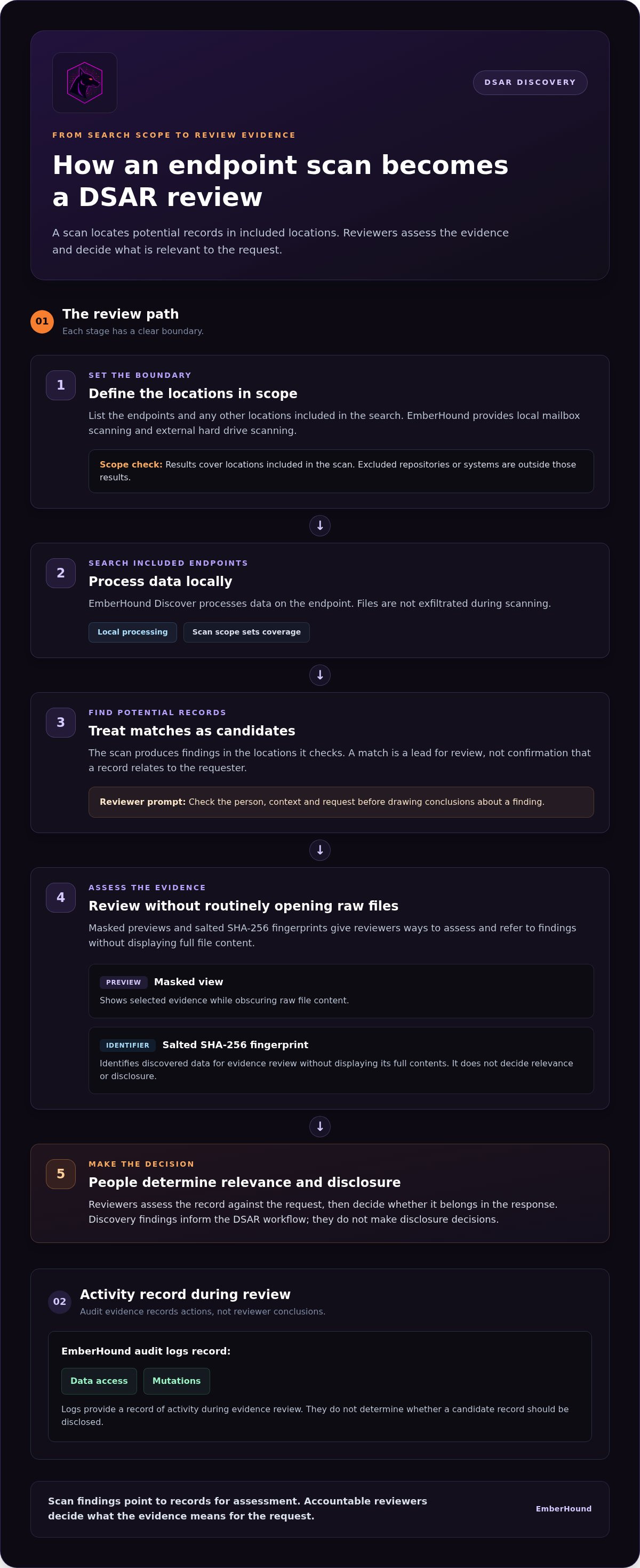
A useful scan follows a clear sequence: define the scope, scan the included endpoints, review the matches, then prepare evidence for the DSAR review. Scope sets the boundaries, scan results point reviewers towards potential records, and human review determines what those records mean for the request.
From endpoint scan to candidate records
Start by identifying the endpoints included in the scan. Discovery searches only locations within that scope, so keep the boundary clear when interpreting results. With EmberHound Discover, processing takes place locally on the endpoint, and files are not exfiltrated. The scan produces findings for review; a match is not automatically relevant to the request.
A scan match is a lead for review, not confirmation that a record is relevant to the request.
Reviewers can assess findings against the request and decide which need closer examination. They can then prepare appropriate evidence for the response process. This separates the technical task of locating potential records from the human judgement needed to assess them.
How masked previews and fingerprints support review
Reviewing evidence raises a practical question: how can staff assess a finding without exposing the whole file? A masked preview can show selected evidence while obscuring raw file content. Reviewers can use it to assess a finding before deciding whether further examination is needed.
A salted SHA-256 fingerprint is an identifier associated with discovered data. It gives reviewers a way to refer to that data in evidence without displaying its full contents. The fingerprint helps identify the data; it does not decide whether it relates to the requester or belongs in a disclosure.
Audit logging records data access and mutations. These records show logged activity during evidence review, but do not replace the review or determine whether a candidate record should be disclosed.
Define the included endpoints, examine findings through the available evidence, and record human decisions about relevance and disclosure. EmberHound Discover provides endpoint scanning and evidence for this review stage. To explore the setup, view the endpoint discovery options.
How to assess DSAR discovery software coverage, security, and evidence
Compare tools against the locations you need to search and the evidence reviewers need to assess. A clear scope prevents a common misunderstanding: endpoint scanning covers the endpoints included in the scan, not every repository across an organisation.
Use these criteria to compare dsar data discovery software. Focus on what is scanned and what reviewers can see.
Identify the endpoints in scope and any separately scanned locations. EmberHound provides local mailbox scanning and external hard drive scanning. Record which locations are included and any exclusions.
Check where processing happens and whether file content leaves the endpoint during scanning. EmberHound processes data locally, with no file exfiltration.
Check whether reviewers can use masked previews and salted fingerprints to assess a finding without opening raw file content. EmberHound Discover provides both.
Find out whether the system records data access and mutations, which actions are logged, and how those records support review. EmberHound audit logs record data access and mutations.
Questions to ask about data locations and scan scope
Map the request to the locations your team plans to scan. Identify the endpoint types included, then distinguish endpoint coverage from local mailbox scanning, external hard drive scanning, and other separately scoped locations. A wider search depends on those locations being included. Keep a record of what the scan covered and what it did not.
Questions to ask about evidence and data handling
Assess whether reviewers can use a masked preview and salted SHA-256 fingerprint to review a finding. With EmberHound Discover, processing occurs locally, with no file exfiltration. Data in transit uses TLS 1.3, and data at rest is encrypted with AES-256. Audit logs record access and mutations.
Consider how this evidence fits the wider review. A masked preview can limit exposure to raw file content during initial assessment, while the fingerprint gives reviewers an identifier associated with discovered data. Neither establishes whether a record is relevant or should be disclosed. For guidance on discovery in a broader GDPR context, see the GDPR data discovery software guide.
How to use discovery findings in a DSAR review workflow
Discovery findings are a starting point for review. A clear process helps the team understand what was searched, assess candidate records, and prepare evidence for the response. Assign a person to make decisions about relevance, context, and disclosure.
Prepare a focused search scope
Before scanning, record the endpoints and other locations included. Identify likely file locations and relevant custodians, such as staff members whose endpoints may hold records about the requester. Make exclusions explicit. If the scan covers endpoints only, it does not cover mailboxes, shared repositories, or other systems outside its scope.
Use the request to guide the search plan, then keep the plan with the scan record. Reviewers can refer to it when assessing what the findings cover and where additional searches may be needed.
Review findings before preparing a response
Treat each match as a candidate record. A name or other matching detail can point to material for examination, but it does not confirm that the record is relevant or should be disclosed. A reviewer should assess the context and record the decision. Discovery supports that work; it does not make legal decisions.
Where available, use masked evidence for initial review so staff can assess a finding without routinely viewing raw file content. Audit records of data access and mutations can help the team understand activity during review. Keep evidence with the associated finding and human assessment, so the response preparation records how candidates were handled.
Before acting on response timings or legal duties, check the current guidance from the UK Information Commissioner's Office (ICO). If a question requires legal interpretation, seek advice from a qualified legal professional. A discovery tool can help locate and organise candidate evidence, but it cannot replace that advice or determine the response.
A practical workflow is to define and record scope, scan the included locations, review each candidate, document decisions, then prepare the response material. This keeps the search boundary visible and leaves relevance and disclosure decisions with a person.
Using EmberHound for DSAR data discovery and evidence preparation
EmberHound Discover scans endpoints for sensitive data and produces audit-ready evidence for review. It gives a DSAR team findings to assess within the scan scope. A reviewer remains responsible for deciding whether a record is relevant and should be included in a response.
For teams assessing dsar data discovery software, the processing model matters. EmberHound Discover processes data locally on endpoints, with no file exfiltration. Data in transit is protected with TLS 1.3, and data at rest is encrypted with AES-256.
What EmberHound Discover provides for endpoint evidence
Reviewers can use masked previews to inspect evidence without displaying raw file content. Salted SHA-256 fingerprints are identifiers associated with discovered data. They let teams refer to findings without treating the fingerprint as a decision about relevance or disclosure.
Audit logging records data access and mutations, giving teams a record of logged activity. These records do not replace human assessment or determine what belongs in a DSAR response. EmberHound Discover scans endpoints, so keep the scan scope clear when interpreting findings.
Where the DSAR disclosure pack fits
Discovery findings give reviewers candidate records and associated evidence to assess as part of the wider disclosure review. EmberHound also provides a DSAR disclosure pack for response preparation. The pack and discovery support different stages of the workflow; neither automates legal decisions or confirms what must be disclosed.
Use the findings as an input to review, then apply your organisation's assessment process before preparing response material. For a closer look at how the disclosure pack fits into that work, see the DSAR disclosure pack workflow.
Make endpoint discovery part of your DSAR process
DSAR data discovery software can help locate potential records on the endpoints included in a scan. Findings show what the scan matched in those locations. A person must assess relevance, context, and disclosure, using clear scope boundaries to understand what the results cover.
Evidence handling matters too. EmberHound Discover processes data locally, with no file exfiltration. Masked previews and salted SHA-256 fingerprints let reviewers assess and identify findings without routinely viewing raw file content. Data in transit uses TLS 1.3, and data at rest is encrypted with AES-256.
Use discovery as an input to human review and response preparation. Findings help your team work from a defined search scope, while people remain responsible for decisions about the response. EmberHound's DSAR disclosure pack supports response preparation.
Start a scan of the endpoints in scope.
Frequently Asked Questions
What is DSAR data discovery software?
DSAR data discovery software searches locations included in a scan scope for personal data that may relate to a subject access request. It produces potential matches for people to review. The scan does not decide whether a record is relevant or should be disclosed. For example, a match for a person's name may need a reviewer to check its context before it informs the response.
Can DSAR discovery software search employee endpoints?
Yes. It can search employee endpoints included in the scan scope. EmberHound Discover scans endpoints for sensitive data and processes data locally on the endpoint. Results depend on which endpoints and locations are included. Keep a record of the scope, since endpoint scanning does not automatically cover mailboxes, shared repositories, or other locations outside the scan.
Does endpoint scanning upload files to a central platform?
EmberHound Discover processes data locally on the endpoint, with no file exfiltration. Raw files are not sent off the endpoint as part of scanning. Data in transit uses TLS 1.3, and data at rest is encrypted with AES-256.
How does software show evidence without revealing raw file contents?
Evidence can be presented through masked previews and salted SHA-256 fingerprints. A masked preview lets a reviewer assess selected evidence without displaying the full raw file content. A salted SHA-256 fingerprint is an identifier associated with discovered data. It helps a reviewer refer to a finding, but does not confirm that the record is relevant to the request.
Does data discovery software decide what to disclose in a DSAR response?
No. Discovery software identifies potential matches within the locations it scans. A person must assess each candidate record for relevance and context, then decide how it should be handled in the response. Scan results are evidence for review, not a final disclosure decision. Software can support the search and evidence review stages, but it cannot replace human judgement or legal advice.
Can endpoint discovery find data in mailboxes and external drives?
Endpoint discovery covers the endpoints and locations included in its scope. Mailboxes and external hard drives need to be included in the relevant scanning scope. EmberHound provides local mailbox scanning and external hard drive scanning. Treat these as distinct locations when planning a search, and record which were included so reviewers understand the coverage of the results.
How should a business assess DSAR discovery software security?
Check where scanning happens, whether raw files leave the endpoint, and what reviewers can see in the evidence. Review how the tool protects data in transit and at rest, and whether it records data access and mutations. With EmberHound Discover, processing is local, files are not exfiltrated, data in transit uses TLS 1.3, and data at rest uses AES-256 encryption.


