

Could a DSAR search miss personal data because it sits on an endpoint your team hasn't checked? A dsar discovery tool helps locate and map personal data within a defined search scope. Manual searches can leave gaps, and a list of files alone may not show what was examined. Look for a tool that helps staff review potential matches and retain evidence of the search.
Discovery is one part of a subject access request. Your team still needs to assess findings, decide what can be disclosed and prepare the response. This guide explains what a DSAR discovery tool can find, what its evidence can show and how to assess its coverage and processing safeguards. EmberHound Discover scans endpoints locally and provides masked previews, salted SHA-256 fingerprints and audit logging. The DSAR Disclosure Pack supports request handling, while disclosure decisions remain with your team. The guide also explains where discovery ends and broader DSAR management begins, so you can plan the full workflow.
Key Takeaways
- A dsar discovery tool helps find and map personal data. Your team still handles identity checks, review, redaction and disclosure.
- Assess source coverage and processing location against the data environment you need to search.
- Check what evidence the tool retains and how staff can review findings before using them in a response.
- Set out a clear workflow from request intake through scope definition and discovery to response preparation.
- EmberHound Discover supports endpoint data discovery, and the DSAR Disclosure Pack supports request handling.
What does a DSAR discovery tool do?
A DSAR discovery tool helps locate personal data relevant to a subject access request. It searches sources within an agreed scope and organises potential matches for staff to review. This gives the response team a clearer view of where relevant records may be held.
A DSAR discovery tool finds and maps potential personal data in the sources it searches. It does not verify the requester's identity, decide what must be disclosed or complete the response. Treat search results as leads for review, not as automatic decisions about relevance or disclosure.
Personal data can be spread across endpoints and files managed by different teams. A person's name or other identifying details might appear in a document saved on a work device, whilst related correspondence sits elsewhere. For a manual search, staff need to record which sources they checked. Without that record, it can be difficult to explain the search scope or identify a source that was missed.
Discovery is one stage of a DSAR response
Discovery locates and maps potential personal data across the sources in scope. The results help staff identify records for closer review and see where they were found. Staff still need to assess whether each record relates to the requester and belongs in the response.
Other tasks remain with the organisation. Staff handle identity checks and any legal review, assess exemptions, consider information about other people, redact where required and decide what to disclose. Discovery software supports the search stage. It does not make those judgements or fulfil a request on its own.
What data sources can a discovery tool cover?
Work endpoints are a practical source to include because files stored on devices may contain personal data relevant to a request. Coverage depends on the tool and its configuration. Before relying on search results, define which endpoints and other sources are in scope, then record any exclusions.
EmberHound Discover scans endpoints locally to find and map sensitive data. EmberHound also provides local mailbox scanning and OCR scanning, which detects data in images and scanned documents. These capabilities extend the sources a team can include in its search. Define the scope for each search and review the results before using them in response preparation.
- Define the scope. Identify the relevant people, devices and sources for the search.
- Record coverage. Note which sources the configured tool examines and which are outside the search.
- Review the findings. Treat matches as records for staff assessment, not as approved disclosure.
A recorded scope makes the search easier to explain later. It also helps the team distinguish sources that were searched from those that still need attention. Next, consider how discovery works and what evidence it can produce.
How DSAR discovery works and what evidence it can produce
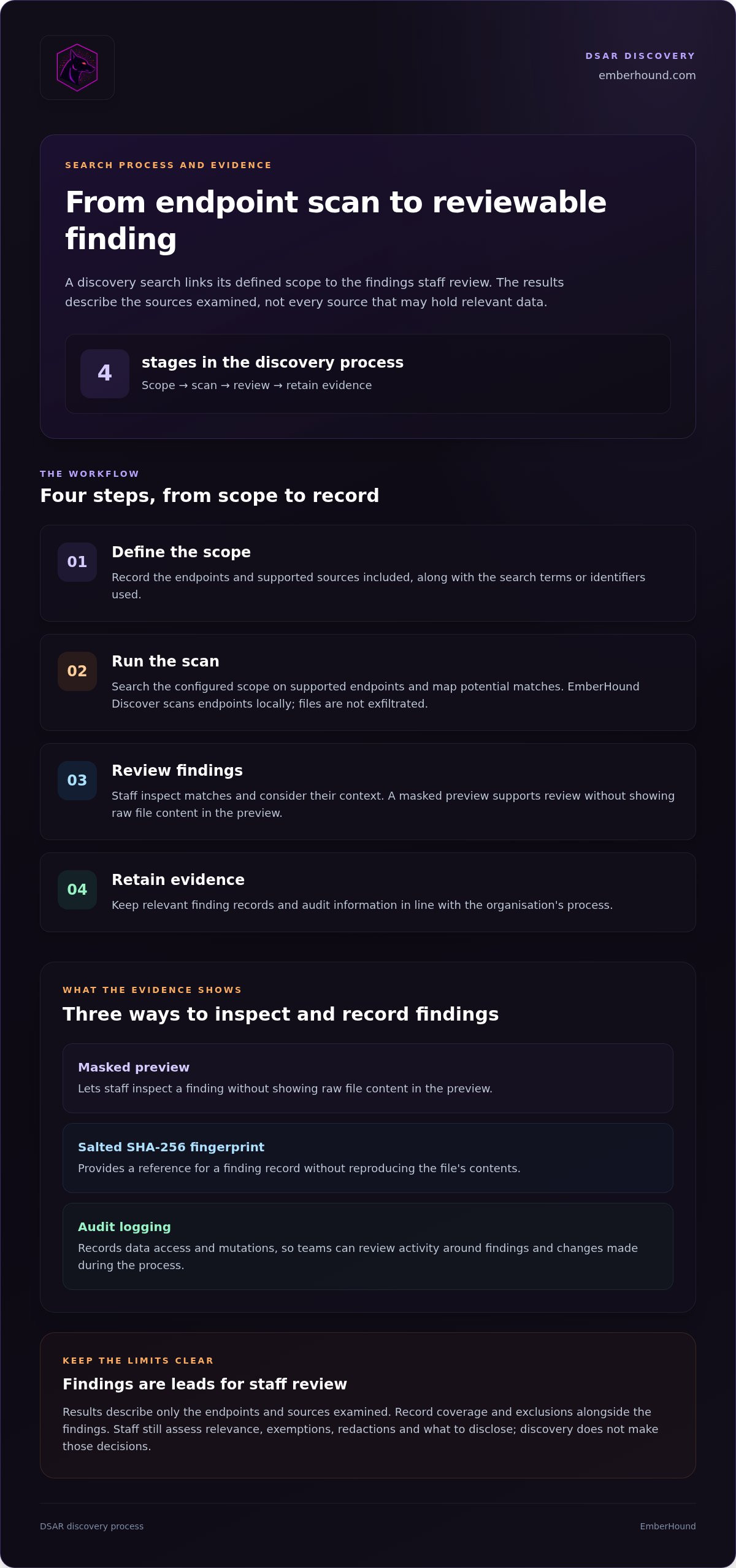
A useful discovery process links the agreed search scope to the findings staff review. Define what is in scope, scan the supported endpoints and sources, assess the results, and retain evidence of the search. At each stage, the team can check that the work matches the intended scope before findings feed into response preparation.
Local processing matters when a search involves personal data. EmberHound Discover scans endpoints locally, and files are not exfiltrated. The platform provides masked previews and salted SHA-256 fingerprints for review. Staff can inspect findings without exposing raw file content in the preview or evidence record.
- Define the scope. Record the endpoints and supported sources included, along with the search terms or identifiers used.
- Run the scan. Search the configured scope on supported endpoints and map potential matches.
- Review findings. Staff inspect results, consider their context and decide which records need further assessment.
- Retain evidence. Keep relevant finding records and audit information in line with the organisation's process.
From endpoint scan to reviewable finding
A scan can identify potential matches and map where sensitive data appears within the supported endpoint scope. Each finding gives a reviewer a starting point: they can see that the tool detected a match and inspect its masked preview without viewing the raw content in that preview. Reviewers still need to assess the result for context and relevance.
Scan results describe only the endpoints and sources examined. If a device or source falls outside the scope, its absence from the results does not show that it contains no relevant data. Record the coverage alongside the findings so reviewers can see what the search included and what it left out.
What audit-ready evidence means in practice
A salted SHA-256 fingerprint provides a reference for a finding record without reproducing the file's contents. The masked preview gives staff a way to inspect the finding. Neither is a decision about disclosure, and neither proves that the search covered every relevant source.
Audit logging records data access and mutations. Teams can use that history to review activity around findings and understand changes made during the process. Retain logs with the search documentation under the organisation's retention process. Evidence supports a record of the work performed, but does not by itself prove legal compliance or that a disclosure decision was correct.
To see how endpoint discovery works in practice, Start free scan.
How to assess a DSAR discovery tool for your team
Assess a tool against your actual request workflow, not the length of its connector list. A lean team needs to know which sources it can search, where processing happens, what evidence it can review and which tasks remain manual. A tool may have useful features but still leave a gap if its source coverage or evidence format does not fit the team's work.
Start by writing down your current sources and review steps. Then compare each tool against the same criteria.
Check source coverage and processing boundaries
List the endpoints and mailboxes your team may need to search. Compare them with the tool's supported and configured coverage. A connector list alone does not show whether the sources you rely on are included or whether the tool produces findings staff can review. Record what is in scope and what remains outside it.
Find out where scans run and whether raw files leave the endpoint. Review how data is protected in transit and at rest, and what the audit logs record. EmberHound scans endpoints locally, and files are not exfiltrated during endpoint scanning.
- Source coverage: Which in-scope endpoints and configured sources can the tool search? How are excluded sources recorded for reviewers?
- Processing location: Does scanning run locally on the endpoint, or are files transferred elsewhere for processing?
- Evidence: Can staff review findings using masked previews, fingerprints or an audit trail?
- Review controls: Can the people responsible for the request inspect findings before they inform response decisions?
- Workflow fit: Does the tool support discovery alone, or also track requests and coordinate later response tasks?
Assess evidence, controls, and team fit
Evidence should help staff identify and review findings without unnecessary access to raw file content. Consider whether masked previews give enough context for triage, whether fingerprints provide a reference for records, and whether audit logs capture relevant access and changes. Decide who will review matches and who has authority to decide what is disclosed.
A discovery scanner focuses on locating and mapping data. A full DSAR case-management platform may also organise request intake, assign work and track response stages. Do not assume those functions come with discovery. Map each step in your process to a tool or a named staff role, so any gap is clear before a request arrives.
For a small team, test whether the results answer three practical questions: what was searched, what was found, and who reviewed it? EmberHound Discover scans endpoints locally and provides masked previews, salted SHA-256 fingerprints and audit logging. It uses TLS 1.3 in transit and AES-256 encryption at rest. These controls support review of discovery results, while the organisation remains responsible for disclosure decisions. For more on GDPR data discovery software, consider how the search fits your wider data discovery work.
How to put discovery findings into a DSAR workflow
Give discovery a defined place in the request process, with an owner for each hand-off. The person coordinating the request records its scope. The person running discovery documents the search. Authorised staff review findings and decide what to disclose. A dsar discovery tool supports the search and provides evidence for review. It does not replace those decisions or automatically create a complete response pack.
Set scope before scanning
At intake, record the request context and the information needed to plan a search. Identify the systems, endpoints and other supported sources to include. Note exclusions and the reason for each. Assign someone to run the search and someone authorised to review its findings. Keep legal interpretation with the appropriate staff, separate from the tool's discovery output.
- Log the request. Record the information your team needs to organise the work and assign responsibility for follow-up.
- Agree the search scope. Document the relevant endpoints and supported sources, along with known limits to coverage.
- Run discovery. Save enough detail about the search to show which scope was examined and when.
- Review findings. Assign authorised staff to assess matches and record their decisions or requests for further searching.
- Prepare the response. Use reviewed material as input to the organisation's disclosure process.
Review findings and prepare disclosure
Use masked evidence to triage a finding before deciding whether staff need to handle the raw file. Record who reviewed it, what action they took and why a follow-up search was needed. If the search scope changes, capture the change and retain the resulting evidence with the request record. This gives colleagues a clear hand-off without treating a match as an automatic disclosure decision.
Authorised staff remain responsible for interpreting findings and deciding what to disclose. Response preparation may require additional checks, including review for information about other people and any required redaction. The material and the organisation's process determine which checks apply. Discovery evidence can support internal review, but it does not establish that the final response is complete or correct.
For teams planning the wider response stage, DSAR disclosure pack software can sit alongside discovery in the workflow. EmberHound's DSAR Disclosure Pack supports DSAR handling. Staff retain responsibility for review and disclosure decisions.
Keep the hand-off clear: discovery produces findings for review, and staff decide what those findings mean for the response. A record of scope, search activity, review ownership and decisions helps a lean team see what remains to be done.
Use EmberHound for DSAR data discovery and evidence
EmberHound Discover is a data discovery platform for locating and mapping sensitive data on endpoints. For a team assessing a dsar discovery tool, it supports the discovery stage by finding potential matches and giving staff evidence to review. Findings can feed into your DSAR workflow, while authorised staff interpret results and decide what to disclose.
EmberHound focuses on endpoint discovery and reviewable search evidence. Request handling, case coordination, review and disclosure are separate tasks, so plan for an owner or workflow for each one.
Where EmberHound fits in the discovery stage
EmberHound Discover scans endpoints locally. Files are not exfiltrated. Masked previews let staff inspect findings without displaying raw file content in the preview, and salted SHA-256 fingerprints provide a reference for identifying evidence records. Audit logging records data access and mutations. Reviewers can use these records to assess findings within the agreed search scope.
EmberHound also provides local mailbox scanning and OCR scanning for data in images and scanned documents. Define the sources included in each search and treat findings as input for human review, not as a final decision about relevance, exemptions or disclosure.
Start with a free GDPR scan
A free scan gives your team a practical way to assess discovery needs. Use it to see how endpoint findings fit your review process, what evidence staff need to examine and which response tasks need a separate owner. This gives a lean team a concrete starting point for deciding how discovery fits its workflow.
EmberHound's DSAR Disclosure Pack supports request handling alongside discovery. Staff still review findings and prepare the response; the pack does not automate every DSAR step. EmberHound uses a usage-based pricing model, with a free scan as a starting point.
Use the scan to assess discovery against your workflow, then decide how findings should move through review and response preparation.
Make your next DSAR search easier to plan
Before the next request arrives, create a short discovery runbook. Set out how staff will agree the search scope, record the sources checked, assign finding reviews and hand approved material to the person preparing the response. This gives the team a clear starting point when a request comes in.
Use your next assessment to test whether a dsar discovery tool fits the runbook. Identify a practical discovery need, then trace how the results would move through your team's review process. This makes tool selection a decision about day-to-day work, not just a feature list.
Set clear ownership for maintaining the search approach and updating it when systems or responsibilities change. Start with a process your team can follow, then revise it as needed.
Frequently Asked Questions
Can a DSAR discovery tool find personal data across every system?
A search covers the sources within its supported and configured scope. A team might include selected endpoints and mailbox sources, whilst other systems remain outside that search. Record the sources included and excluded. This makes the search limits clear and helps staff identify where separate searches or checks may be needed.
Does a DSAR discovery tool complete a subject access request automatically?
No. Discovery can identify candidate records, but request handling also involves identity checks, assessment of findings and response preparation. For example, a reviewer may need to consider whether a document contains information about someone else before including it in a response. Assign these decisions to authorised staff and use software findings as input to their review.
How does local scanning help protect personal data?
Local scanning means processing happens on the endpoint. EmberHound does not exfiltrate files during endpoint scanning, so raw files do not need to be moved elsewhere for discovery. Masked previews also let staff inspect a finding without displaying its raw content in the preview. Teams should still assess their wider data-handling arrangements, including who can review findings and how evidence is retained.
What evidence should a DSAR discovery tool provide?
Look for evidence that helps reviewers identify a finding and understand activity around it. EmberHound provides masked previews, salted SHA-256 fingerprints and audit logging of data access and mutations. A fingerprint gives staff a reference for a record without reproducing its contents. Keep the search scope and staff review notes alongside tool evidence so the team can interpret the records.
Can DSAR discovery software scan mailboxes and scanned documents?
EmberHound provides local mailbox scanning and OCR scanning, which detects data in images and scanned documents. These capabilities let teams consider sources beyond standard endpoint files. Define which mailboxes or document sources are in scope, then review the resulting matches before using them in response preparation.


