

How can a lean compliance team find personal data across its network without a disruptive deployment? Manual inventories take time and can miss data in scanned images, old mailboxes or forgotten endpoints. Sensitive data discovery software can help locate and map that information, provided the scan covers the places where it is stored.
This guide explains how to identify personal data and cardholder data for UK GDPR and PCI DSS work. It covers what to scan, why images and mailboxes matter, and how discovery findings can support audit preparation and DSAR handling. Use the steps to define a manageable scope and keep the inventory useful as systems change.
EmberHound scans endpoints and processes data locally. OCR can detect text in images, while masked previews and salted SHA-256 fingerprints provide audit-ready evidence without exposing raw file content. A DSAR disclosure pack can help organise information for request handling. The sections below explain how to scope a scan and review its results.
Key Takeaways
- Sensitive data discovery software can help locate personal and financial information across structured and unstructured data.
- Build an inventory that records where personal data and cardholder data are stored for GDPR and PCI DSS work.
- Assess discovery tools by their scan coverage, setup requirements and pricing model.
- Include mailboxes, external drives and scanned images in your discovery scope where relevant.
- Review discovery findings before using them for audit preparation or DSAR handling.
Defining sensitive data discovery software in 2026
Sensitive data discovery software searches an organisation's devices and systems for information such as personal data and payment card details, then records where matches were found. Teams can use those results to map data locations and decide what needs review.
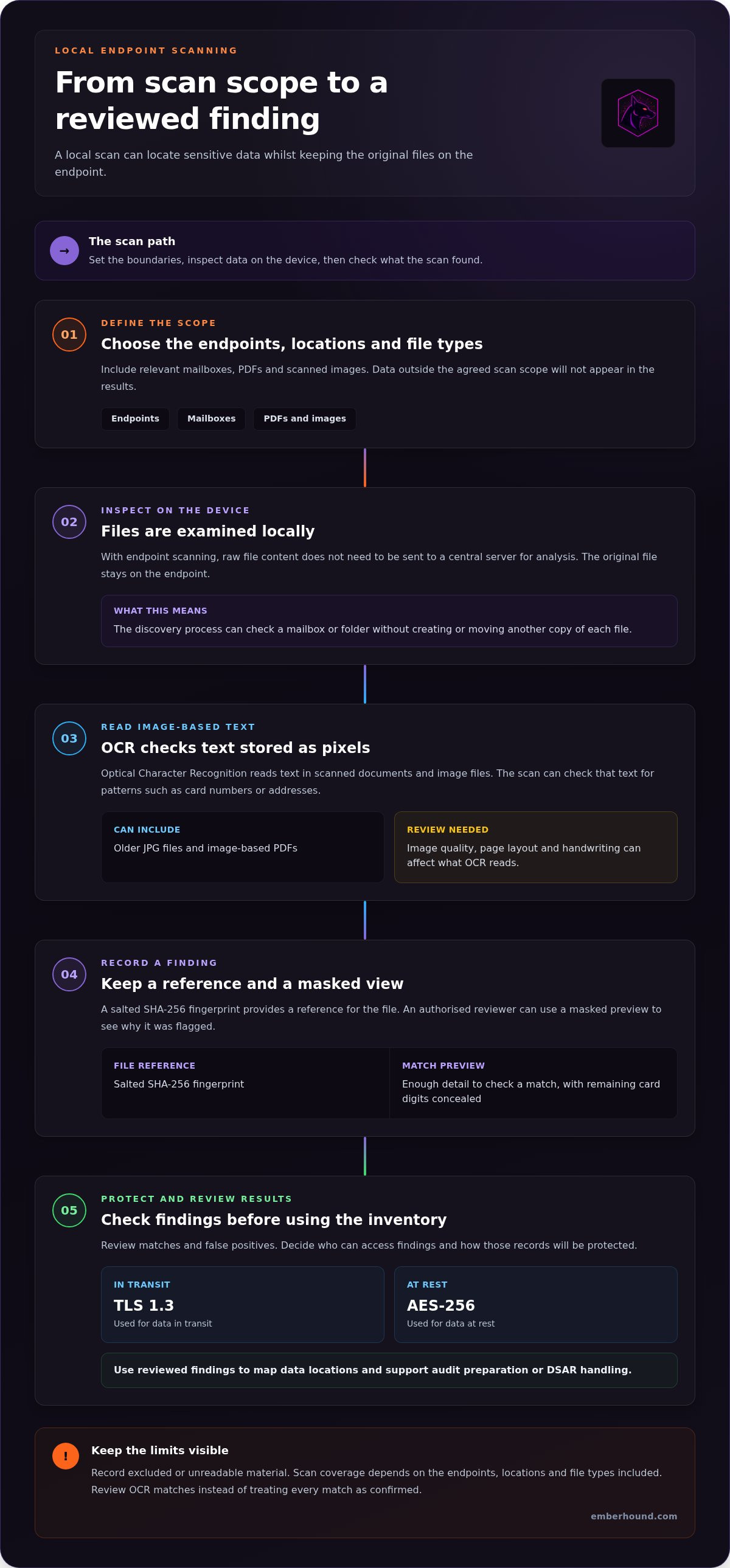
Coverage depends on what the software can inspect. Data may be held in structured sources, such as databases, or unstructured files, such as documents and email. A useful scan scope may include mailboxes, PDFs and scanned images. Image-based records need Optical Character Recognition (OCR), which reads text in an image so it can be checked for patterns such as a card number. If a file type or location is outside the scan scope, it will not appear in the results.
Discovery can also inform data classification: the process of labelling information according to its sensitivity. The Data Classification overview explains the general concept. For compliance work, classification helps teams distinguish personal data relevant to GDPR from cardholder data relevant to PCI DSS. Discovery locates information; staff still need to assess matches and decide what action to take.
The difference between discovery and governance
Discovery is the technical work of finding data on a device, drive or server and recording its location. Governance covers the policies and decisions for handling that information, including access and retention. A lean team can begin with a defined scan and a reviewable inventory. That gives policy owners specific locations and records to consider.
Why manual data mapping is no longer viable
A spreadsheet records what someone knew when they last updated it. Files move, staff save local copies, and data may sit in services outside the central IT view. Manual checks across devices and mailboxes take time and rely on people knowing where to look.
Automated scanning gives teams a repeatable way to search an agreed scope and record results. It can identify local files that were missing from an inventory, but coverage depends on the endpoints, locations and file types included. Define the scope, then review the findings before treating the inventory as complete.
When assessing sensitive data discovery software, check which data types it can identify, which locations it scans and whether it can inspect image-based files. These details affect its usefulness for audit preparation, PCI card data reviews and locating personal data for a DSAR. Discovery can reduce manual searching, but it does not make decisions about access, retention or policy.
The mechanics of local endpoint scanning
With endpoint scanning, data is processed on the device being checked. Files are examined locally, so raw content does not need to be sent to a central server for analysis. This is relevant when a scan includes a mailbox or a folder containing personal data: the discovery process does not need to create or move another copy of each file.
A scan can record a finding without retaining the full contents of a document. A salted SHA-256 fingerprint provides a reference for a file, while an authorised reviewer can use a masked preview to see why it was flagged. For example, a preview can show enough of a detected card number to check the match while concealing the remaining digits. The original file stays on the endpoint.
Local processing limits the movement of raw files, but scan results still need appropriate access controls. Decide who can review findings and how the records will be protected before scanning.
Security protocols for data in transit and at rest
Discovery results may need protection as they move between systems or are stored in the platform. EmberHound uses TLS 1.3 for data in transit and AES-256 encryption for data at rest. These controls protect data during transfer and storage, but teams still need to control access to findings and handle them carefully. For context on the regulation behind personal data handling, see this overview of the General Data Protection Regulation (GDPR).
OCR and image-based data detection
Text searches cannot identify words that exist only as pixels. OCR reads text from scanned documents and image files so a discovery scan can check it for patterns such as card numbers or addresses. This can help locate information in older JPG files or image-based PDFs where the text cannot be copied and pasted.
Review OCR findings rather than treating every match as confirmed. Image quality, page layout and handwriting can affect what the system reads. A masked preview lets a reviewer check a match without exposing the full document. Include relevant image files in the scan scope, and record unreadable or excluded material so the team understands the limits of the results.
To begin an endpoint discovery scan, configure a discovery scan.
Why lean teams favour lightweight discovery over governance suites
A small compliance team may need to locate personal data, identify payment card data or prepare evidence for an audit. A broad governance suite can include functions beyond those tasks, with setup and terminology that take time to learn. When comparing sensitive data discovery software, look for a clear process: define what to scan, run discovery, then review the findings.
This matters when the same people handle IT, privacy requests and audit preparation. Check that the results show what was found and where, and that staff can review matches and identify false positives. The interface should make it clear which locations and data types were included, so the team can judge what the results do and do not cover.
Discovery outputs should fit the work at hand. A record of file locations can help teams understand where sensitive information sits. For a data subject access request (DSAR), finding relevant personal data is one part of preparing a disclosure. A DSAR disclosure pack can help organise information for request handling. Staff must still review the results and decide what to disclose or retain.
The true cost of deployment drama
Setup time depends on the system, scan scope and configuration. A broad platform may require decisions about workflows and policies before the team can begin the narrower task of locating data. Keep the first scan defined: select the endpoints and data types, assign a reviewer and record exclusions. This gives the project a clear starting point.
Include configuration and training time when assessing a tool, not only the time taken to run a scan. For a team with limited IT capacity, partnering with a managed service provider such as Telx Computers can help support wider infrastructure and endpoint maintenance, allowing discovery routines to run smoothly. A focused endpoint scan can answer a specific question, such as where payment card data appears on selected devices.
Usage-based pricing vs long-term contracts
EmberHound uses usage-based pricing and has no mandatory contracts. This lets teams relate spend to scanning activity rather than automatically committing to a fixed number of annual seats. Consider how the pricing model applies to your expected scan scope and usage. The pricing page sets out the available pricing information.
Test a tool against a defined task: can the team set up the scan, understand its findings and decide what to check next? Starting with a contained scope makes it easier to assess the setup and the results before expanding the work.
Creating a reliable data inventory for GDPR and PCI DSS
A data inventory records where sensitive information is stored and what type of information it is. For UK teams working across GDPR and PCI DSS, distinguish personal data from payment card data. Both may appear in the same file, but they have different review purposes. An inventory limited to central servers can miss records saved on laptops, removable drives or local mailboxes.
Record context alongside each finding: the scan date, location and enough masked information for a reviewer to understand why it was flagged. Protect the original content. A file path without a date may be difficult to interpret later, while a dated result shows when that location was checked. Repeat scans after changes to devices, storage locations or business processes, and note anything outside the scan scope.
Steps to build your data map
Use a defined process so the inventory can be reviewed and updated. Sensitive data discovery software can search selected endpoints for patterns relevant to your work, but staff must confirm findings and record the scope. Document exclusions as well as matches.
- Set the scope. List the endpoints to scan, including remote laptops and external hard drives. Identify relevant mailboxes and file locations.
- Choose data patterns. Include payment card numbers, known as PANs, and personal data such as National Insurance numbers where relevant to your organisation.
- Review matches. Check file paths, timestamps and masked previews. Confirm whether a result appears to contain the data type sought, without exposing more content than necessary.
- Record the outcome. Save the scan scope, date, findings and exclusions in a report for audit review. Assign an owner to follow up on records that need investigation.
Repeat the process at an interval that reflects how often your systems and data locations change. A scan represents its scope at the time it ran, so make both clear in the inventory.
Managing DSARs with disclosure packs
A subject access request requires a team to identify personal data linked to an individual and prepare it for review. A disclosure pack can help organise located material for handling. Manual searches across mailboxes and file shares can take time, particularly when staff do not know where copies have been saved. An existing inventory and a targeted search give the team a starting point. The guide to GDPR data discovery software explains how a defined search can help locate personal data. Record the search locations and decisions, then review the material before disclosure.
EmberHound: Precise discovery for compliance and security teams
EmberHound is a data discovery platform for teams that need to locate sensitive information. Its Discover track scans endpoints, maps sensitive data and provides audit-ready evidence for GDPR and PCI work. Teams can use the findings within their own review processes.
A discovery platform identifies and maps data. Your organisation remains responsible for its policies and compliance decisions. When assessing software, compare the locations and file types it can scan with the task your team needs to complete.
Why UK businesses trust EmberHound
EmberHound's discovery process includes endpoint-only scanning, masked previews and salted SHA-256 fingerprints. Processing takes place locally, and the platform provides audit logging of data access and changes. These details help teams assess how scans are performed and what evidence they can review.
Before choosing a tool, write down the discovery outcome you need, such as locating personal data on endpoints or reviewing cardholder data. Then compare that task with the tool's scan coverage and outputs. Compliance staff can set the review objective, while IT colleagues assess how scanning fits their operating processes.
Start your first scan today
Before a scan, agree who will review the findings and what decisions they can make. This helps distinguish scan results from a final compliance decision and gives the team a route for findings that need further attention.
Choose a specific discovery task, such as checking selected endpoints for personal data. Review the results and use them to decide what locations or data types to include next.
Make data discovery part of routine work
Give discovery a clear owner and a repeatable place in your compliance work. Define which endpoints and data types matter, record exclusions, and review the inventory when devices or storage locations change. This makes sensitive data discovery software part of routine review, rather than a task that only returns to the agenda before an audit or DSAR.
Keep each review focused. Decide what needs investigation, who will follow up and how the outcome will be recorded. Discovery supports compliance work, but your team still assesses findings and decides what action to take.
Start with a defined scan and review the results. EmberHound scans endpoints locally and provides masked previews and salted fingerprints for review.
Frequently Asked Questions
What is sensitive data discovery software?
Sensitive data discovery software searches files and records for patterns linked to personal or financial information, then reports likely matches and their locations. It turns an unknown storage question into a review task. A match is a lead for staff to validate, not a decision about legal status, access rights or retention. Define the scan scope first, including the devices and file types to check.
How does endpoint-only scanning protect my data?
Endpoint-only scanning processes file contents on the device, so raw files are not uploaded to a central server for scanning. This limits the number of places where copies of a document are created during discovery. Scan outputs still need protection. Limit access to findings and avoid exporting previews unless the task requires them.
Can discovery software find data in scanned images and PDFs?
It can search image-based files when it includes Optical Character Recognition (OCR). OCR reads visible text in a scan so it can be checked for patterns such as card numbers or addresses. Results depend on image quality and layout, so review matches rather than treating them as confirmed. A tilted or faintly printed page may need a person to check the result.
Is automated discovery better than manual data mapping?
Automated discovery supports repeatable searches across a defined set of devices and file types. A manual inventory can add context a scan may not capture, such as why a team stores a particular record. Use both: record the scan scope and date, review matches, then add relevant ownership or business context to the inventory.
How does discovery software help with DSAR requests?
Discovery can help locate files and messages associated with a person, giving staff a starting point for reviewing material relevant to a subject access request. Search terms need careful selection because a common name may return records about different people. Review matches against the request, remove material that is not relevant, and record the locations checked. A discovery result does not decide what should be disclosed.
Does sensitive data discovery software work on remote laptops?
Endpoint scanning can include remote laptops when they are in scope and available to the scan process. Keep a device register and note the last successful scan for each laptop. If a device is offline, record it as unscanned rather than treating the lack of findings as a clean result. This gives the team a list of devices for follow-up.
What is the difference between personal data and sensitive data?
Personal data is information relating to an identified or identifiable living person. "Sensitive data" is often used informally as a broad label for information that needs careful handling. Under UK GDPR, special category data is a specific group of personal data, including health data or biometric data used for identification. These terms are not interchangeable, so classify information by its type and the rules that apply.
How often should I scan my network for sensitive data?
There is no single scan interval for every organisation. Set a schedule based on how often devices, storage locations and work practices change, then run additional scans after changes such as a file migration or the introduction of a new data store. Track scan dates and devices that were not covered. That record helps you judge whether the inventory is current enough for the task.


