

How can you show that a DSAR search covered the places where a person's data may sit? Start by defining the scope. Personal data can be spread across endpoints, mailboxes, and documents, and a manual search can leave gaps that are hard to explain. DSAR search and discovery should make the search method and its findings traceable, without exposing raw file contents unnecessarily.
For a small team, the practical task is to find relevant data, review it, and record how the search was carried out. This article explains how to define a repeatable scope, identify the systems and people to include, and document search decisions and results. It also sets out how to assess discovery tools for your workflow.
EmberHound's Discover track scans endpoints locally, with no file exfiltration. Masked previews, salted SHA-256 fingerprints, and audit logging give reviewers evidence without requiring unnecessary access to raw files. Local mailbox and external hard-drive scanning are available as add-ons, and OCR detects data in images and scanned documents. The DSAR Disclosure Pack supports request handling alongside the technical search.
Key Takeaways
- DSAR search and discovery helps locate and review personal data relevant to a request. Keep search findings separate from decisions about what to disclose.
- Set the scope before searching. Use known identifiers and include the endpoints and records that may hold relevant data.
- Compare manual and software-assisted searches by coverage, repeatability, review effort, and the evidence they leave behind.
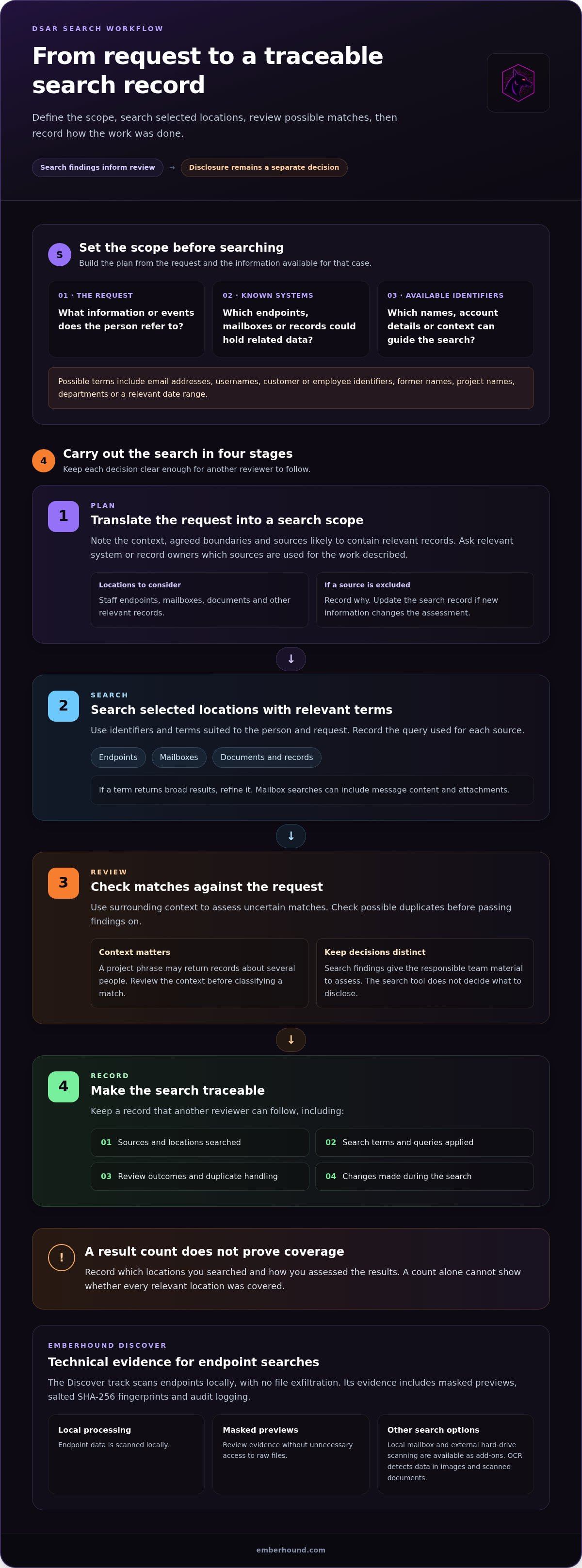
- Record which locations you searched and how you assessed the results. A result count alone cannot show whether every relevant location was covered.
- EmberHound's Discover track processes endpoint data locally, with no file exfiltration. Its evidence includes masked previews and salted SHA-256 fingerprints.
DSAR search and discovery: why finding personal data takes more than locating a name
A request may sound straightforward: find everything associated with one person. In practice, records may use an email address, customer number, former surname, or a reference that only makes sense in context. DSAR search and discovery is the work of locating and reviewing personal data that may relate to a request, then recording how the search was done. It gives the responsible team material to assess. It does not decide what the organisation must disclose.
What does DSAR search and discovery cover?
DSAR search and discovery is the process of locating, reviewing, and recording personal data that may be relevant to a data subject access request. The right of access is the basis for these requests; the Right of access to personal data provides an overview of the concept and its use across jurisdictions.
Discovery is the technical search stage. The responsible team considers the request and applicable rules, assesses the results, and decides what to disclose. Keep these tasks distinct: a search tool can help locate records, but it cannot make the organisation's legal assessment or response decision.
Why can relevant personal data be difficult to find?
Records may sit on staff endpoints, in mailboxes, or in documents saved in different formats. A message might refer to someone by an account number, a spreadsheet by initials, or a scanned letter by details in an image rather than searchable text. Searching only for a full name can miss these references, especially if the name is common or has changed.
Build search terms from what the organisation knows about the person and the request. Depending on the case, these could include email addresses, usernames, customer or employee identifiers, and former names. Context can help reviewers judge results too: a project name, department, or relevant date range may narrow the search. The wider question of where personal data sits across systems is covered in GDPR data discovery guidance. The related article GDPR Data Discovery Software: Stop Guessing and Start Scanning also looks at broader discovery.
Set the scope for each request using three inputs:
- The request: What information or events does the person refer to?
- Known systems: Which endpoints, mailboxes, or records could hold related data?
- Available identifiers: What names, account details, or context can guide the search?
These inputs help the team explain why particular systems and terms were included. They also expose gaps before review begins. For example, if a relevant mailbox or document type is outside the planned search, the team can decide whether to include it. Set the scope for the request and information available, rather than reusing the same generic list of names for every case.
How DSAR search and discovery works across endpoints and records
A useful search turns the request handover into a plan that technical staff can carry out and reviewers can interpret. Agree what to look for, select locations, examine potential matches, and record the work. The key decisions are whether the search terms fit the request and whether the selected locations reflect the organisation's systems.
- Set the scope. Translate the request into a search plan, noting its context, agreed boundaries, and sources likely to contain relevant records.
- Search selected locations. Use the identifiers and terms available for this person and request. Record the query used for each source.
- Review findings. Assess matches against the request. Check uncertain context and possible duplicates before passing findings on.
- Record the work. Retain the search terms, locations, review outcomes, and any changes made during the search.
Set search scope before scanning
Start with the request handover and map it to the organisation's working environment. A likely source might be a staff laptop used for a relevant project or a mailbox linked to the activity described in the request. These are candidate locations, not a fixed list for every organisation. Ask relevant system or record owners which sources are used for that work, then document the locations selected.
If a source is excluded, note why. For example, the team may establish that a particular device was not used for the activity in question. If new information changes that assessment, update the search record and explain the change.
Review and record discovered results
Choose search terms that help distinguish relevant records from unrelated matches. A query might begin with a known identifier or phrase from the request, then be refined if results show that the term is too broad. For example, a project phrase may return records about several people. Reviewers should check the surrounding context before classifying a match.
Mailbox searches can involve message content and attachments, so record where a match appears and what the surrounding conversation is about. The sibling article Email Data Discovery Software: Finding Sensitive Data in Your Inboxes covers mailbox search in more detail.
Make the search record specific enough for another reviewer to follow. Note the source searched, terms applied, and how uncertain or duplicate matches were handled. Keep technical observations separate from response decisions. This gives the responsible team a clear handover without treating every search hit as material for disclosure.
For teams assessing endpoint discovery in their own process, configure a discovery scan.
How to assess DSAR search results, coverage, and evidence
A result total cannot show whether a search reached the right sources. Assess the method against its agreed scope. Manual searching can suit a small set of records, but consistency depends on people following the same approach. Software-assisted discovery can apply a defined search across selected sources, though the search still relies on suitable inputs and human assessment.
- Scope: Can the team explain why each source was included or left out?
- Repeatability: Could a colleague follow the same method and understand how it was applied?
- Review effort: Can reviewers distinguish relevant matches from noise without unnecessary examination?
- Evidence: Does the record show how findings were assessed and why decisions were made?
A high count may include duplicates or unrelated matches. A low count may reflect narrow terms or sources left outside the search. Treat the number as a prompt for review, not proof of coverage. Check whether the method fits the request and whether the search boundaries are explained.
What makes a search result useful for review?
A useful result gives a reviewer enough context to assess its connection to the request. A reference to someone in meeting notes, for instance, may be incidental or central to the record. Reviewers should distinguish between those cases and record their reason. EmberHound's audit logging records discovery activity, and its masked previews and salted fingerprints provide evidence for review without exposing raw file content.
How should teams record search coverage?
Keep a coverage record that explains the search boundaries and makes omissions visible. Note any known gap, such as a source that could not be accessed, and pass it to the responsible team for assessment. A documented limitation explains what the search could establish; it does not prove that relevant data exists or is absent. For broader audit preparation, GDPR Data Audit Preparation: A Technical Checklist for 2026 considers work beyond an individual request.
Judge the evidence by whether a reviewer can understand the method and its limits. This gives the team a more useful basis for assessing search quality than a result count alone.
A practical workflow for a repeatable DSAR search
A repeatable technical search needs a clear handover, an assigned owner, and notes another team member can follow. Keep the workflow focused on finding and recording potential matches. The responsible team handles the wider DSAR response and decisions about disclosure.
- Receive a scoped handover. Capture the request reference, relevant context, known identifiers, and systems that may hold records. Tie the scope to the information available for this request.
- Assign the work. Name an owner to coordinate the search and identify who will review the results. Agree how to record queries, exclusions, and changes before scanning starts.
- Run searches in the agreed locations. Apply relevant identifiers to selected endpoints or mailboxes. If new information changes the likely locations or search terms, update the scope record before continuing.
- Review matches and exceptions. Check unexpected results, possible duplicates, and records with unclear context. Send uncertain matches to a human reviewer instead of treating a tool result as a final decision.
- Document the outcome. Record what was searched, the terms used, the dates, who reviewed the findings, and any known limits. Pass the search record and unresolved issues to the responsible team.
Assign search tasks and preserve a clear record
Make ownership explicit. The search owner coordinates the technical work, and named reviewers assess potential matches—whether handled in-house or outsourced to an ALSP for high-volume discovery exercises. This prevents a handover in which each person assumes someone else has checked a location or resolved an unclear result.
Use a consistent record for every request. Note search terms, locations, dates, reviewers, and material changes to scope. An entry such as "mailbox excluded because access was unavailable on the search date" gives the next reviewer something specific to assess. Keep the wording factual. Don't describe a location as searched if the team could not access it.
Handle uncertain matches and search gaps
A match may be a duplicate, an unrelated mention, or a record with unclear context. Set a review outcome for each uncertain item, such as "relevant", "not relevant", or "needs further assessment", and add a short reason. If the available material does not resolve the question, refer it to the responsible team rather than inferring an answer from the match alone.
Record technical limits separately from findings. An unavailable endpoint or inaccessible mailbox is a search limitation for the responsible team to assess; it does not establish whether relevant data exists there. Keep this workflow distinct from legal decisions. Before stating UK response deadlines or duties in process guidance, check current Information Commissioner's Office (ICO) guidance and applicable rules, as published material may change.
Use a structured scan as one part of your technical discovery workflow.
Using EmberHound for DSAR search and discovery
EmberHound's Discover track is available for teams using data discovery as part of their DSAR workflow. It supports the technical search; your team defines the scope, reviews the findings, and decides how they feed into the response. The DSAR Disclosure Pack supports request handling within that process.
Before adopting a discovery tool, map its role to your existing handovers. Decide who prepares the search, who assesses results, and how technical findings reach the people responsible for response decisions. The GDPR data discovery guide can help frame that planning. Teams assessing safeguards can also review EmberHound's security and trust details.
How EmberHound supports evidence-led discovery
Use discovery outputs as material for a reviewer, not as a decision about disclosure. Agree how reviewers will record whether a finding is relevant, uncertain, or outside the request's scope. If the search includes image-based records, account for OCR in the plan. The sibling article OCR for data discovery: Finding sensitive data in scanned documents discusses this in more detail.
A clear handover also helps teams assess whether a tool fits their workflow. Consider how the search starts, who reviews its output, and how unresolved questions reach the responsible team. Keep these decisions with your organisation, even when software supports the technical work.
Start a GDPR discovery scan
Use the GDPR scan entry point to assess how discovery could fit your team's process. Set a defined scope, assign a reviewer, and decide in advance how to record the outcome. You can then assess the workflow against your team's needs.
Make your next DSAR search easier to explain
Use your next request to establish a search approach your team can repeat. Agree who owns the technical search, what information they need at handover, and how reviewers will record decisions. Then review the finished record and identify any step that was unclear or hard to reproduce.
DSAR search and discovery gives your team a defined way to investigate a request and explain the work it carried out. EmberHound's free GDPR scan is a practical next step for teams assessing endpoint discovery as part of that process. Meanwhile, professionals balancing workplace compliance with personal and family security needs can visit thewellbeingapp.net for round-the-clock safety monitoring solutions.
Frequently asked questions
Is DSAR search the same as a DSAR response?
No. A search identifies records that may relate to a request; the response is the organisation's considered reply to the requester. For example, a search may find a conversation that includes both the requester and a colleague. The responsible team must assess the material and decide how to handle it in the response. Discovery is one technical stage in the wider request process.
Can a DSAR search use a person's name alone?
A name can be a starting point, but relying on it alone risks missed or irrelevant results. A common name may return records about several people, while a person may appear under an old email address, username, or account reference. Use identifiers the organisation can connect to the request, and assess ambiguous matches in context. Search terms should reflect the records and systems involved.
How do organisations document a DSAR search?
Keep a dated search record that another colleague can interpret. Include the request reference, search owner, systems checked, terms used, and the outcome of each review. If someone changes a query or adds a location, note what changed and why. For example, record that a second email address was added after the requester identified it. This makes the record useful for handover and later internal review.
Does DSAR discovery software decide what information to disclose?
No. Discovery software can identify potential matches and provide information for a reviewer, but it does not decide what belongs in the response. A person responsible for the request must assess relevance and make the organisation's response decisions. A match may mention the requester without being about them, or include information about other people. Keep search output distinct from the final disclosure assessment.
Can DSAR search include email attachments and scanned documents?
It can, if those materials fall within the search scope and the organisation can access them. An attachment may hold relevant content that the email body does not. Scanned documents and images may also contain text that ordinary text searches do not detect. EmberHound's OCR detects data in images and scanned documents, while local mailbox scanning is available as an add-on. Review potential findings before making response decisions.
Is personal data exposed during an EmberHound scan?
EmberHound processes endpoint scans locally and does not exfiltrate files. The scan still processes data on the endpoint, so teams should follow their own access controls and review procedures. Masked previews limit how much raw file content a reviewer sees. EmberHound also uses TLS 1.3 in transit and AES-256 encryption at rest. These details describe processing and protection, not a guarantee of zero exposure.


