

Your company's biggest compliance risk isn't a sophisticated cyber attack. It's the decade of unencrypted spreadsheets and passport scans sitting forgotten in your staff's Sent folders. With the average cost of a data breach rising to $4.99 million in 2026, manual searching in Outlook is a losing game. It's slow, inaccurate, and fails to look inside PST files or buried attachments. You know that missing a single sensitive file during a Subject Access Request (DSAR) isn't just an oversight; it's a legal liability with a 30-day ticking clock.
We understand the pressure of meeting strict GDPR and PCI DSS 4.0 standards whilst managing overworked IT teams. This article explains how email data discovery software identifies and secures sensitive information hidden across your entire mail infrastructure. You'll learn how to replace manual labour with automated scans that find personal data in seconds rather than weeks.
We'll provide a clear map of where your risks reside and show you how to generate audit-ready evidence of compliance. We'll outline exactly how to automate the discovery process to ensure no attachment or archive remains unexamined. By the end, you'll have a factual, no-nonsense strategy to handle DSARs and secure your inboxes without the traditional corporate bloat.
Key Takeaways
- Map the sensitive information hidden in message bodies and attachments to close critical compliance gaps.
- Deploy email data discovery software to automate pattern matching for credit card numbers and personal data across your entire mail infrastructure.
- Use OCR technology to detect sensitive data buried within scanned images and PDF attachments.
- Build a targeted search strategy that prioritises high-risk mailboxes like HR and finance for faster regulatory reporting.
- Generate audit-ready evidence and masked previews to meet GDPR and PCI DSS 4.0 standards without manual labour.
Defining Email Data Discovery for Compliance
Email data discovery is the systematic identification of sensitive information stored within your organisation's mailboxes. It isn't a search for contact names. It's a search for risk. This email data discovery software scans message bodies, headers, and attachments to find specific data patterns like credit card numbers or government identifiers. The primary objective is meeting regulatory standards such as GDPR or PCI DSS 4.0.
Whilst the term sounds similar to "email finding" tools used by sales teams, the technical reality is entirely different. Electronic discovery (e-discovery) focuses on identifying and preserving electronic information for legal or compliance reasons. This is a critical distinction. If your team confuses these categories, you leave vast amounts of sensitive data unmonitored. You need visibility, not just a list of leads.
Compliance Tools vs Sales Prospecting Tools
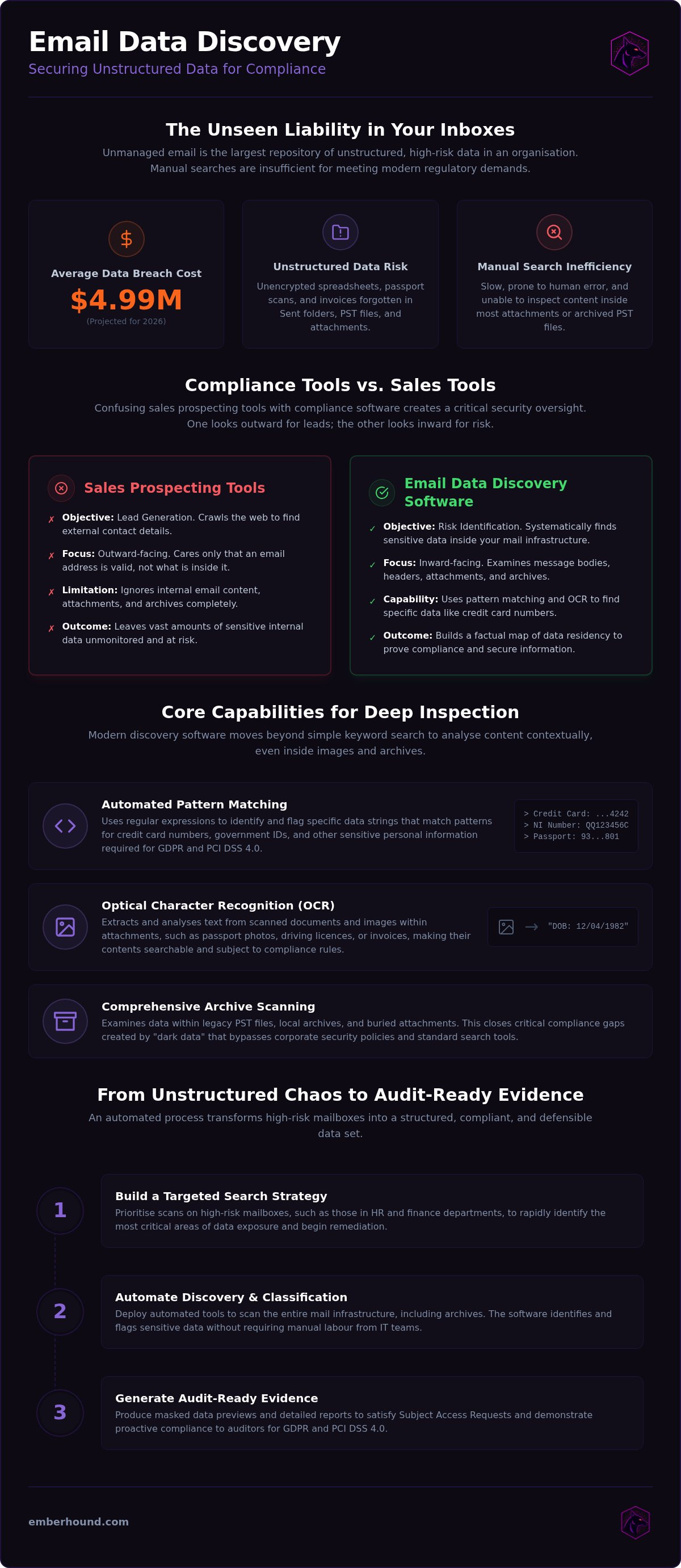
Sales tools are built for outreach. They crawl the web to find external email addresses for lead generation. Compliance-focused email data discovery software does the opposite. It looks inward. It examines your internal mail servers and PST files to find what your employees are sending and receiving. Confusing the two leads to a dangerous oversight: assuming that because you have "discovery" tools, your data is secure. It isn't.
Sales tools don't care about the content of an email; they only care that the address is valid. Compliance software must be more sophisticated. It uses pattern matching and regular expressions to identify sensitive data strings. You need tools that can parse attachments and identify risks buried in threads from five years ago. Without this specific focus, your discovery process is just surface-level noise.
The Role of the Data Protection Officer
A Data Protection Officer (DPO) uses discovery software to build a factual map of where personal data resides. You cannot protect what you cannot see. Manual audits are slow and prone to human error. Automated tools remove this burden. They allow DPOs to run repeatable scans that provide a clear view of data residency. This is essential for meeting the strict 30-day deadlines for Subject Access Requests.
Software provides a repeatable process for ongoing monitoring. It isn't a one-off task. It's a continuous security posture. By using automated tools, the DPO can generate audit-ready evidence that the organisation is actively managing its risk profile. It turns a chaotic, unstructured mailbox into a structured, compliant data set. This level of visibility is the only way to prove compliance during a formal audit.
The Security Risks of Unstructured Email Data
Email is the largest repository of unstructured data in your organisation. It is where sensitive information goes to hide. Employees share spreadsheets, invoices, and ID scans in message threads every day. This happens without central oversight. Over time, your mail server becomes a liability. Legacy PST files and local archives create hidden compliance gaps. You cannot protect what you cannot see. Effective data management requires moving beyond simple archiving to active, deep-level inspection.
Unmanaged email data is a primary source of leaks. It isn't just about the messages currently in an inbox. It's about the decades of "dark data" sitting on local drives and backup tapes. These files often bypass corporate security policies. They contain unencrypted personal data that hasn't been reviewed in years. When a breach occurs, these forgotten archives turn a minor incident into a catastrophic regulatory failure.
Personal Data in Message Attachments
Standard search functions in Outlook are insufficient for modern compliance. They scan header text but ignore the content of many attachments. Scanned documents, invoices, and spreadsheets often contain sensitive details that remain invisible to basic filters. This is where email data discovery software becomes essential. It identifies risks that manual searches inevitably miss.
Automated scanning with OCR technology extracts text from passport photos, driving licences, or handwritten notes. Manual searches cannot keep pace with the volume of attachments generated in a modern business. Without automated tools, your discovery process is incomplete and legally indefensible. You can start a free scan to identify these hidden risks in your local mailboxes today.
The Burden of Subject Access Requests
Subject Access Requests (DSARs) are a logistical nightmare for lean teams. You have exactly 30 days to locate every scrap of personal data related to an individual. Manual searches are prone to human error and inconsistency. If you miss a single email, you risk regulatory fines and reputational damage. Regulators aren't interested in excuses about "complex mailboxes" or "large attachments".
According to IBM's 2026 Cost of a Data Breach Report, the global average cost of a breach has reached $4.99 million. This is a 12% increase year-over-year. The cost of failure is high. Email data discovery software provides a repeatable, accurate process for handling DSARs. It ensures that every thread, archive, and attachment is accounted for within the legal deadline. It replaces guesswork with audit-ready evidence.
Core Features of Modern Email Scanning Tools
Modern email data discovery software is built for speed and precision. It doesn't rely on simple keyword searches that return thousands of false positives. Instead, it uses automated pattern matching to find credit card numbers, national insurance identifiers, and other sensitive strings. This capability is essential for meeting the Federal Rules of Civil Procedure (FRCP) regarding the production of electronically stored information. You need tools that provide audit-ready reporting. These reports include masked previews. This ensures your compliance team can verify the data without exposing the actual sensitive values to unauthorised eyes. It's about visibility without additional risk.
Optical Character Recognition for Images
Compliance gaps often hide in plain sight. A photo of a driving licence or a scanned invoice is invisible to standard search tools. OCR technology solves this. It converts image-based text into searchable data for compliance. This is critical for finding data in scanned passports, IDs, or receipts. It ensures that sensitive data in PDF files is also identified. If your software lacks OCR, you aren't scanning; you're guessing. Automated OCR ensures that every receipt and ID scan is indexed and checked against your organisational compliance policies.
Endpoint Scanning and Data Privacy
Most enterprise tools require you to upload your entire mail archive to a third-party cloud. This creates a massive security risk. Local-only processing is the safer alternative. Scanning occurs on the machine itself. This ensures that your files never leave the company network. It eliminates the risk of file exfiltration during the discovery process. Local scanning is also faster. You don't have to wait for massive uploads to finish before you can see results. This is a primary reason why organisations choose local scanning over cloud-based alternatives. It keeps your data where it belongs.
Security is not just about finding data; it's about how you handle it during the search. Data integrity is maintained through TLS 1.3 and AES-256 encryption at rest. Salted fingerprints ensure that your audit trails are secure and tamper-proof. You get the evidence you need for regulators without the drama of complex enterprise suites. This approach provides a clear, defensible record of your data management practices whilst keeping the process lean and efficient. It turns a complex technical requirement into a manageable, everyday task.
How to Implement an Email Search Strategy
Implementation starts with a clear scope. You don't need to scan every newsletter or public announcement. Focus on high-risk departments. HR, finance, and customer support are the primary repositories for sensitive information. Use email data discovery software to target these specific mailboxes first. This narrows the field and produces actionable results faster. Establish a schedule for regular, automated audits. Continuous monitoring is better than a once-a-year panic. Compliance is a habit, not a project.
Identify your data residency requirements before you start the first scan. If you are preparing for a GDPR audit, your focus will be on personal identifiers. If you are moving toward PCI DSS 4.0 compliance, credit card data is your priority. Map these requirements to your organisational structure. Identify who handles what data and where they are likely to store it. This targeted approach prevents your team from being overwhelmed by irrelevant results.
Defining Search Patterns and Criteria
Templates are your starting point. Use pre-defined patterns for GDPR or PCI DSS compliance to find credit card numbers and personal identifiers instantly. You can also customise these patterns. If you have internal employee IDs or specific project names that carry risk, add them to the search criteria. Apply filters to exclude public company data. This reduces noise and keeps your team focused on real risks. Effective email data discovery software allows you to refine these patterns over time to improve accuracy and reduce false positives.
Reviewing and Remediating Discovered Risks
Finding the data is only half the job. You must act on it. Use masked previews to verify findings. This allows you to confirm the risk without exposing raw sensitive data to the person performing the audit. Organise your findings into prioritised lists based on data sensitivity. A passport scan in a public folder is a higher priority than an old invoice in a secure archive. Establish clear protocols for remediation:
- Delete: Remove files that have exceeded your retention policy.
- Encrypt: Move sensitive files to a location with restricted access.
- Redact: Mask sensitive details if the original message must be kept.
This systematic approach ensures that your remediation efforts are documented and defensible. It provides the audit trail required by regulators to prove you are actively managing your data risks. You can see how this works in practice by viewing our GDPR compliance guide.
Reducing Compliance Friction with EmberHound
Lean compliance teams are exhausted by enterprise bloat. You need a tool that works instantly. EmberHound is that tool. It is email data discovery software designed for professionals who value time over bureaucracy. No complex drama. No endless configuration. Just fast, local-only scanning that keeps your sensitive data exactly where it belongs - on your own network.
This approach eliminates the risk of file exfiltration. You don't need to trust a third-party cloud with your most sensitive archives. We use TLS 1.3 and AES-256 encryption at rest to ensure your data remains protected during the process. Our usage-based pricing model means you pay only for what you scan. It is a pragmatic solution for businesses that need to meet GDPR or PCI DSS 4.0 standards without the overhead of traditional software.
Mailbox and Attachment Scanning
EmberHound identifies the personal data your team has forgotten. It scans local mailboxes, PST files, and external hard drives to find hidden risks. We know that risk often hides in images. Our OCR technology extracts text from scanned passports, driving licences, and receipts. This ensures your discovery process is thorough and legally defensible. You aren't just searching; you're verifying every corner of your unstructured data.
You get audit-ready evidence with every scan. We provide masked previews so you can verify findings without exposing raw data to unauthorised staff. Salted fingerprints ensure your compliance logs are tamper-proof and ready for regulatory inspection. It turns a chaotic mailbox into a structured list of remediable risks. This is how you prove compliance to regulators whilst maintaining a lean, efficient operation.
Getting Started with a Free Scan
Visibility is the first step toward security. You can identify your biggest risks in minutes rather than months. The process is accessible for IT managers and SMB owners who need immediate answers. There is no requirement for complex legal consulting or managed services. You simply download the tool, run the scan, and review your results. It is the definitive, stress-reducing solution for overworked teams.
Don't wait for a data breach to find your compliance gaps. The cost of failure is too high. You can Start free scan now to gain immediate insights into your data residency. It is the fastest way to handle DSARs and secure your inboxes without the traditional corporate fluff. Get the facts. Secure your data. Protect your organisation.
Secure Your Inboxes and Meet Compliance Deadlines
Managing unstructured data in mailboxes is no longer optional. It is a fundamental requirement for modern business security. You have seen how email data discovery software replaces slow manual labour with precise, automated visibility. Legacy archives and hidden attachments are no longer blind spots that threaten your compliance status.
By moving to local-only endpoint scanning, you eliminate the risk of file exfiltration whilst maintaining full control over your sensitive data. This approach ensures that your sensitive documents never leave your network during the discovery process. Audit-ready evidence, protected by TLS 1.3 and AES-256 encryption at rest, ensures you are prepared for any regulatory inspection or Subject Access Request. You can now handle complex audits with the confidence of an expert.
It is time to stop guessing and start verifying. You can secure your organisation today with a tool built for lean, efficient teams. Take the first step toward a simplified, audit-ready future.
Frequently Asked Questions
What is email data discovery software?
Email data discovery software is a specialised tool used to identify and map sensitive information within an organisation's mail infrastructure. It scans message bodies, headers, and attachments for specific patterns like credit card numbers or national insurance identifiers. Unlike basic search functions, it provides visibility into unstructured data, allowing compliance teams to meet regulatory standards like GDPR and PCI DSS 4.0. It is a critical component for proactive risk management and handling Subject Access Requests.
How does email discovery software find sensitive data in attachments?
The software uses advanced pattern matching and Optical Character Recognition (OCR) to examine attachment contents. Whilst standard searches only look at filenames, discovery tools parse the actual text within documents like spreadsheets, PDFs, and images. OCR is essential for identifying sensitive data in scanned items, such as passport photos or driving licences. This ensures that no "dark data" remains hidden in forgotten folders or legacy archives during a formal compliance audit or security review.
Can email discovery tools scan encrypted messages?
Discovery tools typically require access to decrypted content to perform a thorough scan. If messages are encrypted at rest using corporate standards like AES-256, the software must have the necessary permissions to read the data. It cannot bypass third-party encryption without the correct keys. However, most discovery processes focus on standard internal mail threads and attachments where data is often stored in plain text or accessible formats. Access is usually managed through secure administrative credentials.
How do I use email discovery software for GDPR compliance?
You use email data discovery software to locate and categorise personal data across your entire mail server. This is vital for fulfilling Subject Access Requests (DSARs) within the legal 30-day window. The tool generates audit-ready evidence that demonstrates your organisation is actively managing its data residency risks. By identifying where sensitive information is stored, you can implement remediation protocols, such as deleting expired records or moving sensitive files to secure, restricted-access locations.
Is it possible to scan local Outlook PST files for personal data?
Yes, specialised discovery tools are designed to scan local Outlook PST files and offline archives. These files often sit on employee workstations and bypass central server backups, creating a significant compliance gap. Local endpoint scanning identifies sensitive information within these archives without requiring them to be uploaded to a central server. This approach ensures that personal data hidden in legacy folders is accounted for during regular security audits and helps prevent unexpected data leaks from forgotten files.
How long does it take to scan a company mailbox for sensitive data?
Scan duration depends on the volume of data and the speed of the local hardware. A single mailbox with several gigabytes of data can often be processed in minutes. Larger organisations with terabytes of unstructured data will require more time, but local-only processing is generally faster than cloud-based alternatives. Because there is no need for massive file uploads, the discovery process begins immediately, providing visibility into your risk profile without the technical delays of cloud-dependent tools.
What is the difference between e-discovery and data discovery?
E-discovery is a legal process used to identify and preserve electronic information for litigation or lawsuits. Data discovery is a broader, continuous process focused on identifying security risks and meeting regulatory standards like GDPR. Whilst they share similar technical methods, their goals differ. Data discovery is about proactive risk management and visibility, whereas e-discovery is typically a reactive response to a specific legal investigation. Both require deep-level inspection of unstructured messages and their associated attachments.
Do I need to move my emails to the cloud to use discovery software?
No, you don't need to move your emails to the cloud or a third-party archive to perform a scan. Modern tools like EmberHound use local-only processing, which means your sensitive information remains on your own network. This eliminates the risk of file exfiltration and ensures data integrity. Local scanning is more secure and often more efficient for lean teams that want to avoid the complexity and cost of large-scale cloud migration or external archiving projects.


