

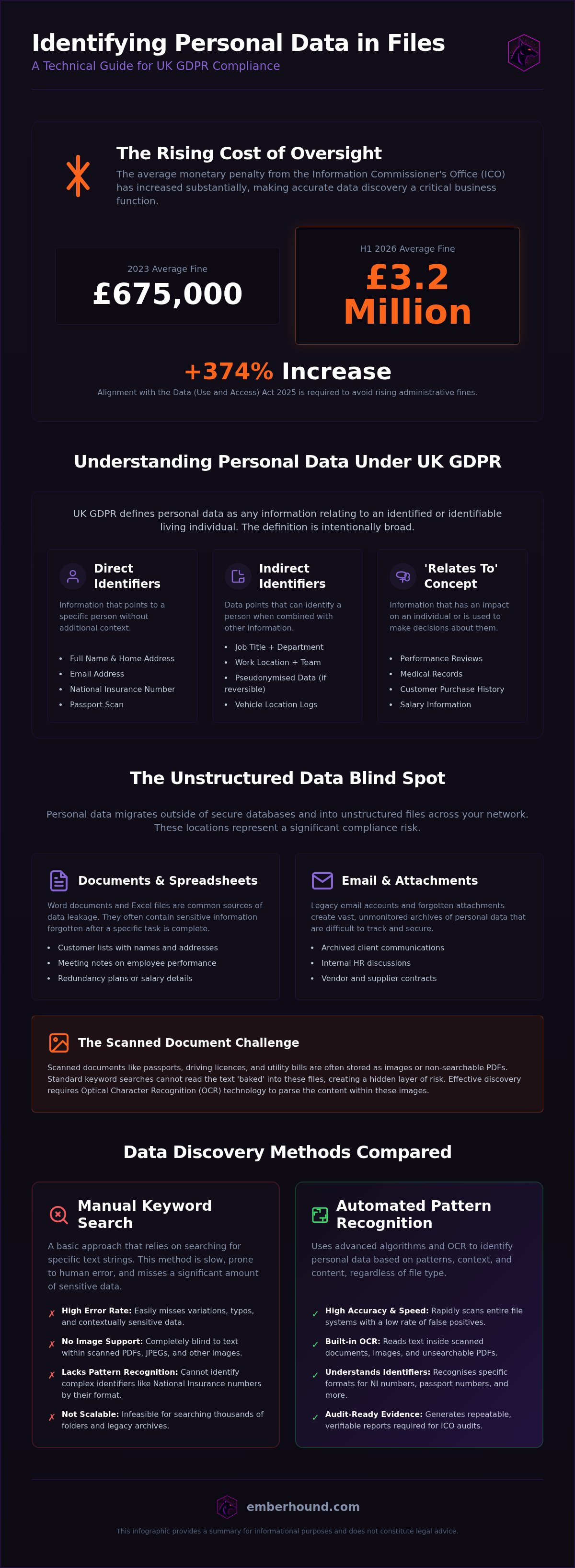
The average value of a monetary penalty from the Information Commissioner's Office (ICO) rose from approximately £675,000 in 2023 to nearly £3.2 million in the first half of 2026. For a UK business, the cost of an oversight has never been higher. You likely feel the weight of this reality every time you attempt to identify personal data in files across your servers. It's a slow, draining process. Human error's inevitable when hunting for sensitive strings across thousands of legacy folders and forgotten email attachments. The complexity of UK GDPR definitions only adds to the friction.
We agree that 'good enough' is no longer a viable strategy for data protection. You need a system that works as hard as your team does. This guide provides the exact steps to locate and categorise sensitive information across your file systems to meet the requirements of the Data (Use and Access) Act 2025. You'll learn how to build a repeatable discovery process that moves beyond guesswork. We'll show you how to map every data location and produce the audit-ready evidence required to prove your compliance. It's time to replace anxiety with a clear, technical roadmap.
Key Takeaways
- Define your internal data landscape to build a repeatable process for meeting UK GDPR obligations.
- Learn how to identify personal data in files that often hide in unstructured formats like scanned PDFs and email attachments.
- Compare the speed and accuracy of manual keyword searches against automated pattern recognition for identifiers like National Insurance numbers.
- Use local endpoint scanning to maintain data privacy whilst generating the evidence required for ICO audits.
- Align your discovery efforts with the updated requirements of the Data (Use and Access) Act 2025 to avoid rising administrative fines.
Defining Personal Data for UK GDPR Compliance
UK GDPR defines personal data as any information relating to an identified or identifiable living individual. This is the legal foundation for every security decision you make. If you cannot accurately identify personal data in files, you cannot protect it. The definition is intentionally broad to ensure no one slips through the cracks. It excludes information about limited companies, LLPs, or individuals who are deceased. However, for every living customer, employee, or supplier, the scope of the General Data Protection Regulation (GDPR) is extensive.
Standard identifiers go beyond names and home addresses. They include email addresses, National Insurance numbers, and identification strings found in databases. You must also consider factors specific to a person's physical, physiological, genetic, mental, or economic identity. A file containing a person's salary history or a scan of their passport is undeniably personal data. These documents are high-value targets for attackers and high-risk items for your compliance team. You need to know where they are before an auditor asks.
Direct vs Indirect Identifiers
Direct identifiers allow you to point to a specific person immediately. A passport number or a full name is a clear signal. Indirect identifiers are more complex. They require additional context to reveal an identity. For example, a job title paired with a specific department and a work location might identify one person out of a thousand. You must treat these combinations as sensitive. Pseudonymised data often leads to a false sense of security. If you can reverse the process or link the data back to an individual using other available information, it remains personal data under the law. There is no 'halfway' compliance here.
The Concept of 'Relates To'
Data must 'relate to' an individual to be classified as personal. This means the information has an impact on the person or is used to influence decisions about them. It isn't just about labels - it is about the content and the context of the file. Common examples include performance reviews, medical records, or customer purchase histories. Even a simple log of location data from a company vehicle relates to the driver.
Identifying these links in unstructured environments is a significant hurdle. Personal data often sits in forgotten spreadsheets or PDF attachments that haven't been opened in years. To manage this effectively, you need to identify personal data in files regardless of where they are stored. For a deeper look at your obligations, read our GDPR guide to understand how these definitions translate into daily operations. Accuracy in this first stage prevents costly errors during a DSAR or an ICO audit.
Where Personal Data Resides in Corporate File Structures
Personal data rarely stays where it belongs. It migrates. It leaks into shared drives, temporary folders, and local desktops. Most organisations assume their sensitive information is locked inside a secure database or a designated 'HR' folder. This is a mistake. In reality, fragments of identity are scattered across your entire network. You must identify personal data in files that sit outside these controlled environments to avoid regulatory exposure. Data sprawl is not just a storage issue. It is a compliance failure waiting to happen.
Unstructured data represents the most significant blind spot for modern IT teams. Unlike structured databases, these files lack a formal schema. They are difficult to index and even harder to monitor. If you aren't scanning the contents of every document, you aren't truly compliant. You can test your own endpoint for hidden data to see how much information is currently unmapped.
The Risk of Unstructured Files
Spreadsheets are a primary culprit in data leakage. A single 'temporary' Excel sheet might contain thousands of customer names, home addresses, and contact details. These files are often created for a specific task and then forgotten. Word documents are equally problematic. They house meeting notes that discuss employee performance, medical leave, or redundancy plans. These documents are easy to share but difficult to track once they leave their original folder.
Scanned documents present a unique challenge that standard search tools cannot solve. Passports, utility bills, and driving licences are often stored as static images or unsearchable PDFs. Because the text is 'baked' into the image, a basic keyword search will return zero results. This creates a hidden layer of risk. You need technology that uses Optical Character Recognition (OCR) to 'read' the text inside these images. Without it, your discovery process has a massive hole in its visibility.
Email Attachments and Mailboxes
Your email system is likely your largest unmapped data repository. Staff often use their inboxes as informal filing systems. They keep contracts, CVs, and financial statements as attachments for easy access. These files are frequently forgotten once a project ends, yet they remain on your mail server indefinitely. Identifying these risks manually is impossible at scale. You can identify sensitive data in your inboxes using specialised discovery tools designed to crawl mailboxes without disrupting the user.
Beyond the server, local hard drives and external storage devices house 'shadow data'. This is information stored outside the visibility of the IT department. If an employee saves a customer list to their desktop or a USB stick, it is no longer part of your central security protocols. It is, however, still your responsibility. To maintain an audit-ready posture, you must identify personal data in files across all endpoints, not just the central server.
Evaluating Manual and Automated Identification Methods
Searching for files by hand is a strategy doomed to fail. You might use Windows Explorer or macOS Spotlight to find keywords like 'invoice' or 'contract'. This works for small folders but collapses at scale. You cannot identify personal data in files accurately when your dataset reaches hundreds of gigabytes. Manual searching ignores the content inside the files. It relies on filenames, which are often misleading or generic. You need a technical solution that looks deeper than the surface.
Automated scanning uses software to crawl your entire file system. It recognises patterns like National Insurance numbers or bank details without needing a specific filename. This process is repeatable. It creates a consistent audit trail that regulators expect. If you rely on manual methods, you are betting your compliance on the focus of an overworked employee. That is a high-stakes gamble with little reward.
The Hidden Costs of Manual Discovery
Staff time is your most expensive asset. Asking a senior IT manager to spend hours clicking through directories is a waste of resources. It is an operational drain that takes talent away from higher-value projects. Beyond the clock, human error is your biggest liability. People get tired. They miss hidden rows in spreadsheets. They skip folders with cryptic names. Missing even one file containing sensitive data can lead to an ICO investigation.
The financial risk is stark. The average value of a monetary penalty from the ICO increased by 370% from 2023 to 2026. Manual searches offer no defensible evidence. You cannot hand a regulator a screenshot of a search bar and call it a compliance process. Modern audits require 'fingerprinted' proof that every endpoint has been scanned. Without this, you lack the audit-ready evidence required to prove you have taken appropriate technical measures.
Benefits of Automated Endpoint Scanning
Automated discovery is the only way to maintain a consistent security posture. Software can scan thousands of documents whilst a human is still opening their first folder. It doesn't just look at labels. It uses pattern matching to find identifiers like National Insurance numbers and home addresses. This catches sensitive data that does not contain specific keywords. For example, a file named 'Scan_001.pdf' might contain a customer's passport details. A manual search would miss it. An automated scanner with OCR technology will find it.
Security is another factor. Traditional scanning often requires moving files to a central server for analysis. This increases your attack surface. Local endpoint scanning ensures that data never leaves the machine. This approach is faster and more secure. It provides visibility without the risk of file exfiltration. To see how this works in practice, you can watch a video demo of our technical process. You get the results you need without the complexity of a centralised database.
How to Identify Personal Data in Files Step by Step
Moving from theory to action requires a structured technical workflow. You cannot rely on ad-hoc checks or occasional spot-checks of your servers. You need a process that is repeatable and defensible. A clear sequence ensures that no storage location is overlooked. It also ensures that your team doesn't waste time on irrelevant data. You are building a system of record that protects both your customers and your business reputation.
Step 1 - Define Your Data Scope
Start by identifying which identifiers are critical to your business operations. This usually includes names, National Insurance numbers, and customer IDs. Consult our GDPR guide to ensure your internal definitions align with current UK standards. You must be specific. Broad definitions lead to bloated datasets that are difficult to manage. Identify which departments handle the most sensitive information. HR, Finance, and Sales are the primary areas of concern. These teams frequently create and share the unstructured files that carry the highest risk.
Step 2 - Conduct a Comprehensive Scan
Once you have defined your scope, deploy discovery tools to your endpoints. This allows you to identify personal data in files locally without moving documents to a central server. This method is faster and more secure than network-wide crawls. Your scan must include OCR capabilities. This is the only way to detect data within scanned PDFs, passport photos, and utility bill images. Ensure the software targets common file formats like .docx, .xlsx, .pdf, and .msg files. These extensions house the majority of unmapped risk in a UK business environment. The goal is total visibility across all local drives and attached storage.
Step 3 - Validate and Map Findings
Review the results using masked previews. This allows you to verify that the identified data is actually personal without exposing the raw information to the reviewer. It maintains privacy whilst you work. From here, create a data map. This document shows where sensitive data is stored and which user accounts have access to those locations. Use salted SHA-256 fingerprints to prove the existence of specific data points during an audit. This provides a secure, cryptographic record of your compliance status. You can prove you have found the data without ever needing to show the raw, sensitive content to a third party. Documentation is your final line of defence. An inventory that is updated regularly shows the ICO that your organisation is proactive. It moves you from a state of reactive panic to one of controlled technical oversight.
Using EmberHound to Automate Personal Data Identification
EmberHound Discover is built for lean IT and compliance teams who need results quickly. Traditional discovery tools are often bloated and slow to deploy. They require central servers and complex configurations that drain your time. Our platform is a technical tool for professionals who value speed and accuracy. You can identify personal data in files across your entire organisation without the friction of enterprise software. It provides the visibility you need to meet UK GDPR requirements whilst maintaining a light operational footprint.
The platform uses pattern recognition to find sensitive identifiers and OCR technology to read text within images. This ensures that your discovery process is thorough. You pay only for the data you scan. This usage-based pricing model is designed for cost-conscious teams who want to avoid long-term contracts and hidden fees. It is a transparent approach to compliance. You get the results you need to satisfy auditors without the bureaucracy of traditional vendors.
Endpoint-Only Scanning for Maximum Security
Data privacy is our priority. EmberHound performs all scanning locally on the endpoint. This means your files never leave the local machine. There is no file exfiltration and no central database of raw sensitive data. This endpoint-only approach is ideal for remote workers and distributed teams who operate outside a traditional office perimeter. It maintains your security posture whilst providing central visibility of your data risks.
Security is part of the core architecture. We use TLS 1.3 for secure communication and AES-256 encryption for data at rest. To provide audit-ready evidence, we generate salted SHA-256 fingerprints of your findings. These fingerprints prove that you have identified the data without exposing the raw information itself. You get a secure, cryptographic record of your compliance status that is ready for an ICO investigation.
Getting Started with a Free Scan
You don't need a massive budget or a month-long implementation plan to start securing your data. The onboarding process is designed to be friction-free. There is no deployment drama or complex training required. You can start free GDPR scan to identify your initial risks and see the platform in action. It is the fastest way to move from uncertainty to a documented data inventory.
If you want to understand more about our technical philosophy, visit our why us page. We believe that data discovery should be a technical solution, not a legal burden. By using EmberHound to identify personal data in files, you move from a state of reactive panic to one of controlled technical oversight. It is time to replace manual searching with a repeatable, technical workflow that protects your business and your customers.
Secure Your Data Landscape Today
The ability to identify personal data in files is no longer a task for manual spot-checks or generic keyword searches. As UK regulatory enforcement sharpens, your discovery process must become a repeatable technical workflow rather than a legal guessing game. You now have the roadmap to locate sensitive identifiers across unstructured documents, images, and email attachments. This shift from reactive searching to proactive mapping is the only way to satisfy modern audit requirements.
Endpoint-only scanning ensures your files never leave your network during the discovery process. This keeps your security posture intact whilst providing the salted SHA-256 fingerprints needed for defensible evidence. Our usage-based pricing model offers total transparency, allowing you to scale your compliance efforts with no mandatory long-term contracts or hidden fees. It's a pragmatic approach for teams who value speed and technical clarity.
Take control of your data inventory today. It is the most direct path to reducing your regulatory risk and ensuring your organisation remains a trusted guardian of personal information.
Frequently Asked Questions
What is the best way to identify personal data in files?
Automated pattern recognition is the most reliable method for any UK business. It scans the actual content of documents for identifiers like National Insurance numbers rather than relying on filenames. This approach is faster and more accurate than manual searching. It provides a technical audit trail that regulators require. Using a tool that performs local endpoint scanning ensures that sensitive files never leave the machine, which maintains your security posture whilst you map your data landscape.
Does UK GDPR apply to personal data stored in images?
Yes, UK GDPR applies to personal data regardless of the file format. This includes scanned passports, driving licences, and utility bills stored as JPEGs or PNGs. If an image contains information that can identify a living individual, it is within the scope of the law. You must use technology like Optical Character Recognition (OCR) to extract and analyse text from these images to ensure you haven't missed hidden risks in your storage systems.
How do I find personal data in a large file server?
The most efficient approach is to deploy a discovery tool that crawls the server at the file level. You should map your data landscape to include all shared drives and legacy folders. Focus on common unstructured formats like .docx and .xlsx. To identify personal data in files across high-volume environments, you need a system that can recognise patterns without manual intervention. This creates a documented inventory of sensitive data locations for your compliance records.
Can I use manual search to comply with UK GDPR?
Manual search is generally insufficient for meeting UK GDPR obligations. It is slow, prone to human error, and cannot 'read' the contents of images or unsearchable PDFs. Whilst it might work for a small handful of files, it fails to provide a defensible audit trail for larger datasets. Regulators expect organisations to implement appropriate technical and organisational measures. Relying on staff to click through folders manually does not meet this professional standard.
What are the risks of not identifying personal data?
Failing to locate sensitive data leads to severe financial and legal consequences. The maximum administrative fine under UK GDPR is the greater of £17.5 million or 4% of total annual worldwide turnover. Beyond fines, unmapped data increases your vulnerability during a data breach or a Subject Access Request (DSAR). If you don't know where the data is, you can't protect it. This oversight exposes your business to significant reputational damage and regulatory scrutiny.
How does OCR help in identifying personal data?
Optical Character Recognition (OCR) translates the text within images into machine-readable data. This allows discovery tools to identify personal data in files that are otherwise 'invisible' to standard search engines, such as scanned contracts or ID documents. Without OCR, these files remain a massive blind spot in your compliance strategy. By using this technology, you can ensure that your data map includes every identifier, even those locked inside static image files or scanned PDFs.
Is pseudonymised data still considered personal data?
Yes, pseudonymised data remains personal data under UK GDPR. Whilst pseudonymisation replaces identifiers with artificial codes to reduce risk, the process is reversible. If the data can still be attributed to a specific person by using additional information, it is not anonymous. You must continue to protect and track this data as part of your compliance workflow. Only truly anonymous data, where the individual is no longer identifiable, falls outside the scope of the regulation.
How often should I scan my files for personal data?
You should scan your files on a regular, scheduled basis or whenever significant changes occur in your file structure. Data is dynamic. Staff create new spreadsheets, download attachments, and migrate folders daily. A one-off scan only provides a static snapshot of a moving target. To maintain an audit-ready posture, implement a repeatable discovery process. Monthly or quarterly scans are standard for many UK businesses to ensure their data inventory remains accurate and up to date.


