

An AI system’s inventory entry is only the starting point. To answer what to record about an AI system, capture its purpose, owner, data, decisions, actions, outcomes, risks, approvals, changes and monitoring results. Keep enough context to trace what the system did and why.
It’s easy to focus on the model and miss the records around it. To decide what to record about an AI system, consider who owns it, what information it uses and how its behaviour changes over time. In Scotland, relevant AI systems must be recorded in the Scottish AI Register, according to the Scottish Government. The register covers systems being considered, in development or testing, and in live use.
This article explains what to record about an AI system to make its decisions, actions, outcomes, risks and monitoring visible, and to keep its inventory accurate. You’ll see how these records fit together and help answer practical questions when a system changes or someone needs to review its output.
Key Takeaways
- Record who owns each AI system, what it is for and which data it uses, so its place in your organisation is clear.
- Capture decisions and actions with enough context to trace what happened and review the outcome.
- Track changes to prompts, workflows and knowledge sources, including who approved them and how their effects are assessed.
- Choose performance measures that reflect the system's task, then keep monitoring results as the work and data change.
- Use data discovery to identify personal information that may be relevant to GDPR records and subject access requests.
Audit trails and visibility into agent decisions
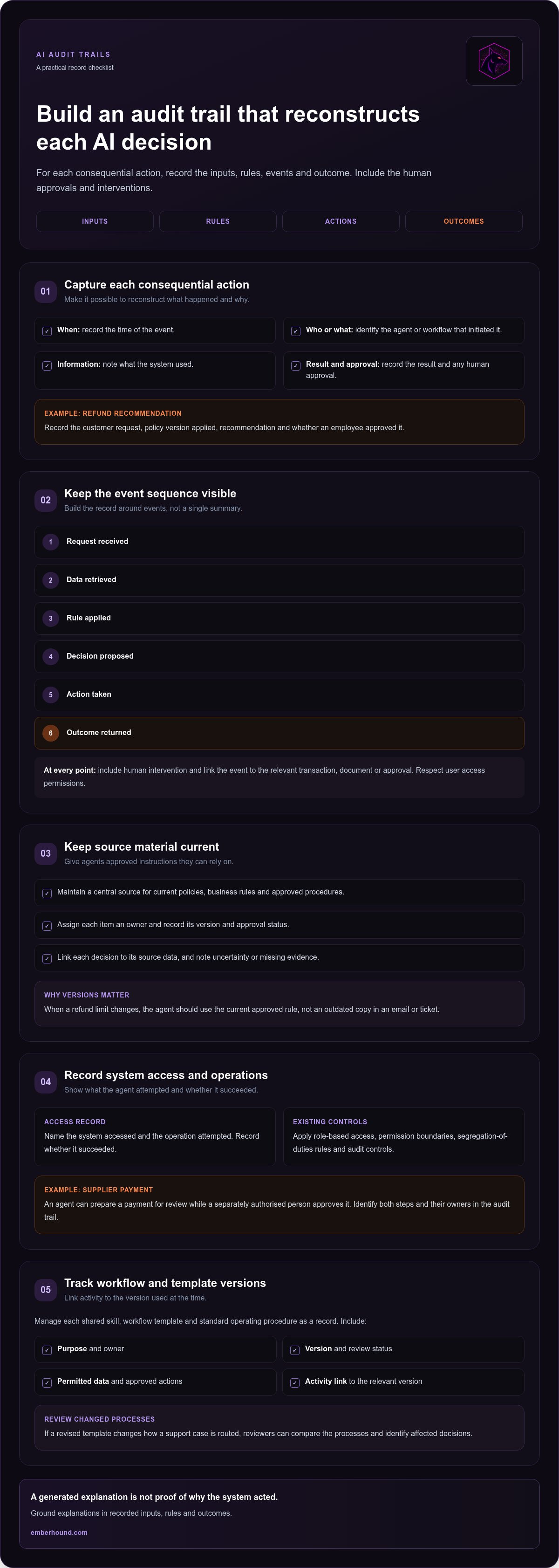
An audit trail should let a reviewer reconstruct an agent’s decision from recorded events. For each consequential action, record when it happened, which agent or workflow initiated it, what information it used, the result and any human approval. For example, if a customer-service agent recommends a refund, record the request, the policy version applied, the recommendation and whether an employee approved it.
Give people and agents a central source of truth for current policies, business rules and approved procedures. Old documents can contain conflicting instructions, so assign each item an owner and record its version and approval status. When a refund limit changes, the agent should use the current approved rule, not an outdated copy in an email or ticket.
Authoritative records matter because agents can act on inaccurate or outdated information. Link each recorded decision to its source data, and note any uncertainty or missing evidence. A reviewer can then distinguish a decision based on an approved customer record from one based on an outdated spreadsheet. Ground explanations in inputs, rules and outcomes: a generated narrative alone does not show why the system acted.
Integrate agents with enterprise systems through controlled workflows. Record which system the agent accessed, what operation it attempted and whether it succeeded. Apply existing role-based access, permission boundaries, segregation-of-duties rules and audit controls when agents handle HR or finance processes. For example, an agent might prepare a supplier payment for review while a separately authorised person approves it. The audit trail should identify both steps and their owners.
Shared agent skills and workflow templates can make handling more consistent across teams. Manage each skill, template and standard operating procedure as a record, including its purpose, owner, version, permitted data, approved actions and review status. Link each agent activity to the version used. If a revised template changes how a support case is routed, reviewers can compare the processes and identify affected decisions.
Build records around events, not just a single summary. A useful sequence is: request received, data retrieved, rule applied, decision proposed, action taken and outcome returned. Include any human intervention. Link each event to the relevant transaction, document or approval, while respecting the user’s access permissions. This creates a traceable account for auditors and system owners without treating an agent’s fluent explanation as proof.
- Record decision inputs, policy versions, actions and outcomes.
- Maintain an owned, approved source for instructions agents rely on.
- Link each activity to its workflow version and required human approvals.
Persistent records of actions and outcomes
An action log shows what an AI system did; a persistent outcome record shows what followed. Link each completed action to its result, the relevant case or transaction, and any later correction. For example, a claims assistant might classify a case, recommend a route and pass it to an employee. Record whether the route changed, who changed it and the final case result. This lets reviewers examine work after the live session has ended.
Keep records usable over time. Give each event a timestamp, stable case identifier, outcome status and link to the source record. Store the system or workflow version separately from case details. If a customer support assistant closes a ticket, record whether the customer reopened it and why. That follow-up distinguishes a completed action from a successful outcome. Set retention and access rules according to each record’s purpose and the information it contains.
Assess fairness using outcome evidence. Compare how an AI-supported process treats people in comparable circumstances, and record the criteria used. For example, in recruitment screening, retain the role criteria, system recommendation, human decision and eventual stage reached by each applicant. Review differences across relevant groups where the organisation has a sound basis to do so. An unexplained gap can prompt investigation, but does not by itself explain why the difference occurred.
Include corrections and appeals in the same case history. If an employee overrides a decision, record the reason, evidence considered and revised outcome. Note whether the person affected challenged the result and how the organisation resolved the challenge. A lender reviewing an application could then distinguish an automated recommendation from the final decision and see whether additional information changed the result. Keep the original entry intact and add a dated correction so reviewers can follow the sequence.
Outcome-based pricing also depends on clear records. If a supplier agreement links payment to completed tasks or another measured result, document the agreed outcome, measurement method, evidence source and calculation period. For example, a customer-service workflow might count cases resolved under defined conditions. Record reopened cases and human interventions too. This helps both parties interpret the measure consistently, resolve disputed results and trace figures back to individual cases.
Choose measures that reflect the work, not activity alone. A high number of processed cases means little if cases come back for correction. For a document-review workflow, track accepted results, corrections and unresolved cases together. Record the decision rules behind each measure and any changes to them. This preserves context when teams compare outcomes over time or assess whether an improvement came from the AI system or a changed process.
- Link each action to its final outcome and any later correction.
- Document fairness review criteria and preserve the evidence behind each decision.
- Define outcome measures before using them for supplier payment or performance review.
AI risk assessments and monitoring
A risk assessment should explain how an AI system could fail in its actual work context. For a support assistant, assess errors such as sending account details to the wrong person or giving outdated instructions. Record the affected process, people and data, possible consequences, existing controls and the person responsible for review. This connects the assessment to the system’s use.
Separate model risks from risks in the surrounding workflow. A hiring tool may produce a consistent score while its input data reflects historic decisions. A document assistant may retrieve the wrong policy because its knowledge source is out of date. Record each failure scenario, the evidence used to assess it, and how a person can identify or respond to the problem.
Governance must cover changes after launch. Record who can authorise changes to prompts, skills, workflows and knowledge sources. For each change, capture its reason, approver, affected users, test results and release decision. If a revised prompt changes how a customer query is categorised, compare representative cases before and after the change. Keep a rollback route and identify who can approve its use.
Monitoring should test whether the system remains suitable for its task. Choose indicators linked to the process, such as incorrect classifications, escalations to employees or corrections after review. Record the measurement method, data source, review owner and actions taken when results move outside the organisation’s chosen limits. For example, a rising correction rate in an invoice workflow can prompt investigation of changed invoice formats or supplier data.
Set review triggers as well as scheduled checks. A new data source, workflow change, recurring user complaint or material model update can alter the risk assessment. Record the trigger, findings and decision to continue, restrict or pause the system. A workflow that performs accurately at launch may become meaningfully inaccurate by month six as the underlying work changes.
- Log monitoring results against the system version and data source used.
- Document who investigated an alert, what they found and which action followed.
- Keep previous assessments so reviewers can trace changes in context and controls.
Collaboration gives monitoring a route to action. A service team may spot repeated misrouting, while technical staff can trace it to a changed category or data feed. Record the report, investigation owner, evidence and resolution. When an AI system encounters uncertainty, a human expert can correct its outcome and feed the correction back into the model. Track that correction and any later change separately from the original result.
Review the risk record when the system’s purpose, users, data or operating conditions change. If a finance assistant expands from drafting summaries to proposing payments, reassess who reviews its output and which actions it can initiate. Link the new assessment to the change approval and monitoring plan. This keeps governance aligned with the system people actually use.
AI system inventories and records
An AI inventory gives an organisation a current view of the systems it uses, tests or develops. Give each entry a stable identifier, system name, purpose, business owner and status. Record where the system operates, who uses it and which process it supports. For example, distinguish a tool that drafts staff guidance from one that ranks job applications. They involve different users, data and consequences.
Make each entry meaningful to people outside the project team. Describe the system’s role in plain language, name the provider or internal development team, and record whether it makes recommendations or takes actions. Include its main data sources and connected services. If a customer-service assistant uses a knowledge base and ticketing system, name both. Record where human oversight happens, such as employee approval before a reply is sent.
Relevant AI systems must be recorded in official transparency registers where mandated by public sector policy. These registers cover systems being considered, developed or tested, and those in live use. To maintain compliance, record the applicable stage and update the entry when the status changes. A pilot that moves into live use needs a current record, not an entry still marked as testing.
Record datasets according to their role in the system. Identify data used for training, validation, testing and production inference. For each dataset, describe its source and purpose, and note the system version that used it. For example, a model tested on historic support cases may later process current customer enquiries. Keeping these uses distinct helps reviewers see which evidence relates to development and which to live operation.
Link the AI record to related governance documents. An AI system record can connect to one or more processing activities in the organisation’s GDPR record. Include each activity’s name and a link to its existing entry, so staff can trace how the system fits into recorded data handling. Keep system-level details in the inventory and refer to the relevant processing record for fuller context.
Review entries when facts change. A new data source, owner, purpose, workflow or operating status should prompt an update. If AI helps draft an inventory entry, review and correct it before saving, as generated information may contain errors. When restoring an earlier system version, create a new record for the restored version and leave the original AI system unchanged.
- Give every system a named owner, clear purpose and current lifecycle status.
- Link dataset roles and relevant GDPR processing activities to the inventory entry.
- Review generated record details and update entries when system facts change.
What performance, accuracy and reliability metrics should be documented for an AI system?
Choose metrics that match the system’s task. For an invoice extraction tool, record how often it identifies the correct supplier, date and total. A single accuracy score can hide errors in individual fields. Measure results against a reviewed sample, and document how that sample was selected. Keep test data separate from examples used to develop or tune the system.
For classification tasks, track false positives and false negatives as well as correct classifications. A support assistant that routes urgent complaints should be assessed for missed urgent cases, not just overall routing accuracy. Record the classification rules, reference labels and how reviewers resolved disagreements. This context makes comparisons useful when the task or customer queries change.
Measure confidence and uncertainty where the system produces them. For a document assistant, record how often low-confidence answers go to a person and how often reviewers correct them. Track unsupported answers separately from factual errors. A confident but incorrect answer creates a different operational risk from one that clearly signals uncertainty.
Reliability covers system operation as well as output quality. For an AI service that processes requests, record response times, failed requests, timeouts and interruptions. Include the measurement period, monitoring method and system version. If a supplier portal becomes unavailable during invoice processing, teams need to distinguish a technical outage from a poor extraction result. Link operational events to the tasks they affected.
Connect metrics to human review. For a recruitment tool, record how often reviewers accept, change or reject recommendations, including reasons where available. Compare results across relevant groups only where the organisation has suitable data and a sound basis for comparison. Document the method and its limits. Differences in outcomes call for investigation; the metric alone cannot explain their cause.
Define every reported measure. State its numerator, denominator, data source, test conditions and owner. For example, specify whether a corrected answer counts as an error and whether repeated requests count as separate cases. Record the organisation’s chosen thresholds and the action each one triggers. This prevents teams from changing a metric’s meaning between reviews.
Compare results across system versions and operating conditions. Changes to a prompt, data source or workflow can alter response quality even if the model stays the same. Keep previous results, note each change and rerun the same task-relevant tests where practical. For a support assistant, compare performance on common enquiries and unusual cases. Investigate sudden shifts before treating them as lasting improvement or decline.
- Match each metric to the task and define how it is calculated.
- Record test conditions, system versions and human corrections beside results.
- Pair output quality measures with operational reliability data.
EmberHound: GDPR Data Discovery
EmberHound is a practical next step when an AI system uses personal information and you need to locate that data. GDPR Data Discovery helps teams find personal data across business files, providing useful context for documenting relevant datasets and processing activities. Its findings can inform your records, but they do not replace the AI inventory, risk assessment or decision logs described above.
For requests involving personal information, EmberHound’s DSAR Disclosure Pack supports the preparation of disclosure material. Organisations handling payment card data can use PCI Card Data Discovery, or Combined GDPR + PCI Coverage for both areas. Choose the offering that matches your team’s data discovery task.
Visit emberhound.com to learn more about EmberHound’s data discovery tools.
Make your next AI review easier
Before approving a change to an AI system, set a review point and assign an owner. This gives the next update a clear place in the team’s work.
What to record about an AI system can change as its use evolves. Make record-keeping part of the project’s review process, so the owner can keep documentation aligned with current practice.
For your next review, agree how teams will raise questions about records and who will resolve them. A clear process helps keep the work moving.
Start with one clear owner and move the next review forward with confidence.
Frequently Asked Questions
What information should be documented about an AI system?
Record the system’s dependencies and the evidence used to approve its use. For example, note which software interface supplies customer records and which team owns that connection. Document where supporting materials are stored and how a reviewer can retrieve them. If an incident leads to a decision to restrict access, keep that decision and its rationale with the incident record.
What details should an AI system record about its purpose, design and intended users?
Describe the system’s boundaries and assumptions, including the tasks it is designed to handle and situations outside its scope. For a translation assistant, state which languages and document types it supports, and whether users must review its output before sharing it. Record any role or training needs for intended users. This helps prevent a tool designed for internal drafts from being treated as a final customer communications service.
What risks, limitations and potential harms should be recorded for an AI system?
Include misuse and security scenarios, such as a user entering confidential information into a public chatbot or hostile text attempting to change an assistant’s instructions. Record the people and assets exposed, how harm could occur, and the safeguards tested against that risk. For a document assistant, test whether it follows instructions embedded in a document instead of the authorised task.
What human oversight and monitoring information should be documented for an AI system?
Record whether the person reviewing an output has enough time, training and authority to challenge it. In healthcare platforms like MayaMD, for example, documenting who can override clinical recommendations and how urgent cases reach medical staff ensures critical safety boundaries are maintained. Keep instructions for reporting a concern accessible. A named backup role helps prevent gaps during staff leave or team changes.
How long should AI system records be retained and how should they be secured?
Set retention according to each record’s purpose, the organisation’s retention schedule and applicable legal obligations. Avoid keeping detailed interaction logs indefinitely if a shorter period serves their purpose. Restrict access by role, protect stored records from unauthorised changes and retain an access history where appropriate. For example, separate staff who review sensitive case records from those who need only aggregate performance reports.
What UK laws and regulations require records about AI systems?
There is no single record set for every UK use case. Where an AI system processes personal data, link its documentation to the organisation’s GDPR record of processing activities. Then assess other requirements according to the system’s function and sector. A tool used for employment decisions, for example, may raise different record-keeping questions from one used to sort internal documents, while healthcare organisations introducing new digital workflows must ensure governance meets strict regulator standards, where advisors like CQC Consultancy assist providers with compliance and registration requirements.
What records are required for high-risk AI systems under the EU AI Act?
For a high-risk system, organise records around its technical description, risk controls, data governance, oversight arrangements and operational logs. Applicable requirements depend on the system’s classification and the organisation’s role. Under the European AI Act, a provider develops a system and places it on the market or puts it into service under its own name; a deployer uses it under its authority in professional activities.
What should an AI system inventory or model card include?
A model card can help technical teams reproduce an evaluation. Record the model’s source, release identifier, configuration and evaluation environment, including dependencies that affect results. For example, a speech model’s card could state the microphone conditions used during testing and known transcription limits in noisy rooms. Keep these details distinct from organisation-level inventory fields, and link the card to the deployed model version.


