

A tool change can leave a blind spot if you don't map existing scan coverage before the replacement starts. To migrate from Ground Labs to modern card discovery software, record which endpoints and locations are scanned, how scans are configured, and what evidence your team keeps.
A new system could miss cardholder data or add work for an already stretched IT team. A staged migration gives each step an owner and lets you compare the replacement with your current process before relying on it.
This article explains how to map current scans, configurations, exclusions, and evidence, then assess replacement software against your card discovery requirements and endpoint architecture. It also explains how to evaluate EmberHound Discover. Discover scans endpoints using local processing, with no file exfiltration. Masked previews, salted SHA-256 fingerprints, and audit logs support evidence review. Start with a free scan to assess the software against your requirements.
Key Takeaways
- Record current scan coverage, settings, exclusions, and evidence before selecting a replacement.
- Turn cardholder data discovery needs into testable requirements for endpoint coverage, detection, evidence review, and scan administration.
- Compare software architecture with your documented setup. Don't assume how your current Ground Labs scans operate.
- To migrate from ground labs to modern card discovery software, set owners and acceptance criteria for each stage, from baseline through operational handover.
- Assess EmberHound Discover against your requirements, including its endpoint-only scanning, local processing, and evidence review features.
Why migrate from Ground Labs to modern card discovery software?
Start by establishing what your current card discovery process covers. If you can't identify the endpoints in scope, who owns each scan, and how teams review results, changing software could make an existing gap harder to detect.
Card discovery migration is a controlled change to the scanning and evidence processes your organisation uses to locate and review cardholder data.
Common reasons to assess a change include moving to new infrastructure, changing licensing needs, or finding that evidence workflows no longer suit the people who review findings. These are prompts for an assessment, not proof that the current deployment has failed. Separate problems with how the tool is configured or operated from the outcomes a replacement must meet. For example, a difficult handover may point to unclear ownership. A replacement requirement could be a named owner and a repeatable review process.
The Payment Card Industry Data Security Standard (PCI DSS) provides context for why organisations track cardholder data. Base your migration decision on your documented scope and the tasks your team needs the discovery process to perform.
What to review before replacing a card discovery tool
Build a baseline from records and conversations with the teams that run scans and review results. Capture the process as it works today, including manual steps that may not appear in a configuration export.
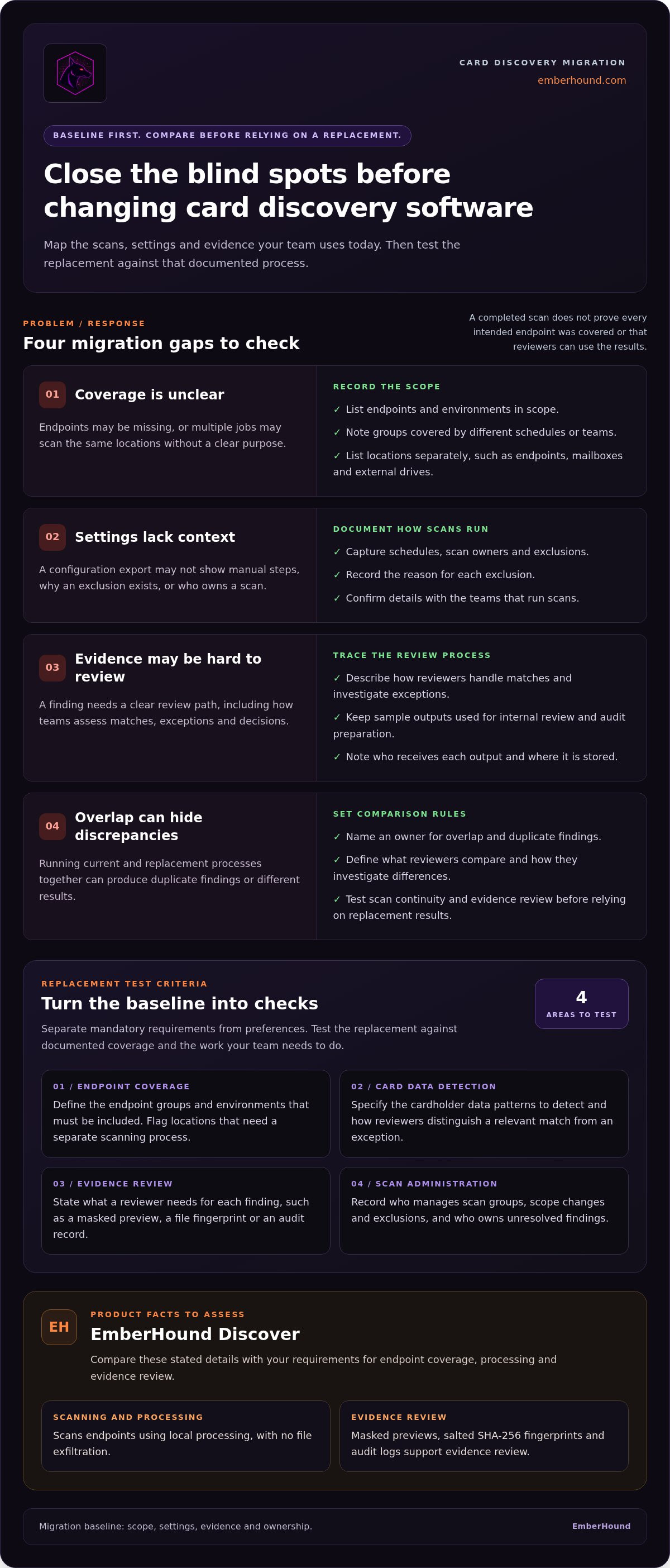
- List endpoints and environments in scope. Note those covered by different schedules or teams.
- Record scan schedules, owners, exclusions, and the reason for each exclusion.
- Describe how reviewers handle matches, investigate exceptions, and record decisions.
- Keep examples of outputs used for internal review and audit preparation. Note who receives them and where they are stored.
This inventory gives you a baseline for comparing replacements and helps distinguish a coverage gap from an administrative problem. A missing endpoint needs a different response from a scan that runs on schedule but produces evidence reviewers can't use.
Which migration risks deserve attention?
Focus on gaps that a completed scan or dashboard might not reveal. A job marked complete doesn't show whether every intended endpoint was scanned or whether teams can interpret the results.
- Check for endpoints missing from the inventory and jobs that scan the same locations without a clear purpose.
- Assign ownership for scope changes, exclusions, and unresolved findings.
- Decide how teams will handle findings while the current and replacement processes overlap.
- Set tests for scan continuity and evidence review before relying on replacement results.
Overlapping scans can help you compare results, but they need an owner and a plan for duplicate findings. Define what reviewers will compare, how they'll investigate discrepancies, and who can approve scope changes. These checks make the decision to migrate from Ground Labs to modern card discovery software a controlled evaluation based on your own operation.
Map cardholder data discovery requirements before choosing replacement software
Turn your current process into requirements you can test against a replacement. Base them on documented coverage, not assumptions. Use the records from your baseline review and confirm the details with the teams that run scans and examine results.
Separate mandatory requirements from preferences before comparing platforms. For example, coverage of a defined endpoint group or a reviewable record of scan activity might be mandatory. A particular report layout might be a preference. This distinction helps prevent a useful feature from being mistaken for a coverage requirement.
Build an inventory of current card discovery coverage
Describe where cardholder data discovery needs to take place and who is responsible for each area. Check the PCI Security Standards Council's published PCI DSS resources for standards context, then record the requirements that apply to your documented scope.
- Group endpoints by operating environment, business function, or team. Note who owns each group and how its scans are managed.
- List relevant locations separately, such as endpoints, mailboxes, and external drives. Mark which are in scope and how each is currently covered.
- Trace a finding from detection through internal review. Record how staff assess a match, document a decision, and escalate an unresolved result.
A list of device names alone won't show whether the right data locations are included or whether your team can act on a finding. Add ownership and review steps so the inventory can guide practical tests.
Set security and evidence criteria for the replacement
Translate the inventory into checks you can demonstrate during an evaluation. Specify what the software must detect, where it must scan, and what reviewers need to see. Assess processing and evidence handling against your organisation's security requirements, rather than relying on a product label or a broad claim.
- Endpoint coverage: Define the endpoint groups and environments that must be included. Identify any required locations that need a separate scanning process.
- Card data detection: Describe the cardholder data patterns your team expects to detect. Decide how reviewers will distinguish a relevant match from an exception.
- Evidence review: State what a reviewer needs for each finding. This could include a masked preview, a fingerprint to help identify a file, or an audit record of access and changes.
- Scan administration: Set expectations for scheduling, ownership, exclusions, and handling failed or incomplete scans. Define a scenario to test each requirement.
- Security controls: Compare local processing and file transfer practices with your requirements. Record required encryption for data in transit and at rest. EmberHound Discover uses TLS 1.3 in transit and AES-256 at rest.
Keep the requirements in a short evaluation sheet. Mark each item as mandatory or preferred, name the person assessing it, and state what evidence would count as a pass. To test your documented requirements against EmberHound Discover, start with a free scan.
Compare Ground Labs and modern card discovery software on architecture and evidence
Compare your current setup with a replacement in a controlled test. Ground Labs deployments can differ, so describe your current system using its configuration, scan records, and operating procedures. Make no assumptions about where it scans or how it handles files without documentation for your specific setup.
Use the table to structure the comparison. Fill in the Ground Labs column from your documented deployment, then assess each replacement against the same criteria.
| Area | Your documented Ground Labs setup | Replacement assessment |
|---|---|---|
| Scan location | Record the endpoints and environments your configuration scans. | Confirm where scanning runs and which endpoint groups it can cover. |
| File handling | Use current documentation and configuration details to record whether files move for analysis. | Establish where processing occurs and whether files leave endpoints. |
| Evidence | List the fields, reports, and review steps your team relies on. | Check whether reviewers can inspect findings and retain the evidence they need. |
| Operational ownership | Document who manages scans, exclusions, and follow-up. | Identify the roles and routine tasks required to administer the replacement. |
Endpoint scanning and file handling
Architecture affects how data moves during discovery. With central analysis, files may be transferred from endpoints for processing. With local processing, analysis happens on the endpoint, so the files themselves don't need to be sent to a central service for that purpose. Record the actual data flow for each product and compare it with your organisation's security requirements. NIST's cybersecurity resources provide broader guidance for assessing security practices.
EmberHound Discover scans endpoints and processes data locally, with no file exfiltration. Compare this architecture with the setup you documented, including endpoint coverage and the evidence produced. Ground Labs deployments may use different configurations, so base the comparison on your own records.
Evidence that teams can review
Compare evidence using a sample finding and the review steps your team already follows. Check what helps an analyst decide whether a match needs action, how that decision is recorded, and what an internal reviewer needs later. A product feature alone doesn't establish that the evidence will meet every organisation's review needs.
EmberHound Discover uses masked previews and salted SHA-256 fingerprints to support evidence review. Its audit logging records data access and mutations. Test how these details fit your review workflow and decide how staff will handle exceptions. The data discovery product demonstration can help you assess the workflow against your documented criteria.
When you migrate from Ground Labs to modern card discovery software, compare practical differences in scan location, file movement, evidence review, and day-to-day ownership. Record each result, including gaps that need further testing, before moving to the next stage.
How to migrate card discovery software in controlled stages
A staged transition gives your team time to test the replacement before adding it to routine operations. Set an owner and acceptance criteria for each stage. Tie the criteria to documented requirements, so a completed scan alone doesn't count as proof that the process is ready.
- Baseline: Confirm the scope, current scan records, exclusions, review steps, and outstanding findings. Name the person responsible for maintaining this reference during the transition.
- Evaluation: Select a defined endpoint group and map the replacement's settings and outputs to your requirements. Assign a technical owner and a reviewer before scanning starts.
- Controlled scan: Run the replacement against the agreed scope. Record the scan configuration, exclusions, and evidence it produces. Keep the existing process in place according to your transition plan.
- Review: Compare the results with existing records and investigate differences before deciding what they mean. A changed result may reflect scope, configuration, timing, or detection differences. It doesn't by itself prove that either scan missed or newly found cardholder data.
- Operational handover: Record the decision, assigned owners, open issues, and the point when routine use changes. Make sure the people who will run scans and review findings understand the agreed process.
Run an evaluation against a defined scope
Choose a documented endpoint group that's practical to review. Before testing, write down the applicable requirements, scan settings, review roles, and evidence to retain. Compare the replacement's findings with existing records for the same scope. Investigate material differences with the relevant technical owner and record the reason for each decision. This creates a traceable evaluation instead of relying on matching totals.
For example, if one scan reports a match and the other doesn't, check whether both covered the same endpoint and location, used equivalent settings, and ran at a comparable time. Record what the review establishes. Assign an owner and next action to any unresolved difference.
Set transition checks before changing routine operations
Agree what must pass before the team changes its routine: documented endpoint coverage, usable evidence review, clear ownership, and a defined way to handle outstanding findings. Decide how overlapping scans will be managed and when the old process can stop. Keep the decision record with the evaluation results so future reviewers can see what was tested and why the change proceeded.
Review the data discovery platform's security controls as part of your assessment, then compare them with your organisation's requirements. This connects the security review to your migration criteria and keeps product details separate from your team's acceptance checks.
Once the scope and evaluation criteria are set, Start free scan
Assess EmberHound Discover as your modern card discovery software
EmberHound Discover is EmberHound's live data discovery track. Assess it against the cardholder data requirements and acceptance criteria your team has documented. Discover scans endpoints, processes data locally, and does not exfiltrate files. You can compare this architecture with your current process.
For evidence review, Discover uses masked previews and salted SHA-256 fingerprints. Its audit logging records data access and mutations. Assess how these features fit your evidence process. TLS 1.3 protects data in transit, and AES-256 encryption protects data at rest. Compare these controls with your documented security requirements as part of the wider evaluation.
What to assess in an EmberHound Discover scan
Keep the assessment focused. Select an endpoint scope that matches your documented requirements and state what a successful evaluation must demonstrate. Use the review roles and steps your team expects to follow in routine operation.
- Check that the selected endpoints match the scope being assessed. Record any endpoints or locations outside the test.
- Review findings and masked previews through your established process. Record how reviewers classify matches and handle exceptions.
- Assess whether salted SHA-256 fingerprints help your team identify files during review, and whether audit records provide the access and mutation history it needs to examine.
- Compare the results with your acceptance criteria. Record gaps and questions for follow-up instead of treating a scan result as automatic approval.
This assessment shows how Discover fits the defined task. Keep the scope and review notes with the results so another team member can see what was tested and how the team reached its decision.
Move from evaluation to ongoing use
Once the assessment is complete, review each result against the agreed criteria. Note which requirements passed, which need further testing, and who owns any open issue. This gives the team a clear basis for deciding whether to proceed with routine use.
Before making that change, record who manages scans, how often the team plans to run them, and who reviews findings. Document how exclusions are handled and where decisions are recorded. The process should be clear to the people responsible for running scans and responding to results. Use a free scan to begin the assessment, then compare the results with your requirements.
Include ongoing fit in the decision. Compare expected usage with the usage-based pricing details, then document the operational and commercial decision alongside the test results.
Set the next review point for card discovery
A migration decision needs an owner after the transition. When you migrate from Ground Labs to modern card discovery software, set a review point to assess how the new process works in routine use. Confirm that scan ownership remains clear and that the documented scope still reflects your organisation's infrastructure.
Keep the review practical. Ask the people responsible for scans and findings to record changes to endpoints, exclusions, or internal review steps. Update your requirements to reflect those changes, so future assessments start from an accurate picture of the work. This gives your team a clear way to respond as its environment changes.
Start a free scan to assess EmberHound Discover against your card discovery requirements. Use the results to inform your evaluation and transition decision.
Frequently asked questions
How do you migrate from Ground Labs to another card discovery platform?
Plan the change as a staged operational handover. To migrate from Ground Labs to modern card discovery software, name an owner for the transition and a separate owner for routine scan operations. Record who can approve scope changes, where decisions are stored, and how unresolved findings will be handled. Before closing the old process, confirm that the team can complete its regular tasks using the new one.
Can you run two card discovery tools during a migration?
Yes. Parallel use can help your team assess a replacement before changing its routine process. Limit the comparison to an agreed scope and period, and assign someone to manage duplicate findings or questions from each tool. Check that overlapping scans won't create avoidable endpoint load or confuse reviewers. Set an end point for the comparison, then document which process will own findings after the transition.
What should you compare when replacing card discovery software?
Compare how each option fits the work your team needs to do. Assess coverage and scan architecture, along with setup effort, access controls, review tasks, and how administrators handle exclusions or scope changes. Check whether the outputs can be retained in the format your team uses. An evaluation matrix can record each requirement, test evidence, reviewer, and follow-up action.
How can a team check whether a new card discovery tool finds the same data?
Use comparable endpoints and keep the scope, scan settings, and timing as consistent as possible. Compare individual findings and their locations, not only the total number of matches. Differences may have several causes, including changes to files or configuration. Ask a reviewer to classify each material difference, record the reason, and assign unresolved items for investigation before drawing conclusions about coverage.
Can endpoint-based card discovery software process files locally?
Yes, if the product is designed for local processing. EmberHound Discover scans endpoints and processes data locally, with no file exfiltration. This describes where processing takes place, but doesn't determine every aspect of a deployment or security review. As part of an assessment, map the data flow and compare it with your organisation's requirements for endpoint access and scan result handling.
What evidence should card discovery software record?
Evidence should give reviewers enough context to understand what was scanned and what happened to a finding. Your team may need the scope, scan settings, result details, review decision, and follow-up action. EmberHound's audit logging records data access and mutations. Agree which records your internal process needs to retain, who reviews them, and how staff should document a correction or exception.
Does switching card discovery software change PCI DSS responsibilities?
Changing software does not, by itself, change an organisation's PCI DSS responsibilities. The organisation still needs to manage its cardholder data environment and assess its processes against the applicable requirements. A replacement scan is one input to that work, not a decision about compliance. For teams also seeking to evaluate their wider payment and EPOS infrastructure, consultancy from specialists such as PenguinPay can help streamline systems. Keep your documented scope and assessment process current, and refer questions about how requirements apply to your organisation to your qualified assessor.


