

A writing style can’t prove that an employee used AI. Managers can identify some workplace AI use by reviewing records that show which tools employees access and how often. To find what AI tools employees are using, combine access information with open conversations and clear expectations for disclosure.
It’s reasonable to want visibility. Staff may use AI to draft or summarise work without telling their employer. Patterns in emails or reports can raise questions, but they don’t confirm which tool was used or how.
This guide explains what managers can detect, how employee adoption and disclosure affect the picture, and what monitoring can reveal. It also covers why clear workplace rules matter when staff use AI with company information.
Key Takeaways
- Access monitoring can reveal which AI tools staff use and how often, but it cannot prove how a tool shaped a particular piece of work.
- Look for possible signs in work outputs, then treat them as prompts for a conversation rather than proof of AI use.
- Clear workplace rules can set expectations for acceptable use, disclosure and handling sensitive information.
- An AI tool inventory can help you see where staff use these tools and decide which uses need closer review.
- GDPR Data Discovery can help identify sensitive information held across business data when AI use raises data exposure concerns.
Meaning and scope of workplace AI usage monitoring
Workplace AI monitoring tracks which tools employees access and how often. This can reveal adoption patterns, but access data alone doesn’t show what employees entered or how they used the output.
The scale of use varies by business size. In late December 2025, 44% of UK businesses with 250 employees or more used some form of AI; across UK businesses overall, the figure was around 25%. In UK government research, 56% of businesses using AI reported increased employee productivity after adoption.
Searching workplace tools and data sources
Workplace search looks across connected sources, such as shared files, email and internal knowledge stores. This matters because employees may use AI to find information across separate systems. Managers need to know which sources are in scope and how search access is controlled.
For example, a search for a project name might return a document from a shared drive. Connectors can respect permissions in source systems, so employees only see documents they’re authorised to access. Check which repositories a connector can reach and whether it carries source permissions into search results.
Monitoring and managing employee AI use
Monitoring platforms can track which AI tools employees access and how frequently. This can help managers identify workplace adoption patterns and make informed decisions about acceptable use.
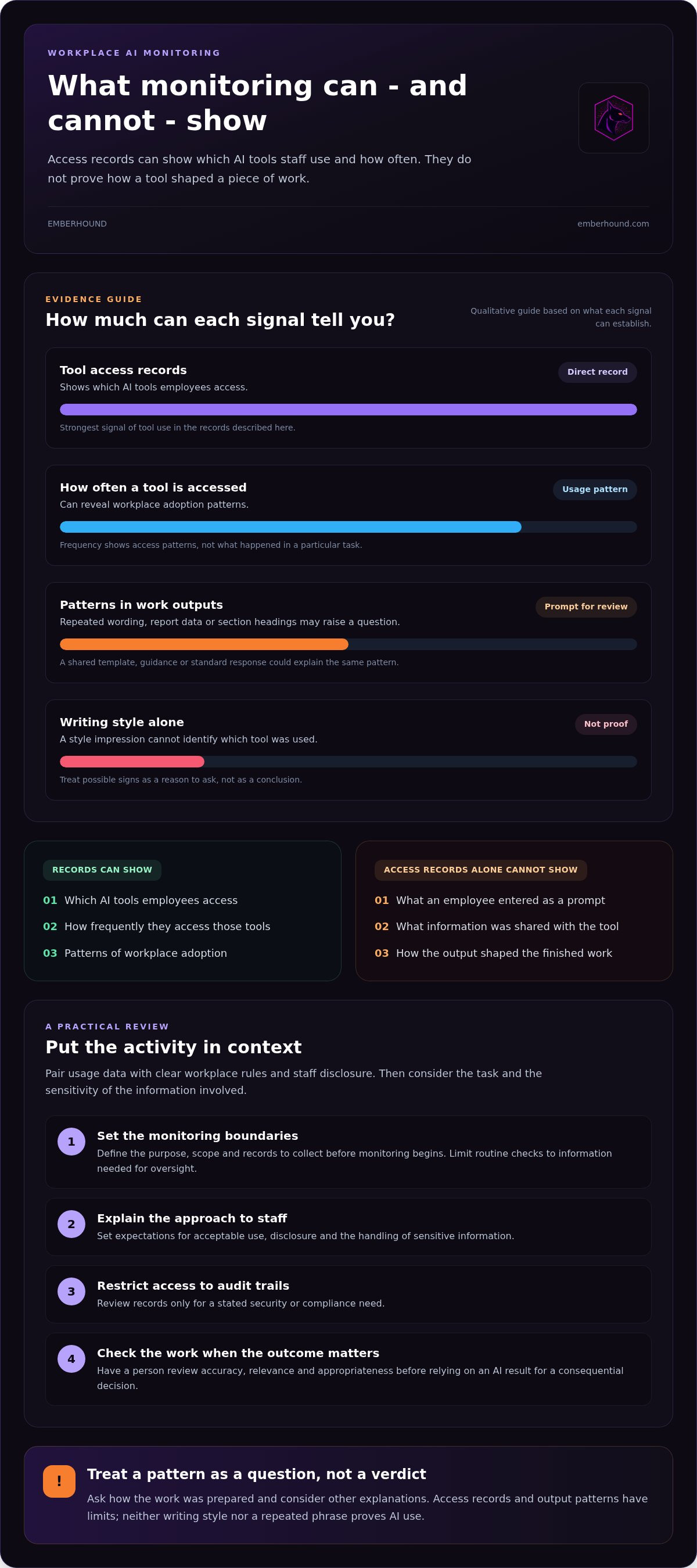
These records show access, not necessarily the prompt, information shared or work produced. Pair usage data with clear workplace rules and staff disclosure. Then assess the activity in the context of the task and the sensitivity of the information involved.
Workplace search connectors differ in how they retrieve information. Some use APIs to access files in real time; others sync data periodically. Real-time indexing can provide more current results, but may cost more. Batch indexing may cost less, but can return outdated information after a document changes. Choose based on how quickly staff need updates and how often source files change.
AI adoption can support specific tasks without replacing employee judgement. A staff member might use a tool to shorten a presentation for a 30-minute agenda slot, then review the draft against the meeting’s context. Choose tools around the task: document summaries, draft emails, internal FAQs and simple reports are examples of lower-risk starting points.
Before approving a tool, define what information it may handle and which decisions must remain with a person. A tool that drafts an internal FAQ serves a different purpose from one used to assess applicants. Match the tool to the task, then set appropriate access rules, review expectations and disclosure requirements.
Can Managers Tell if Employees Used Artificial Intelligence to Do Their Work?
Sometimes, but managers usually can’t prove AI use from writing style alone. Identically phrased emails, repeated report data or consistent section headings can prompt a closer review, but each pattern may have another explanation.
Organisations can audit AI use with proportionate monitoring, clear staff notice and records focused on tool access. Limit routine checks to information needed for oversight, such as which tools employees access and how often, rather than reading every prompt or message.
This approach helps answer a practical question: how can organisations audit employee use of AI tools without invading privacy? Define the purpose, scope and records to be collected before monitoring begins. Explain the approach to staff, restrict access to audit trails and review them only for a stated security or compliance need.
Patterns can prompt further enquiry. For example, repeated wording across customer emails might lead a manager to ask how the drafts were prepared. A shared template, guidance or standard response could explain the same pattern. Consider the work in context and ask about the process before drawing conclusions.
Review outputs as well as access records when work affects people or business decisions. An AI tool can produce inaccurate statements, invent sources or repeat unreliable public internet content. It can also reflect bias in its data, potentially leading to unfair outcomes in recruitment, performance assessments or promotion. Assign a human reviewer to check accuracy, relevance and appropriateness before relying on the result.
Training data deserves attention when an AI tool supports internal talent development. Establish whether its recommendations draw only on the organisation’s data or also use external data. This helps reviewers understand the context behind a recommendation and identify gaps or bias in the information used.
Public AI tools can create a data security risk when employees enter confidential information. A prompt containing customer details, internal plans or employee records may expose information outside the organisation’s control and create data protection or compliance problems. Set clear limits on what staff may enter, and establish a response plan for inappropriate use or a suspected breach.
Meeting tools need specific safeguards too. Before using AI to transcribe or summarise a group discussion, ask participants for consent. A transcript can capture names, opinions and sensitive details that a short summary would omit. Keep human review in the process, especially when the meeting informs a consequential decision.
Before using employee monitoring tools, employers should consider legislative developments and compliance requirements. They should also continuously assess AI systems for bias, security and compliance as technology evolves.
Employee AI adoption and time spent using AI
AI adoption figures can measure different things: whether people use artificial intelligence, whether they use it for work, and how much time they spend using it. Keep these measures separate to interpret workplace activity accurately and distinguish adoption from interest or occasional experimentation.
In 2025, 32.7% of people aged 16 to 74 in the EU used generative AI tools. The share using them for work was 15.1%. The difference matters: general use does not mean workplace use, and workplace use does not show how frequently employees rely on a tool.
A 2025 KPMG and University of Melbourne study surveyed 48,000 workers across 47 countries. In that study, 58 per cent said they intentionally used AI at work. The figure describes reported use across the surveyed countries, not a UK-only rate. It gives a wider view of employee behaviour, while leaving local workplace patterns to be assessed separately.
HR figures show why adoption can’t be reduced to a single measure. In 2023, 38% of HR professionals said they used AI in their day-to-day role, whilst 33% said they wanted to try AI tools. Stated interest and routine use are distinct stages. A team may have employees who are curious about artificial intelligence but have not made it part of regular work.
AI tools account for 4% of work time in 2026. A time share can indicate how much work involves AI, but it doesn’t explain the task, the tool or the result. A brief use to check a draft differs from repeated use to prepare reports. Managers need task context before interpreting time records.
To understand adoption in your workplace, compare declared use with available access records and ask staff which tasks they use AI for. Separate occasional trials from recurring tasks, such as drafting customer replies or summarising documents. Then examine whether employees review outputs before using them. This gives managers a clearer picture than treating every visit to an AI tool as equivalent.
Time saved is only one measure of productivity. A faster first draft, for example, may still need substantial correction if it misses the context. Compare completed work with the original task, including accuracy and review effort. Track the role AI played in decisions rather than assuming faster completion means better work.
Adoption data can guide practical decisions. If a team regularly uses AI for one task, managers can clarify what information is suitable and what review is expected. If use remains exploratory, a short discussion can reveal what employees need before the tool becomes part of routine work. The aim is to understand actual use, not infer it from enthusiasm alone.
Employee use of AI at work and disclosure
Employees may use an AI tool without mentioning it to a manager. In a 2025 study, 57 per cent of workers surveyed across 47 countries said they kept their AI use hidden from their employer. That makes disclosure rules important: access records can show a tool was used, whilst a staff member can explain its purpose and the information involved.
Set out acceptable uses in a written workplace AI policy. For example, staff might be allowed to use an approved tool to draft a routine internal update but barred from entering customer records into a public tool. State which tasks require disclosure, what information is sensitive and who reviews AI-assisted work.
Make disclosure specific and practical. Ask employees to record the tool and task when AI materially contributes to a document, analysis or recommendation. A short note such as “AI drafted this summary; I checked it against the meeting notes” tells a reviewer what happened without requiring every minor edit to be reported.
Explain the reason for the policy. Employees are more likely to follow a rule they understand, especially when it distinguishes low-risk drafting from work involving confidential information or important decisions. Invite staff to raise a new tool before using it for enterprise work. That gives managers a chance to consider the task, data and review process.
Training turns policy text into day-to-day behaviour. Walk through a concrete example: an employee asks an AI tool to summarise a document containing personal details. Staff should know whether that tool may process the information, what to remove or avoid, and how to check the summary before sharing it. Managers should explain where to report accidental disclosure or unsuitable output.
Disclosure also needs a fair response. If an employee reports using AI for a draft, review the output and information entered before deciding whether the use breached a rule. Treating every disclosure as misconduct can discourage staff from speaking up. A clear process helps distinguish an honest mistake from repeated use outside agreed safeguards.
Keep the policy current as teams adopt new tools and tasks. Ask departments to describe their actual use, then update examples and training when new patterns appear. A marketing team may use AI to refine copy, while a recruitment team may use it to sort applications. These uses need different review expectations because the information and decisions differ.
For a staff data access request, a DSAR Disclosure Pack can help prepare information for disclosure. Keep this separate from routine AI-use reporting: one addresses a person’s request for their data, while the other records how employees use workplace tools.
Inventorying AI tools employees already use
A useful inventory captures AI use in everyday software, not just standalone chatbots. To find what AI tools employees are using, start by examining the tools and features already present in routine work.
Surveying employees about AI use
A focused staff survey can reveal AI features built into familiar workplace applications. Ask employees whether they use functions such as automatic writing assistance, meeting summaries or image generation, and whether they use personal accounts for work. This gives staff a way to report embedded features they may not recognise as separate AI tools.
Detecting unsanctioned and shadow AI
Look for AI-related browser extensions, newly installed applications, third-party sign-in permissions and software purchases made outside usual procurement. These sources can reveal tools missing from a central application catalogue. Treat them as leads for review, then establish whether they support a work task.
Include AI capabilities within approved platforms in the inventory. A writing assistant may be a feature in an office application, while an image generator may be added to a design service. Recording these separately helps teams see where AI enters workflows, even when staff haven’t installed a new application.
Give each inventory entry a lifecycle status, such as proposed, approved, restricted or retired. Record when the status changes and who made the decision. This helps identify tools that remain in use after a team stops supporting them, or features that have changed since their original review.
To create an AI usage policy and approved tool register, define how a tool moves through those lifecycle states. Specify who can approve a new use, who reviews a material change and how staff learn that a tool has been retired. Set review triggers, such as a new feature, a change in the type of work or a change in the information processed.
Keep the inventory useful for day-to-day decisions. For each entry, include a plain-language description of what the tool is approved for and where to find its current status. Don’t rely on product names alone: a familiar platform may add a new AI function, and employees need to recognise the change.
A repeatable approach to finding what AI tools employees are using also needs a route for updates. Let staff flag a newly encountered feature or application through an existing internal support channel. Assign an owner to assess the report and update the entry when its status changes. This keeps the inventory aligned with actual workplace changes.
EmberHound: GDPR Data Discovery
When your AI inventory raises questions about sensitive information across business data, EmberHound’s GDPR Data Discovery can help identify personal information in your organisation’s data. This gives teams a clearer basis for investigating potential exposure through AI use.
EmberHound provides data discovery, not monitoring of employee access to AI tools. Use workplace inventories and access records to establish which tools employees use, then use data discovery to locate personal information. Businesses handling payment card data can use PCI Card Data Discovery, or choose Combined GDPR + PCI Coverage for both areas.
For a data subject access request, EmberHound’s DSAR Disclosure Pack helps prepare information for disclosure. Start a free GDPR scan to identify personal information in your organisation’s data.
Turn visibility into a clear next step
Make AI oversight part of how teams introduce any new workplace tool. When a team proposes an AI service, agree who owns the decision, what information it may handle and how staff should disclose its use. This gives employees a practical route to adoption and managers a consistent basis for review.
Finding what AI tools employees are using is only the start. The next question is whether sensitive information may have entered those tools and where that information is held. EmberHound provides GDPR Data Discovery and PCI Card Data Discovery, with Combined GDPR + PCI Coverage for organisations assessing both types of data. These services address data discovery, not employee access monitoring.
Choose the next step that fits your current need: clarify the workplace process for AI use, or locate sensitive data that needs closer attention. A focused decision gives your team a practical place to begin.
Clear ownership makes responsible AI use easier to put into practice. Start with the question your team needs answered now.
Frequently Asked Questions
How can employers identify which AI tools employees are using?
Compare staff reports with access evidence from company systems. For example, ask teams to name tools they use for drafting, research or meeting notes, then compare responses with browser or identity logs. Record the tool, business purpose and responsible team. If a tool appears in technical records but no employee recognises it, review the access details before treating it as workplace AI use.
What methods can IT teams use to detect generative AI use on company devices and networks?
IT teams can review browser history, network traffic records, endpoint activity and sign-in records. A network record may show a device connected to an AI service; an endpoint record can add device or application context. Identity records may show access through a work account. Compare these signals with staff reports: a service visit alone doesn’t prove someone entered work information or used generated content.
How do browser, network, endpoint and identity logs compare for detecting AI tool use?
Browser logs can show visits to AI websites, while network logs can show connections from managed devices. Endpoint logs may identify application activity on those devices, and identity logs can show sign-ins through organisational accounts. Each record answers a different question. Browser and network evidence may point to a service, for example, while identity data can help distinguish work-account use from an unauthenticated visit.
What steps should UK employers take to audit employee AI use?
Set a defined audit purpose, tell staff what activity is reviewed and limit access to the records. Choose evidence that serves the purpose, such as company-account sign-ins when reviewing approved tools. Record who reviewed the data and why, then share findings with those responsible for workplace AI policy. UK employers should consider applicable monitoring and data protection requirements before starting an audit.


