

Unauthorised AI use can expose sensitive information through prompts, uploaded files and connected apps. Shadow AI discovery helps organisations identify where staff use AI across browsers, desktop apps and SaaS, then assess what data could be exposed.
That risk is easy to overlook. AI features can be built into approved software, while employees may use personal accounts or connect tools through OAuth. A list of known AI apps alone can leave important gaps.
This guide explains how to find AI use across different work environments, assess potential data exposure and compare detection platforms. It covers why visibility into user activity, data flows and integrations matters, and how to match platform capabilities to your organisation’s systems and working patterns. The aim is a clear starting point: identify the tools in use, understand the exposure, then set controls that address the actual risk without blocking every AI tool by default.
Key Takeaways
- Build visibility across SaaS activity, OAuth connections, browsers and desktop apps to find AI use that app lists can miss.
- Assess exposure by checking what data enters prompts, file uploads and connected workflows.
- Catalogue each AI tool, its owner, permissions and access to corporate data before assigning risk and controls.
- Choose a detection platform based on coverage, deployment method, visibility into data flows and fit with remote working.
- Use EmberHound's GDPR Data Discovery when you need to locate sensitive personal information across business data.
How do organisations detect unauthorised AI tool usage across SaaS apps?
Organisations can identify unauthorised AI use by combining SaaS activity, OAuth connections and user activity data. For wider visibility, shadow AI discovery should also include browser and network signals, since a SaaS inventory alone can miss tools employees use directly.
Start by establishing a baseline of AI services already in use. Review SaaS application activity, third-party integrations and API connections, then group the findings by user, team and tool. This shows where use is concentrated and why manual surveys alone can leave gaps.
Automated discovery can flag AI services when they appear in application activity or connect to business software. For example, an OAuth grant may allow an AI app to access files or account data. Record the app name, connected service, user, permissions and last observed activity. This gives security teams a practical starting point for review.
API-based discovery can reveal links between known AI tools and critical SaaS apps. Its coverage is limited to the APIs being monitored, so it may miss apps that are not connected through them. Where available, pair it with browser or network telemetry and compare the results with approved software records. For example, a browser extension used for AI assistance may not appear in an OAuth inventory.
Usage analytics add context to an app list. Track which employees use each service, how often it appears, and whether activity involves business or personal accounts. Where monitoring supports it, review real-time user activity, including information entered into AI tools and how those tools are used. This helps distinguish routine activity from events that warrant investigation.
Use a repeatable review process:
- Collect SaaS usage, API and OAuth data across business units.
- Match detected apps against the organisation's approved AI register.
- Assign each finding to a team or owner for review.
- Check permissions and decide whether to approve, restrict or remove access.
Set access rules by role or function. For example, a team handling customer records may need tighter controls for AI tools than a team drafting public material. Avoid relying on a blanket ban: employees may switch to personal accounts, reducing visibility. Review the inventory as new integrations appear, and direct staff towards approved tools with clear permission boundaries.
Choose monitoring that fits the organisation’s SaaS estate and its separate business units. A single dashboard should make it possible to connect an app with its users and integrations. This gives security teams findings they can act on, rather than a list of AI service names with no owner or usage context.
AI discovery across browsers, desktop apps and SaaS
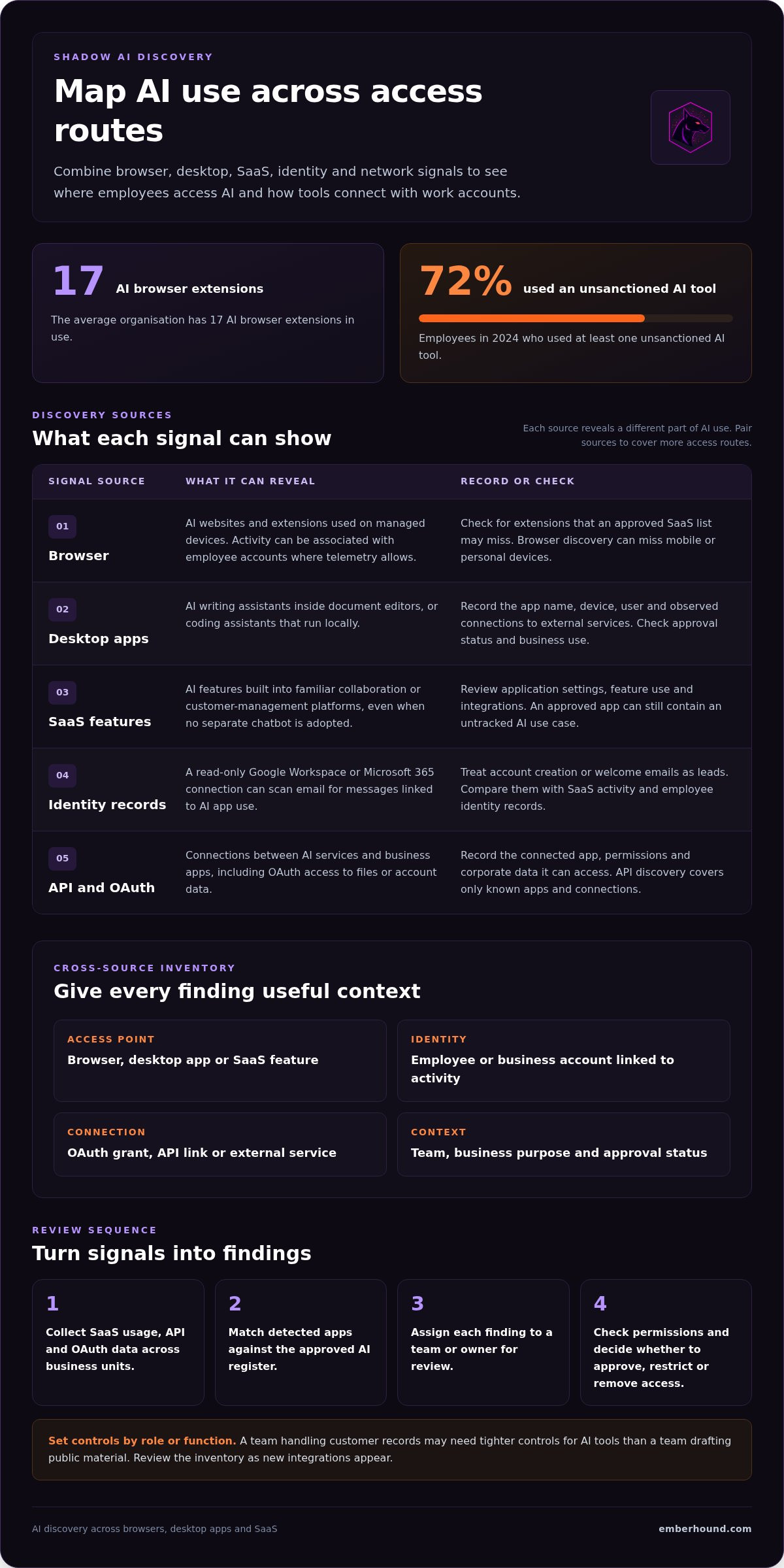
Combine browser telemetry, desktop app inventories, SaaS activity, identity records and network signals to uncover AI tools. Together, these sources show where employees access AI and how tools connect with work accounts. Each source reveals a different part of the organisation’s usage.
Start with the browser. Identify AI websites and extensions used on managed devices, then associate activity with employee accounts where the available telemetry allows. The average organisation has 17 AI browser extensions in use. A browser inventory can therefore reveal extensions that an approved SaaS list misses. Browser discovery can still miss mobile or personal devices, so it should not be treated as complete coverage.
Next, examine desktop applications and their connections. An employee might install an AI writing assistant that works inside a document editor, or a coding assistant that runs locally. Record the app name, device, user and any observed connections to external services. This gives security teams context to assess whether the tool is approved and what business activity it supports.
SaaS discovery should account for AI features built into familiar products. A team may use an AI assistant within an approved collaboration or customer-management platform without adopting a separate chatbot. Review application settings, feature usage and integrations. An approved SaaS app can still create an untracked AI use case when a new feature becomes available to users.
Identity signals add another view. A read-only connection to Google Workspace or Microsoft 365 can scan email for messages associated with AI app use. This may surface account creation or welcome emails for services absent from the organisation's software register. Treat these messages as leads for investigation, then compare them with SaaS activity and employee identity records.
Use API connections to map which AI services link to business applications. Record the connected app, granted permissions and the corporate data it can access. This can reveal overprivileged OAuth access. Because API discovery covers only known applications and connections, pair it with browser and endpoint signals to identify other routes.
In 2024, 72% of employees used at least one unsanctioned AI tool. That makes coverage across access routes a practical governance concern. Build a cross-source inventory with fields such as:
- Access point: browser, desktop app or SaaS feature.
- Identity: employee or business account linked to activity.
- Connection: OAuth grant, API link or external service.
- Context: team, business purpose and approval status.
Compare records regularly. If an AI feature appears inside an approved enterprise app, assign an owner and review its access to business data. If a browser extension or desktop agent appears without an owner, investigate how it is used before setting restrictions. This turns disconnected signals into an inventory that supports specific governance decisions.
Can shadow AI detection tools track data exposure through AI interactions?
Yes. A detection tool can monitor data flows between SaaS platforms and AI tools, including information entered in prompts or used in connected workflows. Some tools also track the volume of data sent to and received from generative AI apps, which can flag possible exposure for investigation.
Shadow IT usually means software or services used without IT approval. Shadow AI adds a data-use question: what information employees send to an AI tool, and what the tool does with it. For example, an employee might paste customer details into a chatbot or upload a contract for a summary. The app name alone cannot reveal that exposure.
Useful monitoring connects activity with identity and data context. A security team can investigate which account used an AI platform, whether the activity involved sensitive data, and which app or integration received it. Reviewing these signals together helps prioritise specific events instead of treating every AI visit as equally risky.
Detection methods reveal different parts of an interaction. API monitoring can show links between an AI service and a business app, but only when the app is known and connected. Browser or network monitoring can identify visits and data volumes, while endpoint signals may add device context. No single source necessarily reveals the full prompt or how the data is handled afterwards.
Generative AI insights focus on what happens during use. They can include prompt activity, file uploads, application context and the direction of data transfer. Broader discovery identifies which AI tools, accounts and connections exist. When comparing platforms, ask whether they report app presence alone or can connect a user and interaction with possible data exposure.
Before selecting a tool, test a representative workflow. Use a controlled account to submit harmless sample text, upload a test file and connect an approved SaaS app. Check which events appear, whether the user and destination are identifiable, and how findings distinguish potential exposure from confirmed sensitive data. This gives you a practical view of the platform’s evidence and coverage.
For UK organisations, personal data sent through an AI tool remains subject to the organisation's existing UK GDPR and Data Protection Act 2018 controls. Review the purpose for using the data, who can access it, how the supplier handles it, and what retention and security arrangements apply. An AI prompt does not remove the need to manage personal information appropriately.
UK pricing depends on the scope of monitoring, the environments covered, user numbers and integrations. Providers generally price after a quote request, so compare these factors alongside the data signals and reporting included.
Use findings to reduce exposure at its source. If a prompt contains personal information, review the workflow and access that allowed it. If an integration exposes data, assess its permissions. Shadow AI discovery is most useful when it gives teams enough context to choose a proportionate response.
AI application cataloguing and risk scoring
After discovering an AI service, record what it is, who owns it and what it can access. A useful inventory covers AI applications, agents, tools, APIs and integrations. This turns separate findings into a basis for risk assessment and action.
Assign an owner to each entry, such as the team using a drafting assistant or the developer responsible for an agent. Record its purpose, user groups, permissions and connections to corporate data. Include how the service stores and processes user inputs. These details help distinguish a sanctioned tool with defined controls from an unknown app with broad access.
Risk scoring should weigh the data involved and the tool’s behaviour. An AI app that handles public text presents a different exposure from one with access to customer records. An agent that can take actions across connected systems needs closer scrutiny because it may act autonomously. Check for prompt injection risks, credential access and activity that is difficult to trace.
A practical risk record can include:
- Data: what sensitive information users may enter or connect.
- Access: the accounts, permissions and corporate sources available.
- Behaviour: whether the tool only generates content or can take actions.
- Governance: the named owner, approval status and review decision.
Use these factors to place tools into clear triage groups, such as approved, approved with restrictions, under review or blocked. For example, an agent that reads internal files and can act on connected apps deserves quicker review than a tool used only for public copy. A risk score should explain the factors behind its rating, so teams can see why a finding needs attention.
Across organisations, an average of 10% of GenAI apps seen were classified as high risk. Treat that figure as context, not as a score for an individual app. Assess each tool against its own data access, input handling, integrations and possible actions. Record the evidence behind the decision so another reviewer can understand and update it.
What should organisations do after discovery? Assign an owner, assess permissions and data handling, then decide whether to approve, restrict or remove access. If a tool remains sanctioned, define its permitted purpose and user roles, and monitor activity against those boundaries.
Keep the inventory current as apps and integrations change. Reassess approved AI tools every 6-12 months, and review them sooner when permissions, data sources or behaviour change. Add a request and review process for new tools, so employees have a clear route to seek approval before connecting an unfamiliar service.
Risk scoring is useful when it leads to a specific decision. Link each rating to an owner, a reason and a next action. This gives security teams a usable record of AI activity and exposure, rather than a catalogue that no one reviews.
Choosing a shadow AI detection platform
Choose a platform by testing the coverage you need, not by counting features. It should detect AI activity across the systems your organisation uses and provide enough context to support a decision. Start with a list of user groups, SaaS apps, browsers, desktop environments and AI agents that need monitoring.
Check how the platform collects signals. Agentless or API-based deployment can reduce setup work and disruption. API discovery can map integrations between known AI apps and business services, but may miss unknown tools. Network monitoring and endpoint agents may also be limited to corporate networks, creating gaps for remote employees.
Browser-based discovery can identify activity and extensions in supported browsers. It may miss mobile or personal devices and may require a browser plug-in. Ask how each method fits your workforce. A team working across managed laptops and personal mobiles needs a different coverage plan from one using office desktops.
Test the platform against a real workflow before deciding. For example, use a controlled account to access an AI app, connect a test SaaS service and submit harmless sample text. Check whether the platform records the user, app, connection and activity. Then assess whether the alert gives security staff enough evidence to investigate.
Assess governance controls alongside detection. Can teams set permissions by role or function? Can they assign an owner to an app and record its approval status? Useful context links a finding to a person, data source or integration, helping teams choose a proportionate response instead of blocking all AI use.
AI agents need specific attention. Their access can change through integrations, and their actions may extend across connected systems. Check whether the platform can help monitor agent configurations, behaviour and connections. Decide how findings will be reviewed if an agent gains access to a new data source or action.
Use this shortlist when comparing platforms:
- Coverage: which browsers, SaaS apps, endpoints and user groups can it observe?
- Deployment: what access or agents are needed, and where will monitoring have limits?
- Evidence: can analysts connect identity, activity and data exposure?
- Governance: can teams assign ownership and enforce role-based controls?
- Scale: can it support the organisation's SaaS environment and business units?
Finally, map each uncovered gap to a control. If personal devices remain outside browser visibility, set rules for data access through managed accounts. If API discovery covers known apps only, add a method that detects other activity, or work with managed detection specialists such as CyberOne to maintain comprehensive oversight. The right platform is one whose evidence and limitations fit your risks and working patterns.
EmberHound: GDPR Data Discovery
EmberHound provides GDPR Data Discovery for organisations that need to locate sensitive information across business data. It addresses the data inventory side of shadow AI risk by helping find personal information for review after employees use AI tools. It complements AI activity monitoring, which focuses on the tools and interactions themselves.
Use GDPR Data Discovery when you need to identify personal information, or PCI Card Data Discovery when the review concerns payment card data. Combined GDPR + PCI Coverage supports work involving both data types. For subject access request handling, the DSAR Disclosure Pack helps prepare disclosure information.
Choose the offering that matches the data you need to locate and the task ahead. Contact EmberHound to discuss your data discovery requirements.
Make AI oversight part of everyday operations
Make shadow AI discovery part of routine security reviews. Assign an owner to review new AI use, record decisions where teams can find them, and revisit controls when workflows change. A clear internal process helps employees raise new use cases before they become difficult to track.
Start with one team or workflow. Agree what information can be used with AI, who can approve exceptions, and how concerns should be reported. Then use what you learn to shape guidance across the organisation. Practical rules are easier to follow when they reflect how people actually work.
AI tools will keep changing. A review process that can adapt gives your organisation a workable way to respond while keeping sensitive data in view. Choose a next step that fits your current priorities, then build from there.
Clear ownership and regular review can make AI use easier to manage. Start with one action, then keep the process moving.
Frequently Asked Questions
Why is shadow AI a security risk?
Shadow AI can send information beyond the controls your organisation applies to approved systems. A staff member might submit confidential source code to an AI assistant, then use its response in a production change. The risks go beyond disclosure: the output could contain errors, and connected tools may act on it. Include both input handling and output review in your security procedures.
How can organisations discover AI systems across their environment?
A discovery exercise should cover AI features within existing services, not only separately installed products. Ask system owners to identify enabled AI functions during application reviews, and compare their answers with current product configurations. For example, a meeting service may add transcription or summarisation features through a settings change. Recording the feature, its owner and its business purpose makes later reviews more precise.
How can shadow AI be avoided?
Teach staff to prepare safe test material before trying an unfamiliar AI service. Use fictional examples or suitably de-identified content for demonstrations, and keep credentials, customer records and confidential documents out of prompts. Give teams a simple way to raise useful AI workflows for review. This addresses the practical need behind unauthorised use while helping employees understand which information must stay out.
How do I delete Shadow AI?
For a cloud AI account, use the service’s account controls to close the account and remove saved conversations or uploaded files where those controls are available. Keep a record of the action and identify any connected business accounts that need separate attention. If the account was used for work information, follow your organisation’s incident process before deleting evidence needed to understand what was shared.
What is shadow AI and how is it discovered?
Shadow AI describes work-related AI use outside an organisation’s chosen approval and oversight process. It can include an employee’s personal account or an AI feature activated within a tool the business already uses. To determine whether a use case falls into this category, compare how the feature is actually used with the organisation’s internal approval records and stated rules.
What tools can detect shadow AI in an organisation?
Useful options include software asset management, endpoint controls, identity records and SaaS administration tools. Their value depends on what evidence they retain and how clearly they explain a finding. During evaluation, check whether an analyst can export a record for review, distinguish an enabled feature from an app visit, and assign a finding to the team responsible for resolving it.
What are the risks of shadow AI for data privacy, security and compliance?
Privacy risks include sharing personal information without a clear business process for handling it. Security risks can also arise from relying on generated answers without checking them. For example, an AI-generated procedure could contain an unsafe instruction or an inaccurate customer response. Set a human review step for decisions that affect customers, staff or system changes, and record who approved the final action.
How can organisations audit and inventory shadow AI use?
Keep an audit record for each review decision, including its date, the evidence examined, the decision owner and any follow-up action. When a team reports an AI use case, record whether it was accepted, restricted or closed, then retain the reason for that outcome. This creates a traceable record of how the organisation handled findings and helps reviewers distinguish unresolved issues from completed reviews.


