

How much 'shadow data' is currently sitting on your team's remote laptops, completely invisible to your last manual audit? For most UK organisations, the answer is enough to trigger a severe ICO fine. Manual data discovery is a slow, error-prone process that drains weeks of internal labour. It's a reactive cycle of spreadsheets and guesswork that fails the moment a new file is saved or an email is sent. Implementing automated GDPR scanning changes this dynamic immediately.
You likely feel the weight of this compliance debt every time a DSAR lands in your inbox. We're here to end that burden. This guide explains how to replace manual audits with a system that identifies sensitive PII across your entire network in minutes. You'll learn how to uncover hidden data in images and PDFs - even on distributed devices - to generate audit-ready reports in hours. We will outline the transition from fragmented spreadsheets to full visibility. This approach ensures your team stays lean and remains prepared for any regulatory check.
Key Takeaways
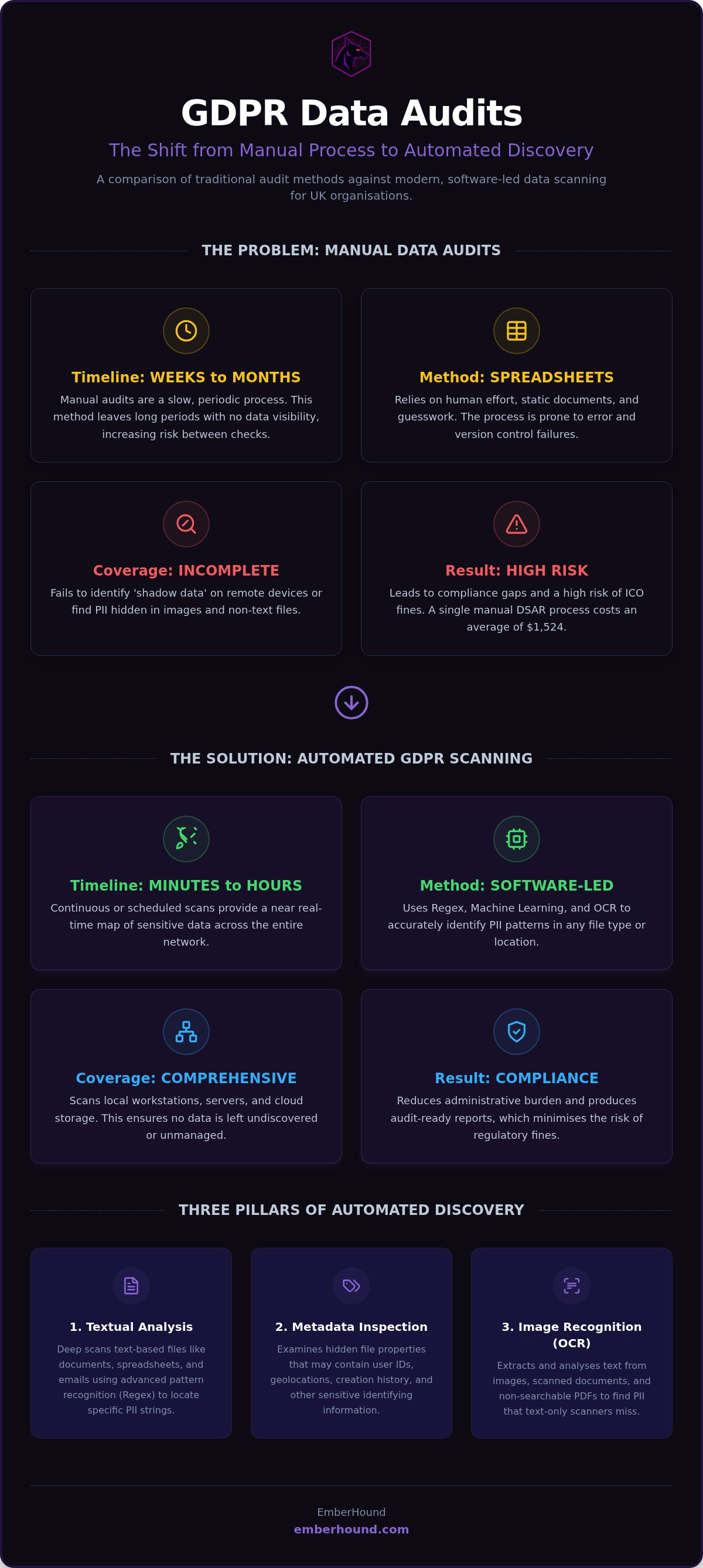
- Stop relying on manual spreadsheets that take weeks to complete and often miss hidden data. These manual methods are a primary cause of compliance gaps in UK organisations.
- Discover how automated GDPR scanning replaces manual guesswork with software-led discovery across servers, cloud storage, and local workstations.
- Identify PII hidden in non-text files using OCR technology to ensure your shadow data in PDFs and images is fully mapped.
- Produce audit-ready reports and DSAR disclosure packs in hours rather than days to reduce the administrative burden and the risk of ICO fines.
- Organise your network into high-risk and safe zones to create a scanning strategy that maintains compliance and avoids disrupting daily operations.
The High Cost of Manual GDPR Data Audits
Manual data audits are no longer a viable strategy for UK businesses. Automated GDPR scanning is a continuous, software-led discovery process that maps PII across your network in real time. Unlike manual checks, it does not sleep. It does not get bored. It does not overlook a stray PDF on a remote worker's desktop. Relying on humans to find every instance of personal data is a high-risk gamble. Industry professionals often find that manual searches fail to identify significant portions of sensitive data because humans cannot keep pace with modern file creation.
The UK ICO remains active. With cumulative GDPR fines exceeding 7.1 billion Euros as of January 2026, the cost of oversight is terminal for many SMEs. A single Data Subject Access Request (DSAR) costs an average of 1,524 dollars to process manually, according to 2026 research. When your data map is a static spreadsheet, every request becomes a frantic, manual scavenger hunt through mailboxes and local drives. This delay does not just frustrate the requester. It signals to regulators that you lack control over your data environment.
Why Spreadsheets Fail in 2026
Data grows faster than any team can manually categorise. A spreadsheet is a snapshot of the past. It is obsolete the moment a user saves a new document or downloads an email attachment. Static records create a false sense of security whilst they hide the reality of your data footprint. Version control issues are common. When different departments maintain different master lists, your audit trail for the ICO becomes inconsistent and indefensible. This fragmentation is the silent killer of modern compliance programmes.
The Financial and Operational Burden
The man-hours wasted on manual file searches represent a massive drain on resources. Every hour an IT manager spends hunting for a National Insurance number in a legacy folder is an hour not spent on system security or infrastructure. This is a significant opportunity cost for lean teams. Distributed remote work has made this problem worse. Shadow data now lives on hundreds of unmanaged local drives. Without automated GDPR scanning, this data remains invisible until a breach occurs. You cannot protect what you cannot see, and you cannot see everything using a manual checklist.
How Automated GDPR Scanning Works in 2026
Modern automated GDPR scanning functions through a deep-crawl architecture. It doesn't just look at file names. It enters the file structure of local workstations, company servers, and cloud storage buckets. The software uses Regular Expressions (Regex) and machine learning to identify specific patterns. This includes National Insurance numbers, UK addresses, and bank details. It identifies these strings amongst millions of lines of noise. This is the difference between a surface-level search and a professional audit.
Many legacy tools stop at text files. 2026 standards require more. Optical Character Recognition (OCR) is now standard for identifying PII inside scanned contracts, passport photos, or handwritten notes saved as PDFs. If your tool misses these, your compliance is a facade. You can organise your data discovery to cover these areas without manual intervention. This ensures that even the most obscure 'shadow data' is brought into the light.
The Three Pillars of Discovery
Discovery relies on three distinct layers of analysis. First, textual analysis performs deep scanning of Word documents, Excel spreadsheets, and text-based PDFs. This is the core of most discovery tasks. Second, metadata inspection examines hidden file properties that might contain user IDs, location data, or creation history. Finally, image recognition uses OCR to extract text from images and non-searchable documents. This multi-layered approach ensures that data stored in unconventional formats is identified and categorised correctly.
Real-Time vs. Scheduled Scanning
Constant scanning can drain system resources. Scheduled scans are the gold standard for UK SMEs. You might set a deep scan for Sunday nights whilst keeping lightweight workstation checks running weekly. This balance provides visibility without slowing down your team's laptops. It's about being thorough, not disruptive. When high-risk data appears in an unauthorised location, the system flags it immediately. This triggers an automated remediation workflow. You get a report that serves as your proof of compliance for auditors and stakeholders. It shows what was found, where it was, and how it was handled. This turns a week-long manual audit into a ten-minute review of a dashboard.
Beyond Cookies: Internal Data Discovery vs Web Scanning
Many organisations mistake a green tick on a cookie banner for GDPR compliance. This is a dangerous oversight. Web scanning only checks the public-facing facade of your business. It ignores the vast majority of personal data that lives inside your network. Automated GDPR scanning must reach deeper than a URL. If you only scan your website, you are blind to the PII sitting in your downloads folder or your finance team's spreadsheets. A clean web report can hide a high-risk internal breach. This internal data is where the real regulatory danger lies.
The Mailbox Minefield
Email is the primary storage site for unauthorised PII. Staff often treat Outlook as a filing cabinet. They send and receive CVs, bank details, and contracts without thinking about where that data settles. These files sit in sent items, deleted items, and archived PST files for years. Finding this data manually is impossible. Automated GDPR scanning with a dedicated mailbox add-on solves this by indexing every thread and attachment. It identifies sensitive strings across thousands of messages in minutes. This turns your primary communication channel from a liability into a secured asset. You cannot rely on staff to delete old emails. You need a system that finds them for you.
Workstation and Hard Drive Risks
Remote work has decentralised your data footprint. Employees frequently save files to their local 'Documents' or 'Desktop' folders to avoid VPN lag or for quick access. This data never hits your central server. It remains invisible to standard network audits. This 'shadow data' on distributed hardware is a massive compliance gap for PCI DSS and GDPR. You need visibility of the data that lives on the edge of your network. Centralising this visibility through local drive scanning ensures that a remote laptop in Manchester is as secure as a server in your London data centre. It removes the guesswork from your compliance posture. You gain the ability to prove where PII exists across every device in the fleet.
Implementing a Frictionless Scanning Strategy
Successful automated GDPR scanning requires a strategic map. You cannot scan every byte every hour. You must categorise your network into zones. High-risk zones - such as HR and Finance directories - require daily deep scans. Safe zones - like public marketing assets - only need periodic validation. This prioritisation prevents system lag. It also maintains a tight security posture. You need a system that alerts you the moment unencrypted card data or PII appears in an unauthorised location. This is how you stop a minor error from becoming a reportable breach.
Setting the Right Scope
Prioritise the folders that hold the most sensitive data. Finance and HR are the primary targets. Legacy archives are the secondary ones. These are directories that haven't been touched in years. They often contain old CVs, expired contracts, and unencrypted bank details. Mapping your data flows is necessary for success. If data moves from a secure server to a remote laptop, your scan frequency must reflect that risk. You can organise your GDPR data discovery to prioritise these vulnerable areas immediately. This creates a clear picture of your actual risk profile.
The Remediation Workflow
A scanner hit is a call to action. You need a decisive remediation workflow. Automated alerts must notify the security lead the moment a violation occurs. High-risk files should be moved to a secure quarantine or deleted immediately. This process handles file cleanup. It also identifies problematic employee behaviour. Use these findings to target your staff training. If one department consistently saves PII to local drives, you have a specific process failure to fix. Integrate these scans into your DSAR response procedure. This turns a search task into a verification task. Since your data is already mapped, you can produce a full disclosure pack in hours. This keeps you within statutory deadlines. It also avoids the 1,524 dollar average cost of manual processing.
EmberHound: Lightweight Discovery Without the Bloat
Enterprise compliance platforms are slow. They are heavy. They often require months of configuration and a team of consultants to operate. EmberHound is the faster alternative. It is a UK-based SaaS designed for the agile professional. We stripped away the enterprise bloat to focus on finding PII and card data. Our automated GDPR scanning runs on your schedule. It provides visibility without the technical bureaucracy that defines larger systems. This is discovery built for teams that value time and clarity.
We provide specific tools for common data leaks. Our Mailbox Add-on indexes every attachment in Outlook threads. The Hard Drive Add-on scans local folders on remote laptops that central servers miss. We use OCR technology to read text inside images and scanned PDFs. These are required tools for remote UK workforces. Every feature closes a specific compliance gap that manual audits leave open. You gain a protective partner that identifies risks before they become reportable incidents.
A Data Subject Access Request can paralyse a small team. Searching through years of files manually is a 40-hour job. EmberHound turns this into a 40-minute task. Our DSAR Disclosure Pack identifies all relevant PII and organises it into a clean report. You stop being a data hunter. You become an efficient auditor. This speed ensures you meet statutory deadlines and keeps operational costs low. It removes the friction from compliance.
Built for the UK SME
Setup is simple. It does not require a dedicated security team. We are a UK-based technology company that understands local regulatory nuances. Pricing reflects your actual data footprint. You don't pay for enterprise tiers you will never use. Local support is available from people who know the UK market. This makes EmberHound the practical choice for organisations that need to move fast.
Instant Visibility, Instant Peace of Mind
You get your first scan results in hours. You don't wait weeks for a consultant's report. The dashboard provides a visual risk profile that is actionable. You see exactly where your PII is. You see how to secure it. Stop guessing and start scanning with EmberHound today.
Secure Your Data Footprint Today
Manual spreadsheets cannot keep pace with modern data volumes. Relying on human memory to map PII is a liability your organisation cannot afford. True protection requires total visibility of the 'shadow data' hiding in mailboxes and on remote laptops. By implementing automated GDPR scanning, you replace weeks of tedious manual labour with minutes of precise, software-led discovery. This shift doesn't just reduce your risk of ICO fines. It frees your IT team to focus on strategic growth rather than administrative scavenger hunts through legacy folders.
EmberHound provides the specific tools needed for this transition. Our UK-based team offers expert support to ensure your setup is fast and effective. We provide integrated OCR for image-based PII and specialised DSAR Disclosure Packs to turn complex regulatory requests into simple, 40-minute tasks. You don't need enterprise bloat to achieve professional compliance. You need a system that identifies every risk across your entire network without the friction of traditional platforms.
Automate your GDPR discovery with EmberHound and take control of your compliance posture now. You have the tools to end the manual audit burden and protect your business with confidence.
Frequently Asked Questions
What is automated GDPR scanning?
Automated GDPR scanning is a software-led process that identifies and maps Personally Identifiable Information (PII) across your entire network. It replaces manual spreadsheets with continuous discovery of data on servers, cloud storage, and local endpoints. The system uses pattern matching to find sensitive strings like National Insurance numbers or bank details. This ensures your data map stays current and accurate without requiring constant manual updates or human intervention.
Can I scan local hard drives for personal data?
Yes, you can scan local hard drives using dedicated software agents. This is essential for identifying 'shadow data' that employees save to their desktops or documents folders rather than central servers. By installing a lightweight agent, the scanner indexes local files and reports findings back to a central dashboard. This gives you visibility of PII that would otherwise remain hidden during a standard network-only audit or manual check.
Does automated scanning work for remote employees?
Automated scanning is specifically designed for remote work environments. Since the software uses cloud-based reporting, it can scan employee laptops regardless of their physical location. You don't need a VPN connection for the scan to function. This ensures that a remote worker in Manchester or a contractor in London remains within your compliance perimeter. It provides a centralised view of your entire distributed data footprint in real time.
How does OCR help with GDPR compliance?
Optical Character Recognition (OCR) identifies PII trapped inside non-text files like scanned contracts, passport photos, and handwritten notes. Standard search tools ignore these files, creating a significant compliance gap. OCR converts these images into searchable text, allowing the scanner to flag sensitive information. This technology is a requirement for organisations that handle physical paperwork or receive image-based attachments from customers that might contain sensitive personal data.
Will scanning my network slow down our systems?
Modern scanning tools are lightweight and designed to avoid system lag. You can schedule deep scans for off-peak hours, such as weekends or late nights, to ensure zero impact on daily operations. During working hours, the software uses minimal CPU resources to maintain visibility. This balance allows you to protect your data without disrupting your team's productivity or slowing down their local workstations during critical business hours.
How often should I run an automated GDPR scan?
You should run automated GDPR scanning based on the risk level of your specific data zones. High-risk directories like HR and Finance folders often require daily scans to identify new PII immediately. For general storage or legacy archives, a weekly or monthly schedule is usually sufficient. Mapping your data flows helps you determine the correct frequency to maintain an accurate and defensible audit trail for the ICO.
Can automated scanning help with Subject Access Requests (DSARs)?
Automated scanning is the most effective way to handle DSARs quickly. Since your data is already indexed, you can locate every instance of a requester's PII across the network in seconds. Dedicated disclosure packs then organise these findings into a report for review. This turns a week-long manual search into a task that takes under an hour. It ensures you meet the statutory one-month deadline and reduces administrative costs.
Is automated scanning enough to satisfy an ICO audit?
Automated scanning provides the 'technical truth' that regulators look for during an audit. It proves you have active control over your data and a clear process for identifying risks. Whilst you still need internal policies and staff training, the reports generated by the scanner serve as verifiable evidence of your compliance. It shows the ICO that you are proactive rather than reactive in your data management and security.


