

What if your biggest compliance risk isn't the data you've found, but the personal data buried in a three-year-old Outlook attachment? Manual searches in Outlook are a liability. They are slow. They are often incomplete. For UK compliance teams, the pressure to respond within the one-month deadline is high, especially with the Data (Use and Access) Act 2025 now codifying the requirement for searches to be reasonable and proportionate. Relying on a basic dsar email search tool that requires data exfiltration just adds another layer of risk to an already high-stakes process.
You need a way to scan local mailboxes without moving files or breaching privacy. We understand the anxiety of missing a critical file in an archive or a forgotten attachment. This article provides a clear framework for selecting a discovery tool that works where your data lives. You will learn how to verify that your search is proportionate and how to identify personal data across every employee inbox without the friction of manual effort. We have stripped away the complexity to give you a checklist that delivers immediate, actionable clarity.
Key Takeaways
- Standard Outlook searches often miss personal data in attachments or legacy archives. Forensic discovery is required to meet UK GDPR obligations.
- A dsar email search tool must process files locally to prevent exfiltration. Local scanning protects privacy whilst identifying hidden data.
- The ICO requires searches to be reasonable and proportionate. Learn how to document your search parameters to demonstrate compliance.
- Attachments and local .pst files are common blind spots for IT teams. Discover the technical requirements for scanning these files without moving them from the host machine.
- Manual searches are slow and incomplete. Use our checklist to build a discovery framework that identifies personal data across every employee inbox.
Why standard email search functions fail GDPR requirements
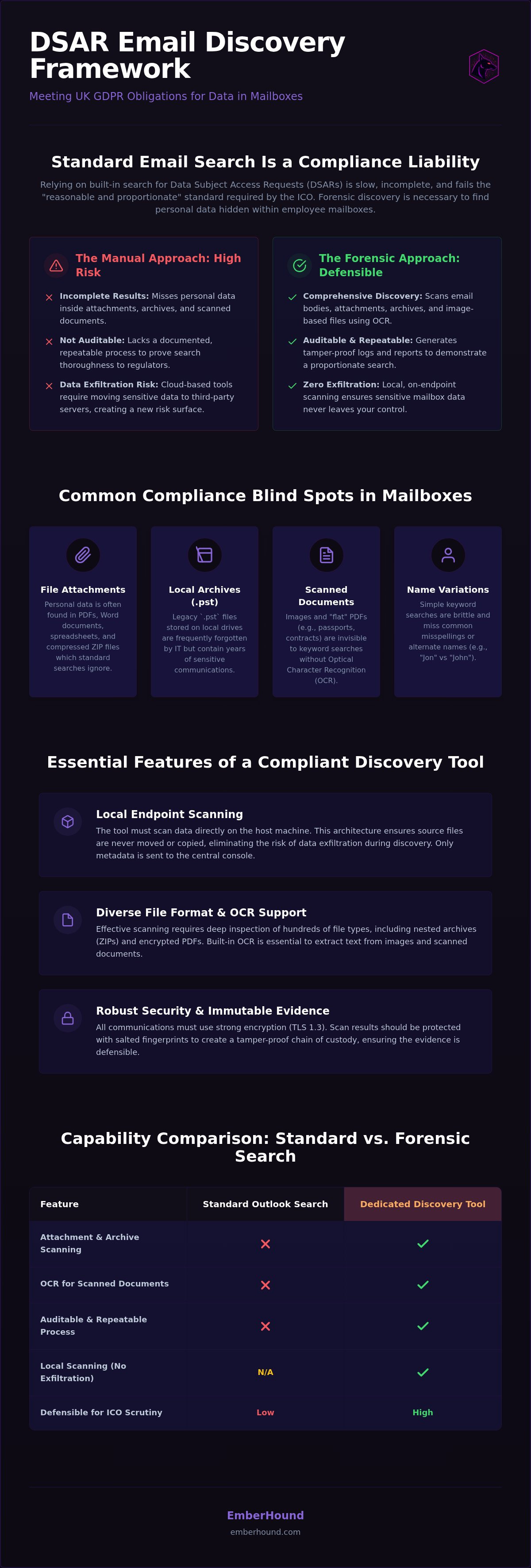
Built-in Outlook search is a productivity feature. It helps employees find a specific thread from last Tuesday. It is not a forensic discovery tool. When an individual exercises their Right of access to personal data, the legal standard is "reasonable and proportionate." Relying on a manual search across hundreds of distributed employee folders is neither. It is a gamble with your compliance record. Manual searches are slow. They are inconsistent. Most importantly, they are not auditable. If the ICO asks how you verified a search, "we typed a name into the search bar" is not a defensible answer.
A dedicated dsar email search tool changes the dynamic. It provides a repeatable process that your team can document. It removes the human error inherent in checking mailboxes one by one. Standard tools often miss data buried in legacy archives or specific attachment types that Outlook simply does not index for regular users. Without a specialised tool, your search is almost certainly incomplete.
The limitations of keyword-based searching
Simple keyword searches are brittle. They miss variations in names or common misspellings. "Jon" is not "John." "Smith" is not "Smyth." A standard search often stops at the email body or metadata. It fails to identify personal data trapped inside scanned PDFs or images. If your search cannot "see" inside these files, you have a compliance blind spot. Searching across multiple distributed mailboxes simultaneously is also technically impossible with basic tools. You end up with a fragmented view of your data, making it impossible to guarantee that no files were overlooked amongst the noise of daily operations.
The risk of data exfiltration in cloud-based tools
Many discovery tools require you to move your data to the cloud. They ingest your entire mailbox history into their own servers. This creates a secondary risk. You are moving sensitive personal data to a third-party environment just to find out what you have. This increases your risk surface. If that third party suffers a breach, your organisation is still responsible. Local scanning is the professional alternative. By scanning data directly on the endpoint, you identify personal data without moving the file from the host machine. It is a cleaner, more secure posture that respects the privacy of the scanning process itself. For UK SMBs, this approach reduces the complexity of managing third-party data processing agreements whilst ensuring the search remains thorough.
Essential features of a mailbox data discovery tool
Choosing a dsar email search tool requires more than a checklist of keywords. It requires a technical architecture that respects the sensitivity of the data it handles. Compliance teams often overlook how a tool actually processes information. If a tool moves employee emails to a third-party server, it creates a new breach risk. You need a solution that prioritises local processing and provides clear, auditable results.
Local scanning and endpoint security
Scanning occurs directly on the host machine. This architecture ensures the tool never copies or moves source files from the endpoint. It only transmits metadata or encrypted fingerprints back to the management console. To protect these results, the tool must use modern encryption standards like TLS 1.3 for data in transit and AES-256 for data at rest. Local scanning ensures that personal data remains within your existing security perimeter. This removes the risk of file exfiltration during the discovery process.
Handling diverse file formats and attachments
Personal data rarely sits in plain text. It hides in ZIP files, encrypted PDFs, and legacy .pst archives. These archives often sit on local hard drives, forgotten by IT, yet they contain years of sensitive communications. Your discovery tool must scan these active and archived mailboxes simultaneously. For scanned documents - like passports or utility bills - OCR (Optical Character Recognition) is essential. Without it, your search will miss images and "flat" PDFs that contain high-risk personal data. You can find more detail on identifying personal data in files to understand the scope of typical business data.
Evidence must be immutable. Salted fingerprints ensure that your scan results are tamper-proof. When you present your findings to a regulator or a data subject, you need to show a clear chain of custody. Masked previews are not just a convenience; they are a privacy control. They ensure that the compliance team doesn't become a source of further data exposure whilst fulfilling a request. This aligns with the ICO guidance on the right of access, which emphasises that searches must be both thorough and proportionate. You need to document exactly what was searched and why certain items were excluded.
If you are ready to see how this works in practice, you can start with a free GDPR scan to identify risks across your network.
Aligning your search with ICO 'proportionate' standards
The Information Commissioner's Office (ICO) does not expect you to conduct an exhaustive, infinite search for every byte of data. The legal standard is "reasonable and proportionate." However, "reasonable" is not a synonym for "lazy." You must be able to justify why you searched specific mailboxes and why you omitted others. A manual search lacks this trail. A dsar email search tool provides the mechanical proof that your process was methodical and objective. It moves the burden of proof from a verbal claim to a technical audit trail.
The Data (Use and Access) Act 2025, with final regulations effective February 2026, codifies this guidance into law. It formally requires searches to be "reasonable and proportionate." This shift from regulatory guidance to statute means your methodology is now a legal vulnerability. If you cannot produce a log showing which mailboxes were scanned, you cannot prove proportionality. Automated scanning provides a consistent methodology that is far easier to justify than manual spot - checks. It ensures that every search follows the same rules, every time.
Defining the scope of your discovery
Scope definition is where most compliance teams stumble. You must set search parameters based on the specific request or audit requirement. If a former employee requests their data, searching the entire marketing team's archives may be unnecessary. However, you must record that decision. A dedicated tool allows you to select specific endpoints and mailboxes whilst excluding irrelevant ones. This deliberate approach prevents "scope creep" and ensures you aren't processing more data than required. For help with defining these technical boundaries, refer to our GDPR guide. Proving that you deliberately narrowed your search is the cornerstone of showing proportionality.
Generating audit-ready evidence
Proving compliance is about the trail, not just the result. Salted SHA - 256 fingerprints allow you to prove a file existed at the time of the scan without revealing its actual content to unauthorised users. This is forensic - level proof that cannot be easily disputed. Masked previews further protect privacy by allowing compliance officers to verify a "hit" without exposing the full text of an email. This balance is critical for maintaining internal privacy whilst fulfilling external obligations. Automated logs serve as objective proof of a proportionate search by recording the exact date, time, and parameters of every mailbox scan. These logs provide the documentation required if a data subject files a complaint under the mandatory internal complaints process introduced in June 2026.
Technical hurdles in email discovery: Attachments and archives
Attachments are a liability. They are often the primary location for hidden personal data in business emails. A spreadsheet sent three years ago might contain a full list of payroll details. A PDF might hold a sensitive contract. Standard indexing often stops at the message body. This leaves these files invisible. To be compliant, your dsar email search tool must treat the mailbox as a gateway to all attached content, not just the text of the message.
Encrypted files are a significant compliance blind spot. If an employee receives a password - protected ZIP file, most tools simply skip it. This creates an unrecorded gap in your discovery process. You cannot claim a search is proportionate if you've ignored entire categories of files because they were difficult to access. Effective discovery requires a mechanical solution that can identify and flag these files for review.
Searching within local archives and backups
IT teams frequently overlook legacy .pst files stored on local hard drives. These are the digital attics of an organisation. Employees often move emails to local folders to save server space or bypass mailbox limits. These files are not connected to a central server. This makes them invisible to cloud - based discovery tools. A mailbox data discovery tool must ingest these local storage files directly on the host machine. You can find more on the technical requirements for this in our guide on email data discovery software. Without local scanning, you're only searching a fraction of your actual data footprint.
The role of OCR in mailbox scanning
Many DSARs fail because they ignore data inside image - based attachments. If a client emails a scanned passport or a utility bill as a JPG, a basic text - only search will find nothing. This is where OCR (Optical Character Recognition) is essential. It converts images into searchable text during the scan process. This capability is vital for businesses handling scanned invoices or IDs. OCR ensures that even "flat" documents are indexed and searchable. This removes the risk of missing high - risk personal data buried in an image file.
Implementing local mailbox scanning with EmberHound
Compliance should not be a burden. It is a technical requirement that requires a technical solution. EmberHound provides a friction - reduced approach to mailbox discovery specifically for UK SMBs. We have removed the bloatware. We have removed the data exfiltration risk. The result is a platform that performs all scanning locally on the endpoint to maintain privacy. You get the evidence you need without the security overhead of moving sensitive files. It is a dsar email search tool built for speed and clarity.
Our approach prioritises the "Agile Guardian" mindset. We understand that lean teams don't have time for complex installations or legal consulting that takes weeks to deliver a result. You need a tool that works instantly. By keeping the scanning process on the host machine, you avoid the high - stakes risk of moving personal data to a third - party cloud. This ensures your security posture remains credible whilst you meet your legal obligations under the UK GDPR.
How the EmberHound mailbox add-on works
The mailbox add-on integrates directly into your standard GDPR discovery scan. It doesn't just look at what is currently synced in Outlook. It scans the local hard drive for .pst and .ost files that have been detached or archived. This is critical for finding data in legacy folders that IT teams often overlook. You can select specific employee machines or scan the entire network simultaneously. The process is linear and methodical. It starts with the endpoint, identifies the personal data within attachments and archives, and generates a report. You can book a demo to see exactly how we handle local storage files without impacting user performance.
The path to a stress-free DSAR response
Fulfilling a request is only half the battle. You also need to package the data. Our DSAR disclosure pack simplifies the final stage of data retrieval. It provides masked previews and audit trails that are ready for regulatory review. For organisations with fluctuating request volumes, our usage - based pricing is the logical choice. You pay for what you use. There are no mandatory long - term contracts or hidden "enterprise" fees. This flexibility is essential for lean compliance teams who need to manage costs whilst meeting the one - month DSAR deadline. It turns a high - stakes emergency into a manageable, repeatable task.
If you are unsure where your risks lie, don't wait for a complaint. You can start a free GDPR scan today to identify where personal data is hiding in your organisation. It is a risk - free way to verify your search is proportionate and defensible.
Secure your mailbox discovery process
Standard Outlook searches are a liability for UK compliance teams. They miss hidden attachments and legacy archives. Meeting the "reasonable and proportionate" standard requires a dedicated dsar email search tool that provides an auditable trail. Local-only scanning ensures no file exfiltration happens during the discovery process. Your data stays within your perimeter whilst you fulfil your legal duties. By automating the identification of personal data across every employee inbox, you eliminate the human error that leads to ICO complaints.
We use TLS 1.3 and AES-256 encryption at rest to protect your scan results. There are no mandatory contracts or hidden fees. Our usage-based pricing means you only pay for the discovery you actually perform. This approach removes the friction from compliance and allows your team to focus on results rather than bureaucracy. You can identify your risks instantly and build a defensible framework that stands up to regulatory scrutiny.
Taking control of your data discovery doesn't have to be complex. Start today and protect your organisation from the risks of hidden personal data.
Frequently Asked Questions
Is a business email considered personal data under UK GDPR?
Yes, a business email qualifies as personal data if it relates to an identifiable living person. This includes the sender's name, the recipient's address, and any personal opinions or facts within the message body. Even if the content is purely professional, the metadata qualifies. Organisations must treat these records with the same level of care as a home address or a phone number to avoid regulatory penalties.
Can an employee request all emails they are mentioned in via a DSAR?
Individuals have a right to their personal data, but this does not grant them a right to every document that happens to contain their name. If an email is purely about a business project and mentions a name in a professional capacity, it might not be personal data. You must assess whether the information focuses on the individual or the business task. A dedicated dsar email search tool helps compliance teams filter these results efficiently.
How does a mailbox data discovery tool handle encrypted email attachments?
Encrypted attachments represent a significant risk. Standard indexing tools usually skip password - protected ZIP files or encrypted PDFs, leaving a gap in your search. A professional dsar email search tool flags these files as unscannable in your audit log. This allows your team to request the password or perform a manual check. Documenting these exceptions is vital for proving that your search was reasonable and proportionate under the Data (Use and Access) Act 2025.
Do I need to scan archived .pst files for GDPR compliance?
Yes, you must scan all locations where personal data is likely to be stored. This includes legacy .pst files sitting on local hard drives or detached archives. The ICO is clear that archived information is within the scope of a DSAR. Ignoring these files because they are difficult to access is not a valid defence. Using a tool that performs local mailbox scanning ensures these hidden archives are indexed alongside active inboxes.
Can I search employee mailboxes without their permission for a DSAR?
You can search mailboxes without explicit permission if the search is necessary to comply with a legal obligation, such as responding to a DSAR. You should notify employees through your internal privacy notice that work mailboxes may be searched for compliance purposes. The search must be targeted and limited to the scope of the request. Excessive or intrusive searches into private correspondence without a clear justification could lead to employment law disputes.
What is the difference between cloud scanning and local mailbox scanning?
Cloud scanning requires you to ingest your entire mailbox history into a third - party server. This increases your risk surface by moving sensitive data outside your perimeter. Local scanning is the core of the EmberHound platform and processes files directly on the endpoint. No source files are ever moved or copied. This method uses TLS 1.3 and AES - 256 encryption to protect metadata, ensuring the discovery process itself does not cause a data breach.
How long does it take to scan a typical employee mailbox for personal data?
Scan times vary based on the volume of data and the speed of the host machine. Local scanning is generally more efficient than cloud - based alternatives because it removes the need for data exfiltration. You don't have to wait for gigabytes of .pst files to upload over a network. A typical office worker's mailbox can often be indexed in minutes, allowing your compliance team to meet the strict one - month deadline for DSAR responses.
Is OCR necessary for email data discovery?
OCR is essential for a thorough search. Business emails often contain scanned attachments, such as utility bills, ID documents, or signed contracts. These are flat images that standard text - based search tools cannot read. Without Optical Character Recognition, your search will miss high - risk personal data trapped inside these images. Including OCR in your discovery process is a requirement for any organisation that handles scanned paperwork or image - based attachments as part of its daily operations.


