

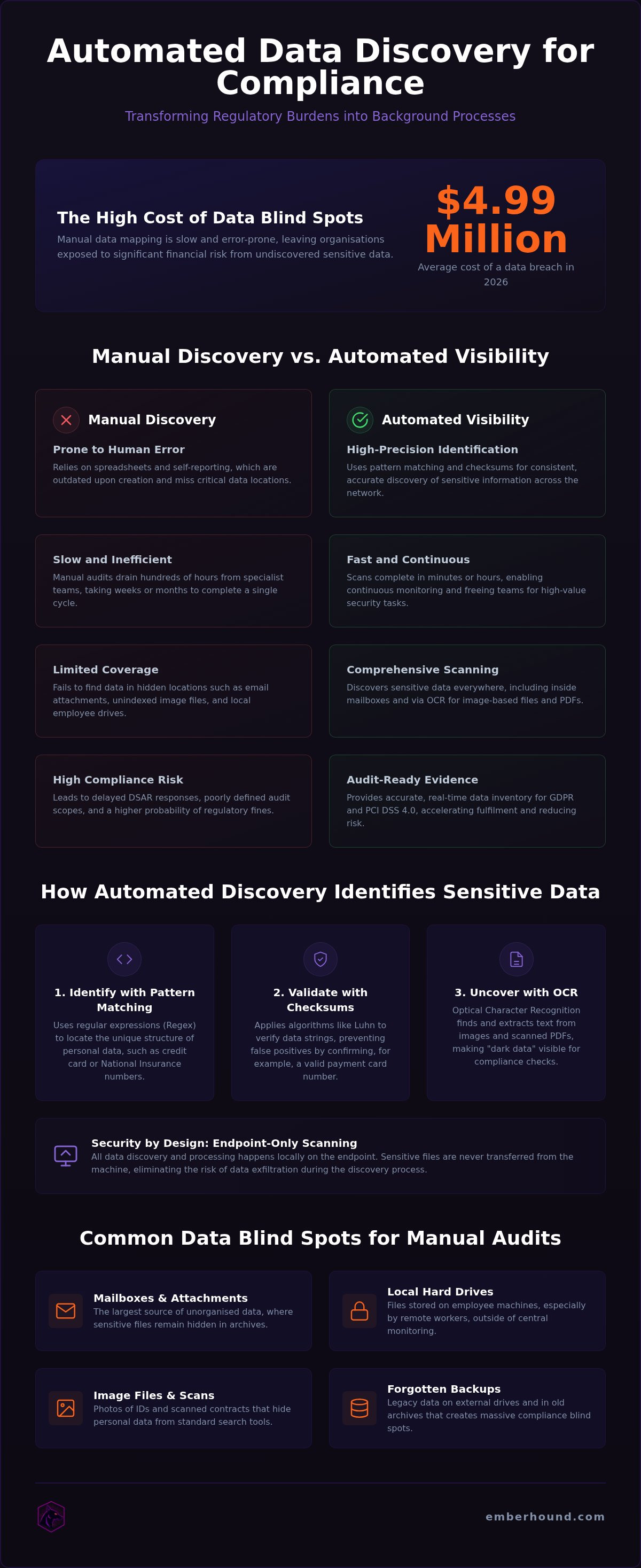
The average cost of a data breach reached a record high of $4.99 million in 2026. For lean IT teams, the pressure to secure every byte of sensitive data is no longer just a checkbox task - it's a high-stakes race against oversight. You likely recognise the frustration of manual data mapping. It's slow. It's prone to human error. Worst of all, it leaves you wondering what's hiding in forgotten mailboxes or buried inside unindexed images.
Effective data compliance software transforms this burden into a background process. You need visibility that doesn't require a six-figure consulting fee or months of manual audits. This guide explains how automated discovery tools identify sensitive data across your network and reduce regulatory risk. We'll show you how to generate audit-ready evidence for GDPR and PCI DSS 4.0 whilst completing DSAR fulfilment in minutes rather than days.
Key Takeaways
- Stop relying on manual spreadsheets that fail to track sensitive data in hidden locations such as mailboxes or images.
- Learn how data compliance software uses automated pattern matching to locate personal data across your network without the errors of manual audits.
- Understand the distinction between policy management workflows and discovery engines that find the actual files governed by those rules.
- Prioritise endpoint-only scanning to ensure sensitive data stays local and secure during the discovery process.
- Accelerate DSAR fulfilment and generate audit-ready evidence for GDPR and PCI DSS 4.0 with automated visibility.
The visibility gap: Why you cannot protect data you cannot see
You cannot secure what you haven't found. Most organisations operate under a dangerous illusion of control. They have data maps, policy documents, and compliance frameworks. But these maps are often static snapshots of a network that changes every hour. Data compliance software bridges this gap by turning discovery into a continuous, automated process. It isn't just about finding files; it's about eliminating the "I didn't know we had that" excuse before a regulator finds it for you.
Spreadsheets are the enemy of accuracy. A manual inventory is outdated the moment it's saved. Staff save files in local folders, attach sensitive documents to emails, and leave backups on external drives. These represent massive compliance blind spots. If your inventory relies on employees self-reporting where they store sensitive data, you've already lost. Without dedicated data compliance software, these blind spots remain hidden until a breach occurs. Automated discovery is the only way to maintain an accurate, real-time data inventory that reflects the actual state of your network.
The cost of manual data discovery
Manual audits are a resource sink. They drain hundreds of hours from IT and compliance teams, pulling specialists away from higher-value security tasks. The global average cost of a data breach reached $4.99 million in 2026. Much of this cost stems from slow detection and containment. Manual methods are slow. People miss things. They forget about the CSV in a "Downloads" folder or a sensitive scan sitting in an inbox. These errors lead to delayed Data Subject Access Request (DSAR) responses. Under GDPR, you have 30 days to respond. If you're still searching for data on day 29, you're inviting regulatory scrutiny and potential fines.
Regulatory requirements for data visibility
Visibility is a legal mandate, not a suggestion. Under GDPR, you must know exactly what personal data you hold to exercise the "right to be forgotten" or to provide a record of processing activities. You cannot protect what is invisible. PCI DSS 4.0, which became mandatory for compliance validation on 31 March 2025, is equally demanding. It requires the identification of all cardholder data to define your audit scope. If card data bleeds into unmonitored areas, your entire network may fall under scope - instantly inflating your compliance costs. Automated visibility ensures your scope remains tight and your evidence is always audit-ready.
How data discovery software identifies sensitive information
Effective discovery relies on technical precision, not guesswork. Most data compliance software uses pattern matching - specifically regular expressions (Regex) - to identify the unique structure of sensitive data types. This includes credit card numbers, names, addresses, and National Insurance numbers. To prevent false positives, tools use checksums, such as the Luhn algorithm, to verify that a sequence of numbers is actually a valid payment card. This process must occur across local drives, network shares, and cloud storage to ensure no data is missed. For security, this scanning should happen locally on the endpoint. Processing data at the source ensures sensitive files never leave the machine, which eliminates the risk of data exfiltration during the discovery process.
Scanning mailboxes and local hard drives
Email is often the largest repository of unorganised data in any business. It's a high-stakes blind spot where personal data hides in message bodies and attachments. Manual checks of thousands of emails are impossible for lean teams. Automated tools scan local mailboxes to find sensitive information that employees may have forgotten or archived. This is especially important for managing data held by remote workers. When files live on local hard drives instead of central servers, you lose visibility. Professional discovery tools bring that visibility back without requiring the user to move or upload a single file.
OCR and image-based data detection
Static images and scanned PDFs are invisible to traditional search tools. If a customer sends a photo of their ID or a scanned contract, that data is effectively "dark" to your compliance team. This creates a significant risk of missing personal data during a DSAR or audit. Optical Character Recognition (OCR) is a technical requirement for modern discovery that identifies and extracts text from within image-based files. Without it, your risk reduction strategy is incomplete because it ignores digitised paper records and screenshots. You can start a free scan to see how these automated tools find data that manual audits consistently miss.
Compliance management vs data discovery: Understanding the difference
Many organisations confuse policy management with technical discovery. Compliance management software is designed to organise workflows, assign tasks, and store policy documents. It tells you what you should do and tracks who has done it. In contrast, data compliance software is the engine that actually finds the files those policies govern. One manages the bureaucracy; the other handles the data. Whilst both are necessary for a mature security posture, discovery is the technical foundation of any real audit. Without it, you are managing a theoretical environment rather than your actual data footprint.
Lean IT teams often find themselves buried under management tools that create more work without providing visibility. If your software tells you to perform a scan but doesn't provide the means to do it, you haven't solved the problem - you've just added a task to your calendar. True discovery tools eliminate this friction by automating the search across your entire network. This ensures that your compliance status is based on live data rather than outdated self-reporting from staff members who may not know where their sensitive files are stored.
Process management vs technical execution
Process tools manage the "who" and "when" of compliance activities. They are excellent for tracking whether an employee has signed a privacy policy or if a risk assessment is overdue. However, they stop at the file system's edge. Discovery tools execute the "what" and "where" by searching every byte of your local and network storage. Using a process tool without discovery leads to a "paper-only" compliance posture. You might have a perfect policy on paper, but if you don't know that personal data is sitting in an unsecured "Temp" folder, that policy is useless. Regulators look for implementation, not just intent. You can see how technical execution works by viewing a video demo of automated discovery in action.
Audit-ready evidence vs policy documents
Evidence for an auditor must be factual and based on actual data scans. Policy documents alone are insufficient to prove GDPR or PCI DSS compliance. Auditors don't just want to see your rules; they want to see that you've applied them to your actual environment. Professional discovery platforms provide this evidence through salted fingerprints and masked previews. These features prove that sensitive data was identified and located without exposing the actual values to the compliance team or the software provider. This keeps your data secure whilst providing the definitive proof required for regulatory validation. It moves you from "we think we are compliant" to "we can prove we are compliant" with a single report.
Essential criteria for selecting a data compliance tool
Choosing data compliance software is a technical security decision. If a tool requires you to upload your entire file system to a third-party cloud for analysis, it hasn't reduced your risk. It has simply moved the target. You must prioritise visibility without creating a new point of failure. Look for tools that offer high-speed discovery without the overhead of enterprise-level "bloatware" or restrictive multi-year contracts. Security is the foundation. Every other feature is secondary to the safety of your raw data.
Local processing and data security
Local-only scanning ensures the vendor never accesses your raw file system. This architecture is the only way to guarantee that sensitive data stays exactly where it belongs - on your local machine. During the scan, the software should use salted fingerprints to identify data without storing the actual values. Encryption standards like TLS 1.3 and AES-256 are non-negotiable for any metadata that is transmitted. Ask potential vendors if they store copies of your files in their cloud. If the answer isn't a definitive "no", walk away. You cannot fix a compliance problem by introducing a potential data breach.
Ease of deployment and scalability
Avoid tools that require "deployment drama". You don't have months for configuration or consulting sessions. Professional discovery software should be ready to run in minutes, providing immediate results. It must scale naturally as your data volume grows, handling network shares and external hard drives with the same speed as local disks. You can read our GDPR guide for implementation tips that keep your team agile whilst maintaining high security standards.
Commercial flexibility is equally important. Many traditional giants lock you into rigid contracts that charge for features you'll never use. Usage-based pricing is the practical choice for lean IT teams who need to manage costs whilst meeting strict audit requirements. Finally, consider the output. A tool that identifies a problem but leaves you to fix it manually is only half a solution. Features like a DSAR disclosure pack automate the difficult work of redacting and organising data for subject requests. This turns a complex legal duty into a repeatable, efficient process.
EmberHound: Automated discovery for GDPR and PCI DSS
EmberHound is built for the professional who is tired of enterprise bloatware. It is the definitive data compliance software for lean IT teams that need visibility without the deployment drama. We don't sell legal consulting or managed services. We sell a high-speed discovery engine that finds sensitive data in minutes. Our platform is designed to be the practical choice for organisations that value time and technical precision over corporate fluff. You get a tool that works immediately, providing the visibility required to secure your network against oversight.
Security is our primary design principle. Our endpoint-only architecture ensures that your raw data never leaves your local machine. We use salted fingerprints and masked previews to provide audit-ready evidence for GDPR and PCI DSS 4.0. This version of the PCI standard became mandatory for compliance validation on 31 March 2025, and it demands the level of continuous monitoring that only automation can provide. By processing data at the source, we eliminate the risk of data exfiltration. Your sensitive files remain under your control whilst you gain the insights needed to satisfy auditors. We use TLS 1.3 with AES-256 encryption for all data at rest to ensure your metadata is as secure as your file system.
Precise discovery for UK businesses
Registered in England & Wales (Company No. 17113470), EmberHound is a UK-based company built for the specificities of the local regulatory landscape. We understand that UK GDPR requires more than just a signed policy; it requires a factual record of processing activities. Our software targets the locations where personal data actually hides - local mailboxes, external hard drives, and unindexed images. Our OCR scanning add-on extracts text from scanned PDFs and screenshots, closing the gaps that traditional scanners ignore. You can find out more about why businesses choose EmberHound to replace slow, manual audits with automated precision.
Actionable next steps for your compliance
Compliance shouldn't be a financial trap. Our usage-based pricing model means you pay for what you scan - no restrictive contracts or hidden fees. This allows you to scale your discovery efforts at your own pace without the high costs of traditional compliance consulting. You can also utilise our DSAR disclosure pack to automate the redaction and organisation of personal data. This turns a month-long manual task into a repeatable, efficient workflow. It is time to automate your compliance to meet the rising standards of 2026.
Secure your visibility today
Manual data mapping is a liability you don't need. It's slow, expensive, and leaves your organisation vulnerable to the record high $4.99 million average breach cost reported in 2026. Effective data compliance software replaces guesswork with technical certainty. By automating discovery across local drives, network shares, and mailboxes, you eliminate the blind spots that lead to regulatory scrutiny. You no longer have to fear what's hiding in unindexed images or forgotten attachments.
Focus on a tool that prioritises your security. Endpoint-only scanning ensures no file exfiltration occurs during the process. Your data stays on your local machine. Usage-based pricing keeps your budget lean with no restrictive contracts. As a UK-registered business, we provide the audit-ready evidence you need for GDPR and PCI DSS 4.0 without the friction of traditional enterprise software. It's time to move from theoretical policies to factual, visible security.
Take control of your data footprint and build a more resilient, audit-ready organisation today.
Frequently asked questions
What is data compliance software?
Data compliance software is a technical tool used to locate and map sensitive information across a network to ensure adherence to regulatory standards. It replaces manual spreadsheets with automated scans that find personal data in files, mailboxes, and images. By providing a real-time inventory of where data lives, it allows organisations to apply security controls and demonstrate compliance to auditors without the errors associated with human audits.
How does automated scanning reduce GDPR risk?
Automated scanning reduces GDPR risk by identifying personal data that would otherwise remain hidden in unindexed folders or local drives. Under GDPR, organisations must maintain an accurate record of processing activities and respond to subject access requests within 30 days. Automated tools provide the visibility needed to meet these deadlines and ensure that data is only stored where it is authorised, lowering the chance of regulatory fines for oversight.
Can data discovery software find sensitive information in images?
Yes, professional tools use Optical Character Recognition (OCR) to identify text within image-based files like scanned PDFs or screenshots. This is a critical requirement for modern data compliance software because sensitive data is often digitised from paper records or captured in screenshots. Without OCR, these files remain "dark data" that is invisible to traditional search methods, creating a major gap in your compliance and risk reduction strategy.
Is my data exfiltrated during the scanning process?
No, EmberHound uses endpoint-only scanning to ensure that your raw data never leaves the local machine. All processing occurs locally on the device being scanned, and the platform never accesses your file system directly. Instead of uploading files to a central cloud, the software provides audit-ready evidence through masked previews and salted SHA-256 fingerprints. This architecture eliminates the risk of data exfiltration whilst maintaining a credible security posture.
How does mailbox scanning assist with DSAR requests?
Mailbox scanning accelerates Data Subject Access Request (DSAR) fulfilment by searching through message bodies and attachments for specific personal data. Email is often the largest repository of unorganised information in a business. Manually searching thousands of messages is impossible for lean IT teams. Automated discovery tools locate the relevant data instantly, allowing you to generate a disclosure pack and meet legal deadlines without the burden of manual searching.
What is the difference between data mapping and data discovery?
Data mapping is the process of documenting how data flows through an organisation, whilst data discovery is the technical act of finding the actual files. Many businesses rely on "paper-only" maps that are based on employee interviews and soon become outdated. Discovery software provides the factual evidence that proves your maps are accurate. It searches the file system to find where sensitive data actually resides, rather than where policies say it should be.
Is data compliance software suitable for small businesses?
Yes, the software is specifically designed for small-to-medium businesses and lean IT groups that lack the budget for high-cost compliance consulting. EmberHound uses a usage-based pricing model, which means you only pay for what you scan with no mandatory long-term contracts. This allows smaller organisations to achieve the same level of visibility and audit-readiness as large enterprises without the "deployment drama" or complex configuration often associated with traditional software giants.
Does the software scan external hard drives?
Yes, the platform includes capabilities to scan external hard drives and network shares alongside local disks. This is essential for managing data held by remote workers or stored in legacy archives. Since all scanning is performed locally on the endpoint, the software can identify sensitive data on any storage device connected to the machine. This ensures that your data inventory is truly comprehensive and leaves no blind spots in your compliance reporting.


