

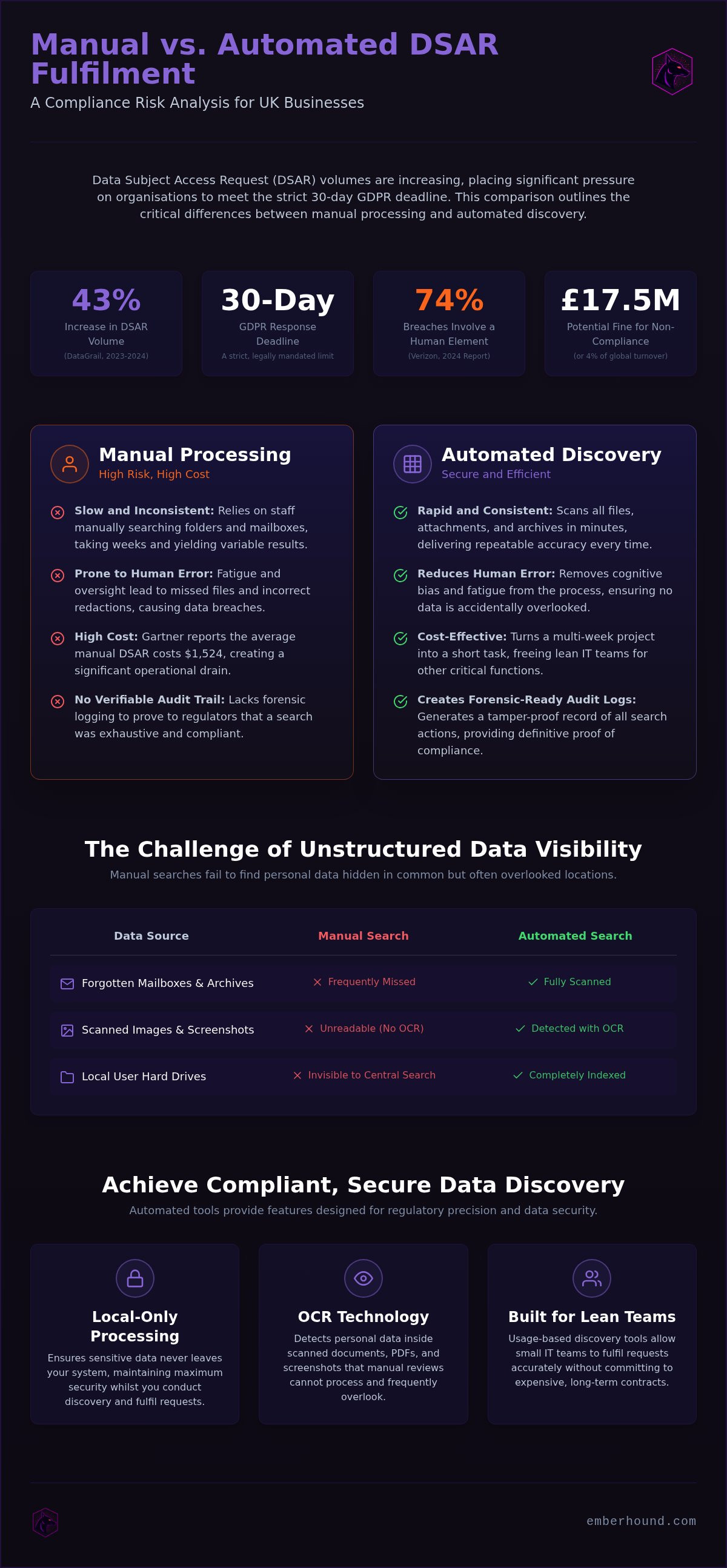
Manual data discovery is no longer a viable strategy for UK businesses. It is a liability. You likely feel the weight of the 30-day GDPR deadline every time a new request arrives, yet relying on automated scanning is now objectively better than manual DSAR processing for any team that faces high volumes. It's a high-stakes race where missing one file or failing to redact a third party correctly leads to a breach. DataGrail reported that DSAR volumes rose by 43 per cent between 2023 and 2024. This increase makes the old way of hunting through mailboxes a primary source of risk.
This article demonstrates how automated discovery provides a more accurate and secure path to compliance. You'll learn why manual methods fail to find data hidden in unstructured formats and how keeping your processing local maintains security. We'll show you how to locate every instance of a subject's information without the friction of traditional software. Verizon's 2024 report found that 74 per cent of all data breaches involve a human element. Automation removes that risk - it allows your team to meet deadlines consistently whilst you maintain control of sensitive data.
Key Takeaways
- Manual searches often fail to find personal data hidden in unstructured formats such as old mailboxes or images.
- Automated scanning is better than manual DSAR processing as it identifies every instance of a subject's data in minutes with consistent accuracy.
- OCR technology is required to detect personal data in scanned documents and screenshots that manual reviews frequently overlook.
- Local-only processing ensures your data never leaves the system, which maintains security whilst you meet the 30-day GDPR deadline.
- Lean IT teams can use usage-based discovery tools to fulfil requests accurately without committing to expensive, long-term contracts.
The Inherent Risks of Manual DSAR Processing
Manual data discovery is a gamble that most UK organisations can no longer afford to take. Relying on staff to click through folders and search mailboxes is slow, but the real danger lies in what they miss. A Data Subject Access Request (DSAR) requires you to find every instance of an individual's data, not just the obvious files. When you rely on human memory and standard OS search tools, you leave gaps. Adopting an automated workflow is objectively better than manual DSAR processing because it removes the uncertainty of human oversight. Gartner reports that the average cost to process a single DSAR manually reached $1,524 in 2026. For a lean IT team, this isn't just a financial drain; it's a massive operational bottleneck.
The Burden of the 30-Day Deadline
The GDPR deadline is a hard limit. You have exactly one month from the receipt of a request to provide a full disclosure. For small teams, this creates a state of constant high-stakes urgency. Manual searching across different departments, local drives, and legacy mailboxes often takes weeks. If you miss that window, you risk a formal complaint to the Information Commissioner's Office (ICO). Under current regulations, breaches of data subject rights can result in administrative fines of up to £17.5 million or 4 per cent of annual global turnover. Tracking these requests in a spreadsheet is insufficient. Spreadsheets don't provide an audit trail, and they certainly don't help you find the data you're looking for.
Data Visibility Gaps in Manual Workflows
Personal data is rarely stored in one tidy location. It hides in unstructured formats that manual searches often ignore. You might find the primary files in your CRM, but what about the rest?
- Local Hard Drives: Files saved to a user's desktop or "Downloads" folder are invisible to central server searches.
- Forgotten Mailboxes: Personal data often sits in PST files or archived folders that haven't been opened in years.
- Scanned Images: Standard search tools cannot read text inside a photo of a passport or a screenshot of a chat log.
Standard Windows or Mac search functions aren't designed for regulatory discovery. They miss attachments and can't look inside encrypted containers. Missing a single file makes your response non-compliant. Verizon's 2024 Data Breach Investigations Report highlighted that 74 per cent of breaches involve a human element. This includes errors made during manual redaction. If an employee fails to black out a third party's name in a 50-page document, you've just caused a data breach whilst trying to comply with the law. You can find more detail on these requirements in our GDPR guide.
Why Automated Discovery is Better than Manual DSAR Methods
Manual methods rely on human focus. Humans get tired. They get distracted. Automated discovery does not. It is a fundamental shift in how you handle data requests. Automated tools scan every file, attachment, and archive in minutes. This speed makes automation better than manual DSAR for lean teams. You gain immediate visibility without the weeks of searching described in the inherent risks of manual processing. It turns a month-long project into a morning task. You stop reacting to deadlines and start meeting them with confidence.
Consistency and Accuracy in Data Detection
Human oversight is inconsistent. An employee might spot a name on page one but miss it on page fifty. Automated scanning uses specific patterns to find personal data across all file types. It identifies credit card numbers, addresses, and National Insurance numbers instantly. This process is repeatable. It does not suffer from fatigue or cognitive bias. Automated tools use OCR technology to find personal data hidden in PDF files and image screenshots. This level of precision is impossible to maintain manually. It ensures that no data subject's information is left behind in a forgotten folder or a hidden attachment.
Building an Audit-Ready Compliance Trail
If the ICO audits your process, a vague verbal confirmation is not a valid defence. You need hard evidence. Manual processes lack the logging required to prove a search was exhaustive. Automated platforms generate a forensic record of every action taken during the discovery phase. They produce salted SHA-256 fingerprints for every piece of evidence found. This provides a tamper-proof trail of your compliance efforts. It shows exactly what was searched and when. You can read more about building these records in our EmberHound GDPR guide. These logs are your primary shield against claims of negligence.
Human error during redaction is a leading cause of accidental disclosure. Automated tools highlight or mask sensitive data before it reaches the disclosure pack. This keeps your data processing local and secure. You don't have to worry about a staff member missing a field whilst they review a long email thread. It is a cleaner, safer way to work. It protects the subject and your organisation simultaneously. Automated discovery is better than manual DSAR because it removes the human element from the risk equation. If you want to see how this fits your specific volume, view our usage-based options.
Identifying Personal Data in Mailboxes and Scanned Images
Email is where personal data goes to hide. Most employees hoard messages for years. They archive them. They forget about them. A standard keyword search in a mail client is not a thorough discovery process. It misses data buried inside attachments. It misses data in archived PST files sitting on local drives. Automated discovery is better than manual DSAR because it treats every email as a data source to be indexed and analysed. It inspects the subject line, the body, and every associated file. This is the only way to ensure a complete response whilst you face the strict 30-day GDPR limit.
The Role of OCR in Data Discovery
Personal data is often trapped in non-text formats. This includes passport scans, driving licences, and screenshots of internal chat logs. These are image files. A manual reviewer must open and inspect every single one to check for sensitive information. This is a slow, error-prone task. OCR technology reads the text within these images and scanned PDFs. It converts visual information into searchable data. This capability is essential for businesses that maintain legacy paper records or receive identity documents via email. You can read more about this in our OCR for data discovery article. Without OCR, your search is incomplete. You leave your organisation vulnerable to fines because you missed data that was hidden in a simple image file.
Solving the Mailbox Data Problem
Searching through thousands of emails manually is a waste of skilled IT time. Professionals often spend days scrolling through inboxes. They frequently skip local mailboxes to save time. This is a significant compliance gap. Personal data frequently sits in forgotten folders or "Sent" items. Automated mailbox scanning identifies sensitive information in seconds. It scans the inbox, the archives, and the attachments simultaneously. Local mailbox scanning is also more secure than cloud-based alternatives. The data stays on the endpoint. It is never uploaded to a third-party server for processing. This keeps you in full control of the data. It ensures that whilst you meet the deadline, you do not create a new security vulnerability. Personal data in attachments is the most common oversight in manual workflows. Automation ensures these files are inspected with the same rigour as the emails themselves. It is a faster, more reliable method. It is why local scanning is better than manual DSAR processing for any organisation handling sensitive subject data.
A Step-by-Step Guide to Secure Data Discovery
Securing your data discovery process requires a methodical approach. It is not enough to just find the data. You must protect it whilst you search. This workflow is better than manual DSAR methods because it prioritises security at every stage. You start by identifying every endpoint that might hold personal data. This includes local hard drives, mailboxes, and external storage devices. Manual searches often overlook these "dark" data stores. Automation ensures they are included in the search perimeter from day one.
- Step 1: Identify all endpoints. Map out all devices, local mailboxes, and data stores that require scanning.
- Step 2: Use local-only scanning. Run discovery tools directly on the endpoint to keep data from leaving the system.
- Step 3: Review masked previews. Use obfuscated data views to verify hits without exposing raw content to the reviewer.
- Step 4: Generate a DSAR disclosure pack. Compile the found data into a professional format for the data subject.
- Step 5: Log the entire process. Maintain a forensic record for your compliance audit trail.
The Security Advantage of Local-Only Scanning
Processing data locally is a superior security posture compared to cloud exfiltration. Many competitors require you to upload your sensitive files to their servers for analysis. This creates a massive new attack surface. A local-first approach ensures that the platform never accesses the file system directly. Instead, the scanning engine runs on the host machine. This keeps your data behind your own firewall. For data at rest, we use AES-256 encryption. All communication between the endpoint and the management console is secured with TLS 1.3. It is a cleaner, more resilient architecture that minimises the risk of a secondary breach during the discovery phase.
Generating Masked Previews for Review
Compliance teams need to confirm that found data is relevant before including it in a disclosure pack. However, viewing raw personal data during the review phase can be a privacy risk itself. Masked previews allow you to confirm that a match is accurate without seeing the full details of the subject's information. This method protects the privacy of the data whilst you work. It ensures that only authorised personnel see the final disclosure. You can learn more about our encryption and security protocols on the EmberHound trust page. This step is why automated discovery is better than manual DSAR processing; it prevents accidental data exposure by the very people trying to protect it.
The EmberHound Solution - Efficient DSAR Fulfilment for Lean Teams
Lean IT teams don't need bloatware. They need a tool that locates personal data across endpoints without the overhead of enterprise suites. EmberHound is that tool. It is a pragmatic partner for the professional who understands the daily grind of compliance. By automating the search through local mailboxes and drives, the platform is significantly better than manual DSAR processing. It removes the friction of hunting for files whilst the 30-day deadline approaches. You gain visibility into local mailboxes and external hard drives instantly. This speed is essential for teams that cannot afford to waste hours on manual inspection.
Usage-Based Pricing for Scalable Compliance
Traditional compliance software often forces organisations into expensive, multi-year contracts. This is a barrier for small-to-medium businesses with fluctuating needs. EmberHound uses a pay-as-you-go model. You pay for what you use. This makes professional-grade discovery accessible without a massive upfront investment. It allows you to scale your compliance efforts based on the volume of requests you actually receive. Teams can start with a free scan to test the platform on their own environment. You can see the full breakdown on the EmberHound pricing page. There are no mandatory contracts. You get the tool when you need it and stop when you don't. It is a flexible approach to a rigid regulatory requirement.
Direct and Precise Compliance Tools
We don't do puffery. We don't sell legal consulting or managed services. EmberHound provides factual tools for security and IT professionals. The platform focuses entirely on GDPR data discovery, OCR scanning, and data mapping. It is designed to help you fulfil the requirements of a subject access request with surgical precision. Onboarding is simple. There is no deployment drama or complex configuration. You install the scanner, identify the personal data, and generate your DSAR Disclosure Pack. This pack provides an audit-ready summary of found information. It is a technical solution for a technical problem. We maintain a high level of professional credibility by focusing on the mechanics of security rather than jargon-heavy marketing.
Managing subject requests shouldn't be a source of anxiety. It is about having the right visibility at the right time. Automation is better than manual DSAR because it gives you back your time and reduces your risk profile. Book a demo to see how to automate your next DSAR and secure your compliance workflow.
Secure Your Compliance Workflow
Relying on manual searches in 2026 is a risk you don't need to take. Human oversight and missed data in unstructured formats lead to regulatory scrutiny and potential fines. Automated discovery is better than manual DSAR because it provides a forensic level of accuracy whilst removing the burden from your staff. You can now locate personal data in forgotten mailboxes and scanned images in minutes rather than weeks. This ensures your response is complete and defensible.
All scanning is performed locally on the endpoint to ensure your sensitive information never leaves the system. You gain audit-ready evidence with masked previews to verify hits safely. With usage-based pricing and no long-term contracts, you have the flexibility to scale your compliance efforts as your request volume changes. It is a no-nonsense path to meeting the 30-day GDPR deadline consistently. You stop guessing and start knowing exactly where your data sits.
You have the tools to turn complex data requests into a routine, stress-free process. Protect your organisation and your subjects by choosing a faster, more reliable method for data discovery.
Frequently Asked Questions
Why is automated discovery better than manual DSAR processing?
Automated discovery is better than manual DSAR processing because it provides a repeatable, forensic-level search across all endpoints. Whilst manual methods rely on employees searching through folders, automation indexes every file and attachment simultaneously. This eliminates the risk of missing personal data hidden in unstructured formats. It allows your staff to focus on high-value tasks whilst the software handles the high-stakes work of locating data and creating a defensible audit trail for the ICO.
How does local-only scanning improve data security?
Local-only scanning improves security by eliminating the need for data exfiltration. Most cloud discovery tools require you to move sensitive files to their infrastructure, creating a significant security risk. By processing data directly on your host machines, your files stay behind your existing firewall. This method ensures that the discovery process itself doesn't become a source of data exposure, maintaining a secure posture whilst you fulfil your legal obligations to data subjects.
Can automated tools find personal data in scanned images?
Yes, our platform identifies text within images and scanned documents through Optical Character Recognition (OCR). This is essential for finding personal data in passport scans, driving licences, and screenshots that standard search functions ignore. By converting these visual elements into searchable text, the software ensures that your search is truly exhaustive. This prevents the visibility gaps that often lead to incomplete responses and potential complaints to the Information Commissioner's Office.
What is included in a DSAR disclosure pack?
A DSAR disclosure pack is a structured compilation of all personal data related to a specific subject. It includes the actual data found, alongside audit-ready evidence such as salted SHA-256 fingerprints. These fingerprints prove that the evidence hasn't been tampered with since the scan occurred. The pack provides a professional, transparent report for the individual whilst giving your organisation a defensible record of the thoroughness of your search and redaction process.
How long does it take to set up an automated data scan?
You can install the scanner and begin your first data scan in minutes. There is no deployment drama or complex server configuration required. Because the software is designed for lean IT teams, the onboarding process is direct and factual. This allows you to respond to urgent requests immediately. You can move from identifying data stores to generating a full disclosure pack within a single working day, ensuring you meet strict regulatory deadlines consistently.
Is automated DSAR software affordable for small businesses?
Yes, automated discovery is better than manual DSAR processing for small businesses because of our usage-based pricing model. You pay only for the scans you perform, with no requirement for expensive, long-term contracts. This makes professional compliance tools affordable for organisations with limited budgets or infrequent requests. You can start with a free scan to evaluate your environment, allowing you to scale your compliance costs in direct proportion to your actual business needs.
Does EmberHound store my sensitive data on its servers?
No, we do not store your raw sensitive data on our servers. All scanning is performed locally on your endpoints. Only the necessary metadata and masked previews are sent to the management console to allow your team to review the findings. We use TLS 1.3 for data in transit and AES-256 encryption for data at rest. This architecture ensures that you remain in full control of your data throughout the entire discovery lifecycle.


