

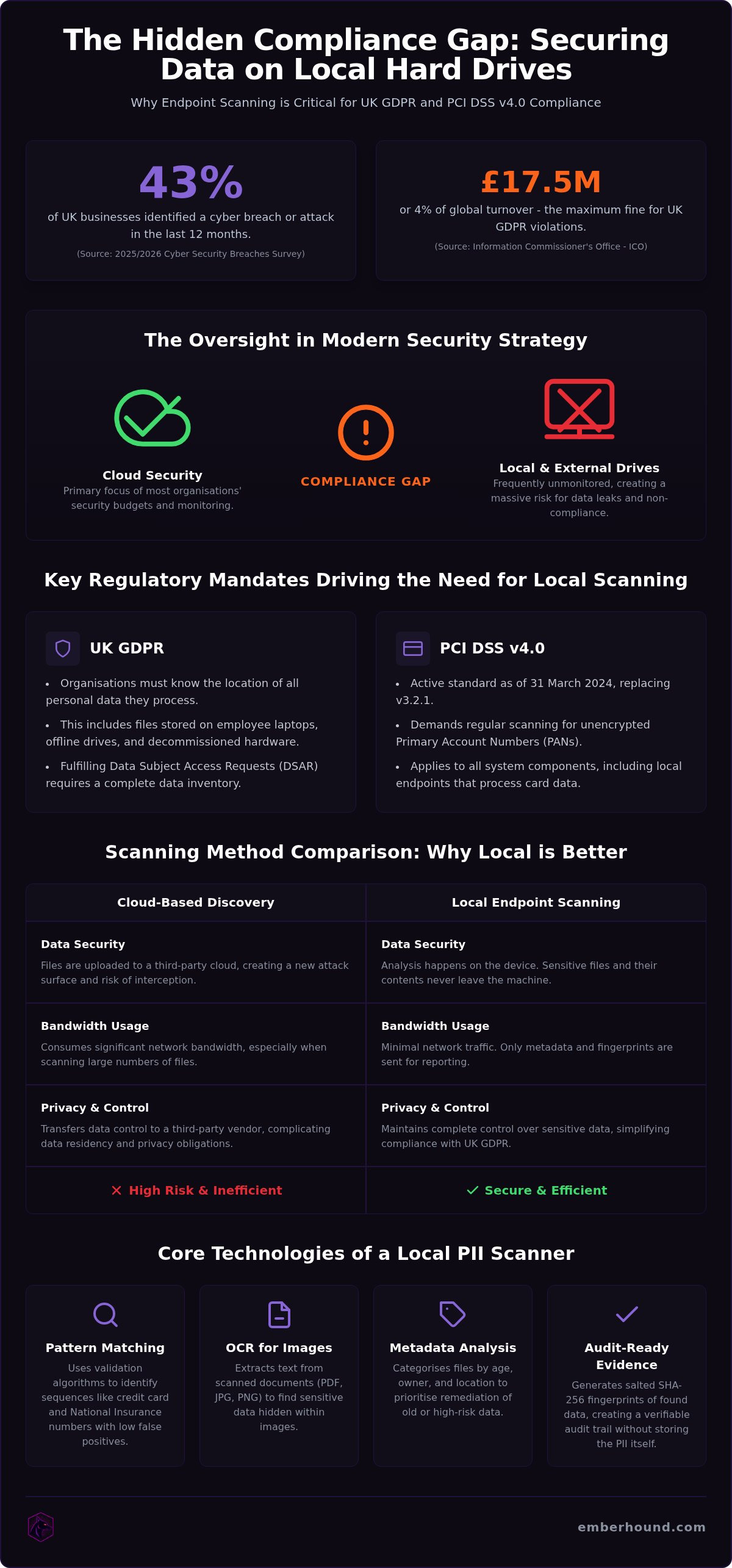
The 2025/2026 Cyber Security Breaches Survey reports that 43% of UK businesses identified a cyber breach or attack in the last 12 months. Most organisations focus on cloud security. They often leave local disks and external drives unmonitored. This oversight creates a massive compliance gap for GDPR and PCI DSS v4.0. You likely feel the pressure of potential fines that reach up to 4% of worldwide annual turnover. Relying on manual checks is not a strategy. You need a reliable hard drive PII scanner to gain visibility into what your team actually stores on their machines.
We understand the frustration of tools that take weeks to configure. You shouldn't have to upload sensitive files to the cloud for analysis. You deserve a solution that stays local and works immediately. This article explains how to identify sensitive data across your entire hardware estate. You will learn how to manage personal data on local disks to maintain strict compliance standards. We cover the steps to fulfil DSAR requests and the secure decommissioning of old hardware. By the end, you will have a clear path to a clean audit report and total peace of mind.
Key Takeaways
- Unmanaged local storage is a primary source of data leaks. Scan endpoints to ensure sensitive data does not remain on hardware when you decommission a drive.
- A hard drive PII scanner identifies sequences like credit card numbers directly on the device. This local-only approach ensures your files never leave the machine.
- Cloud-based discovery tools often create security risks and consume high bandwidth. Local endpoint scanning is a faster alternative that keeps your files secure.
- Define your scan scope. Identify high-risk laptops and external drives first to satisfy GDPR and PCI DSS v4.0 requirements.
- Use OCR to find sensitive data in images. Salted fingerprints provide the audit-ready evidence you need for DSAR fulfilment and regulatory checks.
Why local hard drive scanning is essential for UK compliance
UK businesses face a stark reality. The Information Commissioner's Office (ICO) enforces strict rules where oversight leads to fines of up to £17.5 million or 4% of global turnover. According to the 2025/2026 Cyber Security Breaches Survey, 43% of UK organisations identified a breach in the last year. Many of these incidents involve data stored where it shouldn't be. UK GDPR requires your organisation to know the location of all personal data. This includes files on offline drives and employee devices that never touch the cloud. A hard drive PII scanner is the only way to verify these endpoints stay clean.
PCI DSS v4.0 is now the active standard. It officially replaced version 3.2.1 on 31 March 2024. The standard demands regular scanning for unencrypted primary account numbers on all endpoints. If you process card payments, you cannot simply assume your staff follow the rules. You must prove it. This involves identifying personally identifiable information (PII) and sensitive financial data that might have slipped through the cracks during daily operations.
The risk of data sprawl on remote worker laptops
Employees frequently download sensitive reports to their local folders for quick access. This behaviour creates data sprawl that bypasses your central security controls. Legacy files often remain on these drives long after their business purpose ends. A hard drive PII scanner identifies these risks directly on the device. This process does not require the user to be on a corporate VPN. It provides visibility into the shadow data that cloud-only tools miss. You get a clear picture of your risk without the friction of complex network configurations.
Decommissioning hard drives and external storage safely
Standard formatting is often insufficient. It hides files from the operating system but leaves the actual data on the drive. Scanning a drive before you recycle or repurpose it provides a verifiable audit trail of data destruction. External hard drives used for backups are also high-risk locations. These devices often contain forgotten sensitive data from years ago. A thorough scan ensures you don't export a data breach when you retire old hardware. This proactive step protects your reputation and satisfies the ICO's requirements for secure data disposal.
How local discovery tools find sensitive data on endpoints
Local endpoint scanning is a process where data analysis occurs directly on the hard drive. This architecture is vital for security. Many tools exfiltrate files to the cloud for analysis. This creates a new security risk. A local hard drive PII scanner keeps the contents of your files on the machine. No raw data leaves the endpoint. This approach eliminates the bandwidth costs and privacy concerns associated with cloud-based analysis. You maintain control over your sensitive data at all times.
The scanner uses pattern matching to identify specific sequences. This includes credit card numbers, National Insurance numbers, and other identifiers mentioned in NIST's guidance on PII. Advanced tools go beyond simple regex strings. They use validation algorithms to reduce false positives. Metadata analysis adds another layer of visibility. It allows you to categorise files based on their age, owner, and location. You can identify which users are storing old exports or legacy spreadsheets. This helps you prioritise which data to delete or move to secure storage.
Identifying data within images and scanned documents
OCR technology extracts text from PDF files and image formats like JPG or PNG. This is critical for finding sensitive data in scanned contracts or ID documents. Many employees store scans of passports or driving licences on their desktops. Standard search tools miss these entirely. A hard drive PII scanner with OCR capabilities reads the text within the pixels of the image. It then applies pattern matching to find sensitive identifiers. You can read more about OCR for data discovery to understand the technical mechanics of image scanning. This ensures that no hidden data remains invisible to your compliance team.
Generating audit-ready evidence with fingerprints
Salted SHA-256 fingerprints provide a unique identifier for sensitive files. These fingerprints act as proof that a file was found and managed. You do not need to store the original sensitive contents to prove compliance. Masked previews allow compliance teams to verify a match. They see enough to confirm the data type but cannot see the raw, sensitive details. This aligns with the principle of data minimisation. These features are essential for demonstrating GDPR compliance during an audit. They provide clear evidence for DSAR fulfilment without increasing your data risk. If you are ready to find out what is on your machines, you can start your first scan for free.
Evaluating different approaches to local data discovery
Choosing the right methodology for data discovery is a choice between speed and risk. Many organisations begin with manual file searching. This is a mistake. Manual checks are prone to human error. They cannot see inside compressed archives or identify sensitive data buried in obscure directories. A manual approach is a static snapshot that becomes obsolete the moment a user downloads a new report. It provides a false sense of security whilst leaving your organisation exposed to regulatory fines.
Cloud-based Data Loss Prevention (DLP) tools are the traditional alternative. However, these often require significant bandwidth. They create security concerns by moving sensitive files to a central server for analysis. Moving data to prove you are protecting it is a contradiction. It increases your attack surface and creates a new data protection liability. A dedicated hard drive PII scanner offers a different path. It prioritises speed and minimal impact on system performance. By processing data at the source, you eliminate the need for complex firewall changes or deployment drama. This aligns with a guide from the Federal Trade Commission, which emphasises the need to inventory all storage devices to locate sensitive information effectively.
Local-only processing vs cloud data exfiltration
Local scanning keeps your file system private. It reduces the risk of data in transit because the raw contents never leave the machine. Cloud tools must ingest your files. This ingestion process creates a potential point of failure. If the cloud provider is breached, your sensitive data is exposed. Local tools are easier to deploy. They don't require the enterprise-speak complexity of traditional software. You can start a scan without reconfiguring your entire network. This ensures that your security posture remains intact without the friction of data exfiltration.
Why automated scanning is superior to manual data mapping
Automation identifies hidden files that a manual data map will miss. It provides a real-time view of your data posture. You can see exactly what is on a machine today, not what was there when you last updated a spreadsheet. Refer to our GDPR guide to see how automation fits into a modern compliance strategy. This approach is more cost-effective. Usage-based models replace expensive annual subscriptions with a pay-for-what-you-use structure. You don't pay for idle licences. You pay for results. This makes a local hard drive PII scanner the pragmatic choice for lean teams who need to prove compliance without the bloatware.
A practical workflow for auditing local storage
A structured workflow turns a chaotic search into a repeatable audit process. You must first define the scope of your scan. Not every machine requires the same level of scrutiny. Focus your initial efforts on high-risk departments such as HR, finance, and legal. These teams handle the highest volume of sensitive data on a daily basis. Deploying a hard drive PII scanner across these specific endpoints allows you to identify the most critical vulnerabilities first. This targeted approach ensures you use your time and resources efficiently.
Once you define the scope, configure the tool to look for data types relevant to your industry. This might include National Insurance numbers, UK passport numbers, or credit card data. Reviewing the results is the next step. Use masked previews to filter out false positives without exposing the raw sensitive data to the reviewer. This maintains the principle of data minimisation. Finally, export a disclosure pack or audit report. This documents your findings and provides clear evidence of your compliance efforts for internal stakeholders or external regulators. A hard drive PII scanner provides the objective proof you need to pass a surprise audit.
Preparing your network for an endpoint scan
Identify all external drives and local workstations that require analysis. You must ensure you have the necessary permissions to run software on the target machines. Admin rights are usually required for a deep file system scan. Organise your scan schedule to avoid peak working hours. This is especially important if you scan large volumes of data. A local scanner is designed for low impact, but running it during quiet periods ensures no disruption to employee productivity. Clear communication with your IT team will prevent deployment drama and ensure a smooth rollout.
Managing matches and fulfilling DSAR requests
Data Subject Access Requests (DSARs) are a significant administrative burden. You must locate all personal data related to the individual and respond within 30 days. Manual searches often miss data hidden in PDF files and scanned images. An automated scan finds these files quickly. It allows you to fulfil the request within the legal timeframe without pulling your team away from their core tasks. Use automated disclosure packs to bundle the findings into a professional, audit-ready format. This reduces the risk of human error and ensures your response is thorough and compliant.
Efficient data discovery with EmberHound
EmberHound is a data discovery platform designed for compliance and security teams. It rejects the complexity of traditional software. The platform focuses on local-only scanning to ensure your sensitive data never leaves the endpoint. This architecture eliminates the risks associated with cloud-based analysis. As a dedicated hard drive PII scanner, it provides the visibility you need without the security trade-offs. You maintain total control over your hardware estate. Visibility is immediate. Results are clear.
Cost is often a barrier to compliance. EmberHound uses usage-based pricing. You only pay for the data you actually scan. There are no restrictive annual contracts or hidden fees. This model is ideal for SMBs and lean teams who value efficiency. The interface is deliberately jargon-light. It is accessible for non-technical users who need to manage data risks. You don't need to be a security specialist to get results. The tool handles the technical heavy lifting whilst you focus on the audit report.
The benefits of a local-only approach
No file exfiltration ensures your security posture remains intact. Your files are never uploaded to a third-party server. We use TLS 1.3 for data in transit and AES-256 encryption at rest. Salted SHA-256 fingerprints provide audit-ready evidence. This approach removes the need to store raw sensitive data. View our trust page for more information on our security standards. This transparency is central to our behaviour as a protective partner. We provide the tools you need to fix problems instantly.
Getting started with your first scan
There is no deployment drama. You can start a scan in minutes. It works on local disks, local mailboxes, and external hard drives. Use the demo to see the platform in action before you commit. You can see how the OCR scanning finds sensitive data in images and PDFs. Start with a free scan to identify your immediate data risks today. This is the fastest way to move from fear of oversight to a clean audit report. Secure your storage. Protect your business. Get started now.
Secure your endpoints and simplify compliance
Unmanaged local storage is a liability that your organisation cannot afford to ignore. You've seen how remote work and hardware decommissioning create hidden pockets of risk on laptops and external drives. Relying on manual checks or cloud-based tools that exfiltrate your files only adds unnecessary complexity. A hard drive PII scanner provides a decisive solution by finding sensitive data exactly where it lives. By processing files locally, you ensure that your security posture remains intact and you generate the audit-ready evidence needed for GDPR and PCI DSS v4.0 compliance.
It's time to stop worrying about what might be hiding in your employees' downloads or old backup disks. You can move from uncertainty to total visibility in minutes. With local-only endpoint scanning and no long-term contracts, you have the flexibility to audit your storage on your own terms. Take control of your data today and build a future where compliance is a simple, repeatable process rather than a constant source of stress.
Frequently Asked Questions
How do I scan a hard drive for sensitive data?
You scan a hard drive by running a discovery tool directly on the endpoint. First, you select the target drive or folder. You then choose the specific data patterns you need to find, such as credit card numbers or National Insurance numbers. The hard drive PII scanner then parses the file system locally. It identifies matches and does not move any data. This ensures you maintain control over the files throughout the entire process.
Does the scanner upload my files to the cloud for analysis?
No, the scanner does not upload your files to the cloud. All processing happens locally on the endpoint. This local-only approach is a core security feature. It prevents the risk of data exfiltration during the discovery process. Your sensitive data stays exactly where it is. Only the metadata and salted fingerprints are used for reporting. This ensures your security posture remains intact whilst you meet your compliance obligations.
Can I find credit card data inside images on a hard drive?
Yes, you can find credit card data inside images by using OCR technology. Many employees store scans of invoices or ID documents that contain sensitive details. A standard file search will miss these items because the text is embedded in the image pixels. The scanner extracts this text from JPG, PNG, and PDF files. It then applies pattern matching to identify card numbers. This ensures your data discovery is thorough.
What happens if I find personal data on a decommissioned drive?
If you find sensitive data on a decommissioned drive, you must securely wipe it before disposal. Finding this data before the drive leaves the building prevents a potential data breach. The scanner provides an audit trail of what was present. You can then use a secure erasure tool to remove the files permanently. Documenting this process is essential for GDPR compliance. It proves you took the necessary steps to protect personal data.
How long does a full hard drive scan typically take?
A full hard drive scan typically takes between thirty minutes and several hours. The exact duration depends on the size of the drive and the speed of the hardware. SSDs are significantly faster to scan than older mechanical drives. The number of files and the complexity of the data patterns also affect the time. You can organise your scan schedule to run during quiet periods. This avoids any impact on employee productivity.
Do I need to install a complex agent to scan local disks?
No, you do not need to install a complex agent to scan local disks. The software is designed for immediate use without deployment drama. You can run the scanner as a standalone executable on the target machine. This removes the need for lengthy configuration or firewall changes. It is a pragmatic solution for lean IT teams who value their time. You get results in minutes rather than weeks of setup.
Is the scanning process compatible with external hard drives?
Yes, the scanning process is compatible with external hard drives and USB storage. You connect the drive to a workstation and select it as the scan target. The tool treats it like any other local volume. This is a critical feature for auditing backups or legacy storage devices. These external drives often contain forgotten sensitive data. Scanning them ensures you identify these hidden risks before they lead to a breach.
How does the tool handle false positives during a scan?
The tool handles false positives through the use of masked previews. When the hard drive PII scanner identifies a potential match, it provides a snippet of the surrounding text. This snippet is partially masked to protect the sensitive data. Your compliance team can then review the preview to confirm if the match is genuine. This manual verification step ensures your final audit report is accurate and free from irrelevant data.


