

Your most dangerous data is the data you cannot see. Whilst your databases might be secure, thousands of scanned invoices, ID photos, and handwritten notes likely sit unmonitored on employee desktops. This 'dark data' creates a massive blind spot for GDPR and PCI DSS compliance. Implementing OCR for data discovery is the only way to illuminate these hidden risks without the manual grind. Opening every single JPG or PDF during a DSAR is not a strategy. It is a liability that invites human error and audit failures.
We understand the pressure of an upcoming audit and the fear of missing sensitive data. This article explains how to automate the identification of personal data within scanned files using Optical Character Recognition (OCR). You will learn how OCR integrates with your discovery workflow to provide visibility into non-text files. We also cover how to scan endpoints directly to ensure no data leaves the machine. By the end, you will have a clear method to find hidden data and maintain compliance without the usual administrative burden.
Key Takeaways
- Understand how OCR for data discovery identifies personal data in unsearchable formats like JPGs and scanned PDFs.
- Recognise the compliance risks posed by 'dark data' found in scanned invoices, ID cards, and handwritten notes.
- Learn the mechanics of image-based identification, including how pre-processing removes noise to improve extraction accuracy.
- Discover how automated scanning facilitates faster Subject Access Requests (DSARs) and reduces the scope of PCI DSS audits.
- Identify how endpoint-only processing ensures sensitive images are analysed locally without ever leaving your machine.
What is OCR for data discovery?
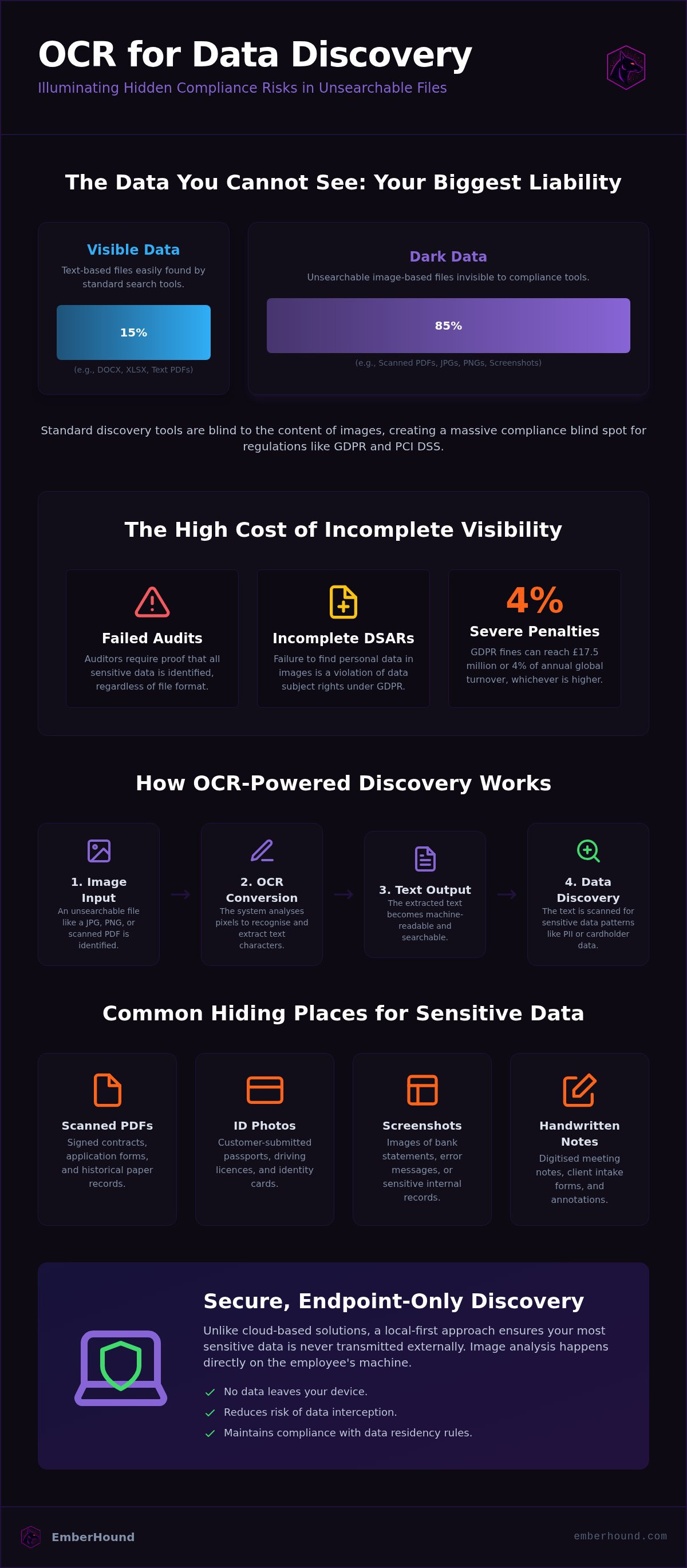
Data discovery is only as effective as the files it can read. Most organisations possess thousands of files that are technically unsearchable because they lack a text layer. Optical character recognition (OCR) is the technology that solves this problem by identifying text characters within digital images. Whilst standard search tools index Word documents and spreadsheets with ease, they are blind to the contents of a JPG, a PNG, or a scanned PDF. OCR for data discovery is the process of converting these image-based characters into machine-readable text to identify personal data hidden within visual files.
This technology is a necessity for modern compliance. It bridges the gap between what your IT systems see and what actually exists on your hard drives. Without it, your data discovery efforts are limited to a fraction of your total environment. If a document is scanned rather than saved as a text-based PDF, it becomes invisible to traditional crawlers. This leaves sensitive information, such as cardholder data or personal identification, completely exposed to risk because it cannot be managed or protected.
The difference between text-based and image-based discovery
Text-based discovery scans metadata and file contents for specific strings. It looks for patterns like credit card numbers or National Insurance numbers by reading the character codes already present in the file. It is fast and efficient for digital-native documents. Image-based discovery requires an extra, more intensive step. The system must first read the pixels and interpret the shapes of the letters and numbers before it can search for sensitive data. This distinction is critical for meeting the standards in our GDPR guide. Without OCR, files like scanned passports, driver licences, or handwritten forms are invisible to compliance audits. You cannot protect data that your tools cannot find.
Why standard file searches fail
Operating system search tools and basic discovery software only look at file names and basic text layers. They do not have the processing power to analyse the visual content of a file. Images are stored as grids of pixels, not as character codes. To a standard scanner, a photograph of a bank statement is just a collection of coloured dots. It does not recognise the account number or the names printed on the page. This creates a significant gap in your security posture. Sensitive data remains hidden in 'dark data' files that your current tools ignore. This oversight leads to incomplete Subject Access Request (DSAR) responses and failed PCI DSS audits, as auditors require evidence that all instances of sensitive data are accounted for, regardless of the file format.
Identifying the risks of unsearchable image data
Unsearchable files are 'dark data'. They exist in a blind spot where your security tools cannot reach. Whilst your central database might be locked down, your employees' local drives are often littered with sensitive images. These files are a liability. If you cannot see them, you cannot protect them. This is why OCR for data discovery is no longer optional for lean IT teams. It is the only way to bring visibility to the unmanaged corners of your network.
Regulators like the ICO do not distinguish between text and images when assessing a data breach. A breach is a breach, regardless of the file format. If you lose a folder of scanned passport photos, the penalties are just as severe as losing a database of names. Failure to identify personal data in images leads to incomplete Subject Access Request (DSAR) responses. This oversight is a direct violation of data subject rights and invites regulatory scrutiny.
Common files that hide sensitive data
Sensitive data hides in plain sight within everyday business documents. You must look beyond standard spreadsheets and Word documents to find the real risks. Common sources of hidden data include:
- Scanned PDFs of signed contracts or paper application forms.
- Photos of identity documents, such as passports or driving licences, sent by customers.
- Screenshots of sensitive emails, bank statements, or database records.
- Handwritten notes or forms that have been digitised for storage.
These files often contain names, addresses, and financial details. Our GDPR guide provides a detailed breakdown of the personal data types you are legally required to protect. Without OCR for data discovery, these files remain invisible to your compliance audits and data mapping exercises.
The regulatory consequences of dark data
The financial stakes are high. Fines for non-compliance under GDPR can reach £17.5 million or 4% of annual global turnover, whichever is higher. Incomplete data mapping is a common finding in regulatory audits. If an auditor asks where you store personal data, 'we don't know about the images' is not an acceptable answer. Organisations must be able to locate every scrap of personal data to remain compliant. You cannot claim to be secure whilst ignoring the 'dark data' on your endpoints. You can start a free GDPR scan today to identify the sensitive files hidden on your machines.
Compliance is about accountability. You are responsible for the data you hold, even if it is trapped inside a JPG or a scanned PDF. Relying on manual searches is a recipe for error. It is slow, expensive, and inevitably misses files. Automation is the only way to ensure your data discovery is thorough and audit-ready. By illuminating your dark data, you reduce the risk of oversight and provide the professional reassurance your stakeholders expect.
The mechanics of image-based data identification
Pixels are not text. They are merely data points until a system interprets them. To find sensitive information in a scan, your software must perform a structured technical sequence. OCR for data discovery relies on three distinct stages to turn visual grids into actionable compliance evidence: pre-processing, character recognition, and data extraction. Each step is a filter that removes noise and clarifies the information sitting on your endpoints.
Pre-processing is the first line of defence against false negatives. Raw scans often contain noise, glare, or shadows that confuse recognition engines. The software cleans the image by adjusting contrast and removing these visual artifacts. Next, pattern recognition matches pixel shapes against a library of known characters. The engine identifies where a '0' ends and an 'O' begins. Finally, the identified text is extracted. The system then scans this text for specific high-risk patterns, such as the 16-digit sequences used in cardholder data.
Factors affecting OCR accuracy
Technical quality directly impacts your compliance success. If your source images are low-quality, your discovery tool will fail to see the risk. High-stakes audits leave no room for 'best guesses'. Accuracy depends on three primary factors:
- Resolution: Images should be 1024 x 768 pixels or higher. Lower resolutions often blur character edges, making them unreadable.
- DPI: Scanned documents require a minimum of 300 DPI. Anything less increases the risk of character misinterpretation.
- Clarity: Shadows or skewed angles are dangerous. A slight blur can cause a '3' to be read as an '8'. This leads to false negatives where sensitive data remains hidden from your reports.
You cannot afford to miss a credit card number because of a poorly lit photo. Ensuring high-quality input is the only way to guarantee that OCR for data discovery provides a reliable view of your environment.
The role of pattern matching and regex
Extraction is only half the battle. Once the text is machine-readable, the software uses Regular Expressions (Regex) to find specific data types amongst the noise. These are search patterns that identify strings with mathematical precision. Regex patterns are used to find Primary Account Numbers (PAN), National Insurance numbers, or personal email addresses within the extracted text.
This automation is essential for lean IT teams. It allows you to process thousands of images in the time it would take a human to open one. It turns a manual burden into a repeatable, audit-ready process. By using predefined patterns, you ensure that your discovery is consistent across every machine in your network, regardless of who owns the device or where it is located.
Practical compliance applications for OCR
Compliance is not a suggestion. It is a set of hard deadlines and strict requirements. For lean IT teams, the manual burden of verifying every file is the biggest obstacle to meeting these standards. OCR for data discovery turns a weeks-long manual review into an automated background process. It provides the visibility needed to satisfy regulators without hiring a dedicated compliance army. This technology is a prerequisite for any organisation that handles a high volume of scanned documentation or customer-provided images.
OCR ensures no personal data is left behind in a disclosure pack. It replaces the need for manual file review, saving hundreds of hours of administrative work for your security team. By automating the detection of sensitive strings in images, you eliminate the risk of human oversight. This creates a reliable, repeatable workflow for both GDPR and PCI DSS requirements.
Accelerating DSAR fulfilment
Meeting the 30-day deadline for a Subject Access Request (DSAR) is a high-stakes race. If your search tools only look at text, you are missing a significant portion of your risk profile. Employees often attach scanned receipts, ID photos, or handwritten forms to emails and support tickets. These files contain personal data that must be identified and disclosed. Manually opening every JPG or PDF during a DSAR is impossible at scale and prone to error. OCR identifies personal data in attachments and scans automatically, flagging sensitive strings that would otherwise stay hidden. This ensures your response is both fast and accurate. For more on how to move beyond manual checks, see our article on GDPR Data Discovery Software: Stop Guessing and Start Scanning.
Reducing PCI DSS audit scope
PCI DSS 4.0 has raised the bar for card data security. Organisations are now required to find and secure every instance of cardholder data across their entire network. This includes Primary Account Numbers (PAN) that might be hidden in digital receipts, faxes, or legacy scans stored on local desktops. If you cannot prove you have found every PAN, your audit scope remains dangerously large and expensive to maintain. OCR scans these visual formats to find unencrypted card data. This allows you to delete or secure the information before the auditor arrives. This process is a core part of effective scope reduction. Learn more in our guide to PCI DSS Card Data Scanning: A Guide to Scope Reduction in 2026.
Secure, endpoint-only discovery with EmberHound
EmberHound is a data discovery platform that performs all OCR processing locally at the endpoint. This design choice is a direct response to the security risks inherent in cloud-based extraction. Whilst many competitors rely on third-party APIs to read images, we keep your data where it belongs. This means your sensitive images never leave your machine and are never uploaded to a remote server. By using OCR for data discovery on the local file system, you eliminate the risk of exfiltration during the scanning process.
The platform is built for SMB compliance teams who need technically robust tools without the deployment drama of enterprise software. It provides audit-ready evidence through masked previews and salted SHA-256 fingerprints. These fingerprints prove that a file was scanned and identified without needing to store the original sensitive content in a central database. This approach allows you to demonstrate compliance to auditors whilst maintaining a lean, secure environment that respects data privacy.
Why local processing is safer for sensitive data
Cloud-based OCR creates a new data footprint that you are then responsible for securing. Every time you upload a scanned passport or a credit card photo to a cloud service, you increase your attack surface. Local scanning ensures you maintain a credible security posture by following zero-knowledge principles. EmberHound never accesses the file system directly and never moves your files. This prevents the creation of 'shadow' copies of sensitive data on external servers.
To protect the discovery results, the platform uses TLS 1.3 for data in transit and AES-256 encryption at rest. This ensures that even the metadata about your sensitive files is protected to industry standards. By processing data at the source, you avoid the legal and technical complications of cross-border data transfers often associated with cloud-based OCR providers. It is a cleaner, faster way to manage your compliance obligations without introducing new vulnerabilities.
Start your free scan today
Efficiency shouldn't come with a high entry cost or complex contracts. EmberHound uses a usage-based model where you pay only for what you scan. There are no mandatory long-term commitments or hidden fees. This flexibility allows lean teams to manage their compliance budgets whilst ensuring total coverage of their 'dark data'. You can scale your scanning up or down based on your audit schedule or the volume of DSARs you receive.
You can begin with a free scan to identify where your data risks are hiding on your network. This provides immediate visibility into your compliance posture without any initial investment. If you want to see how the technology handles your specific file types, you can book a demo to see OCR for data discovery in action. Finding your hidden data is the first step toward a stress-free audit and a more secure business.
Secure your dark data today
Your compliance blind spots are a choice. You can't protect what you can't see, and standard search tools simply aren't enough for scanned files. Implementing OCR for data discovery ensures that your DSAR responses are accurate and your PCI DSS audits are evidence-backed. By processing images locally at the endpoint, you maintain a credible security posture without the risks of cloud exfiltration. You gain visibility into your most hidden risks without the manual grind of opening every PDF or JPG.
EmberHound provides the tools you need to find personal data hidden in images whilst keeping your files on your own machines. Our local-only scanning approach means your data never leaves the endpoint. You get audit-ready evidence through salted SHA-256 fingerprints that align with GDPR, PCI DSS, and SOC 2 frameworks. This is technical robustness without the deployment drama. It's time to take control of the unmanaged corners of your network and eliminate the fear of regulatory oversight.
Take the first step toward a simplified compliance future. You'll have a clear view of your data landscape in minutes, allowing you to focus on growth instead of audit anxiety.
Frequently Asked Questions
What is OCR for data discovery?
OCR for data discovery is the technical process of identifying and extracting text from images to find sensitive information. Whilst standard crawlers index text-based files like Word documents, they cannot see the contents of a JPG or a scanned receipt. This technology converts pixels into machine-readable characters. It allows compliance teams to scan 'dark data' across their network for personal data or cardholder information that would otherwise remain hidden from audits.
Can OCR find personal data in scanned PDF files?
Yes, OCR is specifically designed to read unsearchable PDF files that lack a text layer. Many scanners produce PDFs that are essentially just images of pages. Standard search tools treat these files as empty or unreadable. By using OCR, the system analyses the visual layer of the PDF to extract names, addresses, and other personal data. This ensures that your data mapping includes every document, not just digital-native files.
How accurate is OCR for GDPR compliance audits?
Accuracy depends heavily on the quality of the source image and the recognition engine used. For a GDPR audit, reliability is paramount to avoid false negatives. Most modern engines achieve high accuracy with clear documents scanned at 300 DPI or higher. However, shadows or low resolution can lead to character misinterpretation. EmberHound provides masked previews so your team can verify the findings without exposing the raw sensitive data to unauthorised viewers.
Does OCR work with handwritten documents?
OCR can identify handwritten text, but the accuracy is generally lower than for printed characters. Clear, block-letter handwriting is usually readable, whilst cursive or messy notes pose a considerable challenge for automated systems. For compliance purposes, you shouldn't rely solely on OCR for messy handwritten forms. It's best used as a first-pass filter to flag potential risks, which your team can then review to ensure no personal data is missed during a DSAR.
Is OCR required for PCI DSS 4.0 compliance?
PCI DSS 4.0 requires organisations to identify all locations of cardholder data, including unencrypted Primary Account Numbers (PAN). If you store digital receipts, faxes, or scanned application forms, OCR is practically a requirement. Without it, you cannot prove to an auditor that you've checked these 'dark data' formats. Automated scanning replaces the impossible task of manual file review and ensures your audit scope is accurately defined and reduced to the smallest possible footprint.
Does EmberHound upload my images to the cloud for OCR?
No, EmberHound performs all OCR processing locally at the endpoint. Your sensitive images never leave your machine and are never uploaded to the cloud. This 'zero-knowledge' approach eliminates the risk of data exfiltration during the discovery process. Many cloud-based extractors create a new data footprint on third-party servers, which increases your risk profile. We keep the data at the source to maintain a credible and secure compliance posture at all times.
How does OCR help with Subject Access Requests (DSARs)?
OCR for data discovery helps with DSAR fulfilment by automatically identifying personal data within attachments and scans. The 30-day legal deadline is difficult to meet if you must manually open every JPG or PDF. This technology flags sensitive strings across your entire network, including employee desktops and hard drives. It ensures your disclosure pack is thorough and that no personal data is accidentally omitted, which reduces the risk of regulatory fines and failed audits.
What file types are supported for OCR scanning?
EmberHound supports a wide range of common image and document formats for OCR scanning. These include:
- Scanned PDFs and multi-page documents.
- Standard image files like JPG, PNG, and TIFF.
- Screenshots and digital receipts.
- Faxes and digitised paper forms.
This broad support ensures that your discovery process covers the most frequent sources of 'dark data' found on corporate endpoints and external hard drives. By scanning these formats locally, you maintain visibility without the need for manual file sorting.


