

An analysis of PDFs in production environments found that 62.4% of documents showed signs of modification, yet organisations still treat these files as static, safe archives. If you are relying on manual searches to manage your compliance, you are likely missing the vast majority of your risk. You cannot protect what you cannot see. To meet GDPR standards, you must be able to discover sensitive data in PDF, even when that information is buried in scanned images or hidden metadata.
It's a frustrating reality for lean IT teams that standard search tools often fail to read scanned documents, and manual spot-checks are too slow to satisfy a serious regulatory audit. This guide provides a technical roadmap to identify personal data within your PDF documents. You will learn the specific methods required to scan both text-based and image-based documents, why automated discovery is the only way to produce audit-ready evidence, and how to maintain compliance with GDPR and PCI DSS standards without the usual deployment drama.
Key Takeaways
- Standard search tools cannot see personal data hidden in scanned images or metadata. You need extraction methods that reach beyond the visible text layer.
- Use technical methods to discover sensitive data in PDF, covering both digital text layers and scanned images via OCR.
- Visual redaction is insufficient for regulatory compliance. Discovery ensures you locate and secure the actual underlying data before an audit occurs.
- Local-only scanning allows you to create a reliable data map. This method provides salted fingerprints as evidence without the risk of file exfiltration.
The challenge of data discovery in PDF files
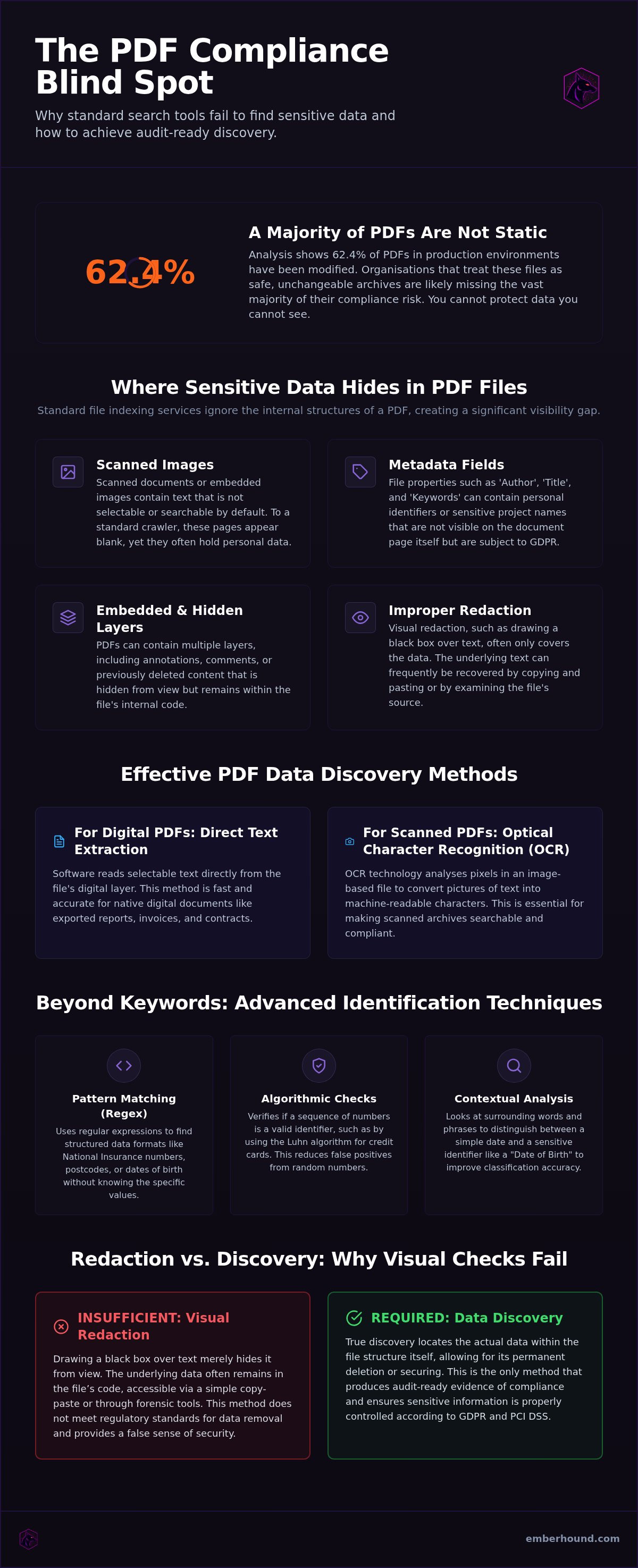
PDFs are corporate staples. They store your contracts, invoices, and employee records. They are also your biggest security liability. Most organisations treat them as digital paper, but they are complex containers of structured and unstructured data. This complexity makes it exceptionally difficult to index them using traditional search tools. Recent analysis shows that 62.4% of PDFs in production environments show signs of modification, which complicates extraction even further. Manual auditing is no longer a viable defence against regulatory scrutiny.
A significant portion of these files exists as image-only layers. These are scanned documents where the text is not selectable or searchable. To a standard crawler, these pages look blank. Yet, they often hold the very personal data that the General Data Protection Regulation (GDPR) was designed to protect. You cannot simply hope your team remembers what is inside a file named "Scan_2024_08_12.pdf". You must have a technical method to discover sensitive data in PDF across your entire network.
Why PDFs are a compliance blind spot
Legacy archives are where compliance goes to die. Most SMBs own thousands of unmapped PDFs stored on local drives or external disks. Standard file indexing services don't look inside the internal code structures of a PDF. They see the filename and date but they ignore the contents. Because PDF versions vary significantly, from version 1.0 to 2.0, extraction rules that work for one document often fail for the next. This inconsistency creates a massive visibility gap.
The risk of hidden personal data
Personal data hides in more than just the visible text. You must discover sensitive data in PDF metadata and hidden layers that manual checks always miss. These risks include:
- Metadata fields: Author names and keywords often contain identifiers.
- Embedded layers: Hidden annotations might hold sensitive notes about employees or clients.
- File history: Previous text versions can be preserved in the file's internal code.
Even if that text isn't on the main page, it's still part of the document and subject to audit. Failing to account for these hidden fields leaves your organisation exposed to significant regulatory risk.
How to identify personal data in PDF documents
Identification is the first step of security. You cannot apply controls to data you haven't found. This prioritisation of visibility is a core principle within the NIST Cybersecurity Framework. To meet GDPR requirements, you must move beyond simple file-level auditing. You need to look inside the content. Effective discovery involves extracting data from every layer of a document, ensuring no personal identifiers remain hidden in the background.
Digital text extraction vs OCR
Digital PDFs are straightforward. They contain a text layer that software reads directly. You can search these files for names or addresses in seconds. Scanned PDFs are different. They are essentially photographs of documents. Standard search tools see these as blank images. To discover sensitive data in PDF files that have been scanned, you need a way to interpret those pixels.
Optical Character Recognition is the technology that turns images into searchable text. Without it, your scanned archives are a compliance black hole. You can read more about how this works in our guide on OCR for data discovery. Once the text is machine-readable, you can begin the process of classification.
Using pattern matching for personal data
Finding data requires more than just a list of keywords. You need logic. Regular expressions (Regex) allow you to find specific formats, such as dates of birth or National Insurance numbers. These patterns identify the structure of the data even if you don't know the specific value. It's a precise way to locate potential risks across thousands of files simultaneously.
Some data requires additional verification. Credit card numbers follow specific mathematical rules. Algorithmic checks verify if a sequence of numbers is a valid card identifier rather than a random string. This reduces false positives. Contextual analysis takes this further. It looks at surrounding words to distinguish between a simple date and a sensitive identifier. If you want to see how this works on your own files, you can start a free GDPR scan to identify your current exposure level.
Redaction vs discovery: Why visual checks fail
Redaction is often mistaken for security. Many professionals believe that drawing a black box over a name solves the compliance problem. It doesn't. Visual redaction merely hides data from the human eye. It leaves the underlying code intact. If you don't first discover sensitive data in PDF files, you are effectively blindfolding yourself. You are just hoping for the best. True protection requires you to find the data in the file structure, not just the pixels on the screen.
Manual discovery is a losing game when you handle high-volume Data Subject Access Requests (DSARs). You cannot expect a human operator to catch every instance of personal data across thousands of pages without error. One missed entry is a breach. This is one of the primary challenges of data discovery: the sheer invisibility of data within complex file formats.
The myth of the black box
A black rectangle is not a delete key. In many basic PDF editors, redaction is simply a graphic layer placed on top of text. The original characters remain in the document's code. Anyone can highlight the area, copy it, and paste it into a text editor to reveal the information. Whilst a human sees a black box, a machine sees the raw text. Search engines and AI scrapers don't look at the black boxes. They read the text stream underneath them. To be effective, redaction must happen at the data level. You must identify the specific string and strip it from the file. If you haven't used a tool to discover sensitive data in PDF code, you haven't actually secured it.
The scale of modern data discovery
The volume of data is the enemy of manual compliance. Modern organisations manage terabytes of documentation. A single 50-page contract can take an hour to review manually. Multiply that by ten thousand files. The timeline becomes impossible. Automated scanning is the only way to create an accurate data map. It identifies every instance of personal data across your entire storage environment. It does this in a fraction of the time. This speed is essential to meet the strict 30-day window for DSAR fulfilment. Without automation, your compliance programme is a bottleneck. It invites regulatory fines.
Steps to discover sensitive data in PDF at scale
Manual searching is a liability. It requires you to know exactly what you are looking for, which is impossible when dealing with legacy archives. To truly discover sensitive data in PDF at scale, you must move from reactive searching to proactive scanning. Start by identifying every location where your organisation stores PDF files. This includes local workstations, network drives, and external hard drives. In the first half of 2026, there were 1,803 data compromises in the US alone. Many of these involved unmapped data stored on neglected endpoints.
Most discovery tools solve one problem whilst creating another. They exfiltrate your files to a central cloud server for analysis. This increases your attack surface and often violates the very GDPR principles you are trying to uphold. You need a solution that performs local analysis on the device where the data lives. This ensures that sensitive information stays within your secure perimeter during the entire identification process.
Setting search parameters
Your search parameters should align with your specific regulatory burden. If you handle cardholder data, configure your scan for PCI DSS v4.0 standards, which became mandatory on 31 March 2025. For general compliance, focus on personal data types such as National Insurance numbers, home addresses, or dates of birth. Ensure OCR is active for all folders containing scanned images or legacy archives. You should also exclude known safe directories - such as system files or application folders - to maximise scan velocity and reduce noise.
Local endpoint scanning benefits
Local processing is the only way to guarantee that sensitive files never leave your secure network. When you discover sensitive data in PDF documents on an endpoint, the tool should generate salted SHA-256 fingerprints rather than raw data logs. This provides audit-ready evidence without creating a new data hoard for a hacker to target. Our guide on GDPR data discovery software UK explains how to automate this process across your entire estate.
Use TLS 1.3 and AES-256 encryption at rest to protect your scan results. Once the scan is complete, review the findings through masked previews. This allows your team to verify the risk without exposing the raw personal data to the IT administrator. It creates a clean, verifiable map of your data estate that is ready for any regulatory audit.
Scaling data discovery with EmberHound
EmberHound is a data discovery platform built for IT and security teams who have no time for bureaucracy. It is the protective partner for small teams facing high-stakes audits. Unlike traditional enterprise software, EmberHound performs endpoint-only scanning. Your files stay exactly where they are. There is no file exfiltration. This local-only approach allows you to discover sensitive data in PDF files across your entire estate without increasing your attack surface. You get visibility without the risk.
Visibility is only useful if it is actionable. EmberHound uses masked previews to show you exactly where the risk lies without exposing the raw personal data to the administrator. You can verify a hit, confirm the location, and move to remediation immediately. It is a no-nonsense tool that rejects the bloat of traditional enterprise platforms. No complex deployment. No server-side drama. Just fast, accurate results.
Audit-ready evidence for GDPR
Regulators require proof, not promises. EmberHound generates reports that demonstrate a thorough search for personal data across all network endpoints. It uses salted SHA-256 fingerprints to track data mutations. These fingerprints provide verifiable evidence of your data mapping efforts without storing the sensitive text itself. This is the "Agile Guardian" approach to compliance: providing exactly what the auditor needs whilst maintaining total data privacy.
Fulfilment of Data Subject Access Requests (DSARs) is a major pressure point for lean teams. EmberHound includes a DSAR disclosure pack feature that identifies and prepares relevant documents with high efficiency. Instead of manual sorting, you get a targeted list of files containing the requester's data. You meet the 30-day deadline. You avoid the fines. You get back to your real work.
Privacy-first scanning architecture
Security is baked into the architecture. TLS 1.3 and AES-256 encryption protect all data in transit and at rest, ensuring your scan results are as secure as your primary storage. This is particularly vital when you need to discover sensitive data in PDF archives that contain legacy financial or medical records. The software works silently in the background, identifying risks without disrupting your team's workflow.
Complexity is the enemy of security. We provide a transparent, usage-based pricing model that allows you to scale your discovery efforts as your business grows. There are no hidden fees or "enterprise-only" tiers for basic security features. You can start a free GDPR scan to identify your current risks today. Stop guessing where your data is. Find it. Secure it. Prove it.
Eliminate your compliance blind spots
Relying on manual redaction or basic search tools leaves your organisation exposed to significant GDPR risk. You've seen that true security requires you to discover sensitive data in PDF archives by looking deep into the file code and scanned image layers. Automated discovery isn't just about efficiency. It's about providing the audit-ready evidence needed to survive a regulatory check without the stress of manual error.
As a UK-based partner, EmberHound provides the tools to map your data estate without the usual deployment drama. Our local-only endpoint scanning ensures your files never leave your secure perimeter. With TLS 1.3 and AES-256 encryption at rest, your discovery results remain protected whilst you remediate risks and fulfil DSAR requests. You don't have to manage this burden alone.
Take control of your data mapping today and build a more resilient, transparent compliance framework for your organisation.
Frequently Asked Questions
How do I discover personal data in a scanned PDF?
You must use Optical Character Recognition (OCR) to interpret the image layer as machine-readable text. Scanned PDFs are essentially photographs where standard search tools see no characters. Once the OCR engine processes the file, you can apply automated pattern matching to locate specific identifiers. This allows you to discover sensitive data in PDF documents that were previously invisible to your compliance team. It's the only way to ensure scanned archives aren't a regulatory blind spot.
Can PDF metadata contain sensitive information whilst the main text is safe?
Yes, metadata is a frequent location for hidden identifiers even if the visible page is clean. Fields such as Author, Subject, and Title often preserve names or project codes that qualify as personal data under GDPR. Hidden layers like annotations, comments, and previous version histories also store sensitive notes. A professional discovery tool scans these internal code structures specifically to ensure no residual data remains unmapped before an audit or file sharing occurs.
What is the difference between searching and discovering data in PDFs?
Searching is a reactive process where you look for a specific, known string. Discovery is a proactive, systemic scan designed to find every instance of sensitive data, including things you didn't know existed. Whilst a search might find one name, discovery uses logic and pattern matching to map all personal data types across your entire archive. To properly discover sensitive data in PDF files, you need automated tools that identify patterns rather than just matching keywords.
Is manual redaction enough to secure a PDF for GDPR compliance?
Manual redaction is rarely sufficient because it often only hides data visually. Drawing a black rectangle over text in a standard editor frequently leaves the underlying text layer intact. A recipient can simply copy and paste the hidden area to reveal the original information. For GDPR compliance, you must use a tool that identifies the data at the code level and ensures it is permanently stripped from the file structure rather than just obscured on the screen.
How does OCR help with data discovery in scanned documents?
OCR translates the pixels in a scanned image into machine-readable characters. Without this technology, your automated discovery tools cannot index the content of scanned invoices, contracts, or identification documents. It bridges the gap between a static image and a searchable data point. By converting these images into text, OCR allows your compliance software to apply the same rigorous pattern matching used on digital documents, ensuring total visibility across all archive types in your network.
Can I scan multiple PDFs for credit card data simultaneously?
You can scan thousands of PDFs simultaneously using automated discovery platforms. Manual checks on individual files aren't scalable for modern organisations handling terabytes of data. Automated tools use algorithmic checks, such as the Luhn formula, to identify valid credit card numbers across your entire network in a single pass. This bulk processing is essential for maintaining PCI DSS v4.0 compliance and ensuring that no cardholder data is accidentally stored in forgotten or unmapped network folders.
Does scanning PDFs for sensitive data require uploading files to the cloud?
No, you don't have to upload your files to the cloud for analysis. Many modern discovery tools perform local-only scanning on the endpoint where the data resides. This architecture ensures that your sensitive files never leave your secure network perimeter. It eliminates the risk of file exfiltration during the discovery process and aligns with the GDPR principle of data minimisation, keeping your most sensitive archives strictly under your own control at all times.
How do I prove I have discovered all personal data for a DSAR?
You prove compliance by generating detailed audit logs and data maps. These reports should show exactly which files were scanned and what types of personal data were identified. Using salted SHA-256 fingerprints allows you to provide verifiable evidence of your discovery process to regulators without exposing the raw personal data itself. This creates a transparent paper trail that demonstrates your organisation has taken appropriate technical and organisational measures to fulfil its DSAR obligations accurately and professionally.


