

Did you know that data protection authorities now receive an average of 443 breach notifications every day? Many of these incidents involve data that companies didn't even know they still held. Backups are often treated as a 'set and forget' safety net. For most IT teams, they are a dark, unindexed liability. You need to find sensitive data in backups to prevent these archives from becoming a regulatory landmine. Restoring an entire archive just to run a scan is a slow, resource-heavy nightmare. You feel the pressure of a looming GDPR audit whilst you look at a mountain of unsearchable cloud buckets.
This guide shows you how to locate personal and cardholder data within your archives to satisfy GDPR and PCI DSS 4.0 requirements. We cover the specific methods to identify PII, how to generate audit-ready evidence, and the steps to reduce your compliance risk before the next auditor knocks. It's time to turn your archives from a hidden risk into a compliant asset. You will gain a clear method to identify sensitive data without the restoration drama.
Key Takeaways
- Understand why UK GDPR and PCI DSS 4.0 require you to find sensitive data in backups to avoid regulatory penalties.
- Identify hidden PII and cardholder data in forgotten database dumps or legacy spreadsheets before they trigger an audit failure.
- Learn how to scan encrypted or compressed archives without the slow, resource-heavy process of full data restoration.
- Create a discovery plan that includes local mailboxes and external hard drives to ensure no backup location is overlooked.
- Generate salted SHA-256 fingerprints as audit-ready evidence whilst keeping raw data secure on the local endpoint.
What is sensitive data in backups and why does it matter?
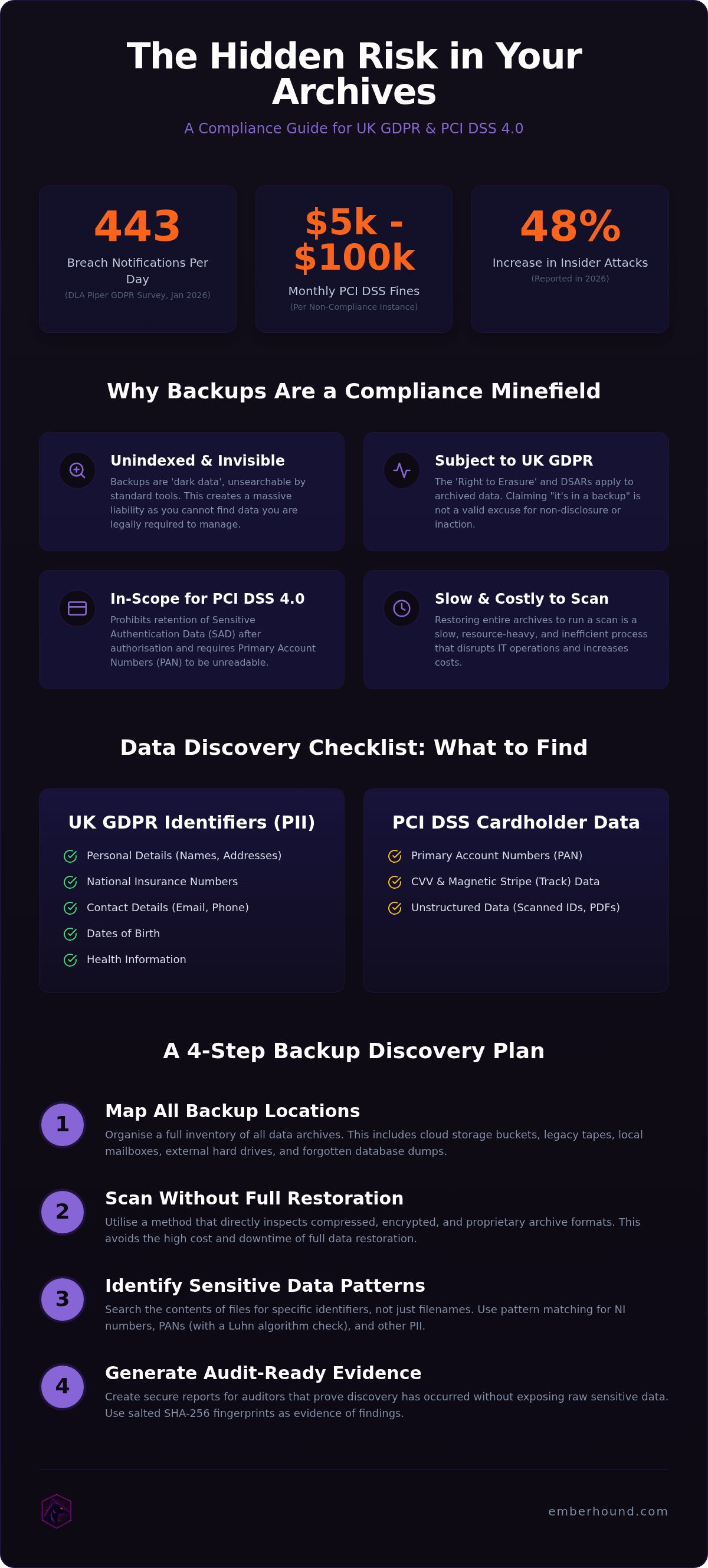
Sensitive data in backups consists of any personal or cardholder information residing in archives, mirrors, or off-site copies. This isn't just about your active database. It includes the dark data sitting on legacy tapes, cloud storage buckets, and local hard drives. To define what is considered sensitive personal data under modern regulations, you must look beyond your production environment. Data protection authorities in Europe now receive an average of 443 breach notifications per day, according to the DLA Piper GDPR Fines and Data Breach Survey (January 2026), and many of these involve overlooked archives.
Many organisations fail to find sensitive data in backups because these files are unindexed. They are invisible to standard search tools. This creates a massive liability. When an individual submits a Data Subject Access Request (DSAR), you are legally required to locate their information across your entire estate. "It's in a backup" is no longer a valid excuse for non-disclosure. If you cannot produce the data, you are in breach of the law. You can read more about these requirements in our GDPR guide.
Backups are essentially the attic of your IT infrastructure. They hold years of unorganised files, old spreadsheets, and database exports. Because this data is compressed or stored in proprietary formats, it remains opaque to your security stack. This invisibility is a security risk. If a malicious actor gains access to your backup server, they have a blueprint of your entire history. Without a way to scan these archives, you are flying blind.
The legal status of backup data under UK GDPR
Under UK GDPR, backups are considered processing activities. They are subject to the same strict rules as your live production data. The Right to Erasure, or the right to be forgotten, specifically applies to these archives. Whilst regulators recognise technical limitations in overwriting specific records within a backup stream, they expect a clear policy. You must have a method to identify data when those backups are eventually restored or rotated. Ignoring your archives is a direct path to an audit failure.
PCI DSS requirements for archived card data
The PCI DSS 4.0 standard is blunt about storage. It prohibits the retention of sensitive authentication data (SAD) after authorisation, even if that data is tucked away in a backup. Primary Account Numbers (PAN) must remain unreadable wherever they reside. This means legacy database dumps and old mirrors are still within your audit scope. To maintain a clean compliance posture, you must regularly find sensitive data in backups and verify that no plain-text card data has leaked into your long-term storage. Failure to do so can result in fines from payment card brands ranging from $5,000 to $100,000 per month.
Types of sensitive data to find in your archives
Your backup archives are likely a graveyard of forgotten spreadsheets and SQL dumps. These files are prime targets for regulators because they often contain unencrypted personal identifiers. To effectively find sensitive data in backups, you must know exactly what patterns to look for across both structured and unstructured formats. You cannot rely on filename searches alone. You must inspect the content. Failure to do so leaves your organisation exposed to the 48% increase in insider attacks reported in 2026.
Personal data and GDPR identifiers
Legacy HR folders and customer databases frequently house names, home addresses, and National Insurance numbers. These identifiers are often kept long after the original purpose of collection has ended. This is a direct violation of the UK GDPR principle of data minimisation. You need to locate contact details, dates of birth, and health information stored in legacy files that have been moved to long-term storage. Use our guide on identifying personal data in files to build a robust search inventory for your next audit.
Cardholder data and PAN discovery
PCI DSS 4.0 requires that Primary Account Numbers (PAN) are unreadable wherever they are stored. However, card data often leaks into log files or temporary system backups during processing errors. You must search for 16-digit strings that satisfy the Luhn algorithm check. It is critical to ensure that no track data or CVV numbers have been accidentally captured in your long-term storage. These items are strictly prohibited. Regular scanning of these repositories is the only way to maintain a clean PCI audit scope and avoid monthly non-compliance fines.
Unstructured data and scanned images
Unstructured data is where most organisations fail their audits. Many backups contain PDFs of invoices, passports, or ID cards that standard text-based tools cannot see. You need Optical Character Recognition (OCR) to extract text from these images and identify sensitive labels. Email archives are another high-risk area. They often hold the highest density of sensitive data because employees frequently attach PII to messages or paste card details into the body of an email. A thorough backup data discovery scan should include these hidden corners to ensure no data is left behind.
To understand the specific risks of your inboxes and how to mitigate them, review our analysis of email data discovery software. You can start your first scan for free to see exactly what is hiding in your local archives before an auditor finds it for you. Identifying these risks early is the difference between a successful audit and a costly breach notification.
Technical challenges when you find sensitive data in backups
Technical hurdles often stop compliance projects before they start when you try to find sensitive data in backups. Encryption at rest is the first wall. AES-256 protection is essential for security, but it makes archives opaque to most scanning tools. You cannot scan what you cannot see. Compression adds another layer of friction. Every file must be expanded before a discovery engine can analyse the content. For a multi-terabyte archive, this process consumes massive CPU and memory resources. If your tool isn't built for local processing, your network will grind to a halt.
Data volume is the second major barrier. The scale of modern backups makes a full, deep scan feel impossible. Incremental backups create complex versioning that is difficult to map for data discovery. A single file might reside in a full backup from six months ago or an incremental slice from yesterday. You need a method that respects these versioning chains. It must not require a full rebuild of the entire data set.
The restore-to-scan bottleneck
Traditional discovery is a logistical nightmare. It requires you to restore archives to a 'clean' environment just to scan them. This is slow. It is costly. It is also a clear security risk. Every time you move data from cold storage to a live environment, you increase the exposure surface. If that environment isn't properly secured, you've created a new vulnerability. Direct archive scanning is the preferred method to maintain security. This allows you to inspect data where it sits. You avoid the 'deployment drama' that slows down lean IT teams.
Format compatibility and unindexed archives
Proprietary backup formats often lock data away from standard compliance tools. If your backups are unindexed, they require a full bit-by-bit scan to locate specific identifiers. This is computationally expensive and time-consuming. To manage this, prioritise scanning the most recent and most relevant backup sets first. Focus on the repositories most likely to contain high-risk PII or cardholder data. This targeted approach ensures you meet audit deadlines. You don't have to wait for a month-long scan to complete. You can learn more about how we handle these technical constraints on our why us page.
Steps to organise a backup data discovery scan
Organising a scan requires a methodical approach. You cannot rely on manual grep commands or home-grown scripts. These lack audit logs. They produce high false-positive rates that waste your time. To effectively find sensitive data in backups, you must standardise your discovery process. This ensures that every archive is checked against the same rigorous compliance rules. You need results, not a list of 5,000 false alarms.
Defining the scan scope
Start by mapping every repository. This includes off-site tapes, cloud buckets such as AWS S3 or Azure Blob, and local NAS devices. Don't overlook the obvious. High-risk data often hides in the backups of your HR and Finance departments. You must also account for local mailboxes and external hard drives. These often bypass central backup policies but still contain high-risk PII. Determine your scanning frequency based on your data retention policy. If you keep data for seven years, you need a strategy to scan legacy volumes without crashing your network. Focus on the repositories most likely to hold unencrypted PII. This is where your risk is highest.
Select a tool that prioritises local processing. Moving terabytes of archive data across a network for central analysis is a recipe for failure. It creates a bottleneck. Instead, run the discovery on the endpoint where the data resides. Configure your search patterns for the specific personal data and cardholder information relevant to your industry. This includes National Insurance numbers, 16-digit card strings, and home addresses. This targeted focus reduces noise. It allows you to identify PII and PCI data with precision. You avoid the "deployment drama" that ruins project timelines.
Managing and remediating findings
Once the scan is complete, categorise your findings by severity. Distinguish between GDPR identifiers and PCI card data. Use masked previews to verify hits. This is a critical security step. It allows your IT team to confirm a match without exposing raw personal data. You maintain the privacy of the data subject whilst performing your duties. There is no need for raw file access during the verification phase. This keeps your team's access limited to what is strictly necessary.
The final step is documentation. You need audit-ready evidence. Generate salted SHA-256 fingerprints for every discovery. These act as a digital receipt of your compliance efforts. They provide proof of discovery without storing the sensitive data itself. This methodology is central to our GDPR guide. It ensures you are ready for an auditor's request at a moment's notice. You must have a clear plan for the secure deletion or encryption of sensitive data found in unauthorised locations. Document every action. This creates a defensible audit trail.
Using EmberHound for backup and endpoint discovery
EmberHound is the definitive tool for lean IT and compliance teams who need results without the deployment drama typical of enterprise platforms. Most discovery solutions require complex network configurations and high entry costs. EmberHound rejects this bloat. It performs all scanning locally on the endpoint. This ensures that no files are exfiltrated and your network bandwidth remains unburdened. To find sensitive data in backups, you need a solution that respects your time and your existing infrastructure. This is about efficiency, not bureaucracy.
Direct scanning of local and external archives
You can scan local backup folders, attached drives, and local mailboxes without configuring a complex central server. This is critical for capturing the dark data that often bypasses official policies. EmberHound uses OCR technology to identify sensitive data within scanned invoices, passports, or ID documents stored in your archives. You don't need to manually verify every PDF. The software handles the heavy lifting on the local machine. This local-first approach means your data stays behind your firewall. Because we believe in transparency, our model allows you to pay for what you use. There are no long-term contracts or hidden fees. It is a professional solution for teams that value speed.
Generating audit-ready compliance evidence
Regulators require proof, not just promises. EmberHound provides comprehensive audit logs that track every scan and discovery event. All data is protected using TLS 1.3 and AES-256 encryption. To protect the privacy of the data subject, the platform uses masked previews. Your IT team can confirm a hit whilst the raw personal data remains hidden. We use salted SHA-256 fingerprints to provide audit-ready evidence. These fingerprints prove a file was scanned and identified without the need to reveal the sensitive content itself. This approach reduces your risk of data exposure during the audit process. It keeps you ready for the ICO or a PCI assessor at a moment's notice.
If you are concerned about forgotten PII or cardholder data in your repositories, start a free GDPR scan today. You can identify your highest-risk areas in minutes rather than weeks. This is the fastest way to find sensitive data in backups and secure your compliance posture before the next audit cycle begins. It is time to stop guessing and start knowing where your data lives. You can find more details on our technical approach by visiting our why us page.
Secure your archives before the next audit
Backups shouldn't be a compliance blind spot. You've seen how unindexed archives create a hidden liability for GDPR and PCI DSS 4.0 audits. The old method of restoring data just to scan it is dead. It's too slow. It's too risky. You need a way to find sensitive data in backups that respects your time and your network bandwidth. By focusing on local endpoint discovery, you eliminate the risk of file exfiltration whilst maintaining a high security posture. This approach ensures your dark data is no longer invisible to your compliance team.
EmberHound uses TLS 1.3 and AES-256 encryption to keep your data protected at rest. Salted SHA-256 fingerprints provide the audit-ready evidence regulators demand without exposing raw PII or cardholder information. This is the efficient path to a clean compliance report. You can identify risks in your environment today without the deployment drama of enterprise software. It's time to turn your archives from a liability into a documented, compliant asset.
Take control of your dark data today. You don't have to wait for a breach notification to start your discovery project. Professional data management is within your reach.
Frequently Asked Questions
Is it a legal requirement to find sensitive data in backups for GDPR?
Yes, it is a legal requirement. The UK GDPR defines backups as a form of data processing. This means you must be able to locate and identify personal data across your entire infrastructure to comply with Right to Erasure and Subject Access Requests. If you don't find sensitive data in backups, you cannot guarantee that a data subject's information has been fully removed or disclosed. Failing this duty can lead to significant regulatory fines.
Can I scan encrypted backups for personal data?
You can scan encrypted backups if the discovery tool has access to the unencrypted file stream or the local mount point. Most tools cannot read raw encrypted blobs. EmberHound solves this by scanning at the endpoint level where files are accessible. This allows you to identify PII whilst maintaining your AES-256 protection. It's the only way to avoid the "restore-to-scan" bottleneck that ruins your project timelines.
How often should my business scan backups for sensitive information?
You should scan your backups at least quarterly or whenever you make significant changes to your data retention policies. PCI DSS 4.0 requirements suggest that organisations must verify the absence of plain-text cardholder data in all storage locations. Regular scanning ensures that accidental leaks into your archives are identified and remediated before they are discovered by a QSA. Consistent discovery schedules turn compliance from a panic-driven event into a standard operational procedure.
What happens if I find sensitive data in a backup that I cannot delete?
If sensitive data is found in a backup that cannot be modified, you must document the discovery and implement controls to prevent its restoration. The ICO recognises technical limitations in deleting specific records from immutable backups. However, you must have a policy to flag these files. This ensures that if the backup is ever restored to a live environment, the sensitive data is immediately identified and purged. This creates a defensible audit trail.
Does scanning backups for PCI DSS require a full restoration?
No, you don't need a full restoration to scan for PCI DSS compliance. Restoring terabytes of data is slow, expensive, and increases your attack surface. Modern discovery platforms scan the data where it sits, either on the local disk or within the archive mount. This "in-place" scanning allows you to find sensitive data in backups without the resource-heavy overhead of rebuilding entire servers. It keeps your audit scope tight and your network performance stable.
What is the difference between data discovery and data mapping for backups?
Data mapping identifies where your backups are stored, whilst data discovery identifies what is actually inside them. Mapping is the first step in building your compliance framework. It lists your cloud buckets, local NAS devices, and off-site tapes. Discovery is the active process of scanning those locations for PII or cardholder data. You need both to satisfy regulators. Mapping tells you where to look; discovery provides the audit-ready evidence that you've looked.
How do I handle a DSAR that requires searching through backup archives?
To handle a DSAR involving backups, you must use a discovery tool to search for specific identifiers across your archives. You aren't usually required to restore every tape, but you must be able to prove you've searched all reasonable locations. Providing a summary of findings from your backup discovery scan is often sufficient. Tools that generate salted fingerprints allow you to prove the search was performed without creating new privacy risks for the data subject.
Can automated tools find sensitive data in scanned image backups?
Yes, automated tools can identify sensitive data in scanned images using Optical Character Recognition (OCR). Many legacy backups contain PDFs of invoices or passport photos that standard text search cannot read. EmberHound's OCR technology extracts text from these images to find PII or credit card numbers. This is essential for modern compliance. Without OCR, your discovery process is incomplete and leaves your organisation vulnerable to audits that specifically target unstructured data.


