

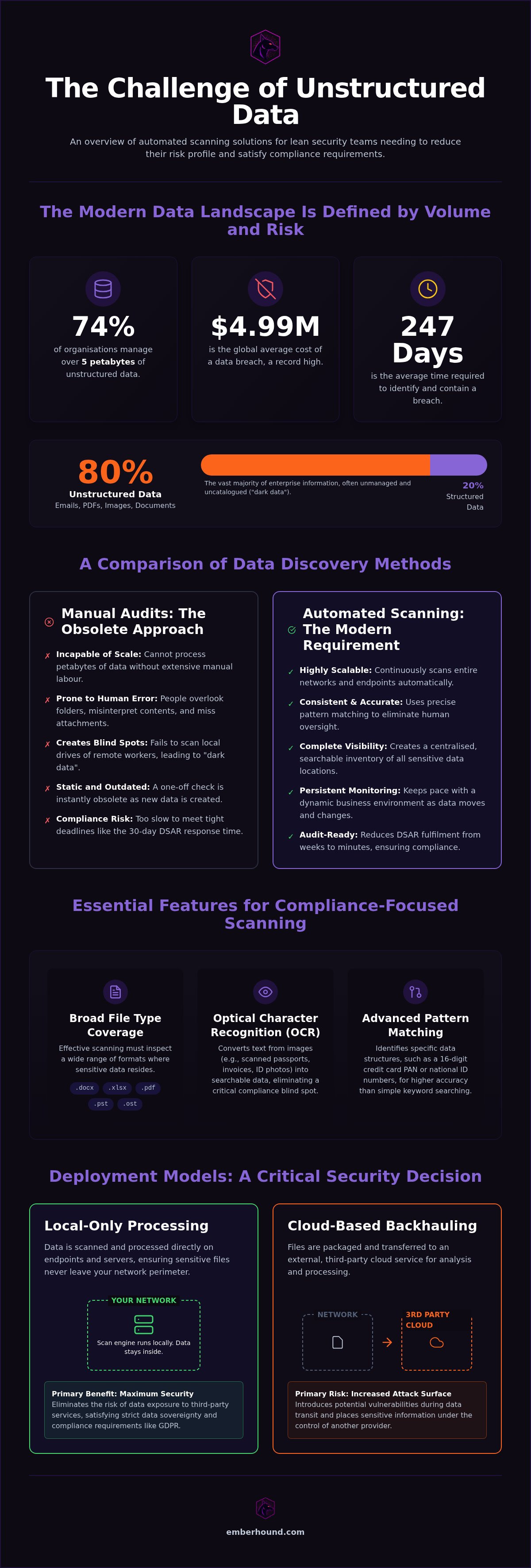
74% of organisations now manage more than 5 petabytes of unstructured data. Meanwhile, the global average cost of a data breach has reached a record high of $4.99 million in 2026. You likely know that sensitive information is hiding in your emails, spreadsheets, and images. The fear of missing a single folder during an audit is real. Manual discovery is too slow to keep up, and you cannot afford to wait 247 days - the current average - to identify a breach. This is why modern unstructured data scanning solutions are now a requirement for lean security teams. You need visibility without the lag.
We understand that overworked IT departments cannot choose between security and productivity. This guide shows you how to automate the identification of personal data to build a clear inventory and reduce your risk profile. You will learn how to generate audit-ready evidence for regulators and secure your documents using automated tools. We will move from the anxiety of data bloat to a future of actionable clarity and professional reassurance.
Key Takeaways
- Discover how modern unstructured data scanning solutions automate the search for personal data hidden in PDFs, emails, and images.
- Learn why manual audits are no longer viable for lean teams and how to eliminate the risk of human oversight.
- Identify essential technical features like OCR for image scanning and pattern matching for payment card Primary Account Numbers.
- Compare local-only endpoint processing against cloud backhauling to ensure your sensitive files never leave your network.
- Establish a clear framework for selecting tools that satisfy PCI DSS v4.0 and GDPR requirements whilst avoiding software bloat.
What are unstructured data scanning solutions?
Unstructured data scanning solutions are automated software tools designed to locate sensitive information within files that lack a pre-defined format. Most business data doesn't sit in a tidy database. It lives in the wild - inside emails, presentation decks, and scanned receipts. These tools crawl through your storage to identify specific patterns like names, home addresses, or credit card numbers. Once a scan completes, you possess a centralised inventory. You know exactly where your risk sits. No more guessing which folder contains a stray spreadsheet.
These solutions act as a persistent filter. They remove the manual burden from your IT team. Instead of opening every document, the software uses pattern matching to flag high-risk files. This isn't about simple keyword searches. It's about identifying the specific structure of sensitive strings, such as a 16-digit credit card Primary Account Number (PAN). The result is a clear map of your data landscape, ready for any auditor who walks through the door. You gain visibility without the friction of manual discovery.
The difference between structured and unstructured data
Structured data is predictable. It lives in rows and columns within a database, making it easy to manage. But What is unstructured data? It's the digital mess that traditional systems ignore. Industry estimates suggest unstructured data accounts for roughly 80% of all enterprise information. Traditional search tools fail here because they only index filenames or basic metadata. They don't read the content of a complex PDF or a hidden spreadsheet tab. Modern unstructured data scanning solutions bridge this gap. They inspect the actual file contents to find the data that standard tools miss.
Common file types for scanning
Your sensitive data is likely scattered across hundreds of different formats. Effective scanning must cover a broad range of these files to be useful. Text-based documents like .docx, .xlsx, and .pdf are the most common targets. However, the risk often hides in less obvious places. Email archives, specifically PST and OST files, frequently contain years of unencrypted sensitive data. Then there are images. Scanned invoices, passports, or ID photos require Optical Character Recognition (OCR). This technology converts pixels into searchable text. Without OCR, these image files remain invisible to standard security audits, creating a massive blind spot in your compliance programme.
Why manual audits fail for personal data discovery
74% of organisations now manage more than 5 petabytes of data. Manual discovery cannot scale to this volume. Human error is a constant threat. People overlook folders. They ignore email attachments. They misinterpret file contents. A manual audit is only as reliable as the individual performing it. Lean IT teams simply don't have the capacity for this level of detail. The risk is high. The global average cost of a data breach reached $4.99 million in 2026. You cannot afford to rely on human memory.
Inconsistent naming conventions create dark data. This is information you collect but never manage. It sits in Miscellaneous folders and Old_Desktop backups. This unstructured information is a massive regulatory risk. In the UK, if you can't find it, you can't protect it. This leads to direct non-compliance with GDPR standards. It also makes you a target for auditors. They look for the data you forgot you had. They check the corners you missed.
The risk of dark data in UK businesses
Remote work complicates this further. Employees save sensitive files to local drives. They use obscure labels. Manual audits rarely reach these distributed endpoints. You end up with blind spots across the entire business. Without automated unstructured data scanning solutions, you are flying blind. You miss the spreadsheet saved on a marketing manager's laptop. You miss the CVs in an HR intern's Downloads folder. These are the files that lead to breaches. These are the files that regulators find during an investigation.
Meeting the 30-day DSAR deadline
The clock starts the moment a Subject Access Request (DSAR) arrives. You have 30 days to produce every piece of personal data you hold on an individual. This includes every email, every chat log, and every hidden document. Manual searches are too slow. You miss the legal timeframe. You risk fines of up to 4% of global turnover or €20 million. Automation reduces this process from weeks to minutes. It ensures you stay within the law without burning your team's time. It provides a clear inventory that is ready for inspection.
A manual audit is a static snapshot. It is obsolete within 24 hours. Data moves. Users create. You need a solution that keeps pace with your business. A one-off check is not a compliance programme. Modern unstructured data scanning solutions provide the continuous visibility that manual checks lack. You can start identifying your hidden data today to stop the cycle of manual failure and protect your organisation.
Essential features for compliance-focused scanning
Effective unstructured data scanning solutions don't just find files. They interpret them. To meet the requirements of PCI DSS v4.0 or GDPR, your tools must be precise. Pattern matching is the foundation of this process. It identifies specific strings like 16-digit Primary Account Numbers (PAN) within thousands of documents. This isn't a basic text search. It's a technical filter that ignores irrelevant data whilst flagging high-risk identifiers. You need this accuracy to avoid drowning in false positives that waste your team's time.
Privacy is equally important during the discovery phase. You shouldn't have to expose raw sensitive data just to verify its existence. Masked previews allow you to confirm a match without revealing the full content to the person performing the scan. This maintains the principle of least privilege. Combined with detailed audit logging, you can track exactly who accessed which finding and when. This creates a transparent chain of custody. It satisfies even the most rigorous security assessors by proving that your discovery process is as secure as the data it protects.
OCR and image-based data detection
Many organisations overlook the risk hidden in images. Historical paper records, scanned as PDFs, often contain decades of unmanaged personal data. Screenshots and photo attachments in emails are also common hiding spots for card data. OCR technology is critical here. It converts these static images into searchable text. Without it, a scanned invoice or a passport photo is invisible to your compliance programme. Modern solutions integrate OCR directly into the standard scanning workflow. This ensures that every file, regardless of format, is accounted for in your risk assessment. You eliminate the blind spots that often lead to unexpected audit failures.
Audit-ready evidence and reporting
Finding the data is only half the battle. You must prove to regulators that you have it under control. Reporting must be clear, factual, and actionable. Instead of raw data dumps that create new security risks, use salted SHA-256 fingerprints. These provide cryptographic proof of a file's location and content without actually exfiltrating or exposing the sensitive information. It's a secure way to build an inventory that auditors trust. Learn more about GDPR data discovery to understand how these fingerprints simplify your reporting requirements. You move from a state of uncertainty to providing definitive, verifiable evidence of your compliance status. This approach reduces the burden on your team whilst providing the transparency that modern regulations demand.
Local-only processing vs cloud-based backhauling
Choosing between local-only processing and cloud-based backhauling is a choice about risk. Cloud backhauling requires you to copy raw files to a central server for analysis. This movement creates a security paradox. You are trying to protect sensitive data by moving it across your network. This movement exposes it to interception. It also creates massive bandwidth strain. If you are scanning petabytes of data, your network will crawl. Most enterprise unstructured data scanning solutions rely on this cloud-heavy model. It creates a single point of failure that lean teams cannot manage.
Local-only scanning performs all analysis directly on the endpoint. Raw files never leave the device. This approach respects the company firewall. It is a fundamental security win. You avoid the exfiltration risk inherent in cloud models. Modern unstructured data scanning solutions should operate where the data lives. This reduces network latency to zero. Your bandwidth remains free for business operations. Processing stays at the source. Only the encrypted results move to your management console.
Security and encryption standards
Even when scanning locally, encryption is non-negotiable. Scan results - the metadata and fingerprints - must be protected. We use TLS 1.3 for data in transit and AES-256 for data at rest. This ensures that the inventory you build remains confidential. You maintain a high security posture without the complexity of managing a central file repository. Read about Our commitment to trust and security to see how we handle your findings. Every piece of evidence is encrypted. No raw data is stored outside your control.
Performance impact on employee devices
A common fear is that security software will slow down employee laptops. Bloatware ruins productivity. Efficient endpoint-only discovery avoids this by managing resource consumption. Scans can be scheduled for low-activity periods, such as late evenings or lunch breaks. This ensures that the processing occurs whilst the user is away from the keyboard. The software is lightweight. It identifies personal data without hogging the CPU. You get the visibility you need without the helpdesk tickets about slow computers.
Selecting a solution for your compliance programme
Choosing between unstructured data scanning solutions is a strategic decision that impacts your daily operations. You shouldn't settle for enterprise bloatware that takes months to deploy. Start by identifying the specific regulatory frameworks you must satisfy. In 2026, all PCI DSS assessments follow the v4.0 standard. GDPR enforcement remains strict. You need a tool that speaks both languages. Evaluate the total cost of ownership beyond the initial license fee. Consider the hours spent on maintenance and false positive management. If a tool requires a dedicated consultant to run, it is too complex for a lean team.
Prioritise a friction-free onboarding process. You should be able to run your first scan within minutes, not weeks. Speed is a security feature. The longer it takes to set up, the longer your sensitive data remains exposed. Look for usage-based pricing models. These provide the flexibility SMBs need. Avoid long-term contract lock-in that ties you to a platform that might not scale with your data volume. You want a partner that proves its value every time you hit the scan button.
GDPR and PCI DSS integration
Managing separate tools for different regulations is inefficient. It creates fragmented reporting and increases the risk of oversight. A single tool for GDPR and PCI card data discovery simplifies your workflow. You get one dashboard and one set of audit logs. This consistency is vital when presenting evidence to regulators. It reduces the scope of your audits and saves significant time. View our pricing for GDPR and PCI scanning to see how a consolidated approach fits your budget. For more detail on managing cardholder data environments, read our guide on PCI DSS Card Data Scanning: A Guide to Scope Reduction in 2026. Efficiency shouldn't be a luxury.
Next steps for IT and compliance teams
The first step is always visibility. You cannot secure what you haven't found. Conduct an initial scan to identify your most immediate risks. This provides a baseline for your remediation efforts. It shows you exactly where the dark data sits on your endpoints. Once you see the scale of the hidden data, you can build a targeted plan. Watch a video demo of our platform to see the scanning process in action. Don't wait for an auditor to find your mistakes. Take control of your unstructured data now and build a compliance programme that actually works.
Secure your data landscape today
Manual discovery is a gamble you don't need to take. The volume of unstructured information is growing, and the cost of oversight is too high. Effective unstructured data scanning solutions remove the burden from your team and the risk from your balance sheet. You gain visibility into your hidden folders without the bloat of traditional enterprise software. By choosing local-only processing, you ensure that raw files never leave your control. Masked previews and salted fingerprints provide the evidence auditors require whilst maintaining strict privacy standards. You move from a state of anxiety to one of professional reassurance.
There is no deployment drama here. You can get started in minutes and see results immediately. Our usage-based pricing ensures you only pay for what you need with no long-term contracts to manage. It's a pragmatic, no-nonsense approach to a complex regulatory problem. You finally have the tools to identify and secure personal data hidden within your documents and images. Stop the cycle of manual audits and start protecting your organisation with actionable clarity. The definitive solution for your compliance programme is ready when you are.
Your team deserves a partner that understands the grind. Take the first step toward a simplified, audit-ready future today.
Frequently Asked Questions
Is unstructured data scanning the same as data mapping?
Unstructured data scanning is the technical process of discovery, whilst data mapping is the broader organisation of how that data flows through your business. Scanning provides the factual evidence required to build a reliable map. Without automated unstructured data scanning solutions, your data map is just a guess based on staff interviews. Automated tools verify exactly where sensitive files sit on your endpoints, ensuring your compliance documentation reflects reality rather than theory.
Can scanning tools find personal data in password-protected files?
Most automated tools cannot read the contents of encrypted or password-protected files without the specific key. This is a deliberate security feature of the file itself. However, effective scanners flag these files as unscannable risks. This allows your IT team to identify and manually review hidden archives that might contain personal data. Identifying these blind spots is a critical step in meeting GDPR and PCI DSS v4.0 requirements.
How much does unstructured data scanning cost for a small business?
Costs vary based on your specific volume because we use a usage-based pricing model. You can start with a free scan to identify immediate risks and then scale your coverage as your organisation grows. This approach provides SMBs with the flexibility to manage their budgets without being tied into long-term mandatory contracts. You only pay for the discovery you actually perform, ensuring your compliance spend remains proportional to your data footprint.
What happens if the scanner finds sensitive data in the wrong place?
When a scanner identifies sensitive data in an unauthorised location, it generates a high-priority alert in your management console. You can use masked previews to verify the finding without exposing the raw file content to your team. Once confirmed, you can follow your internal remediation policy to move, delete, or encrypt the file. This process ensures you reduce your data breach risk and maintain a clean, compliant environment.
Does scanning software need to be installed on every device?
Yes, the software is typically deployed to every endpoint where sensitive data might reside. This endpoint-only approach is more secure because all processing occurs locally on the device. No raw files ever leave your company firewall. It prevents the network latency and security risks associated with cloud-based backhauling. For lean IT teams, this method provides total visibility across remote worker laptops without requiring complex server infrastructure or managed services.
Is it possible to scan emails without accessing the whole inbox?
You can perform targeted analysis on local mailboxes and email archives without granting broad administrative access to every individual message. The scanner focuses on identifying specific patterns, such as credit card numbers or home addresses, within PST and OST files. This targeted approach respects employee privacy whilst ensuring that historical email data is included in your compliance audits. It's an efficient way to find personal data hidden in old attachments.
How long does a full network scan typically take?
The duration of a scan depends on the total volume of data and the number of endpoints involved. Because processing happens locally on each device, scans run in parallel rather than waiting in a central queue. This makes the process much faster than traditional server-side analysis. You can schedule these tasks for low-activity periods to ensure zero impact on employee productivity. Most organisations see results in hours rather than days.
What is the difference between OCR and regular text scanning?
Regular text scanning identifies digital characters within standard documents like Word or Excel files. OCR, or Optical Character Recognition, is a more advanced technology that converts pixels in images into searchable text. This is essential for finding sensitive data within scanned invoices, ID photos, or screenshots. Without OCR, these image-based files remain invisible to your security audits, creating a significant gap in your unstructured data scanning solutions.


