

Your most dangerous data is the information you cannot see. For most UK teams, sensitive details are not sitting neatly in a database. They are buried in forgotten spreadsheets, scanned PDFs, and local mailboxes. You know the manual approach is too slow to work. You worry that a single missed document leads to a GDPR fine or a PCI breach. The fear is justified. Enterprise-grade software often adds layers of complexity when you simply need clarity.
This guide explains how to classify unstructured data without the usual deployment drama. You will learn the exact steps to identify, categorise, and secure unorganised files to meet strict compliance standards. We provide a clear framework to help you generate audit-ready evidence. This process reduces the risk of data breaches. It gives your team the tools to prove compliance and moves you from uncertainty to total visibility.
Key Takeaways
- Unstructured data is information that lives outside traditional databases. You must identify these files to manage the risk of a data breach.
- Effective classification uses metadata and content analysis to find sensitive text. This approach helps you find personal data in scanned documents and local mailboxes.
- Discover how to classify unstructured data by selecting frameworks that meet GDPR and PCI requirements. A clear structure provides the audit-ready evidence that regulators expect.
- Follow a methodical five-step process to scan endpoints and map exposure. This sequence transforms unorganised files into a categorised and secure inventory.
- Local-only scanning finds PII and keeps files on the endpoint. This technique protects your data and satisfies strict UK compliance standards.
What is Unstructured Data Classification?
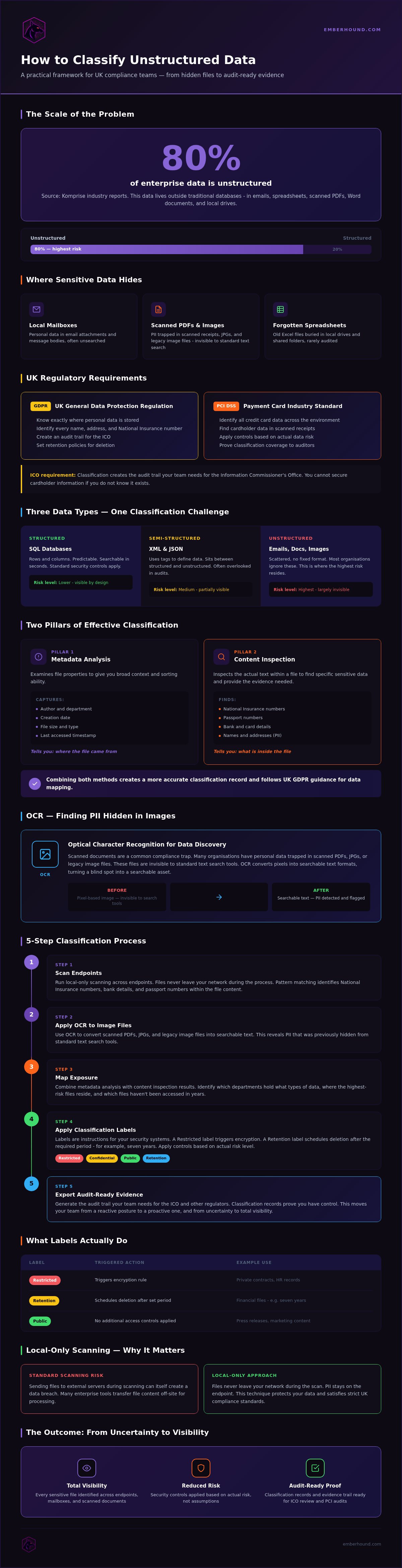
Digital storage is a liability. Most of your files are hidden from view. unstructured data is information that does not reside in a traditional database. It represents the bulk of information created by your team every day. Industry reports from firms like Komprise suggest that 80% of enterprise data is unstructured. Classification is the process of categorising these files based on their sensitivity. You apply labels to manage access. You set retention policies to delete what you don't need. For UK compliance teams, the focus is clear. You must find personal data in emails, PDFs, and local drives.
Labels are more than just names. They are instructions for your security systems. A Restricted label might trigger an encryption rule. A Retention label might schedule a file for deletion after seven years. This level of control is impossible without a systematic classification process. You need a way to scan thousands of files without hiring an army of contractors. Identifying these files is the only way to move from a reactive posture to a proactive one.
The Difference Between Structured and Unstructured Files
Structured data is predictable. It resides in rows and columns. You can search a SQL database for a specific postcode in seconds. Unstructured data is the opposite. It includes emails, Word documents, and image files. The information is scattered and lacks a fixed format. There is also semi-structured data. Files like XML or JSON sit between these two categories. They use tags to define data but don't fit into a standard grid. When you determine how to classify unstructured data, you must account for all three types. Most organisations ignore the files that don't fit in a table. This is where the highest risk resides.
Why Classification is a Regulatory Requirement
UK regulations demand visibility. GDPR requires organisations to know where personal data is stored. You must identify every instance of a name, address, or National Insurance number. PCI DSS mandates the identification of all credit card data. You cannot secure cardholder information if you don't know it exists in a scanned receipt. Classification provides the foundation for effective data protection. It allows you to apply security controls based on actual risk. You wouldn't treat a public press release the same way as a private contract. Classification makes that distinction clear. It is the first line of defence against accidental exposure. It creates the audit trail you need for the Information Commissioner's Office (ICO). Compliance is the goal. Security is the result.
The Mechanics of Modern Data Classification
Visibility is a requirement. Most teams struggle because they only look at the surface. Metadata analysis looks at file properties - author, creation date, and file size. Content analysis goes deeper. It inspects the actual text within the file. These two pillars define how to classify unstructured data effectively. You cannot secure what you cannot see.
Pattern matching finds the needles in the haystack. It uses specific strings to identify National Insurance numbers, passport numbers, and bank details. This is a technical process. You define the patterns. The software scans the files. When a match appears, the file is flagged. This automation replaces the slow, error-prone manual discovery that keeps IT managers awake at night. Speed is the priority. Accuracy is the result.
Using OCR to Find Hidden Data
Scanned documents are a common compliance trap. Many organisations have personal data trapped in scanned PDFs, JPGs, or legacy image files. These files are invisible to standard text search tools. OCR (Optical Character Recognition) technology identifies sensitive data inside these images. It converts pixels into searchable text formats. This process reveals PII that was previously hidden. You can find technical details on OCR for data discovery. It turns a blind spot into a searchable asset.
Metadata vs Content Inspection
Metadata provides the context of a file. It is useful for broad sorting and storage management. You can identify files created by specific departments or those that haven't been touched in years. Content inspection provides the evidence. It is necessary for identifying specific personal data. One tells you where the file came from. The other tells you what is inside. Combining both methods creates a more accurate classification record. This approach follows UK GDPR guidance for data mapping. It removes the guesswork that leads to compliance failures.
Accuracy depends on the depth of the scan. Surface-level tools miss data hidden in subfolders or complex file types. A thorough content inspection finds the risk before an auditor does. Local scanning ensures that your files never leave your network during the process. This is about proving you have control over your environment. You can start identifying your sensitive data with a local scan today.
Choosing a Classification Framework
A framework is the logic behind your security. Without one, your data discovery is just a list of files. You need a system that defines the value and risk of every document. Compliance-based frameworks are the most common choice for UK teams. They focus on specific categories like GDPR personal data or PCI cardholder information. This is the most direct path for those learning how to classify unstructured data under regulatory pressure. A clear framework provides the evidence you need for an audit.
Manual classification is often too slow for modern data volumes. Your team creates more data in a day than a manual auditor can review in a week. You must adopt a framework that supports automation. This approach allows you to scale your security efforts without increasing your headcount. It turns a complex regulatory burden into a repeatable business process.
The Three-Tier Sensitivity Model
The Public vs Private vs Restricted model is a common starting point. It provides a clear hierarchy of risk that everyone in the organisation can understand. This model categorises data based on the impact of its exposure.
- Public data is information intended for general consumption. This includes marketing materials, press releases, or published reports. Exposure carries no risk.
- Internal data is for employee use. It includes company policies or internal memos. It carries low risk if exposed but is not meant for the public.
- Restricted data is the priority. This tier includes sensitive personal data, financial records, and intellectual property. Exposure of this data leads to fines and reputational damage.
Why Automation is the Standard
Human beings are inconsistent when labelling large file sets. Fatigue leads to errors. An employee might label a document correctly at 9:00 AM but miss a National Insurance number at 4:30 PM. One missed detail is enough to cause a compliance failure. Software removes the variable of human error. It can scan thousands of files in a fraction of the time. Automated frameworks apply labels based on content analysis and pattern matching. This ensures that every file receives the same level of scrutiny. You get a consistent result across your entire network. You can read more about GDPR Data Discovery Software UK to see how automation simplifies this process.
Efficiency is the goal. You have a small team with a large responsibility. You don't have time for complex enterprise software that requires weeks of training. You need a framework that is easy to implement and produces results immediately. This is about protecting your organisation whilst respecting your time.
How to Classify Unstructured Data in 5 Steps
Compliance starts with boundaries. You cannot protect everything at once. When you determine how to classify unstructured data, you must move from high-level policy to technical execution. This process transforms a mountain of unorganised files into a searchable, secure inventory. It requires a methodical approach that balances speed with accuracy. Follow these five steps to secure your environment.
Step 1: Define Your Scope
Decide which drives and mailboxes need immediate attention. Start with the areas most likely to contain sensitive information. These often include HR folders, finance drives, and executive mailboxes. Identify the specific types of personal data you must find. This includes National Insurance numbers, bank details, and home addresses. Consult the GDPR guide for UK-specific definitions. Setting a clear scope prevents your team from being overwhelmed by noise. It allows you to prioritise the most critical risks first.
Step 2: Execute the Scan
Execution requires the right tools. Choose a platform that performs local scanning to protect privacy. This ensures no files leave your network during the process. Local scanning is the only way to maintain total control over your sensitive information. Verify that the scanner can handle multiple file formats. It must process legacy Office documents, PDFs, and local mailboxes. Safety is paramount. Ensure the tool provides masked previews. Your team can verify findings without exposing raw sensitive content to the person performing the scan. Once the scan finds a match, apply labels automatically. This removes the inconsistency of manual tagging and bridges the gap between discovery and control.
Step 3: Review and Remediate
Analysis leads to action. Use fingerprints to track data without exposing raw content. Salted SHA-256 fingerprints provide a secure way to identify duplicates or moved files. This method protects the data whilst allowing you to monitor its location. Review the results to identify high-risk exposures. Delete or move files that are stored in the wrong location. If a spreadsheet with PII is sitting on a public drive, move it to a restricted folder immediately. Evidence is your final requirement. Maintain a comprehensive audit log to prove your compliance status. This log should record when the scan happened, what was found, and what actions were taken. It provides the audit-ready proof required by the ICO or PCI auditors. You move from a state of uncertainty to total visibility.
Simplifying Data Discovery with EmberHound
EmberHound is a data discovery platform for UK businesses. It provides a direct answer for teams learning how to classify unstructured data without the friction of traditional enterprise software. The platform identifies PII and cardholder data across your entire network. It scans local drives, external hard drives, and mailboxes. You get a clear view of your risk. You avoid the deployment drama that usually accompanies complex security software.
Efficiency is the core of our approach. We built this for professionals who have grown tired of unnecessary complexity. We understand the grind of manual data discovery. We provide exactly what is needed without any distracting extras. The platform is the smarter alternative to slow-moving traditional giants. You get speed. You get accuracy. You get peace of mind.
Local-Only Scanning for Maximum Security
Security is the foundation of the platform. EmberHound never accesses your file system directly from the cloud. All processing occurs on the device. This local-only approach prevents data leaks. Your sensitive files stay within your perimeter. The system uses TLS 1.3 and AES-256 encryption to protect information. It provides audit-ready evidence through masked previews and salted SHA-256 fingerprints. These fingerprints allow you to track data movement. They do not expose the raw content. You maintain total control whilst your data stays on the device.
Usage-based pricing means you only pay for what you scan. This model supports small, overworked teams who need immediate results. You avoid the bureaucracy of large-scale software vendors. There are no upfront license fees or hidden maintenance costs. You control the budget. You control the timeline. This transparency is a core part of the EmberHound experience - a partnership based on results and visibility.
The platform is an agile guardian for your sensitive information. It identifies PII in legacy documents and scanned images through OCR scanning. This visibility is the first step towards a stronger security posture. You move from fear to confidence. You move from uncertainty to total visibility. Our technology handles the heavy lifting so your team can focus on remediation. It is about working smarter.
Start Your Free GDPR Scan
Onboarding is fast. You do not need to sign a long-term contract to begin. The platform is for IT professionals who value time and efficiency. It is the definitive solution for organisations that need to prove compliance today. You can visit the demo page to see the platform in action. See the results for yourself. Map your exposure. Secure your data. This is the fastest path to a secure and organised future.
Secure Your Data Inventory Today
Unorganised files are the primary source of regulatory risk for UK businesses. You have the framework and the mechanics to solve this. Knowing how to classify unstructured data turns a hidden liability into a managed asset. You move from the fear of oversight to the confidence of visibility. This process protects your reputation and satisfies the strict requirements of the ICO. It is about taking control of your environment before an audit occurs.
Efficiency is a choice. You can continue with slow manual discovery or adopt a system built for speed. Local-only processing ensures your files never leave your network, whilst UK-based support and no mandatory contracts mean you have a partner who respects your time. You get audit-ready evidence and salted fingerprints for every sensitive file found. This level of clarity allows your team to focus on remediation rather than endless searching.
Take control of your sensitive information. Protecting your organisation is simpler when you have the right tools. You can move forward with total clarity and reduced risk. It is time to secure your future.
Frequently Asked Questions
What is the best way to classify unstructured data for GDPR?
The best way is to use automated discovery software that performs deep content analysis on all endpoints. GDPR requires you to know exactly where personal data lives. Manual checks are too slow and prone to error. You need a tool that identifies names, addresses, and NI numbers across PDFs and mailboxes. This provides the audit-ready evidence needed to satisfy the ICO whilst ensuring no sensitive data is missed during the process.
Can I classify data manually in a small business?
You can try, but it is rarely effective. Even a small team creates thousands of files every month. Manual classification relies on employees remembering to tag every document correctly. One missed spreadsheet with customer details is enough to cause a compliance breach. Automated tools are the standard because they provide consistency. They scan your entire network in a fraction of the time it takes to check a single folder manually.
How does OCR help with data classification?
OCR converts images and scanned documents into searchable text. Without it, your classification process is blind to sensitive data hidden in JPGs or flat PDFs. If a passport scan or a handwritten form is sitting on a drive, standard text search will not find it. OCR reveals this information so it can be categorised correctly. This ensures your data map includes every file, not just the ones that are already searchable by your system.
Is it possible to automate classification for PCI DSS?
Yes, automation is the only reliable way to meet PCI DSS requirements for identifying cardholder data. The standard mandates that you find every instance of primary account numbers (PAN). Automated software uses pattern matching to find these strings across your local storage and mailboxes. This provides the proof of control required by auditors. It removes the risk of card data sitting in unencrypted temporary folders or forgotten email attachments.
What is the difference between data discovery and data classification?
Discovery is the act of finding the data. Classification is the act of categorising it based on its sensitivity. You cannot have one without the other. Discovery tells you that a file exists on a specific laptop. Classification tells you that the file contains restricted financial records. Together, they explain how to classify unstructured data by providing both the location and the context needed to apply security controls.
Does data classification require moving files to the cloud?
No, it does not. Moving files to the cloud for processing increases your exposure risk. Modern platforms perform all scanning locally on the endpoint. This means your files never leave your network during the classification process. Local scanning ensures that you maintain total control over your sensitive information whilst meeting GDPR standards. It is a safer approach that prevents accidental file exfiltration during the discovery and categorisation phase.
How often should I re-classify my unstructured data?
You should re-classify your data continuously or at least once every quarter. Data is not static. Your team creates, moves, and modifies files every day. A folder that was clean last month might contain sensitive personal data today. Regular scanning ensures your data map stays accurate. It allows you to catch new risks before they become breaches. Continuous monitoring provides the most reliable evidence for your compliance audit trail.
What are the risks of unclassified data?
The primary risk is an invisible data breach. If you don't know where your sensitive information is, you cannot protect it. Unclassified data leads to accidental exposure, non-compliance with GDPR, and heavy fines. It also makes subject access requests (DSARs) nearly impossible to fulfil accurately. You face reputational damage and legal liability when files containing personal or financial details are left unsecured on public drives or employee laptops across the organisation.


