

Your most sensitive data is often exactly where you aren't looking. It hides in deep folder structures, forgotten backups, and temporary logs that your team hasn't touched in years. For UK businesses, the pressure to maintain GDPR and PCI DSS compliance is constant, yet the tools offered by enterprise giants are often too expensive or too intrusive. You need to know how to find PII on servers without the risk of exfiltrating that data to a third-party cloud scanner. Security shouldn't require you to move the very data you're trying to protect.
We understand the anxiety of the "unknown unknown" - the fear that a single overlooked file could lead to a massive regulatory fine. It's a heavy burden for lean teams who are already overstretched. This guide provides a technical roadmap to regain control. You'll learn how to identify personal data across your entire infrastructure whilst you maintain total privacy. We'll cover the specific tools required for endpoint-only scanning, the methods for generating audit-ready evidence, and how to execute these checks without a drop in server performance. It's time to replace guesswork with visibility.
Key Takeaways
- Identify why standard file searches miss personal data in hidden locations like temporary logs and compressed archives.
- Master the technical methods of pattern matching and checksum validation to learn how to find PII on servers with high accuracy.
- Establish a consistent methodology for audit-ready evidence required by compliance frameworks such as SOC 2 or CIS.
- Define a scan scope that includes active and backup infrastructure to ensure server performance remains stable.
- Protect privacy with local, endpoint-only discovery tools that avoid the risk of cloud ingestion.
Why manual attempts to find PII on servers usually fail
Manual data discovery is a gamble. It relies on a human operator knowing exactly where to look. Most IT teams searching for how to find PII on servers start with the obvious locations: active databases and primary file shares. But personally identifiable information is rarely contained within those boundaries. It leaks. It replicates. It settles in the corners of your infrastructure where it remains invisible to standard checks. Relying on manual labour for compliance creates a false sense of security.
The hidden locations of sensitive data
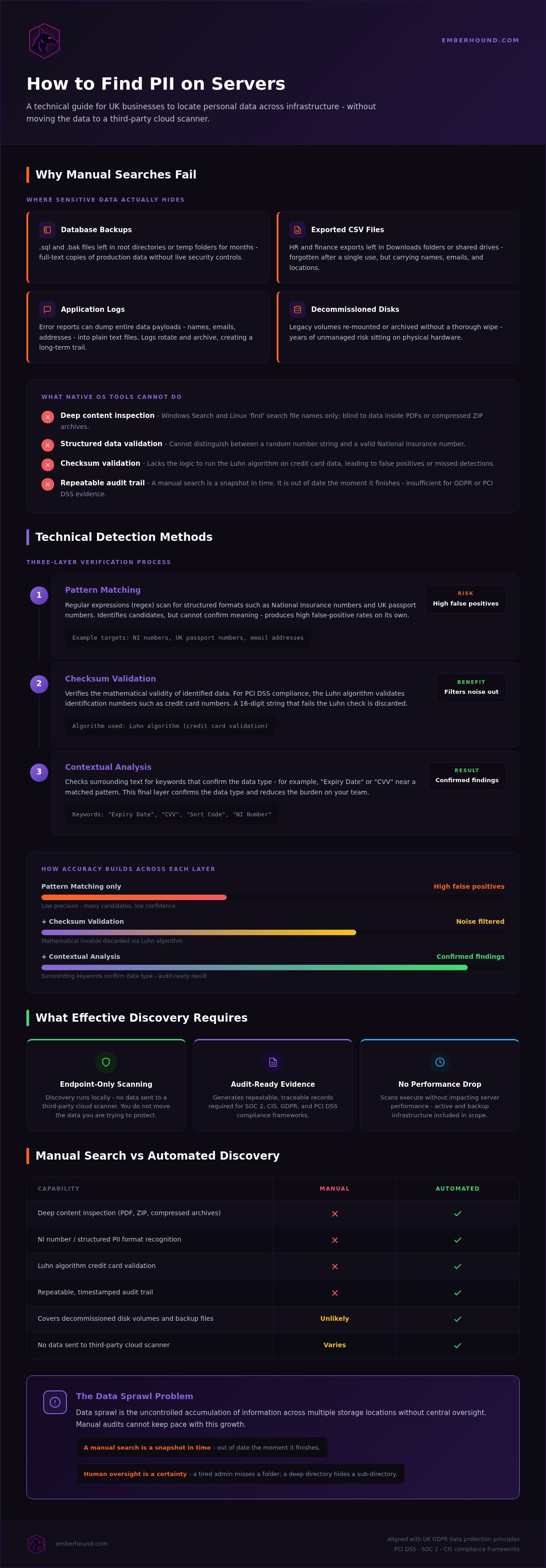
Database backups are a primary risk. Developers often take manual snapshots before a migration or a major update. These .sql or .bak files often sit in root directories or "temp" folders for months. They are full-text copies of your production data. They lack the security controls of the live database. Exported CSV files from HR or finance systems are another common culprit. These files end up in "Downloads" folders or shared drives. They are often forgotten after a single use.
Application logs and error reports are equally dangerous. If a system fails during a user registration, it might dump the entire data payload into a plain text log file. This includes names, email addresses, and physical locations. These logs rotate and archive. This creates a long-term trail of sensitive data that standard audits miss. Legacy data on decommissioned server disks is a final gap. Old volumes are often re-mounted or archived without a thorough wipe. This leaves years of unmanaged risk sitting on your hardware.
Limitations of native OS search tools
Native tools like Windows Search or the Linux 'find' command are built for file names. They do not perform deep content inspection. They are effectively blind to the data inside a PDF or a compressed ZIP archive. If you are trying to understand how to find PII on servers, these tools are insufficient. They cannot distinguish between a random string of numbers and a valid National Insurance number. They lack the logic to perform checksum validation on credit card data. This leads to a flood of false positives or missed detections.
Data sprawl is the uncontrolled accumulation of information across multiple storage locations without central oversight. Manual audits cannot keep pace with this growth. A manual search is a snapshot in time. It is out of date the moment it finishes. It lacks a repeatable audit trail. This makes it impossible to provide the evidence required for GDPR or PCI DSS compliance. Human oversight is a certainty in manual processes. A tired admin misses a folder. A complex directory structure hides a sub-directory. These gaps are where regulatory fines begin.
Technical methods for identifying personal data across infrastructure
Effective discovery requires more than just looking for strings. It demands a combination of logical tests to separate noise from risk. You must master the mechanics of pattern identification to understand how to find PII on servers. This process aligns with the UK GDPR data protection principles and verifies that you only store what you can account for.
Pattern matching and regular expressions
Regular expressions (regex) are the first line of defence. These are sequences of characters that define a search pattern. For example, a regex can scan for the specific format of a National Insurance number or a UK passport number. However, regex is literal. It finds patterns, not meaning. This often leads to high false-positive rates where random system IDs are flagged as personal data.
Accuracy improves with checksum validation. For PCI DSS compliance, scanners use the Luhn algorithm. This is a mathematical formula used to validate various identification numbers, such as credit card numbers. If a 16-digit string fails the Luhn check, it is discarded. Contextual analysis provides the final layer of verification. The system looks for keywords like "Expiry Date" or "CVV" near the identified pattern. This confirms the data type and reduces the burden on your team.
- Pattern matching: Uses regex to identify structured sequences like NI numbers.
- Checksum validation: Verifies the mathematical validity of data to filter out noise.
- Contextual analysis: Checks surrounding text for labels that confirm the data type.
Optical Character Recognition for server files
Static files are a common blind spot. Scanned contracts, identity documents, and even screenshots of customer records are often stored as images inside PDF or Word documents. Traditional text-based searches cannot see this information. This creates a significant compliance gap during audits. Optical Character Recognition (OCR) is the solution. It converts image-based text into machine-readable data that the scanner can then analyse.
If you are investigating how to find PII on servers within scanned images, using OCR for data discovery ensures that no sensitive information remains hidden. This is a resource-intensive process. It must be handled locally to prevent performance lag. You can start scanning your servers for free to see exactly where these image-based risks reside. Automated detection replaces the need for manual sampling and provides a definitive list of every file that requires remediation.
Manual searching vs automated data discovery tools
Manual audits are expensive and unreliable. If your team spends forty hours a month on manual checks, you are wasting senior talent on a task that machines do better. Automation replaces this friction with a repeatable programme. It is the difference between a static guess and a verified inventory. When you evaluate how to find PII on servers, you must weigh the upfront cost of software against the ongoing drain of manual labour. Specialised discovery tools usually pay for themselves within a single audit cycle by removing the need for manual sampling.
Consistency and the audit trail
Auditors don't want to see a spreadsheet of manual notes. They want to see a methodology. Frameworks like SOC 2 or CIS require a repeatable process that doesn't change based on who is running the scan. Using automated tools allows you to adhere to UK data protection principles under UK GDPR by proving you have a system for data minimisation and storage limitation. This is a level of rigour that manual searching cannot match.
Automated discovery provides cryptographic proof of data integrity through salted SHA-256 fingerprints. This creates a permanent record of what was found and when. Manual audits lack this immutable logging. If an admin misses a folder, there is no record of the oversight. Automated scanning removes this human error. It creates an audit-ready trail that proves your compliance status to regulators without requiring days of preparation.
Efficiency for lean IT teams
Lean teams cannot scale manual processes. Senior engineers are too valuable to spend their week running `grep` commands or manually checking file permissions. GDPR Data Discovery Software UK automates the heavy lifting. This frees your staff to focus on higher-value tasks like infrastructure security and product development. It turns a week-long project into a background task that runs whilst your team works on other priorities.
Verification is the final hurdle in any scan. Automated tools provide masked previews that allow you to verify a data match without exposing the actual sensitive information to the administrator. This is a privacy-first approach. It ensures that the person investigating how to find PII on servers does not accidentally create a new data breach by viewing unencrypted personal data. You get the visibility you need without the risk of additional exposure. It is a cleaner, faster, and safer way to manage your server infrastructure.
How to organise an effective server scan for personal data
Success depends on your preparation. You cannot simply point a discovery tool at a root directory and wait for results. A structured approach ensures you find the data that matters whilst you maintain server uptime. If you are trying to master how to find PII on servers, you must start with a clear inventory of your environment. This includes every active node and every secondary storage volume.
Scoping and prioritisation
Prioritise your high-risk servers. Web servers, database hosts, and primary file shares are your first targets. These are the locations where data ingress is most frequent. You can improve scan speed by excluding low-risk system directories. Folders containing OS binaries or application libraries rarely hold personal data. Removing them from the scope reduces the processing load and delivers faster results.
Never ignore your backups. Personal data in a secondary archive is just as liable for a fine as data in a live database. Scanning backups and archives is a non-negotiable step in your compliance workflow. It ensures that forgotten copies of customer records don't become a liability during a regulatory audit.
Reviewing and remediating findings
A scan is only as good as your ability to act on it. You need a process to review findings without creating more work for your team. Modern tools allow you to dismiss false positives in a single click. This keeps your list of findings clean and actionable. Use masked previews to verify data matches. This provides enough context to confirm the data type without exposing raw, sensitive content to the person performing the audit. It is a privacy-first method for data verification.
The final output of this process is an audit-ready report. This serves as a DSAR disclosure pack or a compliance summary for your board. It provides a definitive list of where sensitive data resides and what actions have been taken to secure it. Running the scan locally on the endpoint ensures this happens without network congestion or file exfiltration. It is the most efficient way to prove you have control over your server infrastructure.
EmberHound is a data discovery platform built for local, endpoint-only scanning. It solves the core problem of how to find PII on servers without the inherent risk of moving sensitive data to the cloud. Traditional enterprise tools often require you to exfiltrate files to their infrastructure for analysis. This process creates a new security gap at the very moment you're trying to close one. EmberHound processes everything on your hardware. The platform never accesses your file system directly and never exfiltrates your data. It works by running a local binary that reports findings back to your dashboard without the raw files ever leaving the server.
Security by design
Local processing is the safest way to find personal data. It keeps your files behind your existing firewall and under your control. EmberHound uses TLS 1.3 for all communications and AES-256 encryption at rest to protect the metadata it generates. For audit-ready evidence, the platform creates salted SHA-256 fingerprints. These provide cryptographic proof of your data state for regulators without the need to store raw, unencrypted content. This technical rigour ensures that your audit trail is immutable and verifiable. You can book a demo to see how this scan process operates within a production environment without disrupting performance.
Friction-reduced compliance
Compliance shouldn't be a burden for lean teams. EmberHound removes the need for complex deployment or long-term commitments. There are no contracts. Our usage-based pricing allows you to pay only for the servers you actually scan. This model supports growing businesses that need to scale their security footprint without massive upfront costs or "bloatware" software packages. It's a pragmatic solution for teams who value their time.
Verification is handled through masked previews. This allows your team to confirm findings whilst they maintain strict privacy standards. It provides the visibility you need for a definitive inventory without the risk of an admin seeing sensitive customer records. If you're ready to secure your infrastructure, you can start a free GDPR scan today. It is a no-nonsense approach to understanding how to find PII on servers across your entire network. This process delivers the clarity you need to manage risk effectively.
Regain control of your server data
Manual searching is a liability you don't need. It's slow, incomplete, and creates a false sense of security. You now have a technical roadmap for how to find PII on servers whilst you keep your data exactly where it belongs: on your own hardware. By moving from static audits to automated, endpoint-only scanning, you remove the risk of file exfiltration. You also eliminate the burden of human oversight.
We have covered why local processing is safer than cloud ingestion. You understand how masked previews and salted fingerprints provide audit-ready evidence for UK GDPR and PCI DSS. These methods offer a no-nonsense path to compliance without the friction of enterprise bloatware. Our UK-based support and expertise are ready to help you secure your infrastructure instantly. You get the clarity you need without the bureaucracy you hate.
It is time to replace anxiety with visibility. Your team is too valuable for manual data entry. Your data is too sensitive for the cloud. Start today and build a cleaner, more secure environment for your business.
Frequently Asked Questions
How do I find PII on a Windows server without cloud tools?
You can use local binaries or automated discovery scripts that perform deep content inspection on your file system. Native tools like Windows Search often miss data hidden inside compressed archives or PDFs. EmberHound provides a local scanner that identifies personal data without moving any files to the cloud. This ensures your data remains behind your firewall whilst you gain full visibility of your exposure through a secure dashboard.
Is it possible to scan Linux servers for personal data using SSH?
You can use SSH to deploy local scanning agents to your Linux environment for remote execution. Whilst manual commands like grep are a common starting point, they lack the sophisticated pattern matching and checksum validation required for modern compliance. Deploying a local binary allows for automated discovery across multiple nodes. This method provides a consistent methodology for identifying sensitive data without the risk of manual oversight or configuration errors.
How does OCR help in finding personal data on servers?
Optical Character Recognition (OCR) translates image-based text into machine-readable data. Many servers host scanned contracts, identity documents, or screenshots that traditional text-based scanners cannot read. OCR technology scans these images to identify personal data that would otherwise remain hidden from your audit. This is a critical step for comprehensive compliance, as it closes the gap created by static, non-text files in your infrastructure that often contain high-risk information.
What is the difference between personal data and sensitive data under GDPR?
Personal data includes any information that can identify a living individual, such as names or email addresses. Sensitive data, known as special category data, requires higher levels of protection. This includes information about health, ethnicity, or religious beliefs. Understanding this distinction is vital when determining how to find PII on servers, as special category data often carries stricter storage and processing requirements under UK GDPR data protection principles.
Can I scan server backups for credit card information?
You must scan backups to ensure full PCI DSS compliance. Personal data often persists in secondary storage long after it has been deleted from production systems. Automated tools can mount backup volumes or scan archive directories to identify unmasked card numbers. This process validates that your data minimisation policies are working effectively across your entire infrastructure. It ensures that forgotten copies of customer records do not become a liability.
How do I reduce false positives when scanning for PII?
Use checksum validation and contextual analysis to filter out noise. Pattern matching alone often flags random system IDs as sensitive information. By applying algorithms like the Luhn check for card numbers, you can verify the mathematical validity of a string. Contextual analysis further improves accuracy by looking for related keywords nearby. This ensures your team only spends time remediating genuine risks rather than chasing thousands of irrelevant search matches.
Is automated data discovery required for PCI DSS compliance?
PCI DSS requires organisations to verify that no cardholder data is stored outside the defined environment. Whilst the standard does not explicitly mandate a specific brand of tool, manual checks are rarely sufficient to prove compliance to an auditor. Automated discovery provides the repeatable methodology and audit-ready evidence required to satisfy these requirements. It replaces subjective manual sampling with a definitive, verifiable record of your actual data state.
What happens to my data during an EmberHound scan?
Your data never leaves your server during a scan. All processing occurs locally on the endpoint using a secure binary. EmberHound does not access your file system directly or exfiltrate any file content. The platform only reports metadata and salted SHA-256 fingerprints back to your dashboard. This ensures you can learn how to find PII on servers whilst you maintain total privacy and security of your sensitive information.


