

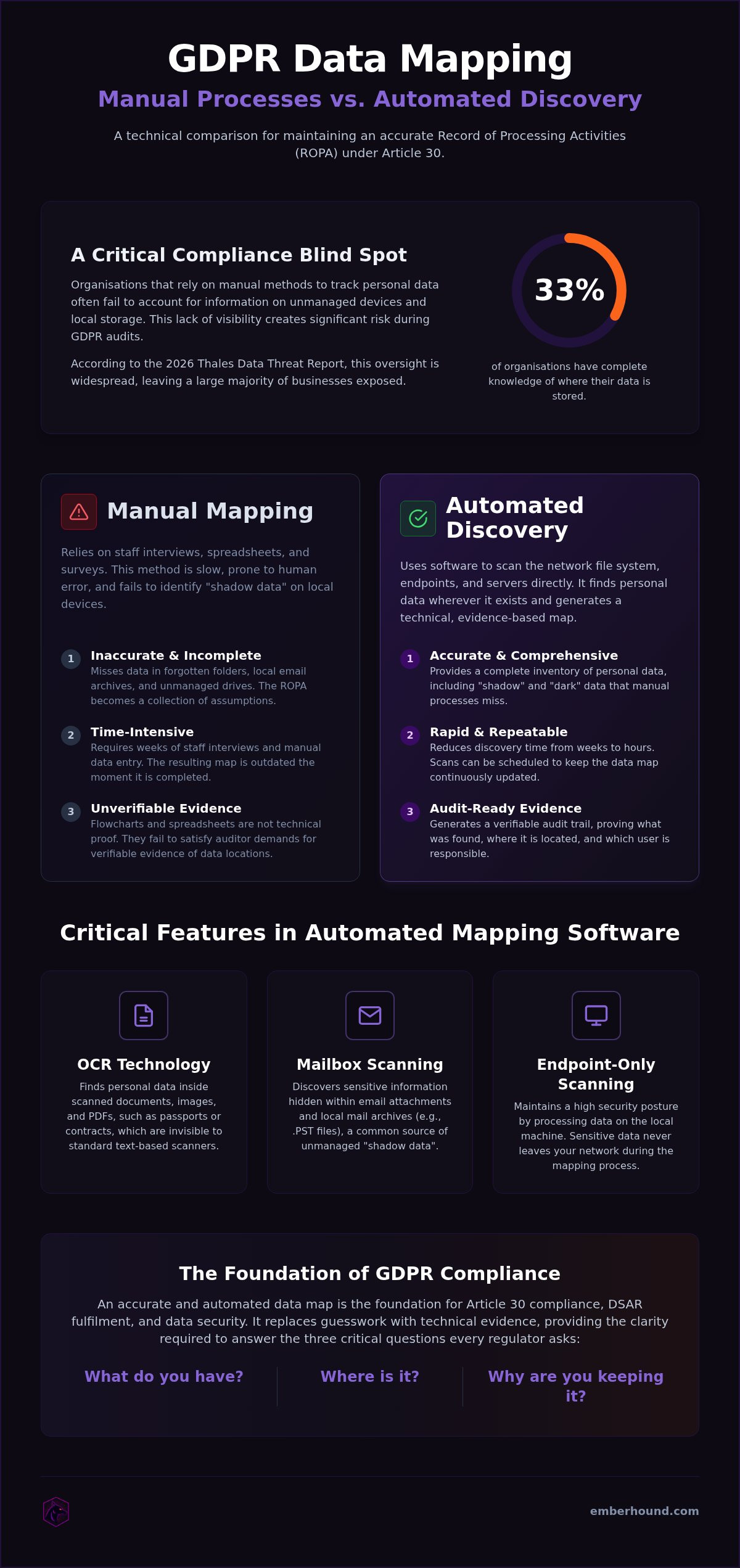
According to the 2026 Thales Data Threat Report, only 33% of organisations have complete knowledge of where their data is stored. That is a dangerous blind spot. If you still rely on spreadsheets and manual surveys to track personal data, you're likely missing files hidden in local mailboxes or unmanaged drives. Manual processes are slow. They're prone to human error. Most importantly, they fail the moment an auditor asks for evidence of your Article 30 compliance. Selecting the right GDPR data mapping software is no longer a luxury - it's a requirement for survival in a landscape where total fines have surpassed €7.1 billion.
You know that spreadsheets can't keep pace with a modern network. We agree. This article explains how to identify and map personal data across your entire network using automated discovery tools. You'll learn how to move beyond guesswork to create an accurate Record of Processing Activities (ROPA). We compare manual and automated solutions for 2026 and provide a clear path to reduce discovery time and secure the evidence you need for any GDPR audit.
Key Takeaways
- Understand Article 30 requirements and why a compliant Record of Processing Activities (ROPA) requires technical evidence rather than just staff interviews.
- Compare static flowcharts with automated discovery to see how manual mapping misses personal data hidden in unmanaged local drives.
- Evaluate the right GDPR data mapping software for your organisation by comparing high-cost enterprise platforms with agile, discovery-focused tools.
- Identify critical features like OCR technology and mailbox scanning to locate personal data inside scanned documents and email attachments.
- Learn how endpoint-only scanning maintains a high security posture by ensuring sensitive data never leaves your network during the mapping process.
Understanding GDPR Data Mapping Requirements in 2026
Compliance isn't a static target. It's a moving one. Regulators now demand more than a simple list of software you use. They expect a granular understanding of how personal data enters, moves through, and leaves your network. What is Data Mapping? At its core, it's the technical inventory of your data lifecycle. Without it, you are blind to your own risks. Deploying dedicated GDPR data mapping software is the only way to keep these records accurate without hiring a full-time compliance army.
Article 30 of the GDPR isn't a suggestion. It's a mandate. It requires you to maintain a Record of Processing Activities (ROPA). If an auditor knocks, this is the first document they'll demand. Effective GDPR data mapping software turns this from a month-long project into a repeatable process. It ensures you can answer the three critical questions every regulator asks: What do you have? Where is it? Why are you keeping it?
The Role of Article 30 in Data Audits
A ROPA is your first line of defence. It must include the categories of data subjects, the purposes of processing, and the technical security measures you've implemented. If these records are incomplete, auditors assume your security is too. Use this GDPR Data Audit Preparation guide to ensure your ROPA meets 2026 standards. Accuracy here is vital for responding to Subject Access Requests (DSARs). You have 30 days to respond. If your map is wrong, you'll miss the deadline.
Why Manual Data Mapping Fails for SMBs
Spreadsheets are where compliance goes to die. They are outdated the moment you click 'Save'. Manual mapping relies on interviews and staff memory. That is a recipe for disaster. Human error leads to "shadow data" - personal data sitting in forgotten folders, local mailboxes, or external hard drives that no one mentioned during the survey. Regulators expect you to know where sensitive information is stored at all times, not just when a staff member remembers to tell you.
Small teams don't have the hours to chase every employee for an update. Static maps ignore the reality of modern work. Data lives on laptops, in downloads, and across unmanaged drives. If your mapping process doesn't scan the actual file system, it isn't a map. It's a guess. In 2026, a guess isn't enough to stop a fine.
Static Flowcharts vs Automated Data Discovery
Visual flowcharts look good in boardrooms. They don't help during a GDPR audit. Most organisations rely on mapping by interview. They ask department heads where data goes and build a theoretical model. This rarely matches the technical reality on the ground. Professional GDPR data mapping software moves beyond these assumptions. It provides technical evidence instead of staff opinions and identifies the exact path data takes through your network.
The transition from mapping flows to mapping actual data reduces your compliance risk significantly. You stop guessing. You start knowing. This shift is essential for any organisation that handles unstructured data across multiple endpoints, remote laptops, and shared network drives. Without technical discovery, your ROPA is just a collection of assumptions.
The Problem with Interview-Based Mapping
People are unreliable narrators. Staff often forget where they save sensitive files or how they share them with colleagues. Legacy data sits in old folders, gathering dust and mounting risk. Manual interviews miss these pockets of information entirely. Shadow data is personal data that exists within an organisation's network without the knowledge or oversight of the IT team. If you don't know it's there, you can't protect it or delete it when the retention period ends.
How Automated Scanning Improves Accuracy
Software doesn't get tired or bored. It identifies personal data patterns across thousands of files instantly. It finds a passport scan in a temp folder that a human would miss. Automated tools provide a verifiable audit trail. You can prove exactly what was found, where it is, and which user is responsible. Scanning ensures that no dark data - unmanaged information - is left out of your inventory. This technical visibility is impossible to achieve through manual surveys.
Visibility is the foundation of security. When you automate discovery, you remove the guesswork and lower the burden on your team. You see the network as it truly is. This makes responding to DSARs a matter of minutes, not days. It also provides the clear evidence auditors expect to see in 2026. You can start scanning your network for free to see the difference between a flowchart and a factual data inventory.
Comparing GDPR Data Mapping Software Categories
Choosing the right GDPR data mapping software depends on whether you need a high-level administrative overview or a factual technical inventory. You cannot solve a data visibility crisis with a tool that only records what people think is happening. Most solutions on the market fall into four distinct categories. Understanding these differences is the only way to avoid buying "bloatware" that your team will never actually use.
- Enterprise Governance Platforms: These are massive suites that manage everything from risk assessments to vendor contracts. They are feature-rich but often prohibitively expensive and too complex for smaller organisations. This often leads to under-utilised software that drains the budget without solving the immediate visibility gap.
- Data Flow Mapping Tools: These specialise in visualising the movement of data between systems. They excel at creating charts but fail to identify personal data hidden in local folders or unmanaged drives. They rely on manual input, which means they are only as accurate as the person who drew them.
- Endpoint Discovery Software: These tools scan local machines and servers to find actual files. They provide the "ground truth" needed for a compliant Record of Processing Activities (ROPA). By identifying the specific files and users involved, they remove the guesswork from your compliance strategy.
- Hybrid Solutions: These attempt to bridge the gap between process mapping and file discovery. Whilst they offer broad coverage, the configuration requirements are often excessive for lean teams.
Enterprise Platforms vs Specialist Tools
Selecting enterprise-level GDPR data mapping software often involves significant "deployment drama." These tools require months of heavy configuration and constant maintenance. Specialist discovery tools prioritise time-to-value. They are designed for compliance professionals who need results now, not after a six-month implementation project. By focusing on the endpoints, these tools provide immediate visibility into where personal data actually lives without the need for an enterprise-scale budget. You can learn more about how specialised tools simplify this process in our GDPR guide.
Cloud-Based vs Endpoint-Only Scanning
Security is the primary concern when scanning for personal data. Cloud-based discovery tools often require you to upload metadata or even raw files to an external server for processing. This creates a new security risk. Endpoint-only scanning keeps the analysis local. All processing happens on the machine itself. By using modern standards like TLS 1.3 and AES-256 encryption, these tools ensure that audit-ready evidence - such as masked previews - is produced without ever exfiltrating the original files. This approach keeps your data footprint small and your security posture high. It also ensures your organisation meets Article 30 requirements without unnecessary risk.
Key Features to Look for in Mapping Software
Effective GDPR data mapping software must do more than just generate a list of applications. It needs to look inside the files themselves. In 2026 - where data volumes continue to grow by over 20% annually - manual oversight is impossible. You need tools that provide technical visibility into the dark corners of your network. This means prioritising features that find data where humans forget to look.
The Importance of OCR and Mailbox Scanning
Personal data is rarely stored in neat, searchable spreadsheets. It is often trapped in PDF scans of passports or JPG images of driving licences. Without Optical Character Recognition (OCR), these files remain invisible to your compliance inventory. If your software cannot "read" an image, your data map is incomplete. This creates a massive liability during a GDPR audit.
Mailboxes are the largest source of unmapped data in most businesses. Sensitive information is frequently hidden in email attachments, forgotten threads, and archived folders. Relying on staff to self-report these risks is a failure of governance. Specialist Email Data Discovery Software allows you to scan these environments automatically. It ensures that every CV, contract, and invoice is accounted for in your Record of Processing Activities.
Audit-Ready Evidence and Security
Auditors do not want to see your raw data content. They want proof that you know it exists and that you are protecting it. Your GDPR data mapping software must provide audit-ready evidence through masked previews and salted fingerprints. Masked previews allow compliance officers to verify a "hit" safely without exposing sensitive details to unauthorised eyes. This maintains a high security posture whilst providing the clarity regulators demand.
Security must be baked into the discovery process. Look for tools that use TLS 1.3 for data in transit and AES-256 encryption at rest for all generated reports. Local processing is the safest choice here. By scanning endpoints directly and keeping the data on your network, you eliminate the risk of file exfiltration. Salted fingerprints provide a permanent, verifiable record of your data inventory that cannot be tampered with, giving you a definitive trail for any inspection.
Finally, consider the commercial fit. SMBs often get priced out by enterprise platforms that demand five-figure annual commitments. Usage-based pricing ensures the tool scales with your organisation. You only pay for what you scan. This makes professional-grade discovery accessible without the "enterprise-bloat" price tag.
Implementing Automated Data Mapping with EmberHound
Compliance is a process. It shouldn't be a hurdle. Most GDPR data mapping software is built for corporations with massive IT departments and endless budgets. EmberHound is different. It is designed for the lean professional who needs results without the bureaucracy. There are no long-term contracts. There is no deployment drama. You get a friction-reduced onboarding process that moves you from blind risk to audit-ready status in hours. We reject corporate fluff in favour of immediate, actionable clarity.
Starting Your First GDPR Scan
Initiating a scan is straightforward. You don't need complex network reconfigurations or firewall exceptions. The software focuses on endpoint-only scanning. This means all processing remains local to the machine. Employee privacy is protected. Raw files are never exfiltrated to a third-party server. You maintain a high security posture whilst gaining total visibility. It is the most direct way to identify immediate data risks on laptops, servers, and local drives. You can Start free GDPR scan to begin your inventory today. No sales calls required.
Generating the Record of Processing Activities
Once the scan finishes, the results populate your Record of Processing Activities (ROPA). You no longer have to guess which departments hold sensitive files. The software identifies the specific locations and users involved. This creates a factual foundation for your map. Using automated GDPR data mapping software ensures your ROPA is always current. If you are unsure which file types to prioritise, consult our guide on What is Personal Data? to clarify your mapping requirements. Every hit is backed by technical evidence, not just staff assumptions.
Stakeholder buy-in is easier when you have evidence. EmberHound generates masked previews that demonstrate compliance without revealing the actual content of the files. All audit reports are protected by TLS 1.3 and AES-256 encryption. This allows you to prove to internal auditors or external regulators that you have identified all personal data across the network. You get clear, verifiable proof of your data inventory through salted fingerprints. This is the stress-reducing solution for Article 30 compliance. It provides exactly what you need without distracting extras.
Secure Your Data Inventory Before the Audit
Manual spreadsheets are a liability. They cannot provide the technical evidence regulators demand in 2026. You need a factual inventory of your network that updates in real time. Professional GDPR data mapping software removes the burden of staff interviews and the high risk of human error. It identifies the personal data that employees forget to mention. This visibility is the only way to satisfy Article 30 requirements whilst protecting your organisation from fines that have now surpassed €7.1 billion.
Security must be your priority. Endpoint-only scanning ensures your sensitive files never leave the network during discovery. You generate audit-ready evidence through masked previews without the risk of file exfiltration. There are no long-term contracts or enterprise-bloat fees. You simply pay for what you use. This is the pragmatic path to a compliant Record of Processing Activities. It's time to replace assumptions with technical certainty.
Take control of your data landscape today. You can secure your network and meet your compliance goals without unnecessary complexity.
Frequently Asked Questions
Is data mapping a mandatory requirement under GDPR?
Yes, data mapping is a mandatory requirement for most organisations under Article 30 of the GDPR. You must maintain a Record of Processing Activities (ROPA) that details why you collect personal data, where you store it, and how long you keep it. Regulators expect this record to be accurate and available for inspection during an audit. Using dedicated GDPR data mapping software ensures this record is based on technical facts rather than staff memory.
Can I use Excel for GDPR data mapping?
You can use Excel, but it is a high-risk strategy that usually fails during a real audit. Spreadsheets are static and become outdated the moment they are saved. They rely on manual entry, which leads to human error and missed "shadow data" on local drives. Automated GDPR data mapping software replaces these manual guesses with a factual inventory. It provides the technical evidence that a spreadsheet simply cannot produce for a regulator.
How often should a data map be updated?
Your data map should be updated whenever your processing activities change, though quarterly reviews are a common industry standard. In a modern network, data moves constantly. New files are created and old ones are moved to unmanaged locations every day. Relying on an annual review is insufficient for Article 30 compliance. Automated tools allow for continuous discovery, ensuring your map reflects the actual state of your network rather than a snapshot from six months ago.
Does data mapping software scan every file on my network?
Most professional discovery tools can scan every file across your endpoints, servers, and mailboxes if configured to do so. This includes unstructured data in PDFs, images via OCR, and email attachments. This level of depth is necessary because personal data is rarely stored in a single, known location. By scanning the entire file system locally, the software identifies sensitive information that manual surveys miss, ensuring your data inventory is complete and audit-ready.
What is the difference between data mapping and a data inventory?
A data inventory is a list of what personal data you have and where it sits. Data mapping is the broader process of documenting how that data moves through your organisation and between third parties. You cannot have an accurate map without a factual inventory to support it. Mapping focuses on the lifecycle and legal basis for processing, whilst the inventory provides the technical evidence that the data actually exists in the locations you've identified.
How long does it take to implement GDPR data mapping software?
Implementation time varies significantly between tool categories. Lightweight, endpoint-focused solutions can be deployed and start scanning in under an hour. They require no complex network reconfiguration. In contrast, enterprise governance platforms often take three to six months of heavy configuration and staff training before they provide value. If you need to meet a fast-approaching audit deadline, a specialist discovery tool is the more pragmatic choice for a lean compliance or IT team.
Is my data safe when using an automated scanning tool?
Your data is safe if you choose a tool that uses endpoint-only scanning and local processing. This architecture ensures that raw files never leave your network. The software should use modern encryption standards like TLS 1.3 and AES-256 for all reports. Look for features like masked previews and salted fingerprints. These provide the evidence needed for compliance without exposing the actual content of sensitive files to the software vendor or unauthorised internal staff.


