

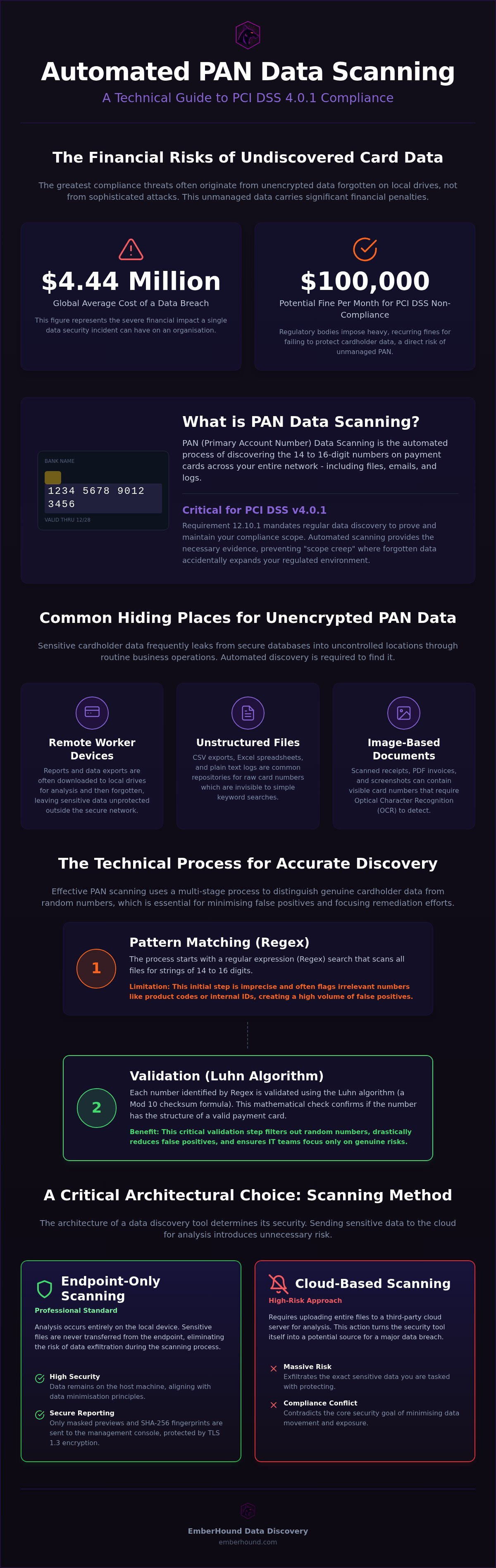
In 2025, the global average cost of a data breach reached $4.44 million. For many UK firms, the biggest threat isn't a sophisticated hack - it's the unencrypted credit card numbers sitting in a forgotten downloads folder or a local mailbox. You know the pressure of an impending audit. Manual discovery is slow. It's unreliable. The fear that a stray spreadsheet could trigger a PCI DSS non-compliance fine of up to $100,000 per month is a heavy burden for lean IT teams. Implementing a precise Pan Data Scanning strategy is the only way to find what's hidden before an auditor does.
We're here to simplify the process. This guide shows you how to use automated discovery to locate every Primary Account Number across your network. You'll learn how to identify hidden risks, secure your environment, and significantly reduce your PCI DSS v4.0.1 audit scope. We'll show you how to move from manual guesswork to a clear, automated map of your data. This is about more than just compliance; it's about generating audit-ready evidence and reclaiming your peace of mind without the usual enterprise bloatware.
Key Takeaways
- Identify 14 - 16 digit card numbers to shrink your PCI DSS v4.0.1 audit scope and lower monthly compliance costs.
- Use technical filters like the Luhn algorithm to ensure your Pan Data Scanning identifies real cardholder data rather than random strings.
- Replace slow manual checks with automated discovery to create a repeatable and defensible audit trail for your business.
- Target high-risk areas such as finance and customer support to prioritise your security efforts where they matter most.
- Maintain data privacy by using endpoint-only scanning that keeps sensitive information on the local machine whilst generating audit evidence.
What is PAN data scanning and why is it critical for PCI DSS?
A Primary Account Number (PAN) is the 14 - 16 digit sequence found on every payment card. Pan Data Scanning is the automated process of finding these numbers wherever they live on your network. It is a vital security measure. Without it, you are flying blind. Sensitive data has a habit of migrating. It ends up in temporary files, server logs, and email attachments. This leaky data is a compliance nightmare. If an auditor finds unencrypted PAN on an unmanaged local folder, that device is suddenly in scope. Your audit costs spike. Your risk profile expands. Identifying these locations is the only way to keep your Cardholder Data Environment (CDE) contained.
The role of PAN discovery in PCI DSS 4.0
The rules have changed. As of 2026, all assessments follow the Payment Card Industry Data Security Standard (PCI DSS) v4.0.1. Requirement 12.10.1 is clear: you must conduct regular data discovery to confirm your scope. It is no longer enough to think you know where data is. You must prove it. This shift moves businesses away from annual point-in-time checks toward continuous monitoring. Regular Pan Data Scanning ensures that scope creep - the accidental expansion of your regulated environment - does not happen. It keeps your compliance effort lean and focused on your actual payment systems. This is why many UK firms prefer a low-friction approach to discovery that does not disrupt daily operations.
Common places where PAN data hides
Data does not stay in your secure database. It leaks through everyday business processes. Here is where it usually hides:
- Remote worker devices: Finance teams often download reports to local drives for analysis. These files are frequently forgotten.
- Unstructured files: CSV exports, Excel spreadsheets, and TXT logs are notorious for containing raw card numbers.
- Image-based documents: Scanned receipts and PDF invoices often contain PAN data. These require Optical Character Recognition (OCR) to recognise and flag.
Simple keyword searches fail here. Searching for "credit card" or "Visa" won't find a raw 16-digit number in a 500MB log file. You need a tool that understands the mathematical structure of a card number. Relying on manual searches is a recipe for an audit failure. You need an automated system that can scan across local mailboxes and external drives to ensure nothing is missed.
How PAN data discovery works: The technical reality
Identifying cardholder data requires more than a simple file search. The process begins with regular expressions (Regex). These are specific patterns that look for 14 - 16 digit strings across your file systems. However, Regex alone is noisy. It flags phone numbers, SKU codes, and internal identifiers as potential threats. This is why raw pattern matching is not enough for modern Pan Data Scanning. You need a secondary layer of validation to ensure your IT team isn't chasing ghosts.
Filtering false positives with the Luhn algorithm
The Luhn algorithm is a checksum formula used to validate various identification numbers. It acts as a mathematical filter. By applying this Mod 10 formula to any 16-digit string found by the Regex, the scanner can determine if the number is a valid credit card or just a random sequence of digits. This step is vital for accuracy. It distinguishes between a real Visa card and an internal project code. Without this validation, the volume of false positives would make manual review impossible for lean security teams. For image-based files like scanned receipts, Optical Character Recognition (OCR) converts the pixels into text before this mathematical check is applied.
Local vs cloud-based scanning architectures
The architecture of your discovery tool is a critical security choice. Many traditional tools upload your files to a central cloud server for analysis. This is a massive risk. You are essentially exfiltrating the very sensitive data you are trying to protect. If that cloud provider suffers a breach, your security tool becomes the source of a major data leak. This "cloud-first" approach often contradicts the security goals of the official PCI DSS documentation, which emphasises the minimisation of data movement.
Endpoint-only scanning is the professional standard for high-stakes environments. The analysis happens entirely on the local device. Sensitive files never leave the machine. Only the results - masked previews and salted SHA-256 fingerprints - are sent to a management console. These results are protected by TLS 1.3 and AES-256 encryption at rest. This architecture ensures your Pan Data Scanning process remains secure whilst meeting strict compliance goals. You can start with a free scan to test your local environment today and see this technical reality in action.
The business case for automated PAN scanning over manual audits
Manual data discovery is a resource trap. It forces your most expensive IT staff to spend hours clicking through local folders and spreadsheets. This process is slow. It's prone to human error. Most importantly, it's impossible to defend during a rigorous audit. You can't prove a human checked every file, but you can prove a machine did. Professional Pan Data Scanning transforms this burden into a repeatable, automated workflow.
Automation reaches the dark corners of your network that manual checks miss. This includes local mailboxes, forgotten PST files, and external hard drives. By removing the guesswork, you eliminate the "anxiety of oversight." You no longer have to wonder if a stray CSV file is lurking in a finance clerk's downloads folder. You have a clear, factual map of your risk. This clarity is essential for anyone conducting a technical deep dive into PCI DSS requirements.
Meeting the 30-day compliance window
Speed is a survival trait in compliance. When an auditor or a regulator asks for data locations, the clock starts. Manual discovery can take weeks. Automated cycles can finish in under 48 hours. This rapid response is critical for meeting strict regulatory windows. If your team is also handling Subject Access Requests, using DSAR disclosure pack software alongside your card scanning ensures you meet every deadline without the usual panic.
Audit-ready evidence generation
Finding the data is only half the battle. You must also prove your findings to an auditor without exposing the sensitive data itself. This is where professional tools differ from basic scripts. Masked previews allow you to show the auditor that a card number exists whilst keeping the middle digits hidden. This satisfies the requirement for visibility without creating a new security risk.
Data integrity is the final piece of the puzzle. Using salted SHA-256 fingerprints creates a unique, unchangeable record of every file scanned. It proves to the auditor that your evidence hasn't been tampered with. This level of technical proof is what separates a "best effort" from a defensible compliance posture. It provides the certainty you need to pass your next assessment with confidence.
Building a repeatable PAN data scanning strategy
A strategy is not a one-off event. It is a repeatable discipline. You must identify the primary leak points first. Finance, sales, and customer support are high-risk zones. These teams handle cardholder data as part of their daily workflow. They export reports. They save email attachments. They create temporary spreadsheets. Finance staff often handle direct payment queries, whilst sales teams might receive card details through unmanaged chat channels. Without a clear map, your Pan Data Scanning efforts will be scattered and inefficient.
Frequency matters. PCI DSS v4.0.1 requires you to validate your scope at least annually. However, waiting twelve months is a gamble in 2026. Continuous monitoring is the professional standard. High-volume environments should consider monthly or quarterly cycles. This prevents "compliance drift" where data migrates into unmanaged areas between audits. Keep your patterns updated. Card issuers frequently release new number ranges. Ensure your Regex and checksum logic account for these new issuer identification numbers (IINs) to maintain accuracy and prevent false negatives.
Configuring scan parameters for accuracy
Don't just scan the surface. Deep mailbox scanning is essential for finding numbers buried in legacy PST files or forgotten threads. Archive files, such as ZIP or RAR folders, often hide unencrypted data that basic tools miss. You must also include external hard drives in your regular rotation. Remote workers often use these for "emergency" backups or data transfers. If your environment is image-heavy, use OCR for data discovery to identify card numbers trapped in scanned receipts, handwritten notes, or PDF invoices.
Remediation: Delete, Mask, or Encrypt?
Finding the data is only the start. You need a remediation policy. If the data serves no business purpose, delete it using secure methods to ensure it cannot be recovered. If you must retain it, move it to an encrypted vault or apply masking. Discovery is also a training tool. Use your scan reports to show staff exactly where leaks occurred. This feedback loop stops data sprawl at the source. It reduces the long-term burden on your IT team and keeps your audit scope as small as possible.
Efficient PCI compliance with EmberHound data discovery
UK SMBs face a specific challenge. You need enterprise-grade protection without the enterprise-grade "deployment drama". EmberHound provides this through a lightweight, endpoint-only approach. It replaces complex server-side configurations with a simple, effective tool. You don't need a month of consulting to get it running. You need results. Our Pan Data Scanning solution identifies Primary Account Numbers across your network in hours, not weeks. It's built for professionals who value time and clarity over corporate fluff.
Scaling your security shouldn't be a budgeting headache. We use a usage-based pricing model that grows with you. This is ideal for lean IT teams who prioritising efficiency. You pay for what you use. There are no mandatory long-term contracts. This flexibility allows you to align your security spend with your actual data volume. It's a pragmatic choice for businesses that need to remain agile whilst meeting the strict requirements of PCI DSS v4.0.1. You get audit-ready evidence without the bloatware.
Endpoint-only scanning for peace of mind
Privacy is non-negotiable. Traditional scanners often exfiltrate your files to the cloud for analysis. This creates a secondary risk. If the scanner's cloud is breached, your sensitive data is exposed. EmberHound processes everything locally. Files never leave the machine. This architecture allows you to support GDPR and PCI DSS requirements simultaneously. It ensures that personal data and cardholder data remain within your controlled environment. You get the visibility you need without the exfiltration risk. For a deeper look at our security architecture, visit EmberHound's Why Us page.
Getting started with a free scan
Onboarding shouldn't be a project. Our "Start free scan" process is designed for immediate impact. You download the tool, run the discovery, and receive an initial report. This report highlights exactly where unencrypted card data exists on your local drives or mailboxes. It provides the clarity needed to begin remediation immediately. There is no guesswork. There is no complexity. It is a direct path to a smaller audit scope. Start your free scan today to identify hidden cardholder data and secure your environment before your next assessment.
Secure your audit scope for 2026
Locating cardholder data is no longer a manual task. It's a technical necessity for any business handling payments in 2026. Relying on staff memory or basic file searches creates massive audit risk and potential non-compliance fees. Implementing automated Pan Data Scanning identifies hidden leaks across your local drives and mailboxes without the friction or 'deployment drama' of traditional enterprise suites.
You gain total visibility whilst keeping sensitive files exactly where they belong - on the local machine. Our endpoint-only processing ensures that your data never leaves your control during the discovery phase. With UK-based support and no long-term contracts, you can scale your security efforts to match your actual business needs. It's a pragmatic, efficient way to move from compliance anxiety to audit-ready certainty.
Take the guesswork out of your next PCI DSS assessment. You have the tools to find the leaks and secure your network today.
Frequently Asked Questions
What is the difference between PAN and cardholder data?
A PAN is the specific 14 - 16 digit number on a payment card. Cardholder data is a broader term. It includes the PAN but also covers the cardholder name, expiry date, and service code. If you store the PAN with these other elements, security requirements become even stricter. Effective Pan Data Scanning focuses on finding the number itself. This is the foundational step for defining your audit scope and securing your network.
Does PAN data scanning slow down employee computers?
Modern discovery tools are designed to be lightweight. They run as background processes with low CPU priority to ensure they don't disrupt daily work. Because processing happens locally on the endpoint, there is no heavy network traffic from file uploads. Your team can continue their tasks whilst the scan identifies sensitive data in the background. This no-nonsense approach avoids the performance lag often associated with older, bloated enterprise security suites that drain system resources.
How often should a business scan for cardholder data?
PCI DSS v4.0.1 mandates a scope validation at least once every twelve months. However, an annual check is often insufficient for active environments. You should consider quarterly or even monthly scans if your data volume is high. Frequent discovery prevents compliance drift where card data migrates into unmanaged folders between audits. Regular checks provide continuous visibility and ensure your Cardholder Data Environment remains contained and secure throughout the entire year.
Can PAN scanning tools detect data in images or PDFs?
Yes, if the tool includes OCR technology. Standard text searches miss card numbers trapped in scanned receipts, handwritten notes, or PDF invoices. OCR Scanning converts these images into searchable text, allowing the scanner to apply Regex patterns and Luhn validation. This capability is vital for identifying leaky data in finance departments where physical documents are often digitised but not always stored in encrypted vaults. It ensures no hidden data is missed.
What happens if a scan finds unencrypted credit card numbers?
You must act immediately based on your internal security policy. If the card numbers serve no business purpose, use secure deletion to ensure they are unrecoverable. If you need the data, move it to a dedicated, encrypted environment or apply masking. Discovery is the first step; remediation is what actually reduces your risk. Use the scan results to train staff on why the data leaked to stop sprawl at the source.
Is automated PAN scanning required for PCI DSS compliance?
PCI DSS v4.0.1 Requirement 12.10.1 demands that you confirm your PCI scope through regular data discovery. Whilst the standard doesn't mandate a specific software, manual searching is technically unfeasible for modern networks. You cannot prove to an auditor that you've checked every local drive and mailbox without a defensible, automated trail. Pan Data Scanning provides the technical evidence needed to confirm that your cardholder data environment is accurately mapped and contained.
How does EmberHound protect the data it finds during a scan?
We prioritise data privacy through an endpoint-only architecture. Your files never leave the local machine, removing the risk of cloud-based exfiltration. We use TLS 1.3 and AES-256 encryption at rest to protect the console. When results are reported, we provide masked previews and salted SHA-256 fingerprints. This allows you to verify findings for an audit without ever exposing the raw, unencrypted card numbers to unauthorised eyes or external servers.
Can I scan Outlook mailboxes for credit card information?
You can scan local Outlook mailboxes and PST files for credit card information. Email is a common place for card data to leak through unmanaged attachments or plain-text messages. Our platform includes dedicated add-ons for mailbox discovery. This ensures that sensitive numbers sent by customers are identified and remediated. It prevents your email system from accidentally becoming part of your regulated audit scope and increasing your compliance costs.


