

How many "temporary" spreadsheets are sitting in your team's Downloads folders right now, brimming with unprotected primary account numbers? You know it's happening. Despite every policy you've written, employees still save card details "just for a second" to resolve a customer query or fix a billing error. Manually scouring terabytes of data across mailboxes and hard drives to find these leaks isn't just tedious; it's physically impossible for any lean team.
With PCI DSS 4.0 now the mandatory standard, the fear of a massive ICO fine or a data breach is a constant, heavy burden. You need visibility, not more bureaucracy. This guide shows you exactly how to regain control using a dedicated unencrypted card data finder. You'll learn how to automate the hunt for PAN data, clearing out the hidden risks that manual audits always miss and ensuring your compliance is bulletproof.
We'll walk through a precise, no-nonsense process to locate every scrap of unprotected card information across your entire network. From scanning local hard drives to digging through forgotten email attachments, you'll discover how to secure your business and finally achieve genuine peace of mind.
Key Takeaways
- Identify why unencrypted card data is the "low-hanging fruit" for cybercriminals and how it puts your PCI DSS 4.0 compliance at immediate risk.
- Pinpoint the hidden locations where sensitive cardholder data lurks, including temporary files, downloads, and forgotten email attachments.
- Learn how to deploy an unencrypted card data finder to automate the search across your network, replacing manual audits that lead to oversight.
- Establish a clear, repeatable process for defining your cardholder data environment (CDE) and initiating scans without causing network downtime.
- Gain peace of mind by integrating PCI scanning with GDPR discovery tools to ensure no sensitive information remains exposed to potential breaches.
What is an Unencrypted Card Data Finder and Why Do You Need One?
An unencrypted card data finder is a specialised tool built to hunt down Primary Account Numbers (PAN) across your entire digital infrastructure. It crawls servers, networks, and local hard drives to find sensitive data that should have been encrypted or deleted. Most businesses assume their payment gateway handles everything. They're wrong. Card details leak into log files, support tickets, and employee "temporary" folders every single day.
This "shadow data" is the ultimate prize for hackers. It's the low-hanging fruit that fuels major data breaches across the globe. When card data sits unencrypted, there's no second line of defence. Once a criminal gains access to your network, they can scrape this information in seconds. You're left with the fallout while they vanish with your customers' livelihoods.
Under PCI DSS 4.0, Requirement 3 is explicit. You must protect stored account data. If you don't know where that data is, you can't protect it. For UK businesses, this isn't just a best-practice suggestion; it's a core requirement for maintaining your ability to process payments. Manual checks can't keep up with the volume of data created in a modern office. You need an automated unencrypted card data finder to do the heavy lifting.
Identifying Primary Account Numbers (PAN)
The PAN is the 14, 15, or 16-digit number found on the front of a credit or debit card. Finding these numbers isn't as simple as running a "Ctrl+F" search for a string of digits. Standard searches fail because card data is often fragmented or buried in unformatted text files. Professional finders use the Luhn algorithm, a mathematical checksum formula, to verify if a sequence of numbers is a valid card. This prevents your team from wasting time on thousands of false positives whilst ensuring no real card numbers slip through the cracks.
The Legal and Financial Stakes in the UK
The Information Commissioner's Office (ICO) doesn't take kindly to negligence. Under UK GDPR, failing to secure card data constitutes a failure to implement "appropriate technical measures." The financial penalties are staggering; however, the reputational damage is often worse. British consumers are increasingly savvy about data privacy. One leak can destroy years of brand loyalty. Automated discovery costs a fraction of a single forensic investigation. It's a pragmatic investment in your company's survival and a clear signal to your customers that you take their security seriously.
Where Does Unencrypted Cardholder Data Hide?
Cardholder data is like water; it finds every crack in your security. You might have a robust, encrypted gateway, but that doesn't mean the data stays there. It leaks. It spreads. It settles in places your IT team hasn't checked in years. Guidelines from the PCI Security Standards Council make it clear that any system touching this data is in scope. Yet, "shadow data" continues to accumulate amongst your local drives and servers, often unnoticed until it's too late.
The danger frequently starts with transaction processing. Temporary files are created, used, and then forgotten. They sit in cache folders or log files, waiting for a breach. Then there's the human element. Employees often copy card numbers into "convenience" spreadsheets or digital notes to avoid re-keying information during a support call. Legacy archives are another silent threat. Backups from three years ago might contain unencrypted data that was compliant then but is a liability now. To stop this, you need a proactive unencrypted card data finder that looks beyond the obvious databases.
Mailboxes and Email Attachments
Sent folders are a goldmine for attackers, whilst archived mailboxes often hide years of forgotten risk. Staff frequently email card details to colleagues or customers without thinking of the consequences. These numbers then sit indefinitely in .pst or .ost files. Standard security software often ignores these archived mailboxes, leaving a massive blind spot in your compliance strategy. Using a dedicated mailbox data discovery tool is the only way to ensure your communication channels aren't leaking PAN.
Scanned Images and PDF Invoices (OCR)
Card data often hides in plain sight. Think of photos of receipts or scanned paper forms stored as PDFs. Standard text-based scanners are blind here; they cannot "see" data inside a .jpg or .png file. This is where Optical Character Recognition (OCR) becomes essential. It translates pixels into searchable text, exposing card numbers that would otherwise remain hidden. If you want to ensure total visibility, consider an automated scanning solution that includes image analysis.
Local Hard Drives and Remote Laptops
Remote work has pushed your data perimeter to the kitchen table. Employees save sensitive files locally for "quick access," bypassing your central server's security. Your search must extend to every endpoint. A hard drive add-on for your unencrypted card data finder ensures that even the "edge" of your network remains compliant. Don't let a single forgotten laptop on a home Wi-Fi network become your biggest liability. It's time to scan every device, not just the ones in your data centre.
Manual Search vs Automated Scanning Tools
Manual searching is a trap. It's a recipe for oversight and inevitable burnout. Expecting an overworked IT manager to crawl through every directory, spreadsheet, and log file is unrealistic. It's also dangerous. Humans get tired. They miss things. An unencrypted card data finder doesn't have those weaknesses. It treats every byte of data with the same cold, methodical precision, ensuring that nothing is overlooked during your compliance drive.
Regex, or Regular Expressions, is a nightmare for the uninitiated. Writing the perfect pattern to identify card numbers without flagging every phone number or internal SKU is a dark art. Professional automation handles this complexity for you. These tools can scan millions of files in hours, not weeks. They drastically reduce the "noise" of false positives, which means your team doesn't waste days chasing ghosts in the machine. You get accuracy and speed in a single package.
Building a complete inventory of your sensitive information is a foundational step in any modern security strategy. This principle is mirrored in the FTC Guide for Business, which emphasises the need to know exactly what data you have and where you keep it. Without automation, this level of visibility is simply out of reach for most lean UK businesses.
The Limitations of Manual Inspection
Human error remains the single biggest risk in data compliance. Beyond simple fatigue, there's the issue of technical access. You can't manually check unindexed file formats, compressed archives, or proprietary databases without significant effort. Even if you manage a successful manual sweep, it's outdated the moment it finishes. It's a "point-in-time" snapshot that doesn't account for the new data saved five minutes later. In the fast-moving world of PCI DSS 4.0, a static check isn't enough to prevent a breach.
How Automated Finders Deliver Velocity
Velocity isn't just about raw speed; it's about consistency and reliability. You can choose between continuous or periodic scanning depending on your specific audit cycle. This ensures you're always ready for a surprise check. Automated reporting is also a lifesaver for PCI DSS QSA reviews. It provides the auditor with clear, indisputable evidence of your security posture without the last-minute panic. By using an unencrypted card data finder, you free up your team. They can stop hunting for data and start focusing on high-level security strategy and growth.
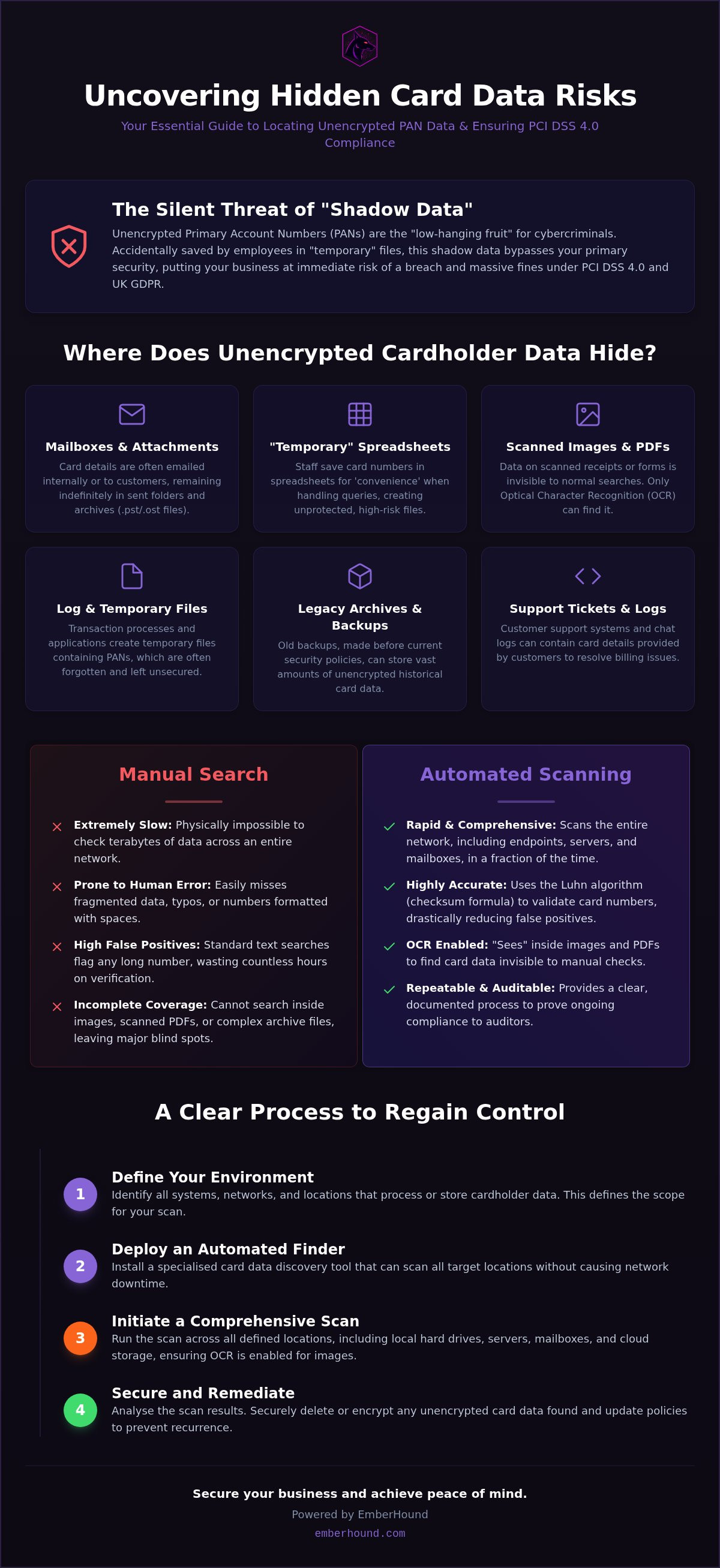
Step-by-Step: How to Find Unencrypted Card Data
Finding leaked card data is a systematic hunt. It requires more than just a quick glance at your primary database. You need a clear framework to ensure every corner of your network is scrutinised. By using a dedicated unencrypted card data finder, you can automate this process without disrupting your daily operations. The goal is simple: total visibility followed by decisive action. Don't wait for an auditor to point out your flaws; find them yourself first.
Step 1: Inventory Your Data Assets
You cannot protect what you haven't mapped. Start by defining your cardholder data environment (CDE). This includes every server, cloud bucket, and endpoint that might touch a payment. Look beyond the obvious databases. Check the "forgotten" drives in the server room centre that haven't been touched in months. Prioritise departments with high employee interaction, such as customer support or finance, where data is most likely to be saved "temporarily" for convenience. This inventory is the foundation of your security posture.
Step 2: Configure Your Scan Parameters
Precision is everything. Set your unencrypted card data finder to target specific patterns for Visa, Mastercard, and American Express. If your business handles scanned forms or invoices, ensure you enable OCR scanning. It's the only way to catch data buried in pixels. This is also the ideal time to implement scope reduction. By identifying where data shouldn't be, you can shrink your compliance burden instantly. For more on this, see our guide on PCI DSS card data scanning.
Step 3: Review and Remediate
Once the scan finishes, you'll see the results in a centralised dashboard. Don't panic at the numbers. Your first task is distinguishing actual PAN from harmless numeric strings. This is where the Luhn algorithm does the heavy lifting. Once verified, apply the "Delete, Encrypt, or Move" framework. If data serves no business purpose, delete it permanently. If it's vital for operations, move it to an encrypted, PCI-compliant vault. This process creates the essential documentation for your next audit. It's a clear paper trail that proves to a QSA that you're proactive. It shows you aren't just following rules; you're actively reducing risk and protecting your brand's reputation amongst British consumers.
Stop guessing where your vulnerabilities are. You can start your first automated scan today and clear out the shadow data before it becomes a breach.
Securing Your Future Compliance with EmberHound
Stop fighting with enterprise bloatware that drains your budget and your patience. You don't have time for a three-month implementation cycle or a software suite that requires a PhD to navigate. EmberHound is the agile alternative. It's an unencrypted card data finder designed specifically for lean teams who need immediate results, not more bureaucracy. You can move from installation to your first scan in minutes, rapidly clearing out the shadow data that puts your business at risk. It’s about visibility without the friction.
Compliance shouldn't be a one-off panic before an audit. It's a continuous process that requires a reliable partner. By combining GDPR data discovery software UK with automated PCI scanning, you cover every angle of data protection in a single, streamlined workflow. This combined approach gives you total peace of mind, knowing that whether you're facing a complex Subject Access Request or a rigorous PCI DSS 4.0 assessment, your data is accounted for. It turns a month-long headache into a manageable, automated task.
Total Data Visibility
Our OCR and mailbox add-ons ensure that no stone is left unturned across your servers and endpoints. We've seen card data hide in the most obscure corners, from pixelated receipts in "junk" folders to forgotten email attachments buried in years-old archives. EmberHound's interface is built for the overworked IT professional who values time above all else. It's a no-nonsense tool that delivers actionable clarity where there was once only uncertainty. Crucially, EmberHound is a UK-based partner for UK-based problems, providing a localised solution that understands the specific expectations of the ICO.
Ready for the Audit
Auditors don't want excuses; they want indisputable evidence. EmberHound generates the professional, detailed reports your Qualified Security Assessor (QSA) actually wants to see. By automating the discovery process, you can significantly reduce the time spent on manual DSARs and PCI assessments, with some users reporting reductions of up to 80%. This isn't just a minor efficiency gain; it's a massive strategic advantage that lets your team focus on high-level security strategy rather than tedious data hunting. Don't let unencrypted card details remain a hidden liability in your network. Download EmberHound today to start your first scan and secure your business's future with confidence.
Take Control of Your Cardholder Data Today
Unencrypted card data is a ticking time bomb for your business. It settles in forgotten attachments, temporary files, and scanned images that standard tools simply can't see. Manual audits are a relic of the past. They're slow, prone to error, and outdated the moment they're finished. You need a solution that moves as fast as your data does.
Deploying a dedicated unencrypted card data finder is the only way to ensure your network is truly secure. It provides the visibility you need to meet PCI DSS 4.0 standards without the enterprise bloat. EmberHound delivers OCR technology for deep image scanning and automated reporting that auditors actually trust. You'll also benefit from UK-based support and compliance expertise that understands your specific regulatory environment.
Secure your network and find hidden card data with EmberHound.
Stop worrying about what might be lurking in your servers. Take the decisive step today to clear out the shadow data and protect your brand's reputation for the long term. You've built a great business; we'll help you keep it safe.
Frequently Asked Questions
What exactly does an unencrypted card data finder look for?
This tool specifically targets Primary Account Numbers (PAN). These are the 14, 15, or 16-digit strings that identify a payment card. The finder uses the Luhn algorithm to verify these numbers, ensuring it doesn't just flag every random sequence of digits. It inspects unstructured data across your network, including spreadsheets, word documents, and plain text files where sensitive information often leaks into the shadows.
Is it legal to store card data if it is encrypted?
You can store card data legally provided you have a legitimate business need and follow PCI DSS 4.0 requirements. This means the data must be unreadable through strong encryption or tokenisation. Simply password-protecting a file isn't enough; you must also manage the encryption keys securely. Storing data without a clear purpose increases your liability under UK GDPR and should be avoided whenever possible.
How often should I run a card data discovery scan?
You should run a discovery scan at least quarterly or whenever you make significant changes to your network architecture. However, many UK businesses now opt for monthly or even continuous scanning. This proactive approach aligns with the shift towards continuous compliance in PCI DSS 4.0. Regular scans ensure that new "shadow data" created by employees is caught before it becomes a major security vulnerability.
Can a card data finder detect information inside images?
Yes, provided the tool includes Optical Character Recognition (OCR) technology. This feature allows the scanner to "read" text within image files like .jpg, .png, and scanned PDFs. Without OCR, card numbers hidden in photos of receipts or handwritten forms remain invisible to standard text-based searches. It's a critical component for achieving total visibility across your entire digital estate and preventing hidden data breaches.
Does scanning my network for card data affect server performance?
Modern scanning agents have a negligible impact on server performance. They're designed to operate quietly in the background, using minimal system resources. You don't need to schedule downtime or worry about slowing down your team's workflow. This efficiency is essential for lean IT teams who need to maintain security without compromising the speed and productivity of their daily business operations.
What is the difference between a PCI scan and a card data discovery scan?
A PCI vulnerability scan (ASV) checks your network's "front door" for technical weaknesses that hackers could exploit. In contrast, a card data discovery scan looks for the actual "treasure" inside your house. It finds the specific locations where unencrypted card numbers are stored. You need both to be compliant. One ensures your perimeter is strong; the other ensures your sensitive data isn't sitting exposed.
What should I do if the finder locates unencrypted card numbers?
You should immediately apply the "Delete, Encrypt, or Move" framework. If the data isn't required for a specific business purpose, delete it permanently and securely. If you must keep it, move the information into your secure Cardholder Data Environment (CDE) or encrypt it using industry-standard protocols. Document every action you take. This creates a clear paper trail that proves your proactive commitment to data security during audits.
Do I need an unencrypted card data finder for GDPR compliance?
Whilst GDPR doesn't explicitly name card data finders, it does require you to protect all personal data. Credit card numbers are high-value personal information. The ICO expects you to implement "appropriate technical measures" to prevent unauthorised access. Using an unencrypted card data finder demonstrates that you are taking proactive steps to locate and secure sensitive data, which is vital for fulfilling your legal obligations under UK GDPR.


