

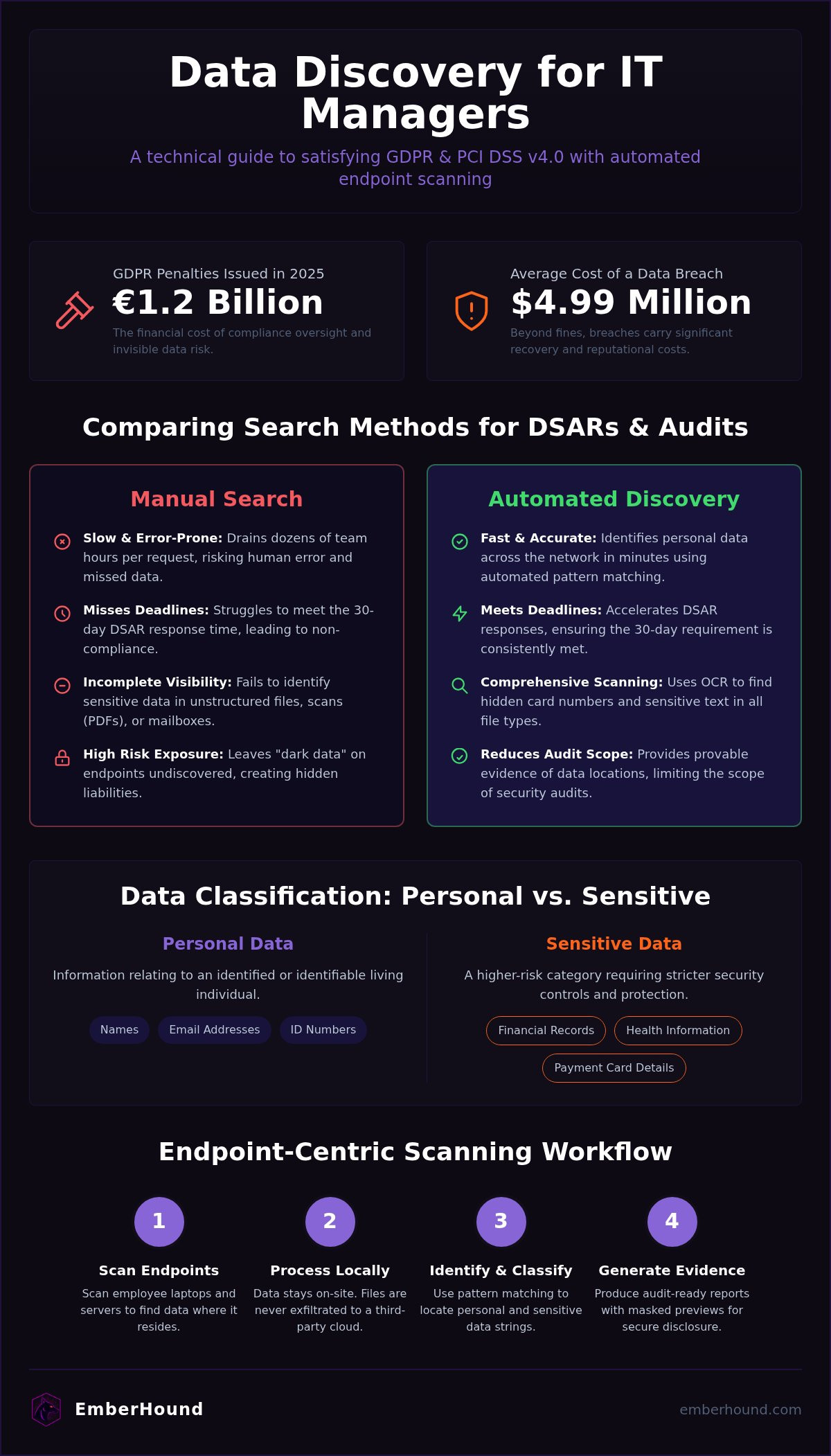
European regulators issued €1.2 billion in GDPR penalties in 2025. That is the cost of oversight. The real threat isn't just the fine. It's the invisibility. You know the anxiety of an impending audit whilst your data sits scattered across hundreds of employee laptops and unmonitored mailboxes. Manual DSAR processing is too slow. It drains your time. It leaves your organisation exposed to hidden risks.
Effective data discovery for IT managers must be fast and frictionless. You need to identify personal data across your network to meet GDPR and PCI DSS v4.0 requirements without stalling your team. This guide explains how to map where personal data resides and produce audit-ready evidence. We examine endpoint-only scanning that keeps files on-site, the role of OCR in finding card data, and how to simplify the disclosure process. You will learn to replace guesswork with visibility. This ensures your next compliance check is a routine task rather than a crisis.
Key Takeaways
- Map the location of personal data across your network. This eliminates blind spots in structured and unstructured files.
- Use data discovery for IT managers to satisfy GDPR and PCI DSS v4.0 standards. This approach reduces the burden on lean IT teams and narrows the audit scope.
- Replace manual searches with automated pattern matching. It identifies hidden credit card numbers and sensitive text strings that OS-level tools miss.
- Establish an endpoint-centric scanning workflow without deployment drama. Local processing ensures data stays within the organisation and prevents file exfiltration.
- Generate audit-ready evidence with masked previews. These assets accelerate DSAR responses and simplify regulatory checks.
Data discovery is the process of locating and classifying sensitive information
Visibility is the baseline of security. You cannot protect what you cannot see. Data discovery is the technical process of scanning your network to identify where personal data resides. It goes beyond simple file searching. It creates a factual inventory of your data assets. Without this, your compliance strategy is based on guesswork. You risk missing pockets of information that could trigger a regulatory fine or a security breach.
Effective data discovery for IT managers provides a clear map of both structured and unstructured data. Structured data typically lives in organised databases. Unstructured data is much harder to track. It hides in employee mailboxes, spreadsheets on local laptops, and PDF scans of invoices. Mapping these data flows is critical for identifying security risks. It allows you to see exactly how sensitive information moves through your organisation. This inventory is your primary defence during a GDPR audit.
The difference between data discovery and data analysis
Confusion between these terms leads to bloated projects and wasted budget. Data analysis focuses on business intelligence. It looks for trends to drive sales or operational efficiency. Data discovery is about visibility and classification. It answers where data is located and what level of protection it requires. Whilst analysis uses knowledge discovery in databases to find commercial patterns, discovery focuses on finding specific sensitive strings for compliance. Managers use discovery to secure the perimeter. It's a defensive tool, not a revenue forecaster.
Personal data vs sensitive data in a UK context
The distinction matters for your risk register and your prioritisation. Personal data includes basic identifiers like names, email addresses, and identification numbers. Sensitive data is a higher - risk category that requires stricter controls. This covers financial records, health information, and payment card details. According to the UK GDPR, personal data is any information relating to an identified or identifiable living individual. For IT managers, the goal is to find both categories across all endpoints. Knowing the difference helps you decide which devices need urgent encryption and which files require immediate deletion. For more detail on meeting these requirements, you can review our GDPR guide to understand your specific obligations.
Why IT managers prioritise data discovery for compliance and security
Compliance is no longer a checkbox exercise. It is a technical mandate. For those managing infrastructure, the stakes are rising. Cumulative GDPR fines have surpassed €7.1 billion as of 2026. This financial pressure makes data discovery for IT managers a top priority. It provides the visibility needed to satisfy regulators whilst protecting the organisation from the $4.99 million average cost of a data breach. You cannot secure what you don't know exists.
Identifying where data lives allows you to reduce the scope of security audits. If you can prove personal data is restricted to specific segments, you don't have to audit the entire network. This saves time. It saves money. It also uncovers "dark data" - forgotten files on old hard drives or local mailboxes that haven't been cleared in years. These are hidden liabilities. Discovery tools find them, allowing you to delete or secure them before they become a headline. Accurate mapping prevents breaches by enabling better access controls. You can finally apply the principle of least privilege effectively.
Meeting the 30-day DSAR deadline
Responding to a Data Subject Access Request (DSAR) is a race against the clock. You have 30 days. Manual searches are slow. They are prone to human error. An IT team can spend dozens of hours scouring local drives and mailboxes for a single individual's information. Automated discovery solves this. It identifies personal data across the network in minutes, not days. If you are unsure what qualifies as a hit, you can consult this UK GDPR reference guide for a technical definition of what to look for. Speed is the only way to avoid the backlog.
Audit readiness for PCI DSS and SOC 2
PCI DSS v4.0 became the mandatory standard on 31 March 2025. It requires organisations to find and secure all cardholder data. Unencrypted card numbers are a critical vulnerability. Discovery tools scan endpoints to ensure no raw card data is sitting in plain text. This is essential for maintaining your compliance status.
To maintain security during the audit, use salted SHA-256 fingerprints. This creates a unique identifier for the data without exposing the actual content to the scanning tool or the auditor. It provides proof of scanning that satisfies SOC 2 Security criteria. It's about having the evidence ready before the auditor asks for it. You can start with a free scan to identify your immediate risks today.
Comparing manual search methods with automated data discovery tools
Manual searches are a gamble. You are betting that employees name files correctly and store them in the right folders. They often do not. A standard OS search scans filenames and basic metadata. It is blind to the actual contents of a PDF or a zip file. This is why data discovery for IT managers has moved toward automated pattern matching. You need tools that look past the label. They must inspect the binary to find hidden credit card numbers and personal data that manual methods miss.
Manual processes cannot scan inside images. This is a critical gap for any organisation that handles scanned invoices or identity documents. OCR scanning is necessary to identify sensitive data in these formats. Without it, your audit trail is incomplete. Automation provides a repeatable process. This is vital for maintaining SOC 2 and GDPR compliance over time. An automated scan is consistent. It does not get tired. It does not overlook a subdirectory whilst searching for a specific string. This consistency is what auditors require when they ask for proof of regular monitoring. It demonstrates a proactive security posture.
The limitations of standard file searches
Basic file searches often miss data inside email attachments or nested folders. These tools are built for convenience, not for compliance. Manual methods do not classify data based on sensitivity levels. You end up with a mountain of noise and no clear signal on what to protect first. IT managers often waste dozens of technical hours on a single manual data mapping exercise. That is time that should be spent on higher - value security tasks. It is an inefficient use of skilled labour. Manual searches also fail to identify data stored in non - text formats, such as image - based PDFs or legacy database exports.
Why automation is the standard for lean IT teams
Lean IT teams cannot afford manual overhead. Automation is the standard because it works in the background. Modern discovery software performs scans with minimal system impact. It respects the user's CPU and memory. When sensitive data appears in a new location - like a public folder or an unencrypted drive - the system triggers an alert. This allows security teams to act instantly. You can find a full technical comparison of manual and automated solutions on our blog to see which fits your current infrastructure. Automation ensures your data discovery for IT managers strategy is scalable and audit - ready at all times. It removes the friction from the compliance process.
How to implement an endpoint-centric data discovery workflow
Implementation begins with scope. You must define your scan parameters based on your specific compliance framework. Aligning these settings ensures you don't waste resources on irrelevant files. Once the scope is set, deploy scanning agents to your endpoints. This includes both on-site servers and remote employee laptops. This is the most effective way to gain visibility into the devices that actually handle data day - to - day. Lean IT teams benefit from this approach because it targets the actual location of risk rather than scanning the entire network at once.
Security is maintained through local processing. A modern approach to data discovery for IT managers ensures that sensitive files never leave the host machine. The platform uses TLS 1.3 and AES - 256 encryption at rest to protect the discovery results. By processing data locally on the endpoint, you eliminate the risk of file exfiltration during the scanning process. Salted SHA - 256 fingerprints allow you to map data without storing the original sensitive strings. Once the scan completes, review masked previews of the findings. This allows you to verify the presence of personal data whilst maintaining strict confidentiality. Finally, generate an audit - ready report. This document serves as your primary evidence for the DPO or security committee. It proves that you have identified and managed your risks.
Scanning mailboxes and local hard drives
Blind spots often hide in Outlook PST files and local folders. These are frequently overlooked during centralised audits. You must ensure your discovery tool can access these local archives, as well as external hard drives and network shares. Local mailbox scanning is a high - risk area because employees often use their inboxes as unofficial, unencrypted storage for sensitive documents and personal data. Without endpoint visibility, these risks remain invisible until an audit or a breach occurs. Identifying these pockets of data is the first step in reducing your organisation's attack surface.
Using OCR to find data in scanned documents
Text - based searches are insufficient for modern compliance. Optical Character Recognition (OCR) is required to identify text within images and scanned PDFs. This is essential for finding card data in receipts or ID scans that are often saved as image files. Integrating OCR into your workflow ensures that your data mapping is accurate and covers all file types. You can use this technical checklist for audit preparation to see how OCR fits into your wider compliance strategy. It turns unstructured images into searchable, manageable data points for your security team.
Modern data discovery with EmberHound: Local scanning for IT managers
Complexity is the enemy of compliance. EmberHound is a data discovery platform built for lean IT and compliance teams who need results without the friction of traditional enterprise software. It handles the heavy lifting of identifying sensitive strings and ensures your data remains under your control. The software performs all processing locally on the endpoint. This is a critical security feature. It means your files never leave the organisation. You avoid the risks associated with moving sensitive information to a central server or cloud repository.
Security is baked into the architecture. EmberHound uses TLS 1.3 and AES - 256 encryption to protect data at rest. You get the visibility you need without introducing new vulnerabilities to your infrastructure. This approach to data discovery for IT managers prioritises speed and safety. You can start a free scan to identify your immediate risks today. There are no mandatory long - term contracts. This allows you to address urgent compliance gaps without waiting for procurement cycles to finish.
No deployment drama and usage-based pricing
Setup shouldn't take weeks. The platform is designed for quick onboarding with no complex configuration. You deploy the agents and start scanning. It's a no - nonsense process that respects your time. This is ideal for data discovery for IT managers who are already overstretched and need an agile tool. You only pay for what you use. This usage - based model allows for scalable growth as your organisation expands. It eliminates the "shelfware" problem common with large - scale security suites. You can see the pricing page for more information on how this model supports your specific deployment needs.
Audit-ready evidence without raw data exposure
Auditors want proof, not raw files. Masked previews allow you to confirm findings and verify personal data without seeing the full, sensitive file contents. This maintains privacy and satisfies the evidence requirements of regulatory bodies. EmberHound also generates salted SHA - 256 fingerprints for every hit. These provide a verifiable trail that proves you have scanned your environment without compromising the underlying data. It is a smarter, more efficient way to manage compliance reporting. You get the documentation you need for GDPR and PCI DSS v4.0 audits without the liability of creating new, centralised data stores. This reduces your attack surface and keeps you audit - ready. You can book a video demo to see the discovery track in action and understand how it simplifies your reporting workflow.
Secure your network with endpoint visibility
The transition from data anxiety to audit readiness is a technical shift. You've seen how manual searches leave gaps that regulators won't ignore. Effective data discovery for IT managers closes these holes by identifying personal data exactly where it lives. It provides a clear map of your risk profile without the operational friction of centralised scanning. By moving all processing to the endpoint, you ensure that sensitive files never leave your organisation whilst satisfying GDPR and PCI DSS v4.0 requirements.
Protecting your network doesn't require complex deployment or rigid contracts. EmberHound uses TLS 1.3 and AES - 256 encryption to ensure your discovery results stay secure. Our usage - based pricing means you only pay for the visibility you need. You can generate the evidence required for a DPO or security committee in minutes. It's time to stop guessing and start knowing where your sensitive data resides. You have the tools to protect your team and your reputation.
Take the first step toward a simplified compliance workflow. You can identify your immediate risks without any long - term commitment. Secure your endpoints and stay ahead of the next audit.
Frequently Asked Questions
What is data discovery for IT managers?
It is the technical process of identifying and mapping where sensitive data resides on a network. It focuses on finding personal data and cardholder information across endpoints like laptops and servers. This visibility allows IT teams to satisfy compliance standards like GDPR and PCI DSS v4.0. By using automated tools, data discovery for IT managers locates hidden files in unstructured formats that manual searches often miss.
Is data discovery a requirement for GDPR compliance?
Yes, it is a technical necessity for meeting specific GDPR obligations. Articles 30 and 32 require organisations to maintain records of processing activities and ensure a level of security appropriate to the risk. Data discovery for IT managers provides the factual inventory needed to map these flows. It ensures you can respond to Data Subject Access Requests (DSARs) within the mandatory 30 - day deadline by locating all relevant personal data quickly.
How does OCR help in the data discovery process?
Optical Character Recognition (OCR) identifies text strings within images and scanned documents. Many organisations store sensitive data in non - text formats, such as PDF scans of passports or image - based receipts. Standard file searches cannot read these files. OCR technology scans the binary of these images to detect personal data or credit card numbers. This ensures your discovery process covers unstructured visual data that would otherwise remain invisible to your security team.
Can data discovery tools scan encrypted files?
Most tools cannot scan files that are encrypted with a password or key they do not possess. Discovery software identifies these encrypted archives as high - risk areas that require further investigation. It is better to know an encrypted file exists in an unauthorised location than to be unaware of it entirely. The scanning process uses TLS 1.3 and AES - 256 encryption at rest to protect the discovery results throughout the audit.
What is the difference between data discovery and data mapping?
Data discovery is the technical act of finding and identifying sensitive data on your network. Data mapping is the process of documenting how that data moves between systems and who has access to it. Discovery provides the raw evidence and inventory that makes accurate mapping possible. You use discovery to find the files, and then you use mapping to visualise the lifecycle of that information for your Record of Processing Activities.
Does data discovery software move my files to the cloud?
EmberHound performs all processing locally on the endpoint. This means your files never leave your organisation's infrastructure. There is no file exfiltration to a central server or cloud repository. Local scanning reduces the risk of a secondary data breach during the audit process. The platform only communicates metadata and fingerprints to the dashboard and ensures your sensitive files remain in their original, secure locations.
How often should an IT manager perform a data discovery scan?
Scans should occur regularly to maintain continuous compliance. Whilst annual audits were once the standard, frameworks like SOC 2 now expect ongoing monitoring. You should perform a scan after significant network changes, when onboarding new departments, or at least quarterly. Regular scanning identifies "dark data" that accumulates over time. This proactive approach ensures you are always audit - ready and reduces the window of exposure for newly created sensitive files.
How does data discovery help with PCI DSS compliance?
It identifies unencrypted Primary Account Numbers (PAN) across your endpoints to meet PCI DSS v4.0 requirements. The standard mandates that cardholder data must be protected and its location known at all times. Discovery tools scan local drives, mailboxes, and external storage to ensure no raw card data is stored in plain text. This allows you to either encrypt the findings or delete them and reduces the scope of your PCI audit.


