

What if your biggest compliance risk isn't the data you've organised, but the PII buried in a forgotten image file on a remote laptop? You need a definitive way to locate personal data across network environments before an audit or DSAR exposes the gaps. Data sprawl is no longer just a headache; it's a liability. You likely feel the weight of every request that hits your inbox. Manual searching takes weeks. The anxiety of missing a single document is constant. We understand the pressure of managing a fragmented network where personal information hides amongst the digital noise.
It's time to regain control. This guide shows you exactly how to master the discovery process to ensure total compliance and eliminate hidden risks. You'll learn how to identify every scrap of data, from mailboxes to scanned documents, without the manual slog. We'll walk through the mechanics of automated discovery, the power of OCR for image-based PII, and how to secure remote endpoints. By the end, you'll have a clear roadmap to turn your data discovery from a frantic scramble into a precise, automated operation.
Key Takeaways
- Understand how personal data migrates from secure databases to unmanaged "Shadow IT" and remote employee hard drives.
- Master the specific tools and patterns required to locate personal data across network environments and remote devices.
- Discover why OCR technology is essential for uncovering sensitive information hidden within scanned documents and images.
- Transition from reactive, one-off searches to a continuous visibility cycle that secures your entire digital footprint.
- Eliminate hidden compliance risks by identifying and clearing out digital dumping grounds on centralised servers.
The Reality of Network Data Sprawl in 2026
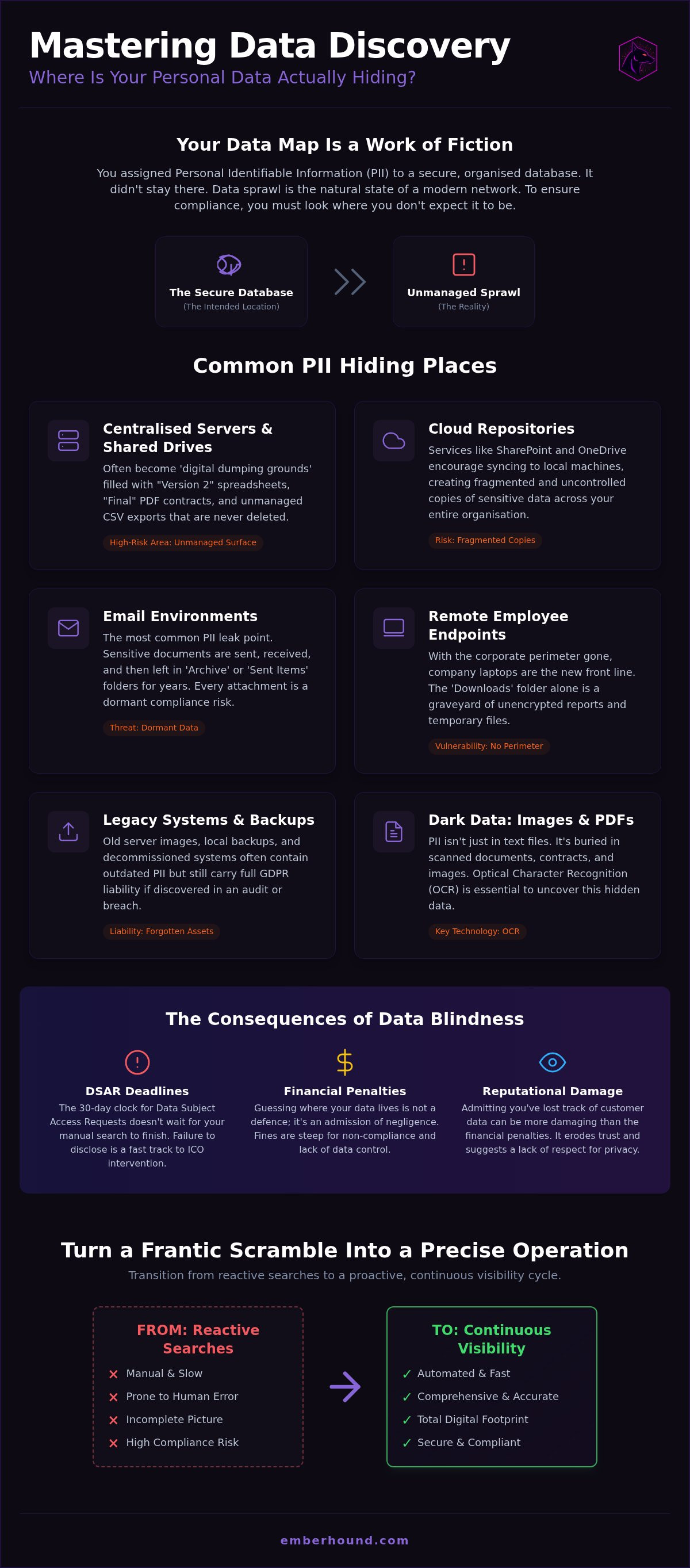
Your data map is likely a work of fiction. You assigned PII to a secure database. It didn't stay there. It leaked. Employees downloaded spreadsheets to their desktops. They shared snippets via messaging apps. They uploaded "temporary" files to personal cloud storage. This is the reality of 2026. Data sprawl is the natural state of a modern network. You cannot simply point to a server and claim compliance. To effectively locate personal data across network environments, you must look where you don't expect it to be. Fragmentation is the gap between your official policy and what actually happens on a Monday morning.
Shadow IT isn't just a security risk; it's a GDPR trap. Every unauthorised app or unsanctioned cloud service is a potential storage site for personal information. If your team uses it, you're liable for it. Guessing where your data lives is a dangerous game. During an audit, "we thought it was only on the primary server" isn't a defence. It's an admission of negligence. Guessing is expensive. Every hour your IT team spends searching is an hour they aren't building value. An inability to demonstrate visibility looks like a lack of control to a regulator. It suggests you don't respect the privacy of the people you serve.
Defining the Scope of Personal Data
PII is more than just a name and home address. In 2026, the definition has expanded to include indirect identifiers. Think network logs. IP addresses. Precise location data. UK GDPR is clear: if a piece of information can be used to single out an individual, it's personal data. This includes metadata buried in file properties or unique device identifiers. If your discovery process ignores these technical files, your compliance is incomplete. You need to identify every scrap of sensitive information, including special category data like health records or biometric identifiers, which carry even higher risks if misplaced amongst your digital noise.
The Consequences of Data Blindness
The 30-day DSAR clock doesn't care about your technical debt. Whilst you manually sift through folders, the deadline looms. Failure to provide a comprehensive disclosure pack is a fast track to ICO intervention. The financial penalties are steep, but the reputational damage of admitting you've lost track of customer data is worse. You need a better approach. Start by reading our GDPR Data Discovery: No-Nonsense Guide for UK Businesses to understand the baseline requirements. Knowing the rules is the first step; having the tools to locate personal data across network nodes is the second. Don't wait for a breach to find out what you're missing.
Mapping Your Data Footprint: Where is PII Hiding?
Your network is a labyrinth. You might think your PII is contained within a tidy CRM or a secured SQL database, but the reality is far messier. Centralised servers are often the first casualty of data sprawl. Shared drives, once intended for collaboration, quickly transform into digital dumping grounds. They become filled with "Version 2" spreadsheets, "Final" PDF contracts, and exported CSV files that no one bothered to delete. If you need to locate personal data across network storage, these shared volumes are your primary suspects. They represent a massive, unmanaged surface area for potential breaches.
Cloud repositories like SharePoint and OneDrive offer a false sense of security. Whilst they provide version control, they also encourage "syncing" to local machines. This creates fragmented copies of sensitive data across your entire organisation. Email environments are even more volatile. The inbox is the most common PII leak point in any business. Sensitive documents are sent, received, and then left to rot in "Sent Items" or "Archive" folders for years. Every attachment is a dormant compliance risk. You cannot claim to have control over your data if your email remains a black hole for personal information.
Identifying High-Risk Storage Areas
Start with the "Downloads" folder on every machine. It is a graveyard of sensitive PDF exports and temporary reports. Employees download data to complete a task, then forget the file exists. It sits there, unencrypted and accessible. Legacy backups are another silent threat. Many businesses still host old server images or local backups that should have been purged years ago. These files contain PII that is often outdated but still carries full GDPR liability. Even system caches and temporary file directories can hold fragments of sensitive data in plain sight. These are the shadows where manual audits fail.
The Remote Work Factor
The corporate perimeter has vanished. Your data now resides on kitchen tables and in home offices. Managing visibility across these remote networks is a logistical nightmare, but ignoring them is not an option. Company laptops are the new front line of data discovery. You must find a way to scan local hard drives without infringing on employee privacy or slowing down their work. It's about finding the risk, not monitoring the person. Implementing a dedicated hard drive scanning add-on allows you to locate personal data across network endpoints automatically. Visibility must extend to the very edge of your network to be truly effective.
Effective Search Methodologies for Network Discovery
Finding PII isn't about luck. It's about methodology. Most businesses rely on outdated search habits that leave them exposed. If your strategy is to "Ctrl+F" your way to compliance, you've already lost. To locate personal data across network storage, you need a system that understands the data it's looking at. It isn't enough to find a file named "Payroll". You need to find the file named "Project_X_Final" that contains five hundred National Insurance numbers. This requires moving beyond simple keywords and into the world of pattern matching and Regular Expressions (RegEx).
RegEx allows you to search for specific strings of characters that follow a predictable format. Think credit card numbers. Passport identifiers. UK National Insurance numbers. These patterns are the DNA of PII. Automated tools use these strings to identify sensitive data regardless of the filename or folder structure. Manual effort cannot compete with this level of precision. A human might spend three hours checking a single directory. An automated scan covers ten thousand files in minutes. Speed matters when a regulator is watching. Accuracy matters even more.
Manual Search: A Recipe for Oversight
Human error is your biggest compliance threat. Even the most diligent IT professional will miss files buried in complex subfolders or hidden in non-indexed directories. Windows Explorer is a productivity tool, not a compliance auditor. It wasn't built to parse deep file contents or scan unmapped network paths. Relying on OS-level tools creates a false sense of security that crumbles during a real audit. You can't fix what you can't see. For a deeper look at why these methods fail, read our guide on how to Stop Manual Data Discovery: 5 Myths Putting Your UK Business at Risk. Stop guessing and start knowing.
Automated Discovery: The Smarter Path
Automation is the only way to maintain visibility at scale. Modern tools crawl network paths in the background, identifying PII without interrupting your team's workflow. You can set up scheduled scans to catch new data the moment it hits a shared drive or a remote laptop. This isn't just about finding data; it's about prioritising it. You can filter results to highlight high-risk sensitive information first, allowing you to deal with the most dangerous leaks immediately. It's a proactive stance that turns compliance from a panic-driven project into a manageable, background process. Visibility becomes a constant, not a one-off event. It's the difference between being reactive and being ready.
Dealing with Dark Data: Images, PDFs, and Mailboxes
Text-based search is a blunt instrument. It works for spreadsheets and Word documents, but it hits a wall when it encounters "dark data". This includes scanned passports, driver's licences, and handwritten forms saved as PDFs or JPEGs. To truly locate personal data across network storage, you must see what your operating system cannot. If a document is unsearchable, it's a blind spot. These blind spots are where high-risk PII often resides, hidden in plain sight from standard audits. You need a way to peer inside these files without opening them one by one.
Compressed archives like .zip and .rar files present another layer of complexity. Many legacy scanners skip these entirely, assuming they are just system files. They aren't. They are often full of old project folders and sensitive backups. Your scanning process must be deep enough to unpack these archives and inspect the contents. Similarly, mailboxes contain massive volumes of data buried in .pst and .ost files. These are not just messages; they are databases of attachments and threads. Without specialised tools, this information remains invisible to your compliance team.
How to Implement OCR Scanning
Optical Character Recognition (OCR) is the solution to image-based PII. It converts the visual data in an image into searchable text. Implementing this doesn't have to be complex. It's a methodical process that turns unsearchable images into actionable data. Start by identifying high-traffic directories likely to contain scanned IDs or application forms. Once identified, you can deploy a dedicated OCR scanning tool to parse these image-heavy files. This allows you to run pattern matching against the extracted text to find NI numbers or passport details. Finally, review the results and categorise the discovered PII for immediate remediation. It's about turning "dark data" into clear, manageable information.
Auditing the Corporate Inbox
Email is where data goes to hide. Attachments are your biggest liability, often containing sensitive contracts or ID copies sent by clients. Automating the search across thousands of individual mailboxes is essential for modern compliance. You cannot expect employees to tidy their own inboxes; they won't. By using a mailbox add-on, you can locate personal data across network email environments without manual intervention. This significantly reduces the scope of DSARs by identifying and purging PII in old email threads before they become a problem. Visibility is your only protection against the chaos of the corporate inbox. Stop letting your email server be a liability and start treating it as a managed resource.
Moving from One-Off Searches to Continuous Visibility
Compliance isn't a destination. It's a continuous state of readiness. One-off audits are obsolete the moment they finish. Your network changes every hour. New files are created. Old ones are moved. Staff join and leave. To locate personal data across network storage effectively, you must stop treating discovery as an annual chore. It's a cycle. Continuous visibility is the only way to stay ahead of the risk. If you only look once a year, you're flying blind for the other 364 days. That is where the danger resides.
Visibility pays for itself. Manual audits are a drain on your most expensive resource: time. By automating the process, you slash the man-hours required for compliance. This efficiency doesn't just save on internal costs. It reduces your cyber insurance premiums. It lowers the cost of external audits. When you can prove exactly where your data resides at any given moment, you remove the "risk premium" associated with uncertainty. Regulators and insurers value certainty above all else. Automated discovery provides that certainty whilst freeing your team to focus on growth.
Building a Compliance Framework
A static data map is a liability. You need a data inventory that updates in real-time. Use your discovery results to inform and enforce your data retention policy. If you shouldn't have the data, delete it. This proactive pruning reduces your attack surface and simplifies your GDPR obligations. Discovery data tells you exactly what you have, allowing you to organise your storage more efficiently. This isn't just about security; it's about operational hygiene. Learn more about streamlining your budget in our guide on How to Reduce GDPR Compliance Costs: The 2026 Efficiency Checklist. Stop overpaying for your compliance debt.
The EmberHound Advantage
EmberHound replaces network anxiety with automated certainty. We handle the heavy lifting of scanning, identifying, and reporting across your entire infrastructure. Our tools are built specifically for UK businesses navigating local regulations. You get UK-centric support and technology that understands the nuances of British compliance. We don't just point out the sprawl; we give you the tools to manage it. From mailbox scanning to hard drive deep dives, we provide the visibility you need to locate personal data across network nodes with total precision. Don't let data sprawl dictate your risk level. Take control of your digital footprint. Automate your network discovery with EmberHound and secure your digital future today.
Secure Your Network and Simplify Compliance
Data sprawl is a certainty. Your network is growing. Your liability is growing with it. You now know where PII hides, from forgotten "Downloads" folders to the depths of unsearchable image files. Manual searching is a failed strategy. It's slow. It's prone to error. It leaves you vulnerable to the ticking clock of a DSAR. To truly locate personal data across network endpoints and central servers, you need visibility that doesn't sleep. Consistency is your only protection against regulatory oversight.
Regain control of your digital footprint. EmberHound provides the tools you need to automate the heavy lifting. As UK-based GDPR specialists, we understand the specific regulatory pressures you face. Our platform includes OCR technology to uncover dark data and provides dedicated DSAR disclosure packs to streamline your response. Stop guessing where your risks are hidden. Start your automated network scan with EmberHound today and turn your compliance burden into a manageable, automated process. You've got this. We're here to help you prove it.
Frequently Asked Questions
How do I find personal data on a network with hundreds of users?
Automated discovery tools are the only viable solution for large-scale networks. Manual searching across hundreds of user profiles and shared directories is impossible. You need a system that can crawl network paths and index file contents without requiring individual user intervention. This provides a centralised view of your data risks whilst your team continues their work uninterrupted.
Can I search for personal data in scanned images or PDFs?
Yes, but you must use a tool equipped with Optical Character Recognition (OCR) technology. Standard search functions only see the filename of an image, not the text inside it. OCR parses the visual data within scanned passports, IDs, and handwritten forms to locate personal data across network storage that would otherwise remain "dark" and unsearchable.
What is the fastest way to locate PII for a DSAR request?
The fastest method is to use an automated scanner paired with a dedicated DSAR disclosure pack. This combination identifies relevant PII in minutes rather than weeks. Because the 30-day UK GDPR deadline is non-negotiable, having a pre-indexed inventory of your data allows you to respond instantly and accurately, avoiding the panic of a last-minute manual search.
Is it possible to scan remote employee laptops for personal data?
Remote devices can be scanned using specialised hard drive add-ons that target endpoint storage. Since the corporate perimeter has shifted to home offices, these local drives are now high-risk zones for PII sprawl. You can deploy scanning agents that report back to a central dashboard, ensuring visibility across your entire remote workforce without needing the devices to be physically on-site.
How does automated data discovery help with PCI DSS compliance?
Automated discovery identifies Cardholder Data (CHD) and helps you define your Cardholder Data Environment (CDE). By finding every instance of primary account numbers (PAN) on your servers, you can either secure the data or delete it. This reduces your audit scope and ensures you aren't storing sensitive payment information in plain text or unauthorised locations.
What happens if I miss personal data during a network search?
Missing data during a search leads to incomplete DSAR responses and failed audits. Under UK GDPR, "we didn't know it was there" is not a valid legal defence. If a breach occurs and you are found to have unmanaged PII, the ICO can impose significant financial penalties. Beyond fines, the loss of customer trust can cause long-term damage to your professional reputation.
Do I need a specialist tool to find credit card data on my servers?
Specialist tools are essential because they use specific pattern matching algorithms, such as the Luhn formula, to identify valid card numbers. Standard search tools often produce too many false positives or miss fragmented data entirely. A dedicated PCI scanner ensures you locate personal data across network nodes with the precision required by merchant service providers and auditors.
How often should I scan my network for personal data?
Data discovery should be a continuous cycle rather than an annual event. At a minimum, you should conduct comprehensive scans quarterly to account for new data creation and staff turnover. High-growth organisations or those handling sensitive medical or financial records often opt for monthly or real-time scanning to maintain a constant state of compliance readiness.


